10 Best ChatGPT Prompts for Vibe Coding in 2026
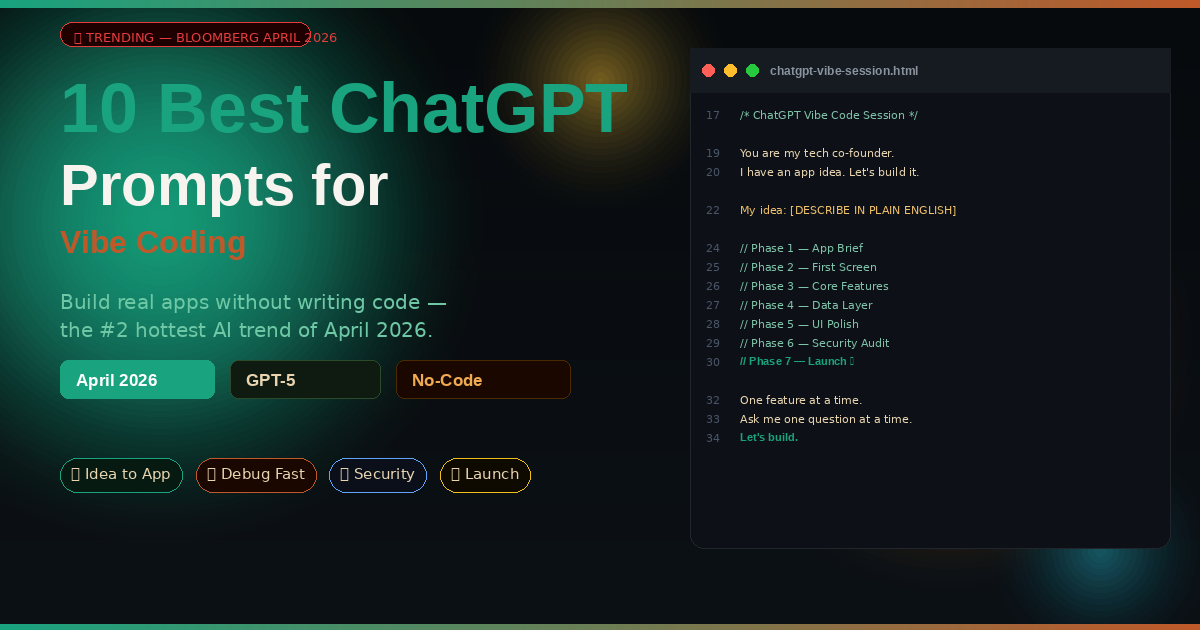
Vibe coding is not a gimmick. It’s the fastest-growing skill in tech right now — Bloomberg called it “the AI trend fueling a new kind of FOMO” this week. These 10 prompts are your shortcut from complete beginner to shipping real apps with ChatGPT.
My friend Priya has never written a single line of code. Last month she built a fully functional client invoice tracker — with a dashboard, PDF export, and automated email reminders — using nothing but ChatGPT and a few hours of her weekend. She didn’t follow a course. She just learned how to prompt correctly. When she showed it to her business partner, the response was: “How long did you hire a developer for?” She hadn’t.
That’s vibe coding. The term was coined to describe what happens when non-technical people stop trying to learn syntax and start treating AI like a conversation. You describe what you want. The AI writes the code. You describe what’s wrong. The AI fixes it. Iterate until it works. According to Bloomberg’s April 2026 coverage, it’s generating a new kind of FOMO — developers and non-developers alike are watching people ship products in hours that used to take weeks, and they want in.
ChatGPT — specifically GPT-4o and GPT-5 — is the most widely used vibe coding tool in 2026. GPT-5 wrote 650 lines of functional code in under four minutes in one documented test. The gap between “I have an idea” and “I have a working prototype” has never been smaller. The bottleneck isn’t the AI — it’s knowing how to prompt it well. These 10 prompts close that gap.
Why ChatGPT Handles Vibe Coding Differently
The vibe coding ecosystem in 2026 includes Cursor, Windsurf, Replit Agent, and v0.dev — all powerful tools. But ChatGPT has one advantage none of them fully replicate: conversation. Real back-and-forth conversation where you can explain your idea the way you’d explain it to a smart colleague, get clarifying questions back, and refine the output through dialogue rather than specification.
Cursor is excellent for developers who already think in code. Replit Agent is fast for simple prototypes. ChatGPT is the tool that works best for people who don’t know what they don’t know — who can’t write a technical specification because they’re not sure yet what they need. The prompts in this guide are structured around that conversational strength. They give ChatGPT just enough context and constraint to produce something immediately useful, without requiring you to know the technical vocabulary of software development.
GPT-5 in particular has changed the game for vibe coding. Its extended context window holds your entire project in memory, its code execution environment lets it test what it writes, and its agentic capabilities mean it can take multi-step actions — build a component, find the error, fix it, and confirm it works — without you needing to understand any of it. The prompts for prompts 7–10 in this guide are designed specifically to exploit these capabilities.
The biggest mistake vibe coders make is trying to get the entire app in one prompt. The second biggest is not saving their context. These 10 prompts build on each other — treat this guide as a single project session, not 10 isolated experiments.
Before You Start: Setting Up Your Vibe Coding Session
Two minutes of setup before you start will save you hours of frustration later.
Use ChatGPT Projects if you have access. Projects keep your conversation history, files, and context persistent across multiple sessions. For a vibe coding project spanning several days, this is essential. Without it, every new conversation starts cold and you’ll spend significant time re-explaining your app’s context. If you’re on ChatGPT Free, create a document with your project summary and paste it at the top of each new session.
Start with a napkin sketch, not a spec document. The best vibe coding sessions begin with a messy, incomplete description of what you want. You don’t need to know the tech stack, the database structure, or the deployment target. ChatGPT will ask. Let it guide the technical decisions while you stay focused on what the product should do for real people.
Build feature by feature, not app by app. One of the most cited lessons from real vibe coders in 2026 is that trying to build everything at once produces fragile, buggy code that’s hard to fix. Build the login screen. Make it work. Then build the dashboard. The prompts below follow this discipline.
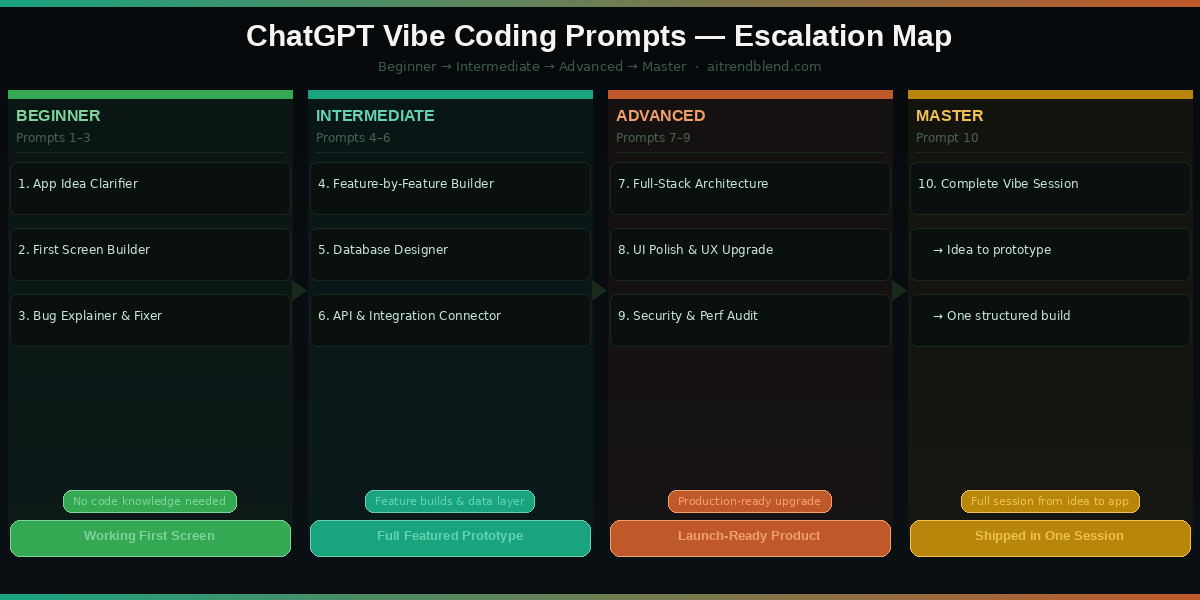
The 10 Best ChatGPT Prompts for Vibe Coding
Prompt 1: The App Idea Clarifier
Most vibe coding sessions stall at the starting line. You have an idea — “I want to build a habit tracker” — but ChatGPT needs more than that to produce code worth anything. This prompt turns a rough idea into a structured product brief in about two minutes. Think of it as the conversation you’d have with a product manager before any development starts.
Asking ChatGPT to ask YOU questions first produces dramatically better output than dumping everything into one prompt. The clarification loop surfaces assumptions you didn’t know you were making — like whether your “simple” app needs user accounts (it probably does), or whether that data needs to sync across devices (it might). Catching these decisions at the brief stage costs zero time. Catching them after three features are built costs days.
Swap “web app” for “Chrome extension” or “Telegram bot” and the clarification questions shift accordingly. The same prompt structure works for any product type — ChatGPT adjusts its questions and tech stack recommendations automatically.
Prompt 2: The First Screen Builder
The single most important moment in any vibe coding project is the first time you see something real on screen. Not a plan, not a list of features — an actual UI you can click. This prompt gets you there fast, building the landing or login screen so you have something concrete to react to before writing another line.
Specifying “single HTML file” with all CSS and JS inline is the critical constraint for vibe coding beginners. Without it, ChatGPT may generate multiple files, import external libraries that need an npm install, or produce code that only works inside a build system. A single HTML file opens in any browser instantly — no setup required.
After you see the first screen, send: “Change the primary colour to [HEX CODE], make the header smaller, and add a navigation bar with links to Dashboard, Settings, and Profile.” Vibe coding lives in these quick iteration loops — small changes, fast feedback.
Prompt 3: The Bug Explainer and Fixer
Something will break. This is not a pessimistic prediction — it’s the nature of building software, even with AI doing the coding. The good news is that ChatGPT fixes its own bugs faster than most developers do, as long as you give it the right information. This prompt is the one you’ll use most often throughout your entire vibe coding journey.
The “expected vs actual” structure is how professional bug reports are written — and for good reason. It gives ChatGPT two anchor points to reason between, making it far more likely to identify the actual cause rather than guessing. Vague bug reports (“it doesn’t work”) produce vague fixes. Specific reports produce targeted solutions.
If you don’t know which part of the code is broken, paste the full file and add: “I don’t know which section is causing this — scan the whole file and find it.” ChatGPT handles this well and will usually identify the issue correctly even in long files.
Prompt 4: The Feature-by-Feature Builder
Here is where it gets interesting. You have a working first screen and the bugs are fixed. Now you need to add real features — user accounts, data storage, search, filters. This prompt is structured around the single most important vibe coding discipline: one feature at a time. Every experienced vibe coder learns this the hard way. You’ll skip the hard way.
The “confirm you understand” step before coding is not redundant — it’s the most valuable line in the prompt. When ChatGPT paraphrases your feature back to you, you’ll often discover a mismatch between what you asked for and what it understood. Catching that before 100 lines of code are written saves enormous time.
Run this prompt once per feature, never twice in the same call. Adding two features in one prompt is how code gets tangled and bugs get impossible to trace. Discipline here compounds into speed later.
Prompt 5: The Database and Data Model Designer
The moment your app needs to remember something — user preferences, saved items, historical records — you need a data model. Most vibe coders skip this step and end up with code that stores data in a tangled, inconsistent way that breaks as soon as the app gets more complex. This prompt designs the data layer before you need it, not after.
Asking ChatGPT to explain each data type in plain English before showing code means you actually understand what’s being built — not just copying and pasting blindly. When something breaks in the data layer later, this understanding is what lets you describe the problem accurately enough for ChatGPT to fix it.
Add “This app will eventually need to support 10,000 users” to get a data model designed with basic scalability in mind. ChatGPT will add indexing recommendations and flag the fields most likely to cause performance problems at scale.
Prompt 6: The API and Integration Connector
Most useful apps connect to something external — payment processors, email services, maps, calendars, AI models. For non-technical builders, this is the scariest step. APIs have documentation written for developers, authentication patterns that are easy to get wrong, and error messages that make no sense out of context. This prompt makes the integration process conversational.
“The biggest unlock in vibe coding isn’t generating the UI — it’s connecting to real-world services without needing to read API documentation.”
— The Vibe Coder’s Prompting Guide, Medium, March 2026
The step-by-step structure mirrors how a developer mentor would walk a junior through an integration — setup first, code second, testing third. Jumping straight to code without the setup steps is how vibe coders end up with API keys in the wrong place, calls hitting the wrong environment, and charges going to real payment systems during testing.
For OpenAI API integration specifically, add: “I want to add an AI chat feature using GPT-4o. The user types a message, my app sends it to the API, and displays the response.” ChatGPT will produce a complete client-side implementation with streaming responses.
Prompt 7: The Full-Stack Architecture Planner
At some point your single HTML file hits its limits. You need user accounts that persist, data stored in a real database, a backend that handles logic securely. This is the transition from prototype to real product — and it’s where most vibe coders stall. This prompt designs the upgrade path before you build it, so you know exactly what you’re getting into.
Including the budget constraint produces dramatically more practical recommendations. Without it, ChatGPT defaults to enterprise-grade architecture that’s overkill and expensive. A $0/month constraint routes the recommendations toward Supabase free tier, Vercel, and Cloudflare Workers — all excellent choices for early-stage vibe coded products.
Add “I want to be able to sell this app in 12 months” and the architecture recommendations shift toward clean code structure, documentation requirements, and separation of concerns — the things that make a product acquirable rather than just functional.
Prompt 8: The UI Polish and UX Upgrade
There’s a version of your app that works. Then there’s a version someone would actually enjoy using. This prompt bridges that gap — using ChatGPT to apply real UX principles, improve visual hierarchy, add the micro-interactions that make products feel alive, and clean up the rough edges that only appear when a real user touches your app for the first time.
The seven-point audit structure forces ChatGPT to evaluate design systematically rather than making cosmetic changes at random. The empty state, error state, and loading state audit items are the ones most likely to surface genuine UX gaps — they’re the screens that real users see most often and that most vibe coders never test.
Add “Mobile-first: 70% of my users will be on smartphones” and the audit prioritises touch targets, font sizes, and tap-friendly spacing — a completely different set of changes than a desktop-focused audit would produce.
Prompt 9: The Pre-Launch Security and Performance Audit
Vibe coded apps have a reputation for security vulnerabilities — not because AI writes insecure code by default, but because most vibe coders never ask it to check. This prompt runs a security and performance audit before any real user ever touches your product. It’s the step that separates a prototype from something you can confidently put your name on.
The severity classification (Critical / Medium / Low) is what makes the audit actionable. Without it, ChatGPT tends to present all issues with equal urgency, making it impossible to prioritise. An exposed API key in frontend code is a critical launch blocker. Slightly suboptimal image compression is not. This prompt keeps that distinction clear.
For apps handling personal data in the UK or EU, add “This app will serve European users — flag any GDPR compliance issues.” ChatGPT will add data consent, privacy policy requirements, and data retention rules to the audit output.
Prompt 10: The Complete Vibe Code Session — Idea to App in One Structured Conversation
This is the master prompt — the one that sets up an entire vibe coding session from first idea to working prototype in a single structured conversation. It’s designed for GPT-5’s extended context and agentic capabilities. When you run this prompt, you’re not asking ChatGPT for advice — you’re hiring it as your technical co-founder for the session and giving it everything it needs to ship something real.
Use this when you want to move fast. The previous nine prompts built the understanding. This one builds the product.
The ground rules at the top function as a persistent operating agreement for the entire session. “Warn me before building something risky” and “tell me if I’m asking for the wrong solution” are the two instructions that save vibe coders the most time — they catch architectural mistakes before they’re built in, and surface better solutions to problems you’ve been approaching from the wrong angle. The phased build sequence keeps the session structured even as the conversation goes long.
After generating a working prototype with this prompt, send: “Write a README for this project that a developer could use to understand, modify, and maintain this codebase.” This is the documentation step most vibe coders skip — and it becomes essential if you ever want to hand the project to a professional developer or sell the product.
Vibe coding is a skill, not a shortcut. These 10 prompts give you the structure that separates people who ship from people who stay in prototype purgatory. The discipline of one feature at a time, the habit of reading before building, the practice of auditing before launching — these separate products from experiments.
Common Vibe Coding Mistakes and How to Fix Them
These are the mistakes that consistently derail vibe coding projects. All of them are avoidable once you know to watch for them.
Mistake 1 — Building the whole app in one prompt. Every experienced vibe coder repeats this lesson: one feature at a time. Large, complex prompts produce code that works on paper but breaks in unpredictable ways when features interact. The discipline of building incrementally feels slower — it’s actually much faster once you account for debugging time.
Mistake 2 — Not saving your code between sessions. ChatGPT’s memory doesn’t persist between conversations. Every new chat starts cold. If you haven’t saved your code somewhere, you’re starting from scratch. Use GitHub (even just as a file storage tool) or copy your code into a Google Doc after every session that produces something working.
Mistake 3 — Skipping the database design step. Most of the “my app broke completely” stories in vibe coding communities come from changing data structure mid-build. Prompt 5 exists precisely to prevent this — spend 10 minutes on data design before you start building features that depend on it.
Mistake 4 — Trusting the first security pass. A well-written vibe coded app can be genuinely secure. But it won’t be secure by accident. Run Prompt 9 before every launch, not after the first user report of a problem.
| Wrong Approach | Right Approach |
|---|---|
| “Build me a full task management app with user accounts, tags, due dates, notifications, and a dashboard.” | Start with Prompt 1 to define scope. Build the task list first. Add accounts in a separate session. |
| Starting a new chat every time without saving code. | Saving your full HTML file after every working session. Copy to GitHub or Google Drive. |
| Building 5 features and then designing the database. | Running Prompt 5 before building Feature 2. The data model shapes everything that comes after it. |
| Launching without a security check because “it’s just a small app.” | Running Prompt 9 on every app that handles user data, regardless of size. |
| Asking “how do I fix this?” without pasting the code or describing the error. | Using Prompt 3’s expected vs actual structure with the actual code. Specific bugs get specific fixes. |
What ChatGPT Still Struggles With in Vibe Coding
Vibe coding with ChatGPT is genuinely impressive in 2026 — but there are real limits worth understanding before you depend on it for something critical.
Complex state management gets messy fast. As long as your app is relatively simple — a few screens, clear data flows — ChatGPT produces clean, workable code. Add multiple users editing the same data in real time, complex multi-step workflows, or sophisticated permission systems, and the generated code starts developing subtle conflicts that are hard to diagnose and fix by conversation alone. This isn’t a dealbreaker — it’s a signal that you’ve graduated from vibe coding into needing a part-time developer to review and structure the architecture.
It can’t see your screen. ChatGPT doesn’t know what your app actually looks like in a browser. When you describe a visual bug — “the button is in the wrong place” or “the layout breaks on mobile” — it’s working from your description alone. The more precise and specific your description, the better the fix. The most effective vibe coders take screenshots, describe them in detail, and sometimes paste the browser’s developer console error text directly into the chat. That context is what ChatGPT doesn’t have by default.
Long-running projects need a handoff plan. After six months of active development, a vibe coded app accumulates technical debt — inconsistent patterns, redundant code, features built on top of features. ChatGPT can help clean this up, but at some point a human developer reviewing and refactoring the codebase is simply faster and more reliable. The best vibe coding founders treat professional developers as an upgrade option, not a failure — they hand over a working, tested prototype and say “make this production-grade.”
The Real Skill Behind Vibe Coding
What you’ve built with these 10 prompts is not just an app. It’s a workflow — a repeatable process for turning ideas into software without needing to learn how software works at the syntactic level. That’s a genuinely new skill, and it’s one that didn’t exist in any practical form three years ago. The people who develop it now will have a significant advantage over those who learn it later.
There’s a deeper truth about vibe coding that the hype cycle tends to skip: it rewards clear thinking more than technical knowledge. The best vibe coded products come from founders who can describe exactly what they want, reason about edge cases, and communicate failure states precisely. That’s not a technical skill — it’s a communication skill. If you’ve worked through these 10 prompts, you’ve been practising it.
Some things still require a developer. Real-time multiplayer, native mobile apps, complex payment systems, enterprise-grade security — these exist in a zone where vibe coding produces a useful prototype but professional engineering produces a reliable product. Knowing where that line is, for your specific project, is itself valuable knowledge. These prompts will help you find it faster.
The trajectory of tools like GPT-5, Cursor, and Replit Agent in 2026 suggests that line is moving — slowly but consistently — toward more complexity being accessible to non-technical builders. Vibe coding today is what no-code was five years ago: underestimated by professionals, quietly being used to ship real products by people who couldn’t care less about the debate. The prompts you now have are your entry point to that world.
Start Vibe Coding Right Now
Open a fresh ChatGPT session and run Prompt 1. You’ll have a working first screen within the hour — no coding experience required.
Disclaimer: aitrendblend.com is an independent editorial publication. Not affiliated with OpenAI or any AI company. All product names are trademarks of their respective owners.