10 Best ChatGPT Prompts for Growing a YouTube Channel (2026 Guide)
Picture this: you have spent an entire Saturday filming and editing a video you actually believe in. The lighting is decent, the audio is clean, the information is genuinely useful. You hit publish, refresh the analytics every twenty minutes, and by Monday morning the video has 63 views — 40 of which are yours. The worst part is not the number. It is not knowing which part of the equation is broken. Was it the title? The thumbnail concept? The hook? The topic itself? Most creators spend months guessing. ChatGPT lets you stop guessing.
What makes ChatGPT genuinely different for YouTube work — different from any other AI tool you could reach for — is the combination of raw creative range and a deeply trained understanding of what holds human attention. GPT-4o writes scripts that do not sound like AI wrote them. It understands narrative arc, pacing, the specific way a hook should feel in the first fifteen seconds of a video. It can take a dry tutorial topic and find the emotional frame that makes someone want to watch all twelve minutes. That creative capacity, combined with structured strategic thinking, is where ChatGPT earns its place in a serious creator’s workflow.
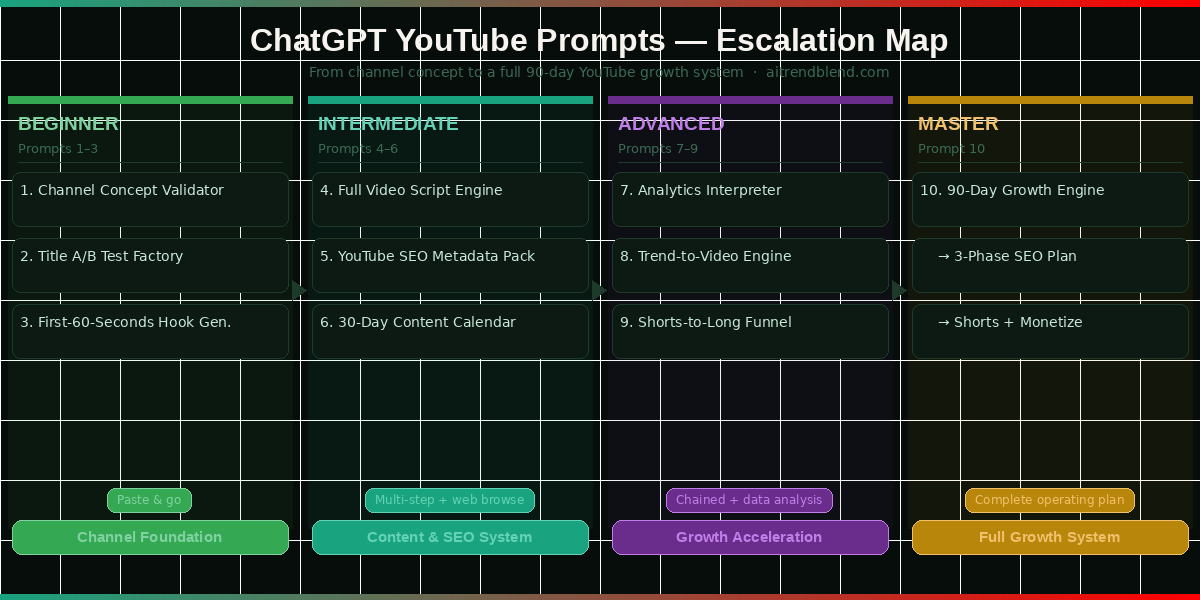
These ten prompts are the ones that actually changed how I approach YouTube production — not the ones that sounded impressive in a demo. Each one is designed to solve a specific, recurring problem that creators hit on the way to a growing channel. By the end of this guide you will have a complete system, from positioning your channel on day one to deploying a 90-day growth engine when you are ready to accelerate.
Why ChatGPT Handles YouTube Growth Differently
The creative writing argument for ChatGPT is the most obvious one, but it bears explaining specifically for YouTube. Writing a video script is not the same as writing an article. A script has to work spoken aloud, at a natural pace, with camera presence and energy changes built in. It has to hold attention through a screen, where the cost of disengagement is a single swipe. GPT-4o has been trained on an enormous volume of high-performing long-form content, and when you prompt it correctly, it produces scripts with the kind of structural sophistication — hooks that earn their opening, transitions that create forward momentum, payoffs that justify the watch time — that most creators develop only after years of iteration.
Beyond scripting, ChatGPT’s web browsing capability (available in GPT-4o) is a meaningful research tool for YouTube strategy. You can ask it to look up what videos are currently ranking for a specific keyword, analyze the title and thumbnail patterns of top performers, and build your strategy around what is actually working today rather than what worked eighteen months ago. Gemini has a comparable feature through Google Search grounding — but ChatGPT’s synthesis and summarization of web research tends to produce more actionable strategic output. It does not just retrieve information; it reasons about it in the context of your specific channel situation.
GPT-4o produces more emotionally resonant, naturally spoken video scripts than any other mainstream AI tool. For narrative-heavy formats — storytelling videos, personal essays, channel trailers, and transformation-arc content — ChatGPT is the strongest available writing partner. Pair its creative output with structured prompts and you get scripts that sound human and are engineered for retention.
The honest comparison: Gemini edges ChatGPT on raw YouTube SEO because of Google’s ecosystem alignment. If pure keyword research and metadata optimization is your primary need, Gemini is the stronger tool. But for everything that touches creativity — hooks, scripts, titles with genuine emotional pull, thumbnail storytelling — ChatGPT is harder to beat. Use both if you can, but if you are choosing one for YouTube growth as a whole, ChatGPT’s versatility wins.
Before You Start: How to Get the Best Results
Use GPT-4o, not GPT-3.5. The quality gap for creative and strategic YouTube work is significant — GPT-3.5 produces noticeably more generic output that requires more editing before it is usable. ChatGPT Plus gives you access to GPT-4o with web browsing, which unlocks the trend research and competitive analysis prompts in this guide. If you are on the free tier, most prompts still work well — just skip the “search the web” instructions and substitute your own research.
Create a channel memory block before your first session. Paste this at the top of every new ChatGPT conversation: “My YouTube channel covers [NICHE]. My target viewer is [DESCRIPTION — be specific]. I upload [X times per week]. My best video got [N views]. My channel goal right now is [GROW SUBSCRIBERS / INCREASE WATCH TIME / MONETIZE]. My content style is [EDUCATIONAL / STORYTELLING / TUTORIAL / COMMENTARY].” This single habit eliminates the most common reason ChatGPT gives mediocre YouTube output — not enough context about who you are making content for.
Use ChatGPT’s Custom Instructions feature to store your channel brief permanently — so every conversation automatically knows your niche, audience, and goals without you pasting a brief each time. Go to Settings → Personalization → Custom Instructions and paste your channel context in the “What would you like ChatGPT to know about you?” field. This single setup step improves every YouTube prompt you ever run.
The 10 Best ChatGPT Prompts for Growing a YouTube Channel
Prompt 1: The Channel Concept Validator
Before you commit to a niche, it is worth stress-testing the concept against the realities of YouTube — competition level, content longevity, audience size, and monetization potential. Most creators skip this and spend six months building in a direction that was never going to work, then pivot frustrated. Five minutes with a well-structured ChatGPT prompt can surface the problems with a channel concept before they cost you months of production time.
This prompt does not just suggest niches — it runs your specific idea through a five-point viability assessment and tells you plainly where the risks are. That honest feedback is what makes it useful.
I want to start a YouTube channel and need you to validate my channel concept before I commit to it.

My channel idea: [DESCRIBE YOUR CHANNEL CONCEPT IN 2–3 SENTENCES]
My background: [YOUR RELEVANT EXPERIENCE OR EXPERTISE]
Target viewer: [WHO YOU WANT TO WATCH — BE SPECIFIC ABOUT AGE, SITUATION, PROBLEM]
Upload capacity: [VIDEOS PER WEEK YOU CAN REALISTICALLY MAINTAIN]

Run a 5-point channel viability assessment:
1. Competition level — is this niche crowded, and is there still room for a new voice?
2. Search demand — do people actively search for this type of content on YouTube?
3. Content longevity — is this niche evergreen or heavily trend-dependent?
4. Audience-to-monetization fit — does this audience type convert well (sponsorships, products, memberships)?
5. Creator-content fit — based on my background and upload capacity, can I realistically sustain this?

For each point, give a score (1–10) and a one-paragraph honest assessment.

Then:
— If my concept passes (average score above 6): give me the single strongest positioning angle for my channel
— If my concept struggles (average below 6): suggest 2 modified versions of my idea that address the weak points

# Be direct. A kind lie now costs months of wasted production time.
Prompt 2: The Title A/B Test Factory
YouTube title writing is one of the most underinvested skills in a creator’s toolkit. Most people write one title, maybe try a second if they are feeling ambitious, and go with whichever sounds better in the moment. The channels that consistently outperform in click-through rate — even in crowded niches — are the ones treating titles as testable hypotheses, not final decisions. This prompt generates fifteen title variations for any video topic, organized by psychological trigger and optimization goal, so you can A/B test with intention rather than instinct.
Generate 15 YouTube title variations for the following video. Organize them into 5 categories (3 titles each):

Video topic: [DESCRIBE WHAT YOUR VIDEO COVERS]
Target keyword: [THE SEARCH TERM YOU WANT TO RANK FOR]
Target viewer: [WHO THIS VIDEO IS FOR]
Channel tone: [EDUCATIONAL / PERSONAL / ENTERTAINING / ANALYTICAL / CONVERSATIONAL]

Categories:
1. Search-optimized: Contains the exact keyword, built for ranking (not click-through)
2. Curiosity-gap: Makes the viewer feel they are missing something they need to know
3. Number or list format: Uses a specific number or promise of structured information
4. Personal story angle: First-person or specific scenario that creates emotional connection
5. Contrarian or counter-intuitive: Challenges a common belief or expectation in this topic

For each title:
— Write the title (max 60 characters)
— Add a [CTR PREDICTION] note: which audience segment this title most appeals to and why
— Rate it on two axes: Search Rank Potential (1–5) and Click-Through Potential (1–5)

Flag your top 3 picks with a ★ and explain in one sentence why each is your top recommendation.

# Avoid clickbait that overpromises. Every title must be something the video genuinely delivers on.
Prompt 3: The First-60-Seconds Hook Generator
YouTube’s audience retention graph almost always shows the same shape: a steep drop in the first thirty to sixty seconds, then a slower decline through the rest of the video. That opening minute is where most viewers decide whether to stay or leave — and it is where most creators lose them, not because the content is bad, but because the hook does not earn the watch fast enough. ChatGPT is exceptionally good at writing hooks because it understands the mechanics of attention: pattern interruption, emotional investment, and the specific type of promise that makes someone commit to watching more.
Write 5 different opening hooks for the following YouTube video. Each hook covers the first 60 seconds of spoken content.

Video title: [YOUR VIDEO TITLE]
Video topic: [WHAT THE VIDEO IS ABOUT]
Target viewer: [WHO YOU ARE TALKING TO AND WHAT THEY CARE ABOUT]
Channel tone: [YOUR CONTENT VOICE — E.G. CALM AND ANALYTICAL / ENERGETIC / CONVERSATIONAL]

Write 5 hook variations, each using a different opening technique:
Hook A — The Scene Drop: Open mid-story or mid-problem, no introduction, no context
Hook B — The Counterintuitive Claim: State something that challenges what the viewer already believes
Hook C — The Stakes Setup: Establish what is at risk if the viewer does not watch this video
Hook D — The Specific Question: Ask the exact question that is already in the viewer's head
Hook E — The Rapid Proof: Lead with a result or number so compelling that it demands an explanation

For each hook:
— Write the full 60-second spoken script (approximately 130–160 words)
— Add a [RETENTION NOTE]: what makes this hook keep people watching past the 60-second mark
— Rate it: Emotional Pull (1–5), Information Pull (1–5)

Hard rule: None of the five hooks can start with "Hey guys", "Welcome back", "In today's video", or "I'm going to show you".

# The best hook makes stopping the video feel like a mistake. Write to that standard.
Prompt 4: The Full Video Script with Engagement Architecture
This is the prompt most creators come to ChatGPT for first, but few structure well enough to get truly useful output. A full video script is not just “write me 1,500 words about [topic]” — that produces a wall of text that is unfilmable and sounds robotic when spoken. A proper script has engagement architecture built in: deliberate pacing, chapter-by-chapter retention mechanics, mid-video re-engagement devices, and a payoff structure that rewards viewers who stay to the end. This intermediate prompt produces all of that, along with camera direction notes so you can film straight from the page.
Write a complete, camera-ready YouTube video script with built-in engagement architecture.

Video title: [YOUR TITLE]
Target length: [TARGET VIDEO DURATION IN MINUTES]
Primary viewer takeaway: [THE ONE THING THE VIEWER SHOULD KNOW OR BE ABLE TO DO AFTER WATCHING]
Content tone: [HOW YOU SOUND ON CAMERA — CASUAL / AUTHORITATIVE / HUMOROUS / PERSONAL]
Key points to cover: [LIST YOUR 3–5 MUST-INCLUDE CONTENT POINTS]

Script structure requirements:
— HOOK (0–60 sec): Use the Scene Drop technique — open in the middle of a situation, no greetings
— PROMISE (60–90 sec): Tell the viewer exactly what they will know by the end, make it specific
— CREDIBILITY BRIDGE (90 sec–2 min): Establish why you can speak to this — one sentence, not a full bio
— CHAPTER 1, 2, 3 (bulk of video): Each chapter ends with a FORWARD-PULL — a reason to stay for the next section
— MIDPOINT RE-HOOK (halfway mark): A surprising fact, a teaser for the best content still to come, or a question
— PAYOFF (final 20% of video): The most valuable or surprising content — never bury the best stuff in the middle
— CTA (final 45 sec): One clear ask, stated naturally — no robotic "smash that subscribe button"

Formatting rules:
— Write the full spoken script in normal prose (not bullet points)
— Add [CAMERA NOTE] for every section where delivery style or shot type matters
— Mark each chapter transition with [CHAPTER BREAK]
— Aim for natural speaking pace: roughly 130 words per minute

After the script, add a SCRIPT RISK ASSESSMENT: the 3 specific moments most likely to cause viewer drop-off and what the script does at each moment to hold attention.

# If it sounds like an AI wrote it, rewrite it. The goal is to sound exactly like me talking to a friend.
Prompt 5: The YouTube SEO Metadata Pack
Most creators treat metadata as an afterthought — the thing you fill in quickly after spending hours on the actual video. That is backwards. Your description, tags, and chapters are what the algorithm reads when deciding who to show your video to, and what a potential viewer reads when deciding whether your video is worth their time. Getting all three right, consistently, is one of the highest-leverage habits available to a growing channel. This prompt generates a complete, publication-ready metadata pack in a single run.
Act as a YouTube SEO specialist. Create a complete metadata pack for this video.

Video title: [YOUR FINAL TITLE]
Video summary: [3–4 SENTENCES DESCRIBING WHAT THE VIDEO COVERS AND WHO IT HELPS]
Primary keyword: [MAIN SEARCH TERM TO RANK FOR]
Channel niche: [YOUR NICHE]
Target audience: [WHO WILL BENEFIT FROM THIS VIDEO]

Deliver the complete metadata pack:

1. VIDEO DESCRIPTION (400–500 words)
   — First 2 sentences must include the primary keyword naturally (shown before "Show more")
   — Paragraph 2: expand on the video's value and secondary keywords
   — Paragraph 3: what the viewer will learn (bullet style, 4–5 points)
   — Chapter timestamps section (use [TIMESTAMP] placeholders)
   — Resource or link section placeholder
   — Closing CTA paragraph (subscribe + next video suggestion)

2. TAGS (15 tags in priority order)
   — 3 exact-match keyword tags
   — 5 broad topic tags
   — 4 long-tail variation tags
   — 3 related topic tags for recommendation algorithm

3. VIDEO CHAPTERS (7–9 chapters)
   — Chapter title + [TIMESTAMP] placeholder for each
   — Chapter titles should be keyword-rich and descriptive, not vague

4. HASHTAGS (3 above-description hashtags)

5. PINNED COMMENT suggestion — what to pin as the first comment to boost early engagement

# Every keyword must read naturally to a human. No keyword stuffing that sounds unnatural.
Prompt 6: The 30-Day Content Calendar with Search Intent Mapping
Random uploads kill channels quietly. The YouTube algorithm builds a picture of what your channel is about based on every video you publish — and a channel that posts three different topic areas in the same month sends a confused signal that slows recommendation growth. A focused 30-day calendar built around a defined theme and consistent upload cadence tells the algorithm exactly who your channel is for and keeps it recommending your content to the right people. The search intent mapping element in this prompt is the detail that most calendar templates skip — and it changes how you structure every individual video you film.
Act as a YouTube growth strategist. Build a 30-day content calendar with search intent mapping for my channel.

Channel niche: [YOUR NICHE]
Upload frequency: [VIDEOS PER WEEK]
Shorts capability: [YES / NO]
Channel goal this month: [SUBSCRIBERS / WATCH TIME / SEARCH RANKING / MONETIZATION]
Content format strengths: [WHAT YOU DO BEST — TUTORIALS, STORYTELLING, LISTS, REVIEWS, COMMENTARY]
Current subscriber range: [UNDER 1K / 1K–10K / 10K–100K]

For each upload slot, provide:
1. Video concept (2–3 sentences)
2. Working title (keyword-optimized, under 60 characters)
3. Primary keyword to target
4. Search intent type — classify each video as one of:
   INFORMATIONAL (viewer wants to learn something)
   NAVIGATIONAL (viewer is looking for a specific resource or creator)
   TRANSACTIONAL (viewer is deciding whether to buy, subscribe, or take action)
   INSPIRATIONAL (viewer wants motivation, ideas, or reassurance)
5. Video format (tutorial / list / case study / vlog / challenge / opinion essay / Shorts)
6. Estimated production difficulty (Easy / Medium / Hard) for a solo creator

Weekly structure:
— Organize into 4 weeks, each with a content theme
— Include 2 evergreen videos per month (designed to get views 12 months from now)
— Include 1 "subscriber magnet" video per month — built specifically to convert viewers to subscribers
— Include 1 "search anchor" video — built specifically to rank for a competitive keyword

# Do not include formats I cannot realistically produce. Solo creator, no production team, no studio.
“The channel that plans its content one month ahead will always outgrow the channel that decides what to film the morning of upload day.”
— aitrendblend editorial, March 2026
Prompt 7: The Analytics Interpreter
YouTube Studio gives you a dashboard full of numbers and very little guidance on what to do with them. Most creators look at views and subscriber counts and call it research. The metrics that actually tell you what to change — average view duration, click-through rate, audience retention by timestamp, traffic source breakdown — require interpretation, and interpreting them in the context of your specific channel situation is where most creators get stuck. This prompt turns ChatGPT into a data analyst for your channel: paste in your numbers and get back a clear, prioritized list of what to fix and why.
Act as a YouTube analytics specialist. Interpret my channel data and give me a prioritized improvement plan.

My channel niche: [NICHE]
Current subscriber count: [NUMBER]
My channel goal: [WHAT YOU ARE OPTIMIZING FOR RIGHT NOW]

Paste your analytics data below (copy from YouTube Studio — any format is fine):
[PASTE YOUR ANALYTICS HERE — VIEWS, CTR, AVG VIEW DURATION, TOP TRAFFIC SOURCES, TOP VIDEOS]

Analyze this data across 5 dimensions:
1. CTR Health — is my click-through rate in a healthy range for my channel size and niche? What does it tell me about my titles and thumbnails?
2. Retention Pattern — does the average view duration suggest a hook problem, a mid-video problem, or an ending problem?
3. Traffic Source Mix — what does my traffic source breakdown tell me about where I am and am not being discovered?
4. Top Performer Pattern — what do my best-performing videos have in common that my lower performers do not?
5. Growth Velocity — given my current metrics, am I on track for my goal or falling behind? What is the single biggest bottleneck?

Output: A prioritized 3-step action plan. For each step: the specific problem, what metric reveals it, and the single most impactful change to make this week.

# Do not tell me what I am doing well. I already know. Tell me what to fix, in order of impact.
Prompt 8: The Trend-to-Video Concept Engine
The creators who grow fastest on YouTube in 2026 are not the ones who ignore trends, and they are not the ones who chase every trend blindly. They are the ones who have a system for identifying which trends are worth responding to, finding the non-obvious angle that their specific audience has not seen yet, and moving quickly before the opportunity closes. This prompt gives you that system — it uses ChatGPT’s web browsing to research current trends in your niche, then applies a structured angle-finding process to surface the video concept that is both timely and differentiated.
Act as a YouTube trend strategist. Search the web and find content opportunities in my niche right now.

My channel niche: [NICHE]
My audience: [WHO WATCHES MY CHANNEL]
My content strengths: [WHAT FORMATS AND ANGLES YOU DO WELL]
Topics or angles I have already covered recently: [LIST 3–4 RECENT VIDEOS TO AVOID REPETITION]

Step 1 — Search the web: Find the top 3 trending topics or news stories in [NICHE] right now that have YouTube content potential.

Step 2 — Relevance filter: For each trend, rate its relevance to my audience (1–5) and its production window (how many days before this trend peaks and starts declining?).

Step 3 — Angle development: For the highest-relevance trend, find:
  a) The obvious angle (what most creators in my niche will make)
  b) Two non-obvious angles that connect the trend to my audience's specific concerns or goals
  c) The angle I should NOT take — and why

Step 4 — Video brief: For the best non-obvious angle, produce:
  — A working title (keyword-optimized, under 60 characters)
  — A 5-point video outline
  — The hook sentence for the first 15 seconds
  — The single strongest thumbnail concept for this angle

# I want to be first with a fresh angle, not fifth with the obvious one.
Prompt 9: The Shorts-to-Long-Form Subscriber Funnel
YouTube Shorts in 2026 is the most powerful free subscriber acquisition tool on the platform — but only when it is connected to your long-form content by design, not as an afterthought. Creators who post Shorts in isolation often get millions of views and almost no subscriber conversion, because the Shorts viewer has no clear path into the full channel. This prompt builds the connective tissue: a Shorts repurposing strategy that turns your long-form videos into a subscriber acquisition system, with every Short engineered to funnel viewers toward the content they actually subscribed for.
Act as a YouTube Shorts strategist. Build a Shorts repurposing funnel that drives subscribers into my long-form content.

My channel niche: [NICHE]
My long-form upload schedule: [FREQUENCY]
My target subscriber: [WHO I WANT SUBSCRIBING AND WHY THEY WOULD STAY]

Source video for repurposing: [DESCRIBE THE VIDEO OR PASTE ITS SCRIPT / KEY SECTIONS]

Step 1 — Clip audit: Identify 5 moments in this video that could work as standalone 45–60 second Shorts. For each, confirm it works WITHOUT any context from the full video — a cold viewer seeing only the Short must be able to follow and find it valuable.

Step 2 — Short scripts: For the top 3 clips, write the Short version:
  — Opening hook (first 3 seconds — must grab before the skip reflex kicks in)
  — Core content (adapted for vertical viewing, high energy)
  — Bridge CTA (closes the Short and explicitly reasons why the full video is worth watching — not "go watch my video" but a specific, intriguing reason)

Step 3 — Funnel architecture:
  — Recommended Shorts-to-long-form posting ratio for my upload frequency
  — Title formula for repurposed Shorts in my niche (the structure that tells the algorithm this is related content)
  — The single most important thing a Short must do in its last 5 seconds to drive subscriptions rather than just views

Step 4 — Subscriber conversion test: How will I know if the funnel is working? Give me 2 specific metrics to track in YouTube Studio and the threshold numbers that indicate the funnel is converting well.

# Every Short is a trailer. The goal is not to go viral — it is to create subscribers who want the full film.
Prompt 10: The 90-Day YouTube Channel Growth Engine (Master Prompt)
Every prompt in this guide has been building to this one. The 90-day growth engine integrates your channel positioning, content strategy, SEO approach, Shorts system, and weekly review process into a single, phased operating plan that you can follow day by day. This is the prompt you run when you decide to stop treating YouTube as a side project and start treating it as a system. Give ChatGPT everything — and it will give you back a plan detailed enough to remove almost all of the guesswork from the next three months.
You are a senior YouTube growth strategist with deep experience in organic channel growth. Build my complete 90-day channel growth plan.

CHANNEL BRIEF:
Niche: [YOUR NICHE]
Current subscribers: [NUMBER]
Account age: [HOW LONG THE CHANNEL HAS EXISTED]
Upload capacity: [LONG-FORM VIDEOS PER WEEK + SHORTS IF APPLICABLE]
Best-performing video: [DESCRIBE IT — VIEWS, AVG VIEW DURATION, SUBSCRIBER CONVERSION]
Worst-performing content type: [WHAT CONSISTENTLY UNDERPERFORMS — FORMAT OR TOPIC]
Content strengths: [WHAT YOU DO WELL ON CAMERA AND IN EDITING]
Production setup: [PHONE / BASIC SETUP / FULL STUDIO]
Monetization status: [NOT MONETIZED / YPP ELIGIBLE / ALREADY MONETIZED]
90-day goal: [SUBSCRIBER TARGET OR WATCH-TIME / REVENUE MILESTONE]

RESEARCH: Before building the plan, search the web for:
1. What YouTube channels in [NICHE] are currently growing fastest and why
2. Top 3 search keywords in my niche with the best combination of search volume and competition level
3. One significant content gap — something this niche's audience wants that no major creator is delivering well

BUILD MY 90-DAY PLAN IN THREE PHASES:

PHASE 1 — Days 1–30: Foundation
- Channel positioning statement (one sentence my entire content strategy builds around)
- 3 content pillars with percentage split across my uploads
- YouTube SEO foundation: the 3 keyword clusters to own this month
- Upload schedule with day-of-week rationale
- Thumbnail style guide: 3 design elements consistent across all thumbnails
- Week 1 full video brief: title, outline, primary keyword, hook sentence, thumbnail concept
- Weekly Sunday review: exactly which 5 metrics to check and what action each number triggers

PHASE 2 — Days 31–60: Growth Acceleration
- Content adjustment based on Phase 1 data (what to do more of, what to cut completely)
- Binge-series concept: a multi-video series designed to drive watch sessions and channel exploration
- Community engagement plan: comment strategy, Community tab posts, pinned comment system
- Collaboration or feature opportunity: one specific type of creator to reach out to and why

PHASE 3 — Days 61–90: Scale Push
- Increased upload sprint: when to increase frequency and by how much without sacrificing quality
- Shorts funnel activation: how to use Shorts to amplify each long-form upload
- SEO compounding: how to build follow-up videos around existing rankings to create content clusters
- Monetization readiness: the exact subscriber and watch-hour milestones to hit and what to prepare in advance

CONSTRAINTS:
- Solo creator, no team, no production budget for paid promotion
- Must be authentic — only content I can make with real expertise and genuine enthusiasm
- I want loyal, returning subscribers — not viral spikes that generate views but no community

End with: the single most important thing I must do every week for all 90 days, without exception, regardless of how the channel is performing.

# Use web research to make every recommendation specific to what is actually working in my niche in 2026. No generic advice.
Common Mistakes When Using ChatGPT for YouTube Growth
These prompts work — but they work considerably better when you avoid the patterns that consistently produce disappointing output. The most common mistake is also the easiest to fix.
Mistake 1: Treating ChatGPT as a content machine instead of a thinking partner. The creators who get the most from ChatGPT for YouTube are not the ones generating the most content with it. They are the ones using it to think more clearly about strategy, positioning, and audience — and then making better human decisions based on that thinking. If you are using ChatGPT mainly to produce content faster, you are using it at its lowest value. Use it to think harder and you will see disproportionate returns.
Mistake 2: Publishing scripts verbatim. GPT-4o writes excellent structure and solid content — but it writes in a voice that sounds like a capable AI, not like you specifically. Your long-term channel growth depends on viewers developing a relationship with your voice, your specific opinions, your idiosyncratic way of explaining things. Every ChatGPT script needs to pass through your editing filter before it is filmable. Rewrite the phrases that feel stiff, add your own examples, cut the sections that do not reflect how you actually talk. This is not optional — it is the step that determines whether your channel sounds like a person or a well-formatted summary.
Mistake 3: Not enabling web browsing for trend and SEO prompts. Prompts 8 and 10 specifically instruct ChatGPT to search the web before responding. Without browsing enabled, ChatGPT answers from training data that may be six to twelve months old — and a YouTube strategy built on stale keyword or trend data produces stale results. Toggle the web search tool on before running any prompt that references what is “currently” happening in your niche.
Mistake 4: One session, one video. The prompts in this guide are designed to be used as a connected system, not individual one-off tools. The analytics you collect from Prompt 7 should inform your next calendar from Prompt 6. The best-performing hook style from Prompt 3 testing should become your default in Prompt 4. The pattern only compounds if you bring data from previous sessions into new ones — so keep a running log of what you have tested and what it revealed.
| Mistake | Wrong Approach | Right Approach |
|---|---|---|
| Content machine mindset | Using ChatGPT mainly to produce more content faster — scripting, titling, and describing every video with minimal editing. | Using ChatGPT for strategic thinking first — positioning, audience analysis, competitive research — and production second. |
| Verbatim publishing | Reading ChatGPT’s script word-for-word on camera. It sounds competent but not personal. | Editing every script for personal voice — changing word choices, adding your own examples, removing sections that do not sound like you. |
| No web browsing | “What keywords should I target for [NICHE] videos?” — answered from training data. | “Search YouTube and Google for the current top-performing videos in [NICHE] and identify keyword patterns.” — answered from live data. |
| No context brief | “Write me a script about home budgeting.” | “Write a script for my channel targeting 28–40 year olds drowning in lifestyle inflation who have never made a budget before. Tone: honest, non-judgemental.” |
| Isolated sessions | Starting a new ChatGPT conversation for each video with no reference to previous outputs or analytics. | Maintaining a running channel brief updated with real performance data, and referencing previous outputs when running new prompts. |
What ChatGPT Still Struggles With for YouTube Growth
ChatGPT’s web browsing capability — while genuinely useful for trend research and competitive analysis — is inconsistent in a way worth planning around. Sometimes it retrieves current, specific results that substantially improve the output. Other times it produces what appears to be a web search but falls back on training knowledge when live results are ambiguous or unavailable. For keyword-critical decisions, do not rely solely on ChatGPT’s browsing output. Cross-reference with YouTube Studio’s own search insights, Google Trends, or a dedicated keyword research tool before committing to a primary keyword strategy. The browsing tool is a useful first layer of research, not a complete replacement for it.
On the creative side, ChatGPT’s scripts have a particular structural tendency that experienced creators notice quickly: they front-load explanation and under-deliver on emotional texture. A ChatGPT script will tell you what happened, why it matters, and what to do about it — efficiently and clearly. What it does less naturally is the moment of genuine vulnerability, the unexpected analogy that makes an abstract concept suddenly click, the specific sensory detail that makes a viewer feel like they are in the room with you. Those elements require your editorial hand. They cannot be prompted into existence; they have to be written in. Think of ChatGPT as handling the architecture of your script while you provide the soul.
Finally, ChatGPT has no access to your YouTube Studio data unless you paste it in. Unlike some analytics tools, it cannot pull your channel statistics automatically — which means the quality of analytics-based prompts (like Prompt 7) depends entirely on the data you bring to the conversation. The habit of exporting your key metrics before a strategy session, not after, is the behavioral change that makes the data-driven prompts worth running.
Your YouTube Channel Has a Strategy Problem — These Prompts Are the Solution
Somewhere in the gap between “I made a video” and “my channel is growing” there is a strategy layer that most creators either skip or handle poorly. The ten prompts in this guide are an attempt to make that layer explicit and actionable — to give you a repeatable process for the decisions that determine whether a channel grows or stalls. Channel positioning, title architecture, script structure, SEO metadata, content planning, analytics interpretation, trend response, Shorts strategy, growth planning: each one of those has a ChatGPT prompt behind it now. That changes what it means to be a solo creator in 2026.
There is a principle running through all of these prompts that is worth naming directly: specificity wins. The more precisely you describe your situation — your audience’s exact frustration, your channel’s specific voice, your most and least successful content — the more useful ChatGPT’s output becomes. Generic prompts produce generic strategy. The creators who grow fastest with AI tools are the ones who have done enough thinking about their channel to brief the tool properly. The prompts here are designed to prompt that thinking in you as much as they are designed to generate output.
Some things remain entirely yours. The creative instinct that tells you a video concept is genuinely interesting versus technically correct. The on-camera energy that makes someone click subscribe after watching three minutes. The editorial judgment that saves a viewer thirty seconds of dead air. The commitment to keep uploading on the weeks when the analytics look disappointing and there is no obvious reason to believe it is going to turn around. AI tools do not have those — and those are the things that actually build a channel people care about.
YouTube in 2026 rewards creators who understand their audience deeply and serve them consistently. ChatGPT accelerates both — the understanding and the consistency. The 90-day growth engine in Prompt 10 is not a shortcut; it is a structure that makes sustained creative effort more likely to pay off. Run these prompts, bring your real data, edit the outputs until they sound like you, and film the videos. The compounding starts from the first video where you actually knew why you were making it.
Try These Prompts in ChatGPT Right Now
Open ChatGPT, enable web browsing, paste your channel brief, and run Prompt 1. Everything else follows from getting clear on what you are actually building.