
- Gemini
- YouTube
- Channel Growth
- SEO Titles
- Video Scripts
- Shorts Strategy
- 2026 Guide
You upload a video you genuinely think is good. The thumbnail looks clean, you spent real time on the edit, the content is solid. Seven days later it has 84 views and three of them are yours. Meanwhile a channel that launched six months after yours sits at 40,000 subscribers, pumping out content that is not obviously better than what you are making. The gap between those two outcomes is almost never about talent or equipment. It is almost always about strategy, search visibility, and consistency. Gemini happens to be unusually well suited to help with all three.
- Gemini reads YouTube the way it reads a search engine, so it tends to balance search rank and click appeal in titles faster than rival models.
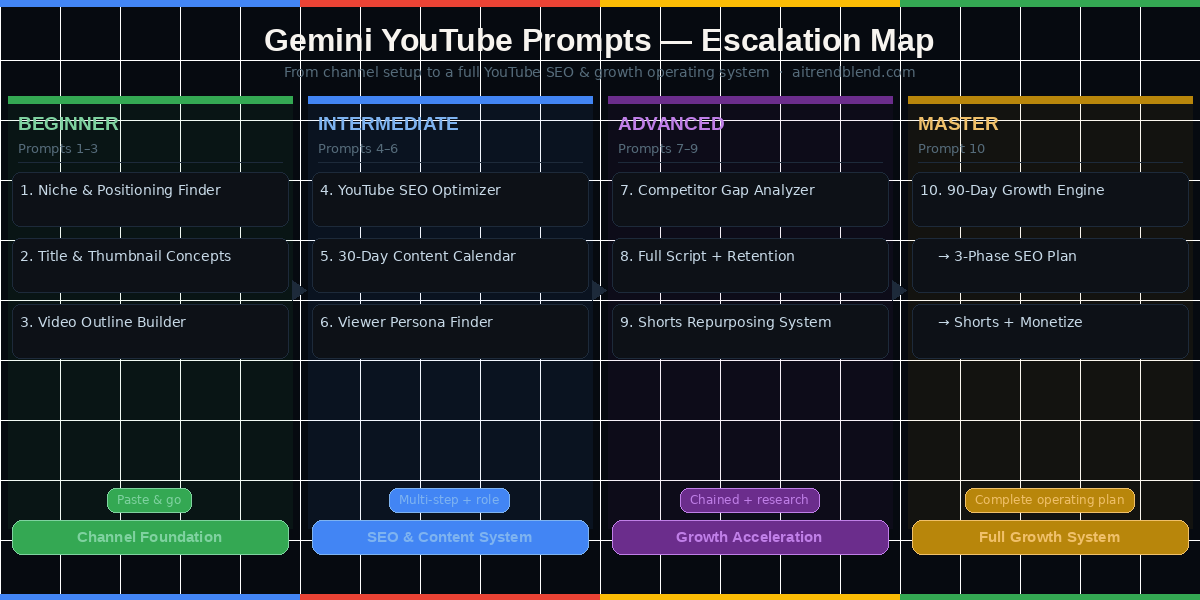
- The ten prompts escalate from channel positioning through SEO, calendars, audience psychology, competitor gaps, scripts, and Shorts, ending in a 90 day growth engine.
- Enabling Google Search grounding in Gemini Advanced sharpens every keyword and title prompt with current search data instead of stale training knowledge.
- Each prompt ships with a why it works note and an adapt step so you can fold your real analytics back into the next run.
- Reach for Claude when you need emotionally textured long form writing, and reach for Gemini for structure, SEO, and thumbnail reasoning.
Why Gemini Handles YouTube Growth Differently
The thing that sets Gemini apart for YouTube work is something people overlook. Google built Gemini, and Google owns YouTube. That is not a trivial detail. Gemini carries a deeper and more current grasp of how YouTube search and recommendation behave than any other mainstream model. When you ask it to optimize a video title, suggest tags, or build a content strategy around search intent, it draws on the same foundational understanding of keyword signals and audience behavior that powers the platform you are trying to grow on. No other mainstream AI tool has that structural alignment.
Ask most AI tools to write a YouTube title and they hand you something that sounds decent. Ask Gemini and it thinks about the title the way it would treat a search query, because it treats YouTube as the world’s second largest search engine rather than a video platform alone. The practical difference is large. A title built for clicks looks different from a title built for search, and the strongest YouTube titles thread both needles at once. Gemini tends to find that balance faster than its competitors because search intent is woven into how it reads language.
The multimodal side of Gemini 2.0 is another real advantage. You can upload a screenshot of your analytics dashboard, a competitor thumbnail, or a draft of your video’s first frame and ask Gemini to read it. Some versions of Claude can do this too, yet Gemini’s visual grasp of YouTube specific design conventions, things like thumbnail composition, text placement, and face and reaction dynamics, runs noticeably stronger thanks to its Google ecosystem training. When you ask it to judge a thumbnail concept, it reasons about click through rate in a way that feels informed rather than generic.
Gemini was trained on Google’s data infrastructure, which carries deep familiarity with how YouTube search and recommendation behave. For keyword research, title optimization, search friendly descriptions, and reading search intent on the platform, Gemini is the strongest AI partner you can reach for. Use that edge on purpose in every prompt you run.
Where Gemini is genuinely weaker than Claude for this work is long form creative writing. If you need a nuanced, emotionally textured 3,000 word video essay script, Claude tends to produce a more literary result. Gemini shines at structured, purposeful output such as outlines, SEO elements, audience analysis, and strategic frameworks, and it writes solid scripts for educational and informational content. Learn which tool to reach for when, and you walk away with the best of both. You can open Gemini and follow along with each prompt below.
Before You Start, How to Get the Best Results
Use Gemini 2.0 Flash or Pro rather than the older versions. The jump in quality for YouTube specific tasks, especially the SEO reasoning and the multimodal thumbnail analysis, is meaningful. If you are on Gemini Advanced through Google One, you already have the best available model for this work. If not, the free tier of Gemini 2.0 Flash handles most of these prompts reasonably well, with one caveat. The multimodal image analysis prompts benefit from the stronger visual reasoning in the Pro model.
Create a channel brief before you start and paste it at the top of every fresh Gemini conversation. Keep it compact but specific. Something like this works well. “My YouTube channel covers [NICHE]. My target viewer is [DESCRIPTION]. I upload [X times per week]. My top performing video got [N views or subscribers in first 30 days]. My 90 day subscriber goal is [TARGET].” That brief costs you forty five seconds and removes an enormous amount of vague, off target output. Gemini, like every large language model, performs far better when the context is rich rather than sparse.
Enable Google Search grounding in Gemini when you run keyword and SEO prompts, which lets Gemini pull current search data rather than leaning on training knowledge alone. In Gemini Advanced it appears as a Search toggle under the prompt input. Using it for title research and keyword prompts noticeably improves the accuracy of anything SEO related.
The 10 Best Gemini Prompts for Growing a YouTube Channel
Prompt 1. The Channel Niche and Positioning Finder
Starting a YouTube channel without a clearly defined niche is like opening a restaurant with no cuisine. You might attract a few customers, but you will not attract the loyal ones who come back every week. Niche clarity is not about narrowing your audience. It is about becoming the obvious choice for a specific viewer with a specific need. Gemini is particularly good at finding the overlap between what you know, what has search demand, and what stays genuinely underserved, because it can reason about the YouTube competitive landscape with more precision than a loose brainstorming session allows.
Use this prompt before your first video, or when your channel feels like it is posting in too many directions at once and growing nowhere.
I want to build a growing YouTube channel. Help me find and sharpen my niche positioning.

My broad topic area: [YOUR BROAD TOPIC — E.G. "PERSONAL FINANCE", "HOME COOKING", "FITNESS"]
My background or expertise: [YOUR RELEVANT EXPERIENCE OR KNOWLEDGE IN 1–2 SENTENCES]
My target viewer: [AGE RANGE, SITUATION, MAIN PROBLEM OR GOAL]
Upload capacity: [HOW MANY VIDEOS PER WEEK OR MONTH YOU CAN REALISTICALLY PRODUCE]

Please do the following:
1. Suggest 5 specific sub-niches within my topic that have strong YouTube search demand in 2026
2. For each sub-niche, rate: competition level (low / medium / high) and content longevity (evergreen vs trend-dependent)
3. Identify which 2 sub-niches best match my background and upload capacity
4. For each of those 2, write a channel positioning statement — one sentence that would work as a YouTube channel description and communicate exactly who the channel is for
5. Suggest a channel name formula for each (not specific names, but the structural pattern that works in this niche)

# Be direct about overcrowded niches. I would rather adjust now than spend months in a crowded space.
Prompt 2. The YouTube Title and Thumbnail Concept Generator
Your video title and thumbnail decide whether a viewer clicks long before they have watched a single second of your content. Most creators write their titles last, after the edit is done, when their creative energy has run dry. The titles that perform well on YouTube are written first, as a hypothesis about what a viewer is searching for and what will make them choose your video over the alternatives sitting beside it in the results. Gemini understands that distinction, and when you frame the task well it produces titles that balance search ranking with real human curiosity.
Generate YouTube titles and thumbnail concepts for the following video:

Video topic: [DESCRIBE WHAT YOUR VIDEO COVERS IN 2–3 SENTENCES]
My channel niche: [YOUR NICHE]
Target viewer: [WHO YOU ARE MAKING THIS FOR]
Primary search keyword I want to rank for: [YOUR TARGET KEYWORD OR PHRASE]

Part 1 — Titles: Write 10 title variations, sorted into 3 categories:
  Category A: SEO-first titles (include exact keyword, optimized for search rank)
  Category B: Click-through-first titles (optimized to make someone stop scrolling)
  Category C: Hybrid titles (balance keyword inclusion with emotional pull)
Flag your top 3 overall with a ★. Keep all titles under 60 characters.

Part 2 — Thumbnail concepts: For the top 3 titles, describe a thumbnail concept each:
  — Main visual element (what is shown, facial expression if person is present)
  — Text overlay (3–5 words max, what it says and color/placement)
  — Background style (simple color, environmental, split-panel, etc.)
  — The psychological trigger this thumbnail uses (curiosity / social proof / fear of missing out / before-after)

# Titles must feel like real search queries a viewer would type, not marketing copy
Prompt 3. The Video Outline Builder
The difference between a video that holds viewers to the end and one that loses 60 percent of them in the first two minutes is almost always structure. Viewers rarely leave because the content is bad. They leave because they cannot see where the video is going, and their attention quietly decides the risk of wasting more time is too high. A strong outline signals structure before you say a word, and it keeps your delivery on track without making you sound scripted.
This prompt generates a ready to film outline with a proven retention architecture, the hook, the promise, the content chapters, and the payoff, built around the goals of your specific video.
Build a YouTube video outline optimized for high audience retention.

Video title: [YOUR CHOSEN TITLE]
Target video length: [E.G. 8 MINUTES / 15 MINUTES / 20+ MINUTES]
Primary viewer goal: [WHAT THE VIEWER WANTS TO KNOW OR BE ABLE TO DO AFTER WATCHING]
My channel style: [EDUCATIONAL / DOCUMENTARY / TALKING HEAD / TUTORIAL / VLOG]

Structure the outline as follows:
— Hook (0–30 sec): The opening statement or scene that makes stopping impossible
— Promise (30–60 sec): What the viewer will gain by watching the full video
— Context or credibility (60–90 sec): Why you are the right person to explain this
— Main sections (name each chapter, include a one-sentence description of what it covers and an estimated timestamp)
— Retention hook (midpoint): A question or teaser placed halfway through to prevent drop-off
— Payoff section: The most valuable or surprising information saved for the last third
— CTA (final 30 sec): One specific action for the viewer to take

For each main section, add a [RETENTION NOTE] — one sentence on how to keep viewers watching through that specific part.

# Save the most valuable point for the final third of the video, not the beginning
Prompt 4. The YouTube SEO Optimizer
Getting a video to surface in YouTube search takes more than a good title. The description, the tags, the chapters, and even the transcript all send signals to the algorithm about what the video covers and who should see it. Most creators treat the description as an afterthought, a dumping ground for social links and a generic paragraph about the channel. The creators whose videos rank for competitive terms treat every metadata field as a chance to optimize for search. This prompt handles all of it at once.
The step up at this level is the role assignment. You ask Gemini to think like an SEO specialist for this exact platform, and you pair that with a structured output that covers every metadata field that matters.
Act as a YouTube SEO specialist. Optimize the complete metadata for this video.

Video title: [YOUR VIDEO TITLE]
Video topic summary: [2–3 SENTENCES DESCRIBING WHAT THE VIDEO COVERS]
Primary keyword: [MAIN KEYWORD YOU WANT TO RANK FOR]
Channel niche: [YOUR NICHE]
Target audience: [WHO THIS VIDEO IS FOR]

Produce the following:

1. Optimized description (400–500 words):
   — First 2 lines must contain the primary keyword naturally (visible before "Show more")
   — Include 3–4 secondary keywords worked in naturally
   — Section for chapters/timestamps (placeholder format)
   — Social links placeholder section
   — Closing paragraph with a subscribe CTA

2. Tags: 15 tags in priority order — mix of exact-match, broad, and long-tail variations

3. Video chapters: 6–8 chapter markers with timestamps and titles (based on the outline structure I provide or generate one)

4. Hashtags: 3 hashtags to add above the description (the ones YouTube shows as clickable tags)

5. Keyword opportunities: 3 related keywords this video could rank for beyond the primary target, with a one-sentence explanation of why each has potential

# Every keyword inclusion must feel natural to a human reader, not stuffed for crawlers
Prompt 5. The 30 Day YouTube Content Calendar
Consistency is the variable that most separates channels that grow from channels that stall. The YouTube algorithm rewards accounts that publish on a predictable schedule inside a defined niche, since each new video reinforces your topical authority and makes the system more confident about who to show your content to. The catch is that holding a schedule means planning content before filming day arrives rather than scrambling for ideas the morning of the shoot.
This prompt generates a full month of planned content with a topic arc, an upload schedule, and format variety, all designed to build a coherent thread through your content that keeps subscribers coming back rather than dipping in for one video and leaving.
Act as a YouTube content strategist. Build me a 30-day content calendar for a [NICHE] channel.

Upload frequency: [HOW MANY VIDEOS PER WEEK]
Channel goal this month: [GROW SUBSCRIBERS / INCREASE WATCH TIME / BUILD EMAIL LIST / MONETIZE]
Content strengths: [WHAT YOU DO WELL — TUTORIALS, STORYTELLING, DATA, REVIEWS, TALKING HEAD]
Audience I want to attract: [WHO YOU WANT AS NEW SUBSCRIBERS]
Shorts capability: [CAN YOU PRODUCE YOUTUBE SHORTS IN ADDITION TO LONG-FORM? YES / NO]

For each upload slot, provide:
1. Video concept (2–3 sentences)
2. Suggested title (keyword-optimized, under 60 characters)
3. Video format (tutorial / list / case study / opinion / challenge / interview / Shorts)
4. Primary keyword to target
5. Estimated search intent (are people searching this to learn / to decide / to be entertained?)
6. Best upload day and time (based on 2026 YouTube engagement patterns for this content type)

Organize by week with a weekly content theme. Include at least 2 evergreen topics per month (content that will keep getting views 12 months from now) and 1 trend-responsive slot per week.

# Make this achievable for a solo creator. Ambitious is fine, unrealistic is not.
Prompt 6. The Viewer Persona and Content Angle Finder
Here is something most YouTube growth guides never say. Knowing your subscriber count matters far less than knowing why specific viewers subscribe and stay. Two channels in the same niche with the same subscriber count can follow radically different growth paths depending on whether their audience watches passively or actively hunts for more of their content. The difference almost always traces back to how deeply the creator understands the fears, goals, and frustrations of the people who watch.
This prompt builds a detailed viewer persona grounded in real audience psychology, then translates that persona straight into content angles, specific video ideas that land because they speak to what the viewer actually cares about.
Act as a YouTube audience strategist. Build a viewer persona and derive content angles from it.

My channel niche: [NICHE]
My top 3 performing videos (describe each briefly): [VIDEO 1 / VIDEO 2 / VIDEO 3 — OR "STARTING FRESH"]
My channel goal: [WHAT OUTCOME YOU WANT FOR YOUR VIEWERS — TO LEARN / TO SAVE MONEY / TO TRANSFORM / TO BE ENTERTAINED]

Step 1 — Viewer persona: Build a detailed profile of my ideal subscriber:
  a) Demographics (age range, life situation, income level if relevant)
  b) Primary goal they have related to my niche
  c) Their biggest fear or frustration in this space
  d) What has already failed for them before they found my channel
  e) The type of YouTube creator they already watch (describe style, not specific names)
  f) What would make them subscribe vs just watch one video

Step 2 — Content angles: Based on this persona, generate:
  — 5 video ideas targeting their primary goal
  — 5 video ideas targeting their biggest fear or frustration
  — 3 "subscriber magnet" video concepts — videos specifically designed to convert one-time viewers into subscribers
  — 2 video angles I should avoid because they would attract the wrong audience for my channel goals

# Ground this in real viewer psychology, not marketing demographics. I want to understand how they think, not just who they are.
“The channels that grow consistently are not the ones with the best cameras or the most editing tricks. They are the ones with the clearest understanding of exactly one person they are making every video for.”
aitrendblend editorial, March 2026
Prompt 7. The Competitor Analysis and Gap Finder
Your five biggest competitors on YouTube are not your enemies. They are your free research department. Every video they have made tells you something about what your target audience searches for. Every gap in their catalog is a video you could make. Every comment section they have ignored holds a viewer still waiting for someone to answer the question. This prompt turns competitor watching into a systematic map of content opportunities, using Gemini’s research strength to surface the gaps that are actually worth a video.
Act as a YouTube competitive intelligence analyst. Help me find content gaps I can own in my niche.

My channel niche: [NICHE]
My content style and strengths: [HOW YOU MAKE CONTENT AND WHAT YOU DO WELL]
My target audience: [WHO YOU ARE TRYING TO REACH]

Competitor profiles (fill in what you know — approximate is fine):

Competitor 1: [CHANNEL NAME OR DESCRIPTION] | Approx subscribers: [NUMBER]
  What they cover: [THEIR MAIN TOPICS] | What performs best for them: [VIDEO TYPES THAT DO WELL]

Competitor 2: [CHANNEL NAME OR DESCRIPTION] | Approx subscribers: [NUMBER]
  What they cover: [THEIR MAIN TOPICS] | What performs best for them: [VIDEO TYPES THAT DO WELL]

Competitor 3: [CHANNEL NAME OR DESCRIPTION] | Approx subscribers: [NUMBER]
  What they cover: [THEIR MAIN TOPICS] | What performs best for them: [VIDEO TYPES THAT DO WELL]

Based on this, identify:
1. Topics all three avoid or underserve (content gaps with real search demand)
2. Audience questions these channels consistently leave unanswered in the comments
3. Video formats none of them use effectively (opportunity for differentiation)
4. A "differentiation statement" I could own — the one sentence that would make my channel distinctly different and valuable to the same audience
5. My first three "gap videos" — specific video concepts that fill a real need none of these channels are meeting

Prioritize by: ease of production for a solo creator AND likelihood of converting viewers to subscribers (not just getting views).

# If a gap exists but has low search demand or does not convert viewers to subscribers, flag it as a vanity gap.
Prompt 8. The Full Video Script with Retention Engineering
Most scripts written by AI share the same structural failure. They front load all the good information and leave nothing for viewers who stay through the middle and the end. The result is high early engagement and a steep fall off, a video that looks great in the first 30 seconds of analytics and dismal on the audience retention graph. This prompt builds a complete, camera ready script engineered to hold attention through every section, with deliberate retention devices placed at each risk point.
The advanced element here is the chained structure. Gemini reasons about the viewer’s psychological state at each timestamp rather than only deciding what information to deliver.
Write a complete YouTube video script engineered for maximum audience retention.

Video title: [YOUR TITLE]
Target length: [IN MINUTES]
Primary viewer goal: [WHAT THEY WANT TO LEARN OR ACHIEVE BY THE END]
My channel tone: [DIRECT AND EDUCATIONAL / CONVERSATIONAL AND PERSONAL / ENERGETIC / CALM AND ANALYTICAL]
Key points to cover: [LIST 3–5 MAIN THINGS THE VIDEO MUST INCLUDE]

Script requirements:
— HOOK (0–45 sec): Open with the viewer's problem stated in their own language, then immediately promise the solution. No "Hey guys welcome back."
— PATTERN INTERRUPT at 90-second mark: A surprising fact, a bold claim, or a question that re-earns their attention
— CHAPTER TRANSITIONS: Each section must end with a forward-pull — a reason to stay for the next section
— MIDPOINT HOOK (halfway through): A teaser for the most valuable information coming in the second half
— PAYOFF: The genuinely most useful or surprising information in the last 25% of the video
— CTA (final 60 sec): One specific ask, stated twice — once before and once after the outro music cue

Write the full script with [CAMERA DIRECTION] notes in brackets where relevant.
After the script, add a RETENTION RISK MAP: the 3 moments most likely to cause viewer drop-off and what the script does to prevent each.

# Never open with "In today's video" or "Welcome back". Start mid-story or mid-problem.
Prompt 9. The YouTube Shorts Repurposing Strategy
YouTube Shorts crossed 200 billion daily views in 2025, and Shorts remain the fastest organic subscriber acquisition tool available to creators in 2026. Most creators treat Shorts as a separate content lane that needs separate production. The smarter approach is systematic repurposing, using your long form videos as source material and pulling Shorts that drive new viewers into your full catalog. This prompt builds you a complete Shorts strategy, not only clip selection but hooks, editing notes, and a publishing framework that turns Shorts into a subscriber funnel rather than a distraction.
Act as a YouTube Shorts strategist. Build me a complete Shorts repurposing system for my channel.

My channel niche: [NICHE]
My long-form upload schedule: [HOW OFTEN YOU UPLOAD LONG-FORM VIDEOS]
My audience: [WHO WATCHES YOUR CHANNEL]
My channel goal for Shorts: [SUBSCRIBER GROWTH / BRAND AWARENESS / DRIVING TRAFFIC TO LONG-FORM / ALL THREE]

I want to repurpose this video into Shorts: [DESCRIBE THE VIDEO OR PASTE THE SCRIPT / OUTLINE]

Step 1 — Clip identification: Identify 5 moments in this video that could work as standalone 30–60 second Shorts. For each, explain why it works independently (does not require context from the full video).

Step 2 — Short scripts: For your top 3 clips, write the Short version:
  — Opening hook (first 2 seconds — must hook without context)
  — Core content (edited for vertical format, 30–55 seconds)
  — Closing CTA (drives to the full video or channel subscribe)

Step 3 — Shorts publishing framework:
  — Recommended Shorts posting frequency relative to long-form uploads
  — Best timing for Shorts posts relative to when you upload long-form (before / same day / after — and why)
  — 3 Shorts title and description formulas that perform well for repurposed content in my niche

Step 4 — Shorts-to-long-form bridge: How to structure the CTA in each Short to maximize click-throughs to the full video.

# The goal of every Short is to make someone want more. Do not give them everything in the Short.
Prompt 10. The 90 Day YouTube Channel Growth Engine (Master Prompt)
This is the prompt you run on day one of your growth push and revisit every 30 days with updated data. It folds everything from the previous nine prompts, niche positioning, SEO strategy, content calendar, audience psychology, competitor gaps, and the Shorts system, into a single phased growth plan. The output is not a collection of tips. It is a structured, three phase operating manual specific enough to act on week by week.
Give Gemini everything you know about your channel. The master prompt earns its title only when the context brief is complete. Every placeholder you leave empty is a section of the plan that defaults back to generic advice.
You are a senior YouTube growth strategist and SEO specialist. Build my complete 90-day channel growth plan.

CHANNEL BRIEF:
Channel niche: [NICHE]
Current subscribers: [NUMBER]
Channel age: [HOW LONG IT HAS EXISTED]
Upload capacity: [VIDEOS PER WEEK — LONG-FORM AND/OR SHORTS]
Best-performing video: [DESCRIBE IT, ITS VIEW COUNT, AND WHY YOU THINK IT WORKED]
Worst-performing content: [WHAT CONSISTENTLY UNDERPERFORMS — FORMAT OR TOPIC]
Content strengths: [WHAT YOU DO WELL — EDITING, RESEARCH, STORYTELLING, ON-CAMERA ENERGY]
Production resources: [PHONE ONLY / BASIC SETUP / FULL STUDIO — BE HONEST]
90-day subscriber goal: [TARGET NUMBER]
Current monetization status: [NOT MONETIZED / YPP ELIGIBLE / ALREADY MONETIZED]

BUILD MY 90-DAY PLAN IN THREE PHASES:

PHASE 1 — Days 1–30: Foundation and SEO Authority
- Channel positioning statement (the one sentence the whole channel is built around)
- 3 content pillars with the percentage of total videos each should represent
- YouTube SEO foundation: primary keyword clusters to target this month
- Upload and Shorts schedule with day-of-week reasoning
- Thumbnail style guide (3 consistent elements that should appear across all thumbnails)
- Week 1 video brief: title, outline, primary keyword, and thumbnail concept
- Weekly review checklist (which 5 metrics to check every Monday and what action each triggers)

PHASE 2 — Days 31–60: Growth Acceleration
- Content strategy adjustment based on Phase 1 performance data
- Thread-through series concept: a multi-video series that drives binge-watching and subscriber conversion
- Community engagement plan (comments, Community tab posts, pinned comment strategy)
- One "breakout video" concept designed specifically for high impressions and subscriber conversion in my niche

PHASE 3 — Days 61–90: Scale and Monetize
- High-output sprint plan (if subscriber goal requires increased upload frequency)
- YouTube Shorts acceleration: how to use Shorts to drive subscribers into long-form content
- SEO compounding strategy: how to build on existing ranking videos with follow-up content
- Monetization readiness checklist: what I need in place before and after hitting YPP threshold

CONSTRAINTS:
- Solo creator, no production team
- Zero paid promotion budget
- Must feel authentic — I will not make content that does not match my actual voice and expertise
- I want subscribers who genuinely want more, not inflated numbers from misleading thumbnails

End with: the single most important habit I must protect every day for all 90 days, even on low-motivation weeks.

# Use your Google ecosystem knowledge to make every SEO recommendation as specific and current as possible for 2026.
Common Mistakes When Using Gemini for YouTube Growth
The prompts above produce strong output, yet a handful of consistent habits reliably undermine that output when left unchecked. The most common one is also the easiest to fix.
Mistake 1. Using Gemini for titles without enabling Google Search grounding. Gemini’s training knowledge of YouTube keywords is solid but not current. New trends emerge, search volumes shift, and seasonal patterns change. For any title or keyword work, the Search grounding feature in Gemini Advanced gives you outputs based on current search behavior rather than what was true six months ago. The difference in keyword relevance is meaningful.
Mistake 2. Publishing Gemini’s script word for word. Gemini writes competent, well structured scripts. They almost never sound exactly like you. Your channel’s long term growth depends on viewers forming a relationship with your specific voice rather than a smooth AI approximation of it. Treat every Gemini script as a first draft. Rewrite it in your own voice, add personal examples, and change the phrases that sound generic. The pass takes twenty minutes and makes the final video noticeably more human.
Mistake 3. Optimizing metadata without checking competitor metadata. Running the SEO optimizer prompt without knowing what competing videos’ descriptions and tags look like means you are optimizing in a vacuum. Before running Prompt 4, spend five minutes looking at the top three YouTube results for your target keyword and noting their description patterns. Then give Gemini that context. The output becomes a competitive response rather than a generic template.
Mistake 4. Skipping the Shorts strategy entirely. Many creators past their thirties dismiss Shorts as a format that attracts the wrong audience. The data in 2026 tells a different story. Shorts that are thoughtfully bridged to long form content produce subscriber conversion rates comparable to long form for a fraction of the production investment. Prompt 9 is not optional if growth speed matters to you.
| Mistake | Wrong Approach | Right Approach |
|---|---|---|
| No Search grounding | Running title prompts with base Gemini only, so outputs lean on potentially outdated training data. | Enabling Google Search grounding in Gemini Advanced for all keyword and title prompts to reach current search behavior. |
| Word for word script publishing | Reading Gemini’s script straight to camera with no edit for personal voice. | Using the script as a structural template and rewriting every section in your own phrasing before filming. |
| SEO in a vacuum | Asking only to optimize a title and description for a keyword. | Giving Gemini the titles, descriptions, and tag patterns of the top three ranking videos, then asking it to optimize yours to rank alongside them. |
| Empty context brief | Asking for a video script about investing with no audience or tone detail. | Naming the audience, for example burnt out people in their thirties with 500 dollars a month to invest and no finance background, and the tone, calm and non judgmental. |
| One time use | Running the 90 day plan once and following it rigidly regardless of performance data. | Rerunning the master prompt every 30 days with updated analytics to recalibrate the strategy against real results. |
What Gemini Still Struggles With for YouTube Growth
Gemini’s Google ecosystem advantage is real, but it has limits worth understanding before you build a strategy around it. The most significant one is access. Gemini does not have a live feed of YouTube analytics data or current trending video performance unless you provide that data yourself. When Gemini says a type of video is currently performing well, it is reasoning from training data and general search pattern knowledge rather than from a record of what got uploaded and went viral yesterday. For trend sensitive decisions, supplement Gemini’s reasoning with YouTube’s own Trending tab and the search section of YouTube Studio.
Long form creative scriptwriting is another area where Gemini has a genuine gap compared to Claude. For informational, tutorial, and list based YouTube content, Gemini produces excellent scripts. For narrative heavy content such as channel trailers, personal story videos, and documentary style essays, Claude tends to produce more emotionally resonant writing. This is not a dealbreaker. It just means that for certain video types your workflow might look like using Gemini for SEO and structure and using Claude for the emotional narrative layers. The two tools complement each other well for YouTube production.
Finally, Gemini’s thumbnail analysis, while genuinely useful, is not a substitute for testing. Gemini can tell you whether a thumbnail concept follows best practices and which psychological trigger it uses. It cannot tell you whether that specific combination will produce a 6 percent or a 2 percent CTR on your specific channel with your specific audience. YouTube’s built in thumbnail testing, available to monetized channels, is the only way to know that with certainty. Use Gemini to design strong candidates, then let the data choose between them.
Growing Your YouTube Channel, Strategy First and Content Second
Every prompt in this guide is ultimately a thinking tool, a way to get clarity on decisions that most creators make on instinct or not at all. The niche finder forces you to articulate what makes your channel worth watching. The competitor analysis forces you to understand your landscape before assuming there is room for you in it. The 90 day growth engine forces you to plan three months at once rather than making one video at a time and hoping for compound growth that never arrives. Gemini does not replace that thinking. It speeds it up.
There is a broader principle here that applies to every AI tool you use for creative work. The quality of your input shapes the quality of your output in a way that is close to perfectly linear. Creators who paste vague one sentence prompts and wonder why the output feels generic are getting exactly what they asked for. The prompts in this guide are structured to give Gemini everything it needs, your context, your constraints, your goals, and your audience, so that what comes back is specific enough to act on the same day.
Some things stay out of reach for any AI tool. The energy you bring to camera. The specific personal experience that makes your explanation of something click for a viewer in a way no one else’s does. The editorial instinct that tells you a video is not quite ready yet. The decision to keep going after a video gets 200 views when you expected 2,000. Gemini can do a great deal, but it cannot film the video for you, and it cannot build the audience relationship that only your presence creates.
YouTube in 2026 is more competitive than it has ever been and at the same time more accessible, because the tools available to solo creators have never been this good. The channels that will sit at 100,000 subscribers twelve months from now are the ones being planned systematically today. Start with Prompt 1. Work through the system. Come back to Prompt 10 every 30 days with real data and a willingness to change what is not working. The gap between where your channel is today and where you want it to be is mostly a strategy problem, and strategy problems are exactly what these prompts are built for.
Try These Prompts in Gemini Right Now
Open Gemini Advanced, enable Google Search grounding, paste your channel brief, and run Prompt 1. Everything else follows from knowing exactly what niche you are building.
Frequently Asked Questions
Which Gemini model is best for YouTube growth work?
Gemini 2.0 Pro is the strongest choice because its SEO reasoning and multimodal thumbnail analysis are sharper than the older models. The free Gemini 2.0 Flash tier handles most of the text prompts well, and the main reason to reach for Pro is the visual analysis prompts that read thumbnails and analytics screenshots.
Is Gemini better than ChatGPT or Claude for YouTube SEO?
For keyword research, title optimization, and search intent on YouTube, Gemini has a structural edge because Google built it and Google owns YouTube. For emotionally textured long form scripts, Claude tends to write more naturally. A practical workflow uses Gemini for SEO and structure and Claude for narrative video types.
Do I need Gemini Advanced, or does the free tier work?
The free Gemini 2.0 Flash tier runs most of these prompts well. Gemini Advanced adds Google Search grounding, which pulls current search data into keyword and title prompts, and it gives you the stronger Pro model for thumbnail and analytics analysis. If SEO accuracy matters to you, Advanced is worth it.
Can Gemini analyze my thumbnails and analytics screenshots?
Yes. Gemini 2.0 is multimodal, so you can upload a thumbnail concept, a competitor thumbnail, or a screenshot of your analytics and ask it to read them. It can judge composition and which psychological trigger a thumbnail uses, but it cannot predict your exact click through rate, so pair its advice with real thumbnail testing.
How often should I rerun the 90 day growth prompt?
Run the master prompt on day one, then revisit it every 30 days with your updated analytics. Each rerun lets Gemini recalibrate the next phase against what actually happened rather than against assumptions, which turns a static plan into an iterative system.
Should I publish Gemini’s scripts word for word?
No. Gemini writes competent, well structured scripts, but they rarely sound exactly like you. Treat each script as a first draft, then rewrite it in your own voice and add personal examples before filming. The viewer relationship that drives long term growth depends on your specific voice, not a smooth AI approximation of it.