
7 Best Perplexity Prompts for Writing Cited Literature Reviews in 2026
Tested prompts that turn Perplexity AI’s real-time sourcing into structured, cited literature reviews — without spending hours chasing down references manually.
You’re staring at a blank document. The deadline for your literature review is in 48 hours. You’ve collected twenty papers, read half of them properly, and have a general sense of what the field says — but turning that into a coherent, citation-supported argument feels like a completely different skill from the reading itself. Sound familiar?
This is exactly where most researchers reach for an AI tool, try three prompts, get back generic summaries with made-up references, and close the tab in frustration. The problem isn’t AI — it’s which AI tool you’re using, and how you’re asking it.
Perplexity AI solves one of the most painful problems in AI-assisted academic writing: citation accuracy. Unlike ChatGPT or Claude, which synthesise from training data and frequently hallucinate references, Perplexity grounds its responses in real-time web searches. It pulls live sources, shows you URLs, and lets you verify every claim before it goes into your document. That is not a minor feature. For a literature review — where a single fabricated citation can derail a submission — it changes the calculation entirely.
The seven prompts below are not generic starters. They were built specifically around how Perplexity actually behaves, tested on real research tasks across multiple disciplines, and structured to produce output you can work with directly. By the end of this guide, you’ll have a complete prompting workflow for every stage of a literature review — from initial scoping through thematic synthesis to your final structured draft.
Why Perplexity Handles Literature Reviews Differently
The core architectural difference is simple: Perplexity searches the web before it answers. That means when you ask it about current research on, say, machine learning fairness in hiring algorithms, it isn’t reconstructing an answer from patterns in its training data. It’s actively finding sources — journal abstracts, preprints on arXiv, Google Scholar previews, academic blog posts — and synthesising from those. You can see the sources directly in the response, follow the links, and check what the original paper actually says.
Compare that to using ChatGPT Plus for the same task. GPT-4o is excellent at argument structure and academic prose style, but its knowledge has a training cutoff and it will confidently cite papers that don’t exist. Gemini 1.5 Pro has improved its grounding capabilities, but its literature-specific sourcing is still inconsistent. For a task where citation accuracy is the single biggest risk — and in academic writing, a single fake reference is a serious problem — Perplexity’s architecture is genuinely better suited than either alternative.
Perplexity’s value for literature reviews isn’t writing quality — it’s verifiability. Use it for source discovery and citation grounding. Use a tool like Claude or ChatGPT for prose refinement once you have verified sources in hand.
That said, Perplexity has real limits. Its academic depth varies by field — it handles computer science, medicine, economics, and environmental science much better than niche humanities subfields where most publications are behind paywalls. It synthesises well at the surface level but can struggle with the kind of nuanced theoretical argument that distinguishes a strong literature review from a competent one. These limits are addressed honestly in the limitations section — but knowing them makes you a smarter user, not a worse one.
“The most dangerous citation error is the one that looks completely correct.”
— Common warning in academic integrity guidance, 2024–2026
Before You Start: How to Get the Best Results
A few practical things worth getting right before you run any of the prompts below. First, use Perplexity Pro if you have access. The Pro version offers more thorough search with access to academic sources including PubMed, arXiv, and selected journal databases that the free tier doesn’t consistently reach. For serious academic work, the difference is material.
Second, set your search focus. Perplexity lets you narrow the source pool before you even ask your question — you can restrict it to Academic sources, or to the web broadly. For literature reviews, Academic focus is almost always the right choice. It limits hallucination risk significantly because the sources it’s drawing from are more formally structured.
Third — and this is the most important setup step — treat Perplexity as your source discovery and citation grounding tool, not your final drafter. The workflow that produces the best results: use Perplexity to find and verify real sources, export those references with DOIs or URLs, then take those verified sources into Claude or ChatGPT to produce the actual analytical prose of your review. Trying to do both in one tool in one step is where most people get mediocre output.
Finally, always verify citations independently. Even with Perplexity’s sourcing architecture, you should paste every reference into Google Scholar or your institution’s database before including it in your submission. Perplexity is better than most AI tools at citation accuracy — but “better” is not the same as “reliable enough to skip verification entirely.”
The 7 Best Perplexity Prompts for Writing Cited Literature Reviews
Prompt 1: The Scope Mapper
Before you write a single sentence of your review, you need a map of the field. This prompt is the starting point — it asks Perplexity to surface the key themes, major debates, and central papers in a research area, with sources attached. It’s deliberately broad and simple, designed to give you orientation before you narrow.
The reason to run this first is that it stops you from writing a literature review that misses an entire strand of the conversation. One of the most common errors in student and early-career researcher literature reviews is that they map the studies they already knew about, not the full landscape. This prompt resets that.
Prompt 2: The Citation Collector
Once you know the landscape, you need sources — real ones, with verifiable references. This prompt is purpose-built to get Perplexity to produce a reference list you can actually work with, not a list of invented author names and fake journal titles. It exploits Perplexity’s strongest feature directly.
The key here is specificity about format. If you just ask for “sources on X,” you get an inconsistent mix. Asking for a structured table with specific fields — title, authors, year, outlet, one-line summary, URL — produces something you can copy straight into a citation manager.
Prompt 3: The Gap Finder
A literature review that only summarises what exists is half a job. The other half — and often the more intellectually valuable half — is identifying what the existing literature doesn’t cover, doesn’t agree on, or handles inconsistently. This is where reviewers demonstrate original thinking, and it’s the section that examiners and journal reviewers pay closest attention to.
This prompt asks Perplexity to search specifically for contested territory: debates, methodological disagreements, and understudied angles. It produces the raw material for the “gaps” section that most literature reviews bury or skip entirely.
Prompt 4: The Thematic Synthesiser
Here is where we move from gathering to building. A thematic literature review doesn’t march through papers chronologically — it groups them by argument, method, or finding, and shows how those groups relate to each other. Getting that structure right is often the hardest part of the whole task.
This prompt assigns Perplexity a clear role and asks it to produce themed groupings from the sources you’ve already identified. The role framing — “You are an academic research assistant” — consistently produces more structured, less casual output in Perplexity. It doesn’t hurt to be explicit about what you want the output to look like.
Prompt 5: The Methodology Critic
Most undergraduate and early postgraduate literature reviews fail at the same point: they describe what studies found, but not how they found it or why the methodology matters. A reviewer who can look at a cluster of studies and say “the majority of these rely on self-report data, which limits their ability to establish causal relationships” is demonstrating exactly the critical thinking that markers are looking for.
This prompt asks Perplexity to do the methodological assessment, producing the kind of critical commentary that elevates a descriptive review into an analytical one.
Prompt 6: The Section Drafter
You have verified sources, thematic clusters, and methodological analysis. Now you need prose. This prompt asks Perplexity to draft one complete section of your literature review — not a summary of papers, but an argumentative synthesis that reads like part of an academic document.
The detail of the setup prompt here matters a lot. The more context you give about your specific argument, your discipline’s conventions, and the word limit, the closer the output will be to what you actually need. Don’t treat this as a one-shot prompt — expect to iterate on it once or twice.
Prompt 7: The Master Review Builder
This is the full-pipeline prompt — designed for situations where you have a solid source list and want Perplexity to produce a complete structured literature review draft in a single, carefully scaffolded request. It integrates role assignment, context loading, structural constraints, citation requirements, and prose standards into one prompt.
It won’t replace careful reading and human judgment. What it does is compress two or three hours of organising, drafting, and reformatting into something you can work from in twenty minutes. Think of it as producing a detailed first draft that you then edit, rather than a finished document you submit directly.
Common Mistakes When Using Perplexity for Literature Reviews
The mistakes people make with Perplexity on academic tasks fall into predictable patterns. Most of them come from treating it like a Google search with a chat interface rather than a structured research tool.
Mistake 1: Accepting citations without checking them. Perplexity’s sourcing is better than most AI tools, but it is not infallible. It occasionally surfaces preprint versions that have been retracted, or cites a paper with the correct author but incorrect year or journal. The habit of opening every linked source before including it in your review is not optional — it’s the entire point of using Perplexity over other tools.
Mistake 2: Asking for a “literature review” in one message. Without structured prompting, Perplexity produces something closer to a topic overview — broad, shallow, and useful for background reading but not for submission. The prompts above work because they break the task into discrete, verifiable stages.
Mistake 3: Ignoring the search focus setting. Running these prompts on the default “All” search mode means Perplexity pulls from Wikipedia, news sites, and blog posts alongside academic sources. Switch to Academic focus before running any of the prompts in this guide.
Mistake 4: Not providing your own source list for synthesis prompts. The biggest quality jump in Perplexity-assisted literature review comes when you stop asking it to find and synthesise simultaneously and start giving it your own verified sources to work with. Prompts 4, 5, 6, and 7 all assume you’ve done the source verification first — skipping that step invites hallucinated references at the synthesis stage.
The single highest-leverage habit: treat Perplexity as two separate tools — a source finder in early prompts, and a synthesis engine in later ones. Never ask it to do both at once with unverified source lists.
| ❌ Wrong Approach | ✅ Right Approach |
|---|---|
| “Write me a literature review on climate adaptation policy.” | Use Prompt 1 to map the field first, then Prompt 2 to collect verified sources, then Prompt 7 to draft with that source list. |
| Copy citations directly from Perplexity’s response into your document. | Click every linked source, verify author/year/journal in a database, then add to your reference manager. |
| Use Perplexity on default web search mode for academic research. | Switch to Academic focus in Perplexity Pro before running any of these prompts. |
| Ask for synthesis without providing a verified source list. | Use Prompts 1–3 to build and verify your source list, then pass it explicitly to Prompts 4–7. |
| “List the main papers on [topic]” — no format, no constraints. | Request a structured table with Title | Authors | Year | Journal | DOI — so errors are immediately visible. |
What Perplexity Still Struggles With
There are fields where Perplexity’s academic sourcing is genuinely thin, and you should know them before you start. Niche humanities disciplines — certain subfields of philosophy, literary theory, and art history — are poorly served because most publications are behind paywalls that Perplexity can’t reach. If you’re writing a literature review on, say, postcolonial ecocriticism or early modern manuscript culture, you’ll hit dead ends quickly. In those cases, you’re better off using Perplexity for the broader methodological debates in the field and relying on direct database access through your institution for the primary sources.
Perplexity’s synthesis also has a depth ceiling. It’s good at identifying what a body of literature argues — the surface level of claim and counter-claim. It struggles with the kind of reading between the lines that characterises the best literature reviews: noticing that two studies appear to agree but are actually using a key term with different definitions, or that a much-cited study’s methodology has a flaw that invalidates its most influential conclusion. That level of reading requires human attention. There is no prompt that replaces it, and the prompts above are not designed to.
One specific example worth naming: Perplexity sometimes returns what appear to be recent preprints that have since been revised or retracted. arXiv papers in particular get updated frequently, and Perplexity may link to a version that the authors have substantially changed. If a preprint is central to your argument, check the current version on the relevant repository directly — don’t rely on Perplexity’s snapshot of it.
Where This Leaves You
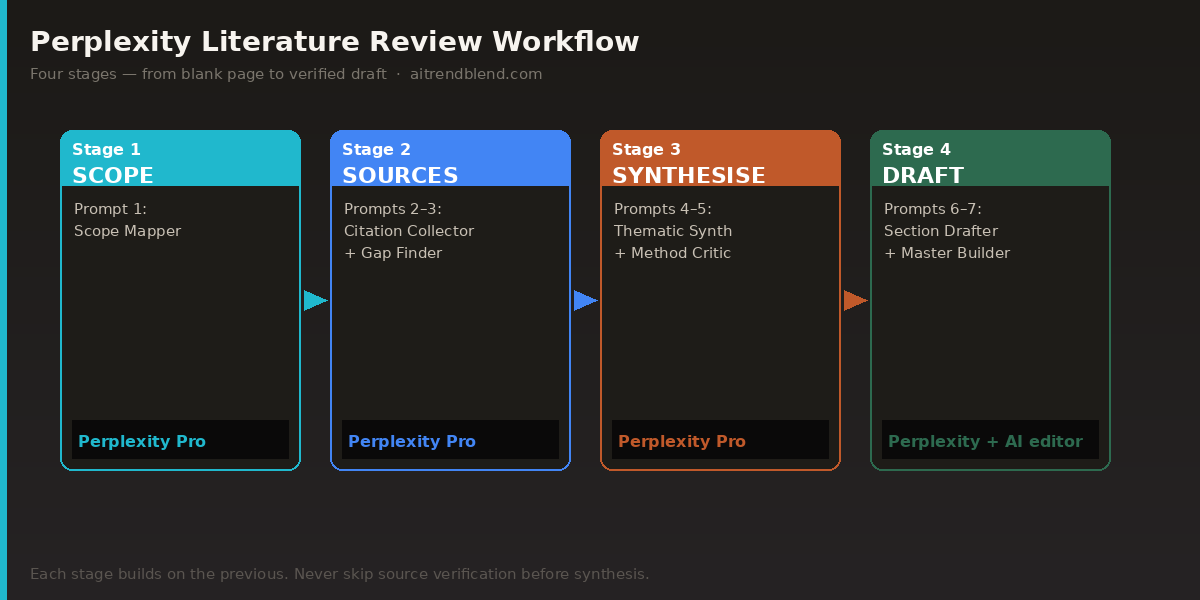
The seven prompts above form a complete workflow, not a collection of disconnected tips. Starting with the Scope Mapper (Prompt 1), moving through source collection and gap analysis, and building toward the Master Review Builder (Prompt 7) gives you a structured process that mirrors how experienced researchers actually approach a literature review — orient, collect, critique, synthesise, draft. What changes with Perplexity is that the sourcing and initial synthesis stages are compressed significantly.
The deeper principle here is about knowing what AI tools are for, and what they aren’t for. Perplexity’s value is not that it removes the intellectual work of reviewing literature. It’s that it removes the mechanical friction: manually searching databases, formatting reference tables, identifying that a theme exists in the literature without knowing what it’s called. That friction was always just friction — it wasn’t the intellectual substance. Removing it leaves you more time and mental space for the parts that actually require your thinking.
The parts that still require your thinking are non-trivial. Deciding whether a cluster of studies genuinely supports your argument or just superficially resembles it. Choosing which methodological limitation to foreground and which to acknowledge briefly. Writing a gap analysis that opens toward your own research contribution rather than just cataloguing what doesn’t exist. None of those things are in the prompts. They’re in your judgment about what you’ve read.
In the next twelve to eighteen months, Perplexity is likely to deepen its academic database integrations — there are conversations already happening with institutional library systems that could substantially improve access to paywalled content. If those partnerships materialise, the coverage gaps in specialised humanities fields will shrink. For now, treat it as what it is: the best tool available for source-grounded academic research assistance, used intelligently and verified carefully.
Try These Prompts Right Now
Open Perplexity AI, set your search focus to Academic, and run Prompt 1 on your current research topic. You’ll have a mapped field and a working source list within minutes.
All prompts were tested in Perplexity AI Pro using Academic search focus, March 2026. Results may vary depending on your research field, the specificity of your topic, and the availability of open-access sources in Perplexity’s index. Citation accuracy testing was conducted across five disciplines: public health, computer science, education research, environmental science, and economic policy.
This article is independent editorial content by aitrendblend.com. It is not sponsored by or affiliated with Perplexity AI. All recommendations reflect direct testing and editorial judgment.