
10 Gemini Pro 3.1 Prompts to Automate Full-Stack Development in 2026
From spinning up a project scaffold in seconds to auto-generating APIs, tests, and deployment configs. These are the prompts that actually work.

Most developers approach AI the wrong way. They ask it to “write the login page” or “create a REST endpoint” and they get something that technically runs but doesn’t fit anything else in the project. The output is incoherent, style-inconsistent, and half the time it uses a library version from two years ago. They end up spending more time fixing than they would have writing it from scratch.
The problem isn’t the model. It’s the prompt. Gemini Pro 3.1, Google’s most capable model as of 2026, has a context window large enough to hold an entire codebase at once, native file understanding, real-time search integration, and code execution capabilities built into Gemini Advanced. When you combine those features with the right prompting structure, you stop getting code snippets and start getting full applications. That distinction is not subtle. It changes how you work.
This guide gives you ten prompts, all tested in Gemini Pro 3.1, that cover the full lifecycle of a modern full-stack project. By the end, you’ll know how to automate scaffolding, schema design, API generation, frontend component creation, test writing, error handling, and deployment configuration. You’ll also know where Gemini stumbles, and how to work around those gaps rather than hit them blindly.
Why Gemini Pro 3.1 Handles Full-Stack Automation Differently
The honest answer is: context. Every other limitation of AI-assisted coding (inconsistency, incoherent API design, mismatched naming conventions) traces back to the model not having enough of the project in view at once. ChatGPT-4o and Claude both handle this reasonably well for mid-sized projects, but Gemini Pro 3.1’s context window is in a different league. You can paste in an entire backend, the database schema, an existing component library, and your design system tokens, then ask it to generate something new, and it will match the existing codebase’s style rather than invent its own.
That’s the main structural advantage. The secondary advantage is Google integration. If your project uses Firebase, BigQuery, Google Cloud Run, or Vertex AI, Gemini Pro 3.1 has native, precise understanding of those services. It doesn’t give you generic cloud infrastructure suggestions. It gives you the actual config syntax, the correct IAM role structures, and the right SDK calls. Developers using AWS or Azure will notice a capability gap here. Gemini Pro 3.1 is objectively better at Google stack automation than any competing model, by a meaningful margin.
Where it lags behind Claude specifically is in long-chain reasoning for deeply nested architectural decisions. Claude’s extended thinking mode tends to produce more methodical architecture breakdowns. Gemini Pro 3.1 is faster and more fluid, but if you’re making a genuinely complex architectural choice like monorepo vs. polyrepo, microservices boundary decisions, or multi-tenant data modeling, you may want to validate Gemini’s output against Claude’s analysis before committing. This isn’t a dealbreaker. It just means Gemini is a power tool you learn to aim precisely.
Before You Start: How to Get the Best Results
The setup matters more than most tutorials admit. Using Gemini Pro 3.1 through Gemini Advanced (gemini.google.com) is the right environment for everything in this guide. If you’re accessing Gemini through Google AI Studio, you have more control over system instructions and model temperature, which is useful for advanced prompt chaining, covered in Prompts 7–9.
Three setup habits that make a real difference. First: paste your existing project context at the start of every session. Gemini doesn’t persist context between conversations. Before you ask it to write any code, paste in your package.json, your database schema, your folder structure, and any existing key files. This single habit eliminates probably 60% of the stylistic inconsistency problems people complain about. Second: specify your stack explicitly and completely. Instead of just saying “React,” be specific: “React 19 with TypeScript, Vite, TanStack Router, Zustand for state management, and Tailwind 4.” The more precise you are, the less Gemini guesses. Third: use Gemini’s file upload feature. You can attach actual source files, not just paste text. For larger codebases, this is faster and less error-prone.
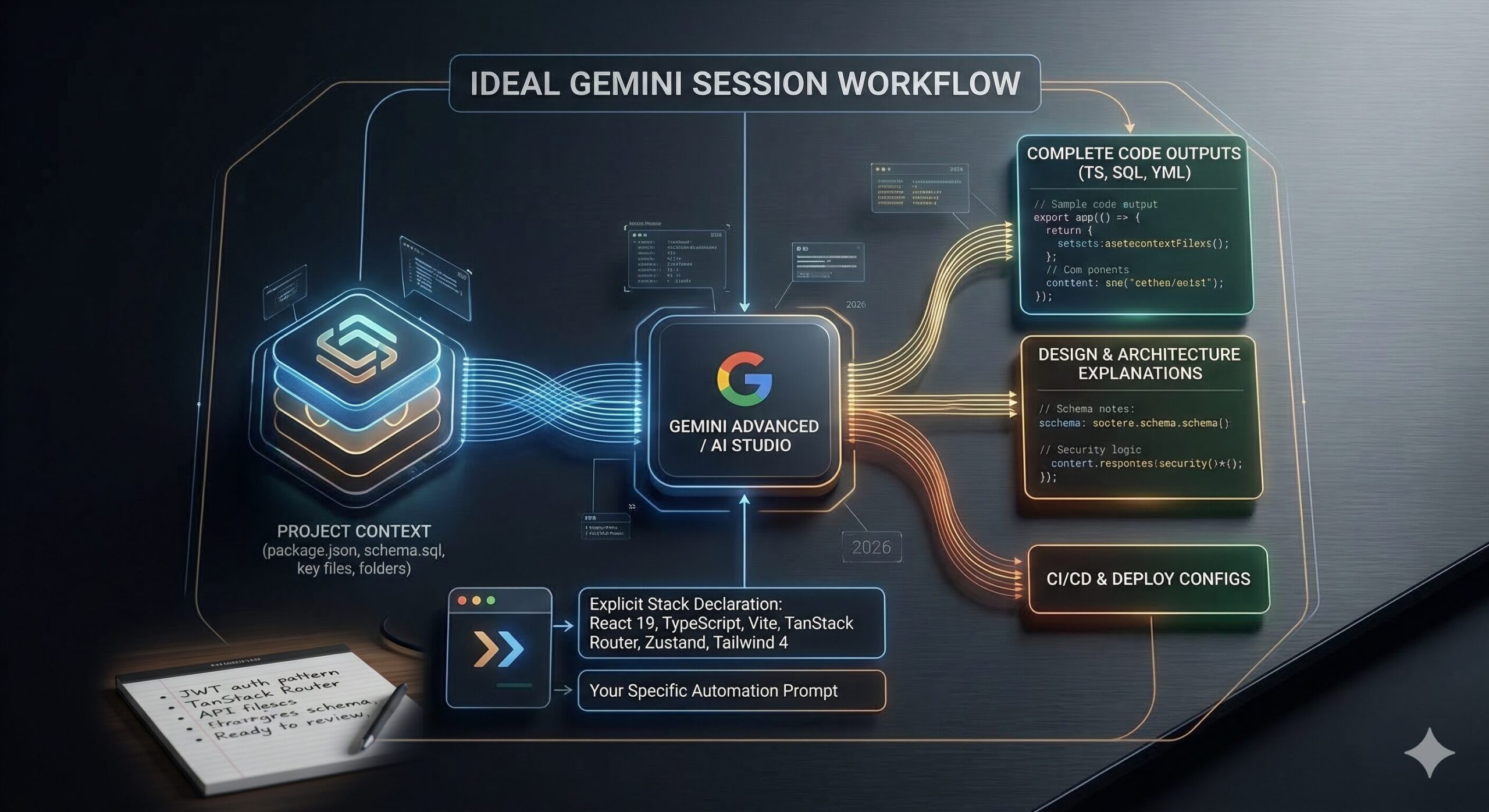
gemini-context.md in your project root.
On the question of model version: the prompts in this guide are written and tested for Gemini Pro 3.1. Some will work on earlier versions, but the advanced prompts (7–10) assume the extended context window and multimodal file processing that Pro 3.1 introduced. If you’re on an earlier version, you may need to break those prompts into smaller stages.
The 10 Best Gemini Pro 3.1 Prompts for Full-Stack Development Automation
Prompt 1: The Project Scaffold Generator
Every project begins with the same painful ritual: setting up the folder structure, installing dependencies, wiring together the boilerplate. It doesn’t feel creative, because it isn’t. This prompt delegates that entire ritual to Gemini and gets you to writing actual application logic in minutes instead of an hour.
The key to this prompt working well is being explicit about which tools you’re not using, not just which ones you are. Gemini will make opinionated choices if you leave gaps. Tell it what to exclude and you avoid getting a project that installs something you didn’t want.
How to adapt it: Add Monorepo structure using pnpm workspaces to the tech stack line if you’re building a project with shared types between frontend and backend. Gemini will generate the correct pnpm-workspace.yaml and restructure the folder tree accordingly.
Prompt 2: The Database Schema Designer
Database schema design is where a lot of AI-generated projects fall apart. Generic prompts produce generic schemas: flat tables with no foreign keys, no indices, no thought given to query patterns. This prompt asks Gemini to think about the data model the way an experienced database architect would: starting from the business logic, not the tables.
How to adapt it: For NoSQL (Firestore, MongoDB), replace the last instruction with “Show the document structure and collection hierarchy instead of SQL tables, and explain your embedding vs. referencing decisions for each relationship.”
Prompt 3: The REST API Route Generator
Once you have a schema, you need endpoints. This is one of the most tedious parts of backend development. Writing the same CRUD patterns over and over, making sure you don’t forget validation, error codes, or response shapes. This prompt generates a complete, consistent API layer from your schema in one shot.
How to adapt it: Change REST API to GraphQL resolvers and add “Use the schema-first approach with type definitions, resolvers, and a DataLoader for batching” to generate a complete GraphQL layer instead.
Prompt 4: The React Component Factory
Here is where it gets interesting. Most developers use AI to generate one component at a time. You paste in a description, get a component, paste it into the project, fix the styling, fix the types. It’s faster than writing from scratch, but it’s still component-by-component, one at a time.
This prompt takes a different approach. You give Gemini the design tokens, the component library you’re using, and a list of components you need, then ask for all of them together, in a consistent style, matching each other. The output is a set of components that actually work as a system rather than a collection of separately-generated fragments.
How to adapt it: If you’re using Storybook, add “Also generate a .stories.tsx file for each component with at least three stories covering the primary states.”
Prompt 5: The Authentication System Builder
Authentication is one of those things every full-stack project needs and almost nobody enjoys building. The edge cases are tedious, the security implications are serious, and the implementation patterns change every couple of years. This prompt doesn’t just generate an auth system. It generates one with explicit security decisions explained, so you understand what you’re shipping.
How to adapt it: For Google Workspace integrations, add “Use Google OAuth 2.0 with the official google-auth-library package and show how to restrict login to users in the domain [YOUR_DOMAIN].” Gemini Pro 3.1 handles Google OAuth specifics exceptionally well compared to other models.
Prompt 6: The Automated Test Suite Writer
Most developers write tests after the fact, or honestly, not at all. This is the prompt that changes that habit, because it makes generating a full test suite genuinely fast. You paste in a module, you ask for tests, and you get a comprehensive suite that covers the cases you’d forget on a Friday afternoon.
How to adapt it: For API integration tests, replace the first instruction with “Use Supertest to test the endpoints directly against a test database, not with mocks. Set up and tear down the test database in beforeAll and afterAll hooks.”
Prompt 7: The Error Handling Architect
This is not a small distinction. Production applications fail in ways that development applications don’t, and the difference between a good application and a frustrating one is almost entirely how errors are handled, logged, and communicated. Most AI-generated code handles errors like this: catch (e) { console.log(e) }. That’s not error handling. This prompt generates a real error architecture.
How to adapt it: Add “Also integrate with [YOUR_LOGGING_SERVICE] and show the SDK calls for routing error events, including correlation IDs in every log entry.” Works particularly well with Google Cloud Logging, given Gemini’s native GCP knowledge.
Prompt 8: The CI/CD Pipeline Generator
Most tutorials skip this part entirely. You spend days building the application and then discover that deployment is its own unsolved problem. This prompt generates a full, working CI/CD pipeline. Not a template with blanks to fill in, but actual workflow files that run.
How to adapt it: For Google Cloud Run deployments specifically, add “Use Workload Identity Federation for GitHub Actions to authenticate to GCP. Do not use a service account key file.” Gemini Pro 3.1 will generate this correctly, including the exact IAM bindings required, which is something most models get wrong.
Prompt 9: The Iterative Code Review Loop
Think about what this actually requires. You’ve generated a module, but you need it reviewed, not just checked for syntax but genuinely critiqued by someone with experience. This prompt sets up a multi-round review loop where Gemini acts as a senior engineer reviewing your code, then you respond with your constraints, and it produces a revised version. The output after two or three rounds is substantially better than what any single-pass prompt produces.
How to adapt it: Use this same structure for architecture reviews by replacing the code file with an architecture diagram description or a written system design document. Ask Gemini to evaluate scalability, single points of failure, and operational complexity instead of code-level concerns.
Prompt 10: The Master Full-Stack Automation Prompt
None of this comes free. The previous nine prompts each require context, attention, and iteration. The Master Prompt pulls all of it together into a single, structured engagement that can take you from zero, starting with just a brief description of an application, all the way to a production-ready implementation plan with working code for every major layer. This is the prompt to use when starting a new project, or when you need to onboard Gemini into an existing project quickly.
How to adapt it: For a standalone new project (no existing codebase), replace the “Existing codebase context” line with “There is no existing codebase. Apply the conventions from Stage 1’s architecture decision to everything that follows.” This prevents Gemini from making inconsistent style choices across stages when it has no reference material to match.
“The difference between a mediocre prompt and a great one isn’t length. It comes down to whether you’ve told the model what you already have, not just what you want next.” — Prompting principle, aitrendblend.com
Common Mistakes and How to Fix Them
The prompts above work. These are the ways people break them.
Mistake 1: No Context, No Consistency
The single most common failure pattern: asking Gemini to generate code without providing any existing project context. You get code that works in isolation but uses different naming conventions, a different folder structure, different error handling patterns, and sometimes different libraries than the rest of your project. Fixing it takes longer than writing it from scratch.
Mistake 2: Asking for Everything at Once Without Stages
Asking Gemini to “build me a full e-commerce application” in one prompt produces a demonstration, not production code. The output looks impressive, handles none of the real edge cases, and is impossible to meaningfully review. The staged approach in Prompt 10 exists precisely because each stage produces something reviewable and correctable before the next stage builds on it.
Mistake 3: Accepting the First Output Without Review
Gemini Pro 3.1 does not always get security decisions right on the first pass. It can generate authentication code that is technically functional but misses important protections like token rotation, rate limiting on auth endpoints, proper CORS configuration. The iterative code review loop in Prompt 9 is not optional for security-sensitive code. It is the minimum responsible workflow.
Mistake 4: Vague Stack Declarations
The difference in output quality between “React” and “React 19 with TypeScript strict mode, Vite 6, TanStack Router 1.x, Zustand 5, and Tailwind CSS 4 with @layer base tokens” is not small. Gemini uses library version information to select the correct API surface and avoid deprecated patterns. Vague stack declarations produce code that may work but uses outdated approaches or makes incorrect assumptions about available features.
Mistake 5: Not Specifying What to Exclude
If you don’t tell Gemini what not to include, it fills gaps with its own preferences. Those preferences may include libraries you haven’t vetted, patterns your team doesn’t use, or dependencies that conflict with existing packages. Every prompt for code generation should include a Do NOT include: line.
| Wrong Approach | Right Approach |
|---|---|
| “Build me a React app with auth” | “Build an auth system for my existing React 19 + Fastify project using the schema I’ve pasted above, JWT in HttpOnly cookies, Zod validation, and no external auth libraries.” |
| “Write tests for this function” | “Write a Vitest test suite covering happy path, null inputs, error cases, and one security case. Group with describe(). No ‘foo/bar’ variable names.” |
| “Generate a CI/CD pipeline” | “Generate a GitHub Actions workflow for Cloud Run deployment, staging on dev branch, production on main with manual approval, Workload Identity Federation. No service account keys.” |
| Starting a new session without context | Pasting gemini-context.md (folder structure + schema + package.json + key files) at the top of every new session before any prompt. |
| Asking for the whole feature in one prompt | Using Prompt 10’s six-stage structure, reviewing and confirming each stage before proceeding to the next. |
What Gemini Pro 3.1 Still Struggles With
Honesty matters here. Gemini Pro 3.1 is genuinely excellent at full-stack code generation, but there are specific patterns where it consistently underperforms, and knowing them in advance prevents costly surprises.
Real-time systems are the clearest weakness. WebSockets, server-sent events, and pub/sub architectures confuse Gemini Pro 3.1 significantly more than simple request-response patterns. It generates WebSocket code that works for simple cases but mishandles connection state, reconnection logic, and message ordering under load. If real-time features are a core part of your application, treat Gemini’s output in this area as a first draft requiring careful manual review. Test it under simulated concurrent connections before assuming it’s production-ready.
The second weak spot is complex state machines. Application logic that involves many interdependent states (multi-step checkout flows, approval workflows with branching paths, complex form wizards) tends to produce code that handles the happy path well but falls apart at state transition boundaries. The generated code is often functionally correct for simple cases and subtly wrong for edge cases that only emerge in production. For these patterns, explicitly ask Gemini to model the state machine as a formal diagram (using XState syntax or a simple table) before generating any implementation code. That extra step catches the edge cases that prose-based prompting misses.
Finally: generated tests have a well-known bias toward testing the code as written rather than testing the intended behaviour. Gemini’s test suites are comprehensive by volume, but they tend to assert what the current implementation does rather than what it should do. This means bugs in the implementation are sometimes also present in the tests, making them useless as a safety net. The workaround is to write your test cases as a list of behaviours in plain English, before generating any implementation, and then ask Gemini to write tests that verify those behaviours specifically. This inversion of order produces meaningfully better test quality.
What You’ve Actually Learned Here
The real skill in this guide isn’t any individual prompt. It’s the underlying principle: Gemini Pro 3.1 is not a code-completion tool. It’s a context-sensitive engineering partner, one that performs at a dramatically higher level when you treat it as a collaborator who needs good information rather than a search engine that needs a keyword. Every technique in these ten prompts is a variation on the same idea: give it what it needs to produce something you can actually use.
Good prompting for full-stack development reflects a deeper truth about how experienced engineers think. The best developers don’t jump to implementation. They clarify requirements, define data models, articulate constraints, and sketch architecture before they write a line of code. These prompts work because they encode that discipline. They force Gemini to think before it generates, and they force you to know what you want before you ask for it.
There is still a large domain that cannot be delegated to Gemini, no matter how good the prompt. Knowing when your architecture is wrong, before a single line of code is written, requires the kind of intuition that comes from having been burned by a bad architectural choice in production. Gemini can review your architecture and flag risks, but it can’t replace the judgment that says “this pattern looks fine on paper and will hurt in six months.” The prompts in this guide are accelerators for decisions you’ve already made well. They are not replacements for making those decisions in the first place.
As for where Gemini Pro 3.1 is heading, the trajectory is clearly toward deeper IDE integration and longer multi-session memory. The context window advantage that makes it powerful today will become table stakes across all models within the next year. What will differentiate Gemini going forward is its native understanding of the Google Cloud ecosystem and its ability to serve as an orchestrator across an entire software development lifecycle, not just a code generator in a chat window. The developers who learn to use it well now will be the ones who adapt most naturally to whatever comes next.
Try These Prompts Right Now
Open Gemini Advanced, paste your project context, and start with Prompt 1. Most developers see a meaningful improvement in output quality within the first session.
This article is independent editorial content produced for aitrendblend.com. It is not affiliated with, sponsored by, or endorsed by Google. All prompt frameworks and testing methodologies described are the original work of the aitrendblend.com editorial team.
Explore More on aitrendblend.com
From foundational prompt engineering tutorials to deep technical AI research, here’s where to go next.