Prompt Engineering · Claude Opus 4.6 · YouTube Growth
10 Best Claude Opus 4.6 Prompts to Boost Your YouTube Channel
From title writing to full channel strategy — prompts tested in 2026, from beginner to master level, with explanations of why each one actually works.
Claude Opus 4.6YouTubeContent StrategySEOScript WritingChannel GrowthAI Tools 2026
By aitrendblend.comUpdated: March 202612 min read
The pairing of Claude Opus 4.6’s extended reasoning with YouTube’s content demands turns out to be surprisingly well-matched.
You posted another video. Spent three days on it. Filmed twice, re-edited the thumbnail four times, wrote a description you thought was solid. Seventy-two hours later: 61 views. Most of them were you, your roommate, and your mum. The algorithm didn’t blink. Sound familiar?
The honest truth about YouTube growth in 2026 is that the technical side — filming, editing, even production quality — has gotten easier for everyone. The ceiling has risen. What separates channels that break through from channels that plateau at a few hundred subscribers isn’t gear or editing skill. It’s strategic thinking: knowing what to make, why to make it, how to frame it, and how to build one video into ten. That’s exactly where Claude Opus 4.6 becomes genuinely useful.
I’ve been using Claude for YouTube work for a while now, and Opus 4.6 in particular handles the kind of multi-layered thinking that channel growth actually requires. It doesn’t just spit out a list of video ideas — it reasons through your niche, your competition, your audience psychology, and the search intent behind a query, then synthesizes that into something you can actually use. That’s not something you get from a simpler model.
What follows are ten prompts I’ve refined specifically for Claude Opus 4.6 — arranged from simple beginner tasks to a master-level prompt that turns Claude into something close to a full channel strategist. Each one comes with an explanation of why the structure works, not just what it does. By the end, you’ll have a system, not just a list.
Why Claude Opus 4.6 Handles YouTube Strategy Differently
Most AI tools that promise to help with YouTube content approach it transactionally. You ask for ten video ideas, you get ten video ideas. They’re fine. Sometimes they’re even good. But they rarely connect the ideas to your channel’s specific situation, your audience’s psychology, or the strategic gap you could exploit in your niche. Claude Opus 4.6 operates differently because of how it handles reasoning chains — it thinks through a problem in stages before answering, rather than pattern-matching to what a “YouTube video ideas” prompt usually returns.
Where this really shows up is in tasks that require holding multiple constraints at once. Writing a title isn’t just about making it catchy — it’s about balancing search intent, click psychology, the viewer’s expectation, and the thumbnail concept all in one phrase. ChatGPT-4o handles this reasonably well when you’re explicit about what you want. Gemini does well on trend research if you use its real-time search integration. Claude Opus 4.6’s edge is in depth of reasoning: it can produce titles, then critique them, then revise them against stated criteria without losing track of the original goal. For strategic multi-step YouTube tasks, that matters.
The one caveat worth naming upfront: Claude doesn’t have real-time YouTube data. It can’t tell you what’s trending on the platform right now, what a competitor channel’s last twelve videos were, or what the algorithm rewarded last week. For trend intelligence, pairing Claude with a tool like vidIQ or TubeBuddy makes sense. What Claude gives you is the thinking layer on top of that data — the strategy, the writing, the structure, the positioning.
Key Takeaway: Claude Opus 4.6 excels at reasoning through complex, multi-variable YouTube tasks — title strategy, script architecture, content series planning, audience psychology. It’s not a trend-spotter, but it’s one of the best strategic thinking partners available for the craft side of channel growth.
Before You Start: How to Get the Best Results from Claude Opus 4.6 for YouTube
A few setup habits make a real difference before you paste any of these prompts.
First, always open a new conversation for each major task. Claude Opus 4.6 performs best when its context isn’t cluttered with the residue of previous requests. Second, if you have a Claude account with Projects enabled, create a YouTube Channel Project and add a system prompt that describes your channel — niche, target audience, upload frequency, tone, and any existing context about your brand. Every prompt in that project will benefit from that shared context without you having to repeat it.
The model version matters here. Make sure you’re selecting Claude Opus 4.6 specifically — not Sonnet or Haiku. The prompts in this article are calibrated for Opus’s extended reasoning capability, and you’ll notice a real quality difference on the strategic prompts especially. On the simpler beginner prompts, Sonnet does fine, but Prompts 7 through 10 genuinely benefit from Opus.
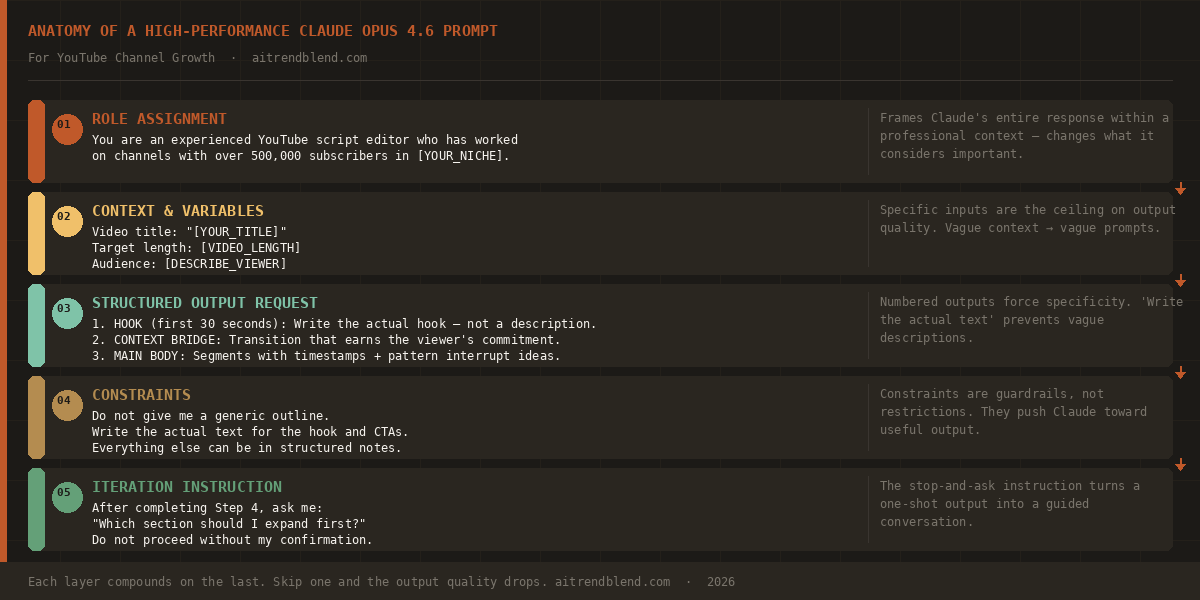
The anatomy of a high-performance Claude Opus 4.6 prompt — each layer builds on the previous, and the iteration instruction at the end is what separates the master-level prompts from the beginner ones.
One more thing: don’t treat these prompts as templates to fill in and fire off. Read them. Understand why each section is there. Once you grasp the logic, you’ll start writing your own variations that are tuned to your channel’s specific needs — and those will outperform any generic prompt every time.
The 10 Best Claude Opus 4.6 Prompts for Boosting Your YouTube Channel
Prompt 1: The Channel Identity Clarifier
Most struggling channels share a common problem: they’re unclear on what they actually are. Not the topic — that part is usually fine — but the specific value proposition. Why should someone subscribe to your cooking channel instead of the other forty thousand cooking channels? Claude Opus 4.6 can help you work this out before you make another video.
Prompt 1 · Beginner · Channel Strategy
The Channel Identity Clarifier
I run a YouTube channel about [YOUR NICHE].
My current channel description is: “[PASTE YOUR CURRENT DESCRIPTION OR WRITE “I don’t have one yet”]”
My target viewer is: [DESCRIBE YOUR IDEAL VIEWER IN 1-2 SENTENCES]
Please help me define my channel’s identity by answering:
1. What is the single most specific promise my channel makes to a viewer?
2. What is the one thing my channel does better or differently than generic channels in this niche?
3. Write a revised channel description (under 200 words) that is specific, human, and makes a viewer think “this channel is exactly for me.”
4. Suggest a consistent video sign-off line that reinforces my channel’s identity.
Why it works: By giving Claude your existing description and audience context, you’re not asking for generic advice — you’re asking it to diagnose and improve a real situation. The four numbered outputs force Claude to be concrete rather than general.
How to adapt: If you’re just starting out, replace the current description with your channel idea and ask Claude to help you define the identity before you launch, not after you’ve posted twenty videos with no clear direction.
BeginnerChannel BrandingClaude Opus 4.6
Prompt 2: The Video Idea Machine
Generating video ideas sounds easy. It isn’t. The problem isn’t coming up with ideas — it’s coming up with ideas that are searchable, specific enough to rank for something real, broad enough to attract viewers beyond your existing subscribers, and actually interesting to make. This prompt asks Claude to think about all four dimensions at once.
Prompt 2 · Beginner · Content Ideation
The Video Idea Machine
My YouTube channel covers [YOUR NICHE]. My audience is mainly [DESCRIBE AUDIENCE: e.g., “beginner home cooks aged 25-40”].
Generate 15 video ideas for my channel. For each idea, give me:
– The working title (written for maximum click appeal, not just description)
– One sentence on why this idea would attract search traffic
– One sentence on why this idea would get shared or recommended
Avoid generic ideas that every channel in my niche has already covered. Prioritise ideas that are specific, have a clear problem-solution angle, or tackle a common misconception in [YOUR NICHE].
Why it works: The constraint to avoid generic ideas, combined with the specificity of your niche and audience, steers Claude away from the obvious and toward the overlooked. Asking for both search rationale and shareability rationale forces ideas that work algorithmically and socially.
How to adapt: After you get your 15 ideas, follow up with: “Now rank these by which ones I could produce fastest with minimal equipment” — useful when you need content quickly and can’t wait for a big production shoot.
BeginnerContent IdeationSEO
Prompt 3: The Title Sharpener
A title has one job: get the click. Not inform, not describe, not summarize — get the click. And a thumbnail has the same job. These two things working together are responsible for more channel growth or stagnation than almost anything else, and they’re both places where Claude Opus 4.6 can do serious work fast.
Prompt 3 · Beginner · Title Optimization
The Title Sharpener
I’m making a YouTube video about: [DESCRIBE YOUR VIDEO IN 2-3 SENTENCES]
My target audience: [WHO IS WATCHING]
Please write 10 different title options for this video. Cover the following angles across the 10 titles:
– 2 titles using a curiosity gap
– 2 titles using a specific number or result
– 2 titles framed as a mistake or warning
– 2 titles that are direct and search-friendly
– 2 wildcard titles that break from these patterns
After the 10 titles, tell me which 2 you’d recommend for A/B testing and why.
Why it works: Specifying the angle for each pair forces variety rather than ten versions of the same title formula. The recommendation request at the end makes Claude commit to an opinion — which is actually useful, because it forces a ranking rather than just a list.
How to adapt: Paste your final two title candidates into a follow-up message and ask: “Now write 5 thumbnail text options that pair well with each title — keep thumbnail text under 5 words.”
BeginnerTitle WritingClick-Through Rate
Prompt 4: The Script Structure Architect
There’s a meaningful difference between a video outline and a script structure. An outline is a list of points. A script structure is a plan for how attention flows — when to hook, when to deliver, when to reward, when to tease the next thing. Claude Opus 4.6 understands this distinction well, and the following prompt exploits it.
Prompt 4 · Intermediate · Script Planning
The Script Structure Architect
You are an experienced YouTube script editor who has worked on channels with over 500,000 subscribers in the [YOUR NICHE] space.
I’m making a video titled: “[YOUR TITLE]”
Target length: [VIDEO LENGTH, e.g., “10-12 minutes”]
Audience: [DESCRIBE VIEWER]
Create a complete script structure with:
1. HOOK (first 30 seconds): Write the actual hook — not a description of it. This should make a viewer stop scrolling.
2. CONTEXT BRIDGE (30-90 seconds): Transition that earns the viewer’s commitment to watch the full video.
3. MAIN BODY: Break this into clear segments with estimated timestamps. For each segment, write: the key point, the evidence or demonstration needed, and one “pattern interrupt” idea to re-engage attention.
4. CALL TO ACTION: Write 3 different CTA options — subscribe push, comment prompt, and next-video tease — and tell me where in the video each works best.
Do not give me a generic outline. Write the actual text for the hook and CTAs. Everything else can be in structured notes.
Why it works: The role assignment (“experienced YouTube script editor”) gives Claude a specific professional frame that shapes tone and specificity. Asking for the actual hook text — not a description — is the key move. The pattern interrupt request acknowledges that retention dips mid-video and forces Claude to plan for it.
How to adapt: After getting the structure, follow up with: “Now write the full hook section as a proper script, written in my voice. My usual tone is [describe it].” This two-step process produces better hooks than asking for a full script in one shot.
IntermediateScript WritingAudience Retention
Prompt 5: The YouTube SEO Description Writer
Most creators treat the video description as an afterthought. They paste their sponsor links, write two generic sentences about the video, and move on. That’s leaving ranking potential on the table — descriptions are one of the few places where you can directly influence how YouTube’s search algorithm categorizes your video.
Prompt 5 · Intermediate · SEO Writing
The YouTube SEO Description Writer
You are an SEO content strategist who specializes in YouTube search optimization.
Write a complete YouTube video description for this video:
Video title: “[YOUR TITLE]”
Video topic: [2-3 SENTENCE SUMMARY OF WHAT THE VIDEO COVERS]
Primary keyword I want to rank for: [MAIN KEYWORD]
Secondary keywords (if any): [LIST 2-3 SECONDARY KEYWORDS]
Channel name: [YOUR CHANNEL NAME]
The description must include:
– A compelling first 2-3 lines (these show before “Show more” — make them earn the click to expand)
– Natural keyword integration — not keyword stuffing
– Timestamps for the main sections (use placeholder times I can fill in: [00:00], [02:30], etc.)
– 3 relevant hashtags placed at the end
– A subscribe CTA that sounds human, not corporate
Keep the total description under 5,000 characters. Write it in an editorial tone — not a sales tone.
Why it works: The instruction about the first 2-3 lines reflects how YouTube actually displays descriptions — the majority of viewers never click “Show more,” so those opening lines do double duty as both a hook and a search signal. The placeholder timestamps are practical: you can’t know exact timestamps before editing, so building them in as variables saves you from rewriting the whole description later.
How to adapt: Use this same prompt structure for Shorts by changing the format requirements — no timestamps, tighter keyword focus, and a first line that reads like a caption rather than an article opener.
IntermediateSEOYouTube Search
Prompt 6: The Thumbnail Concept Creator
Thumbnails are visual arguments. They need to make a promise fast — under a second — that the title then reinforces. The problem with most thumbnail advice is that it focuses on technical design choices (big faces, bright colors, bold text) without addressing the underlying question: what emotional response does this thumbnail need to create?
Prompt 6 · Intermediate · Thumbnail Strategy
The Thumbnail Concept Creator
You are a YouTube thumbnail strategist with a background in visual communication and consumer psychology.
My video is titled: “[YOUR TITLE]”
My channel’s niche: [NICHE]
My channel’s visual style (if established): [DESCRIBE OR WRITE “not established yet”]
Create 4 distinct thumbnail concepts for this video. For each concept, describe:
1. EMOTIONAL HOOK: What single emotion should this thumbnail trigger in the viewer? (Curiosity, fear, excitement, FOMO, aspiration, etc.)
2. VISUAL COMPOSITION: Describe the layout — what’s in the foreground, background, and any text overlay
3. TEXT OVERLAY: The exact words on the thumbnail (maximum 6 words — shorter is better)
4. WHY IT WORKS: One sentence explaining the psychological mechanism
Then recommend which concept you’d test first and why, given that I’m trying to appeal to [DESCRIBE YOUR TARGET VIEWER].
Why it works: The emotional hook question shifts Claude’s frame from “how should this look” to “how should this make someone feel” — which is the right frame for thumbnail design. Four concepts give you real choices without overwhelming you.
How to adapt: Take your preferred concept and follow up with: “Now write a brief for a graphic designer or AI image tool to create this thumbnail. Be specific about dimensions (1280×720px), color palette, font style, and any photography/illustration direction needed.”
IntermediateThumbnail DesignVisual Psychology
Prompt 7: The Content Series Architect
Here is where it gets interesting. Single videos are hard to grow from. Series are easier — each video borrows authority from the others, viewers have a reason to stay subscribed between uploads, and the algorithm rewards channels that keep people in a topic loop. But planning a series is genuinely hard to do well, because you have to think about ordering, inter-video tension, SEO coverage, and production feasibility all at once.
Prompt 7 · Advanced · Content Planning
The Content Series Architect
You are a content strategist who specializes in building YouTube channel series that grow subscriber counts through compounding viewership.
My channel: [CHANNEL NAME AND NICHE]
My current subscriber count: [NUMBER]
Upload frequency: [HOW OFTEN YOU UPLOAD]
My biggest existing video (if any): “[TITLE AND APPROXIMATE VIEWS]”
Design a 10-video series on the topic of: [SERIES TOPIC]
For the full series, provide:
1. The series name and a one-line positioning statement (why would someone binge this series?)
2. A viewing order with titles for all 10 videos
3. For each video: the title, the primary search keyword, and the inter-linking instruction (which other video in the series should it link to in the end screen, and why?)
4. Which video should I publish FIRST to build momentum — and is it necessarily Video 1?
5. One video in the series I should film last, once I know what questions the earlier videos are raising in comments
Think like a showrunner, not a content calendar manager. The series should have narrative tension — each video should leave the viewer with one question that the next video answers.
Why it works: The “showrunner, not content calendar manager” instruction is the key move here. It changes Claude’s mental model from list-making to narrative planning. The inter-linking instruction is a practical SEO play — YouTube’s end-screen and card system is an underused growth lever, and planning it at the series level rather than video-by-video dramatically increases session watch time.
How to adapt: If you already have an existing series that isn’t performing well, change the prompt to: “Audit this existing series and tell me what’s missing, what’s redundant, and what single video I should add or remove to improve its performance.” Paste in your video titles.
Your comments section is the most underrated research tool available to you. It contains direct, unfiltered data about what your viewers want more of, what confused them, what they disagreed with, and what they’re curious about next. The problem is that humans are bad at reading patterns across hundreds of comments. Claude Opus 4.6 is not.
Prompt 8 · Advanced · Audience Research
The Comment Intelligence Analyst
I’m going to paste in comments from one of my YouTube videos. Your job is to analyze them as an audience researcher — not to respond to them, but to extract strategic intelligence from them.
Video title: “[YOUR VIDEO TITLE]”
Video topic: [BRIEF DESCRIPTION]
Here are the comments:
[PASTE 20-50 COMMENTS — copy from YouTube Studio or the comments section]
From these comments, extract:
1. CONTENT GAPS: What questions did viewers ask that the video didn’t answer? (List as potential follow-up video topics)
2. PAIN POINTS: What frustrations did viewers express — about the topic, not the video?
3. POSITIVE SIGNALS: What specific moments or points got the most positive reactions? (These are your channel’s strengths to lean into)
4. AUDIENCE PROFILE INSIGHTS: Based on the language, questions, and context clues in these comments, what can you infer about who is actually watching?
5. ONE FOLLOW-UP VIDEO: Based purely on this comment data, what is the single most logical next video I should make?
Be specific. Name actual quotes from the comments to support your analysis.
Why it works: Claude Opus 4.6’s long context window means it can hold fifty comments in mind simultaneously and find patterns across them — something that’s genuinely tedious for a human to do rigorously. The instruction to name actual quotes is important: it keeps Claude grounded in evidence rather than making up patterns that aren’t there.
How to adapt: Run this on your three best-performing videos and your three worst-performing ones. The contrast between the two sets will tell you more about your channel than any analytics dashboard.
Most creators treat their YouTube video as the end product. It isn’t — or it shouldn’t be. A well-structured ten-minute video contains enough material to fuel a YouTube Short, three tweet threads, a newsletter edition, and a LinkedIn post, all of which drive traffic back to the original video. The challenge is that repurposing done badly looks lazy and generic. Done well, it looks native to each platform.
Prompt 9 · Advanced · Content Repurposing
The Cross-Platform Repurposing Engine
You are a cross-platform content strategist who understands how different social media audiences consume content differently.
I have a YouTube video titled: “[YOUR TITLE]”
Here is the full transcript or a detailed summary of the video:
[PASTE TRANSCRIPT OR WRITE A DETAILED SUMMARY — at least 300 words]
Repurpose this video content into the following formats. Each must feel native to its platform — not like it was copied and pasted from YouTube:
1. YOUTUBE SHORT SCRIPT (60 seconds max): Pick the single most surprising or counterintuitive moment from the video. Write a Short script that hooks in 3 seconds, delivers the insight, and ends with a question that drives comments.
2. TWITTER/X THREAD (8-10 tweets): Distill the video’s core argument into a thread. First tweet is the hook. Last tweet links to the full video. Middle tweets are the evidence, not summaries.
3. EMAIL NEWSLETTER INTRO (150-200 words): Write the opening of a newsletter edition that teases this video without summarizing it. The reader should finish reading and immediately want to watch.
4. LINKEDIN POST (250-300 words): Frame the video’s insight as a professional lesson. LinkedIn readers respond to earned perspective — write this as if you learned something the hard way.
For each format, briefly explain what you changed and why — what works on YouTube doesn’t automatically work elsewhere.
Why it works: The instruction that each format must “feel native” is what distinguishes this from a simple summarizing prompt. The explanation requirement — “what you changed and why” — makes Claude reason through the platform differences explicitly, which produces far better results than just asking for repurposed content directly.
How to adapt: If you don’t have a transcript, use YouTube Studio’s auto-generated captions as your input. They’re not perfect, but they’re close enough for Claude to work with.
This is the one that takes a while. Not to run — Claude handles it fast — but to fill in properly, because the quality of what you put in determines the quality of what comes out. This master prompt turns Claude Opus 4.6 into something close to a channel consultant: it analyzes your current situation, identifies the specific gap holding you back, and builds a 90-day action plan calibrated to your channel’s actual constraints.
Prompt 10 · Master · Full Channel Strategy
The Complete Channel Growth System
# CLAUDE OPUS 4.6 — YOUTUBE CHANNEL GROWTH SYSTEM
# Fill in every section before submitting
# The more specific you are, the more useful the output
You are a senior YouTube channel strategist with a track record of growing channels from under 1,000 subscribers to over 100,000. You are analytical, honest about what doesn’t work, and focused on sustainable growth over viral shortcuts.
## CHANNEL SNAPSHOT
Channel name: [NAME]
Niche: [BE SPECIFIC — not “fitness” but “strength training for men over 40”]
Current subscribers: [NUMBER]
Average views per video: [NUMBER]
Upload frequency: [HOW OFTEN]
Channel age: [HOW LONG YOU’VE BEEN UPLOADING]
My 3 best-performing videos (titles + approximate views): [LIST THEM]
My 3 worst-performing videos (titles + approximate views): [LIST THEM]## CURRENT SITUATION
What I think is holding my channel back: [BE HONEST]
What I’ve already tried to fix it: [WHAT YOU’VE TRIED AND WHAT HAPPENED]
My available production time per week: [HOURS]
My production budget: [ROUGH MONTHLY BUDGET OR “zero”]## WHAT I NEED FROM YOU
Based on everything above, produce a complete channel growth plan:
1. DIAGNOSIS: What is the real bottleneck — not what I said it was, but what you can infer from the data I’ve given you? Be direct.
2. POSITIONING: In one paragraph, tell me exactly what my channel should be and who it should serve. If I need to change something fundamental about my positioning, say so plainly.
3. 90-DAY CONTENT PLAN: Give me 12 specific video titles (one per week for 90 days) calibrated to my niche, audience, and the growth stage I’m in. Explain the logic behind the sequencing.
4. QUICK WINS: List 3 things I could do in the next 7 days — without filming a new video — that would meaningfully improve my channel’s performance.
5. THE ONE THING: If I could only change one thing about my channel in the next 30 days, what should it be and why?
After delivering this plan, ask me: “What’s your biggest concern about implementing this?” Then respond to my answer with specific, practical solutions.
Do not give me generic YouTube advice. Everything must be specific to my channel’s situation as described above.
Why it works: This prompt works because it separates diagnosis from prescription — Claude first has to figure out what’s actually wrong before it recommends anything. The instruction to diagnose differently from “what I said it was” is deliberate: creators often misidentify their own problems (they think it’s thumbnails when it’s actually niche positioning, or they think it’s consistency when it’s actually content quality). The “ask me” instruction at the end turns the conversation into a genuine back-and-forth rather than a one-shot output.
How to adapt: Run this prompt quarterly. Your channel’s situation will change — what’s holding you back at 500 subscribers is different from what’s holding you back at 10,000. The prompt scales with you because the inputs change.
Master LevelFull Strategy90-Day PlanChannel AuditClaude Opus 4.6
“The gap between a channel that grows and one that stagnates is rarely talent. It’s usually clarity — about the audience, the promise, and the strategy. Claude Opus 4.6 is one of the best tools I’ve found for building that clarity fast.”
— aitrendblend.com editorial perspective
Common Mistakes and How to Fix Them
Using Claude for YouTube strategy sounds straightforward. In practice, most creators hit the same walls early on. Here’s what goes wrong and how to fix it.
Mistake 1: Vague Inputs → Vague Outputs
The number one reason Claude gives generic responses is generic inputs. “I have a cooking channel, give me video ideas” will get you ten ideas you’ve already seen somewhere else. The specificity of your input is the ceiling on the quality of the output.
Mistake 2: Asking for Everything at Once
Cramming five different requests into one message — write me a title AND a description AND a thumbnail concept AND a script outline — produces mediocre results across all of them. Claude does better when it can focus. Use separate conversations or at minimum separate turns for each task.
Mistake 3: Accepting the First Response
Claude’s first response is a first draft. Treat it that way. Follow up: “The third title option is closest to what I want — can you write five variations on that one specifically?” That second pass is usually where the real value lives.
Mistake 4: Ignoring the Role Instruction
The “You are a…” line at the start of a prompt isn’t decoration. It changes the frame Claude uses to approach the task. “You are a YouTube script editor” produces different output from “You are a content marketing strategist” even on the same underlying request — because the professional frame shapes what Claude considers important.
Wrong Approach
Right Approach
Why It Matters
“Give me YouTube title ideas for my tech channel”
“My channel covers budget PC building for first-time builders aged 18-25. Write 10 titles for a video about why AMD CPUs are currently better value than Intel for this audience.”
Specificity is the ceiling on quality
“Write me a video script”
“Write the opening 90 seconds of a script for this title: [X]. The hook must create curiosity within the first 8 seconds.”
Scoped requests produce usable output; open requests produce wall-of-text
“How do I grow my YouTube channel?”
Use Prompt 10 above — give Claude your actual data
General questions get general answers; specific situations get specific plans
Accepting the first title Claude suggests
“Option 3 is strongest — give me 5 variations on that angle”
The second pass is where the genuinely good titles usually live
Using the same prompt for every video
Adjust inputs for each video’s specific audience, goal, and context
Your channel’s situation changes — the prompt inputs should reflect that
Remember: Claude is a thinking partner, not a vending machine. The quality of the conversation you have with it determines the quality of what you get back. Push back, ask follow-ups, and iterate — that’s how you get output worth publishing.
What Claude Opus 4.6 Still Struggles With for YouTube
Real talk: Claude is not a replacement for platform-specific tools, and there are tasks where you shouldn’t rely on it. Understanding where it falls short will save you from applying it in the wrong places.
The most significant limitation for YouTube creators is the absence of real-time data. Claude’s training has a knowledge cutoff, and it cannot access what’s trending on YouTube right now, what a specific channel uploaded last week, or what search volumes look like for a given keyword today. If you ask Claude “what YouTube videos are going viral in my niche right now?” you’ll get a hallucinated answer that sounds plausible but isn’t accurate. For current trend intelligence, you need vidIQ, TubeBuddy, or just spending time on the platform itself. Claude is for the strategy layer on top of that research — not the research itself.
The second limitation is audience voice. Claude can write in many styles, but it doesn’t know your voice the way your existing subscribers do. Scripts that come directly from Claude often have a slightly formal, polished quality that can feel off for casual vlog-style channels. The fix is to treat Claude’s script output as a first draft — paste it back and say “now rewrite this in a more casual, conversational tone. Cut any sentence that sounds like it was written for publication rather than spoken aloud.” That extra step makes a real difference. And for channels built on personal charisma or specific cultural references, the personality gap is wider. Claude can help you structure the story; you have to bring the storytelling.
Finally, Claude can’t watch your videos. It can analyze transcripts and thumbnails described in text, but it can’t perceive pacing, energy, editing rhythm, or visual appeal — the qualities that often determine whether a video holds attention regardless of its topic. For that kind of feedback, you need human reviewers, or tools built specifically for video analysis.
Putting It to Work
The ten prompts in this article cover the full arc of YouTube channel growth — from getting clear on what you are, to planning what to make, to squeezing more value from everything you’ve already made. What you now have is not just a set of tools but a way of thinking about each creative decision: what information does Claude need, what frame should it use, and what should I do with what it gives me?
There’s a broader principle underneath all of this. YouTube growth, like most creative careers, is largely a problem of thinking clearly under time pressure. You have limited hours, a deadline, and a dozen decisions to make before you hit publish. Claude Opus 4.6 doesn’t remove those constraints, but it dramatically compresses the thinking time. What would take you two hours of staring at a blank document — working out your series structure, your title options, your SEO description — takes twenty minutes with the right prompts.
That said, some things haven’t changed. The judgment about what makes a video good — whether the story has the right rhythm, whether the hook actually earns its promise, whether the argument is honest — that’s still yours. Claude can generate a hundred title options, but you have to know which one is true to your channel. It can write a hook, but you have to recognize when the hook has real tension and when it’s just clever-sounding. The creative intelligence still lives with you. Claude just helps you move faster.
Where Claude Opus is heading — and what this means for YouTube creators in the next twelve to eighteen months — is toward even tighter integration with content workflows. We’re already seeing Claude being embedded in project management tools and content calendars, not just as a chat interface but as an embedded reasoning layer. The creators who get ahead will be the ones who’ve already built the habit of thinking in prompts: knowing how to frame a problem for AI assistance, how to evaluate the output, and how to iterate quickly. Start that habit now. It compounds.
Try These Prompts Right Now
Open Claude Opus 4.6 and paste Prompt 10 above. Fill in your actual channel data and see what comes back — most creators find the diagnosis section alone is worth the time.
Usage Note:
These prompts were developed and tested using Claude Opus 4.6 as of March 2026. AI model capabilities evolve rapidly — if a specific feature or behavior referenced here doesn’t match what you experience, the model may have been updated. Always verify that prompt structures still produce the expected outputs in your current model version before using them in a production workflow.
This article is independent editorial content produced by aitrendblend.com. It is not affiliated with, sponsored by, or endorsed by Anthropic, YouTube, or Google. All channel growth results depend on execution quality, niche, audience, and factors outside any AI tool’s control.