
Best AI Tools for Writing Academic Papers in 2026: Claude vs ChatGPT vs Gemini vs Perplexity
An honest, tested comparison of the four leading AI tools for academic paper writing — rated across argument quality, citation handling, long-form coherence, and real-world usability.
Academic writing presents a specific set of challenges that general-purpose AI tools handle with varying degrees of competence. It requires coherent argumentation over thousands of words — not just the next sentence, but the next ten paragraphs holding together logically. It demands accurate citation, careful hedging of claims, engagement with existing literature, and a formal register that’s consistent without being monotonous. Most AI tools can produce something that looks like academic writing. Fewer can produce academic writing that actually holds up under scrutiny.
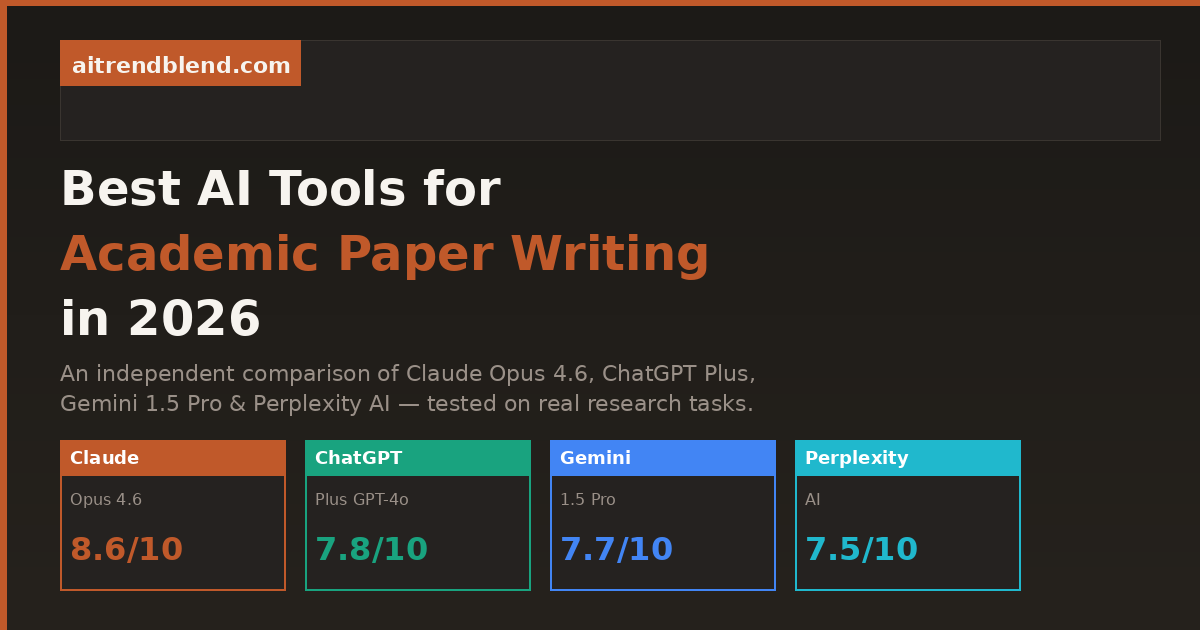
This comparison tests four tools that researchers and students are actually using in 2026 — Claude Opus 4.6, ChatGPT Plus (GPT-4o), Gemini 1.5 Pro, and Perplexity AI — across the specific tasks that academic writing requires. Not in abstract benchmarks, but in the concrete, frustrating scenarios you actually face: structuring an argument from a pile of notes, writing a literature review that synthesizes rather than lists, handling citations without hallucinating DOIs, and sustaining coherent logic across a 5,000-word document.
The verdict isn’t a single winner. Different tools genuinely excel at different parts of the process. The goal of this article is to give you enough clarity to know which tool to open first depending on what you’re trying to do.
How We Evaluated These Tools
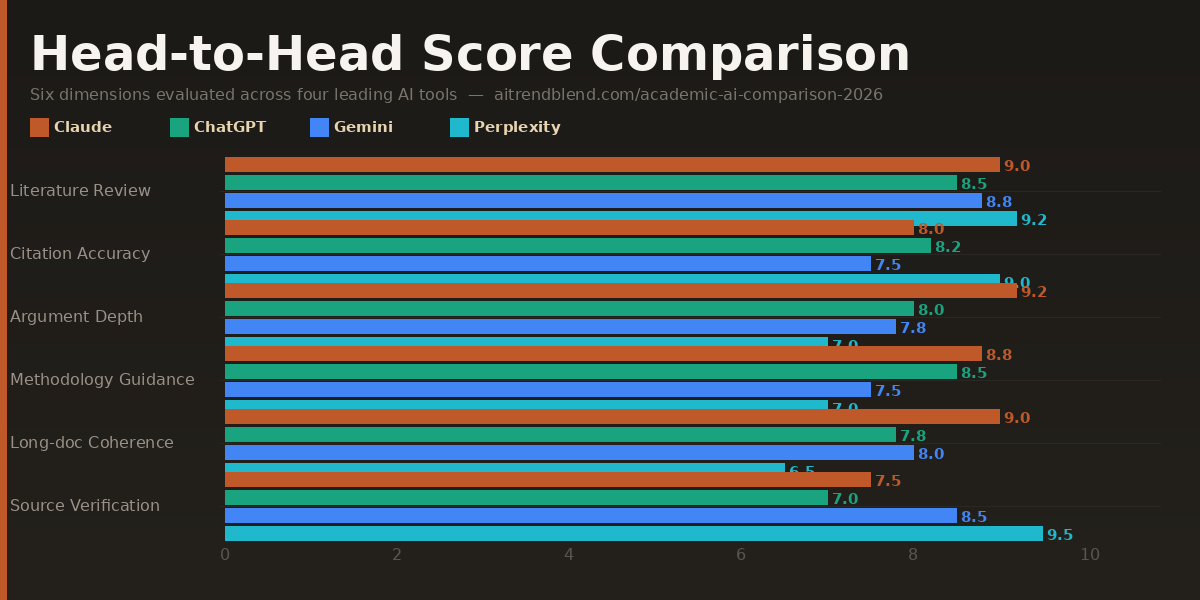
Each tool was evaluated across six dimensions that matter specifically to academic writing. The scoring reflects real use across a range of disciplines — social sciences, STEM, humanities — rather than a single test case. No tool was given an unfair advantage through elaborate prompt engineering; each was tested with prompts a competent graduate student would actually write.
One important caveat before the scores: AI models update frequently, and a tool that underperforms on one dimension today may have improved by the time you read this. The comparisons below reflect testing conducted in early 2026. The relative rankings are more stable than the absolute scores — use them as a guide to where to direct your expectations, not as a definitive hierarchy that will never change.
The Four Tools, Evaluated
Claude Opus 4.6 is the tool that surprises people most when they first use it for academic writing. The expectation — based on the general AI writing experience — is that it will produce fluent, generic prose that sounds vaguely right but lacks analytical depth. What you actually get, with the right prompting, is something closer to a thoughtful collaborator who has read widely in your area and can reason through the implications of an argument rather than just describing it.
The standout quality is long-form coherence. Where other tools start to drift — introducing inconsistencies in argument, forgetting a distinction they drew three paragraphs earlier, or simply losing the thread — Claude tends to hold a sustained logical position across extended output. For a 6,000-word literature review or a theoretical framework section, that consistency is not a small thing. It’s the difference between a draft that needs light editing and one that needs structural reconstruction.
Its handling of academic hedging is also notably good. Academic writing requires a specific kind of epistemic honesty — “the evidence suggests” rather than “the evidence proves,” “this interpretation is contested” rather than “scholars agree.” Claude does this naturally and contextually rather than mechanically, which prevents the wooden over-qualification that some AI tools fall into. It reads like careful scholarship, not a disclaimer generator.
Strengths
- Best-in-class long-form argument coherence
- Nuanced academic register and hedging
- Excellent at synthesizing complex theoretical positions
- Strong revision responsiveness — takes direction well
- Handles ambiguity in research questions thoughtfully
Limitations
- No real-time access — can’t retrieve current papers
- Citation hallucination remains a real risk without verification
- Slower on high-volume generation tasks
- Less strong on highly quantitative / statistical sections
Best used for: Literature reviews requiring synthesis rather than listing, theoretical framework sections, discussion chapters, and any section where the argument needs to hold together across several thousand words. Always verify citations independently — Claude generates plausible-sounding references that may not exist.
ChatGPT Plus running GPT-4o is the tool most academic writers already have open. That familiarity is part of its value — there’s no learning curve, the interface is intuitive, and the model is genuinely capable across a wide range of academic tasks. It’s not the deepest reasoner in this comparison, but it’s the most reliable all-rounder for day-to-day writing work, and it’s faster than anything else in the group at producing well-structured first drafts.
Where it distinguishes itself is in structural organisation. Ask ChatGPT Plus to produce an outline for a 10,000-word dissertation chapter and the result is consistently well-organised, appropriately sectioned, and logically sequenced. The scaffolding it produces is genuinely useful — perhaps more useful, in many cases, than its actual prose, because it gives you a structure you can populate with your own thinking rather than content you have to interrogate for accuracy.
The weakness that matters most in academic contexts is shallow argumentation on complex topics. ChatGPT Plus is excellent at explaining, summarising, and structuring. It’s less strong at building an original argument through a series of sustained logical moves — at pushing against a position, identifying its internal tensions, and working through what those tensions imply. For undergraduate work and well-defined research questions, this rarely matters. For doctoral-level analysis or interdisciplinary theoretical work, it starts to show.
Strengths
- Fastest high-quality first-draft generator
- Excellent structural organisation and outlining
- Strong on well-defined, bounded research questions
- Good at adapting output format to specific requirements
- Most accessible interface — low friction, widely known
Limitations
- Argumentation can be shallow on complex theoretical topics
- Long-form outputs sometimes lose logical thread
- Citation accuracy still requires manual verification
- Can over-simplify contested debates into false balance
Best used for: First-draft generation, structural outlines, methodology section writing, abstract drafting, and any task where speed and good-enough quality matters more than analytical depth. Particularly strong for STEM papers with clear structure requirements.
Gemini 1.5 Pro occupies a specific and genuinely useful niche in academic writing workflows: it handles very long inputs better than anything else in this comparison. With a one-million-token context window, it can ingest entire dissertations, multiple research papers simultaneously, or extensive field notes and work meaningfully across all of that material at once. For researchers dealing with large datasets of text, or writers who need to synthesise across dozens of sources in a single session, that’s a real capability advantage — not a marketing point.
The most practical application is document-level synthesis. Feed Gemini five research papers and ask it to map the points of agreement and disagreement across them, identify the methodological approaches each uses, and highlight where the literature has gaps your work might address. It does this credibly and at a scale that would take a human researcher considerably longer to do manually. The output isn’t always polished enough to paste directly into a paper, but as a research scaffold — a structured map of a literature — it’s highly practical.
The limitation worth knowing is that Gemini’s prose quality, when writing original content rather than synthesising existing material, sits noticeably below Claude and slightly below ChatGPT. The writing is competent and clear, but it lacks the analytical edge and tonal range of the top two. For tasks that require genuine intellectual originality in the prose — an argumentative introduction, a theoretically dense discussion section — Gemini is not the tool to reach for first. Use it to understand your material, then use Claude to write about it.
Strengths
- Largest context window — handles entire papers simultaneously
- Best for cross-document synthesis and literature mapping
- Can process PDFs, tables, and multimodal research data
- Strong integration with Google Scholar via search
- Excellent at identifying gaps and contradictions across sources
Limitations
- Original prose quality lower than Claude and ChatGPT
- Argumentation lacks analytical depth on complex topics
- Writing style can feel mechanical in extended passages
- Context window advantage is less relevant for short-form work
Best used for: Synthesising large volumes of existing literature, processing multiple PDFs simultaneously, generating annotated bibliographies, identifying research gaps across a corpus, and early-stage literature mapping before you begin writing. Not the first choice for writing the paper itself.
Perplexity occupies a different category from the other three tools in this comparison. It is, fundamentally, a research assistant rather than a writing assistant — and being clear about that distinction is the key to using it well. Where Claude, ChatGPT, and Gemini are tools you ask to write and reason, Perplexity is a tool you ask to find and cite. Within that function, it’s genuinely excellent and has no real competition in this group.
The core difference is its real-time web access combined with inline source citation. Every claim Perplexity makes comes with a numbered citation linking to an actual source you can verify. For academic work, where the provenance of every claim matters, that’s not a convenience feature — it’s a fundamental quality assurance mechanism that the other tools can’t match. Ask Perplexity about recent developments in your field and it will return accurate, sourced, up-to-date information. Ask ChatGPT or Claude the same question and you’ll get confident, fluent text that may be months or years behind the current state of the literature.
Where it falls short — and this is a real limitation — is in the quality of extended writing it can produce. Perplexity’s prose is serviceable but not sophisticated. It’s better at informing your writing than at doing the writing itself. The paragraphs it produces tend to be factually reliable but stylistically flat, and it struggles with the kind of sustained argumentative development that characterises good academic prose. Think of it as an extremely well-read research assistant who gives you excellent source material, but whose drafts you would substantially rewrite before submitting.
Strengths
- Best citation accuracy by a wide margin — real, verifiable sources
- Real-time access to current research and publications
- Excellent for finding sources on a specific claim or topic
- Up-to-date on developments your training data won’t cover
- No hallucinated DOIs or author names
Limitations
- Prose quality is functional, not sophisticated
- Cannot sustain complex arguments over long passages
- Writing feels flat — significant editing always needed
- Not suitable as a primary writing tool for academic papers
Best used for: Finding and verifying sources, building your reference list, checking whether a claim is supported in the recent literature, staying current with fast-moving fields, and as a first-pass research tool before moving to Claude or ChatGPT for the actual writing.
Head-to-Head Comparison Table
| Dimension | Claude Opus 4.6 | ChatGPT Plus | Gemini 1.5 Pro | Perplexity AI |
|---|---|---|---|---|
| Argument Construction | 9.1 ★ | 7.8 | 7.2 | 6.5 |
| Literature Synthesis | 8.7 | 7.6 | 9.0 ★ | 8.2 |
| Citation Accuracy | 6.4 | 6.8 | 7.0 | 9.5 ★ |
| Long-Form Coherence | 9.3 ★ | 7.5 | 7.8 | 6.2 |
| Technical Accuracy | 8.4 | 8.1 | 8.0 | 8.8 ★ |
| Revision Responsiveness | 9.0 ★ | 8.3 | 7.4 | 6.8 |
| Real-Time Research Access | ✗ | Partial | Partial | ✓ ★ |
| Long Document Ingestion | Good | Good | Excellent ★ | Limited |
| Prose Quality | Excellent ★ | Very Good | Good | Functional |
| Overall Score | 8.6 | 7.8 | 7.7 | 7.5 |
“The most effective academic writers using AI in 2026 are not using one tool. They’re using Perplexity to find sources, Gemini to map the literature, and Claude to write the argument. The tools are not competitors — they’re a workflow.” — aitrendblend.com editorial perspective
Which Tool Wins for Your Specific Use Case
Overall scores are useful for a general picture, but they hide the real decision you face. Here’s which tool to reach for depending on the specific academic task.
Claude’s synthesis capability and long-form coherence make it the strongest choice for literature reviews that argue a position rather than just cataloguing sources. Use Perplexity first to build your source list, Gemini to map relationships across papers, then Claude to write.
ChatGPT Plus produces cleaner, more actionable structural outlines than any other tool here. Its ability to scaffold a dissertation chapter or thesis structure quickly and logically is consistently strong across disciplines.
No contest. Perplexity’s real-time, cited research capability makes it the only tool in this group you can actually trust to give you verifiable source material. For building a reference list or fact-checking a claim, it’s the right tool.
Feed Gemini five to fifteen papers simultaneously and ask it to map agreements, contradictions, methodological approaches, and research gaps. Its long context window gives it a capability advantage here that the other tools simply can’t match.
Discussion sections demand the most from an AI writing tool — sustained argument, engagement with counterevidence, nuanced interpretation of findings. Claude Opus 4.6 is the only tool in this group that reliably produces discussion sections worth reading without heavy reconstruction.
Methods sections are structured, specific, and relatively formulaic — the ideal conditions for ChatGPT Plus. It produces well-organised, technically accurate methods descriptions quickly, especially for quantitative research designs.
Claude and ChatGPT have training cutoffs. Perplexity doesn’t. For a fast-moving field where papers from the last six months are material, Perplexity is the only tool that will give you current, accurate information with sources you can actually cite.
Paste a 2,000-word section into Claude and ask it to tighten the argument, improve transitions, or strengthen the academic register. Its revision responsiveness is the highest in this group — it makes changes that improve the logic, not just the style.
What None of These Tools Do Well
Honest comparison means naming the shared limitations, not just the differentiators. There are things that all four tools handle poorly enough that you should not rely on any of them for these tasks.
The most important is citation accuracy. This is the most dangerous limitation for academic work. All four tools — including Perplexity, which is the best here by a wide margin — can produce references that look correct but are not. Author names are real but attributed to the wrong paper. DOIs exist but point to a different article. Publication years are off. The only safe approach is to verify every citation independently against a primary source like Google Scholar or your institution’s library database before including it in any submission. This is not optional. AI citation errors have ended academic careers.
The second shared gap is understanding of cutting-edge research. Even Perplexity, with its real-time access, cannot synthesise the most recent preprints, conference papers, and unpublished working papers that constitute the active frontier of most fields. If you’re writing in a research area where the newest six months of work are material, supplement every tool here with direct database searches.
Third, none of these tools understand the specific conventions of your discipline unless you teach them. The norms for how a literature review is structured in sociology are different from history, different again from molecular biology. What counts as sufficient evidence, how hedging works, whether first-person is acceptable, what citation style to use — all of this varies, and all of it needs to be specified explicitly in your prompts. The tools do not know your discipline’s unwritten rules. You do.
The Recommended Academic Writing Workflow for 2026
Based on the evaluation above, the most effective approach is not to pick one tool — it’s to use all four in sequence, each at the stage it’s best suited for.
Stage 1 — Research (Perplexity): Find and verify sources. Build your initial reference list. Get current on recent developments in your topic.
Stage 2 — Mapping (Gemini 1.5 Pro): Upload your key papers as PDFs. Ask Gemini to map agreements, contradictions, methodological approaches, and gaps across the corpus. Build your literature map.
Stage 3 — Drafting (ChatGPT Plus or Claude): Use ChatGPT Plus for structural outlines and methods sections. Switch to Claude Opus 4.6 for literature reviews, theoretical frameworks, and discussion sections requiring sustained argument.
Stage 4 — Revision (Claude): Paste completed sections into Claude for argument tightening, transition improvement, and academic register editing. Always verify citations manually before submission.
The Bottom Line
Claude Opus 4.6 is the best single tool for academic writing in 2026 if you have to pick one — its argumentation depth, long-form coherence, and revision responsiveness put it ahead of the field on the tasks that matter most in academic contexts. But the honest answer is that “pick one tool” is the wrong frame. Each tool in this comparison has a genuine, non-overlapping strength, and the writers who get the most from AI assistance are the ones who understand those strengths and route work accordingly.
What hasn’t changed — and won’t change regardless of how good these tools get — is that academic writing is an intellectual act, not a production task. AI tools can help you find sources, organise structure, improve prose, and accelerate drafting. They cannot supply the original analytical contribution that makes a paper worth reading. That remains yours, and it’s still the thing that distinguishes work that advances a field from work that merely describes it.
The practical implication is this: use AI tools most aggressively on the parts of academic writing that are laborious but not intellectually distinctive — finding sources, formatting references, drafting methodology sections, improving transitions, checking consistency. Reserve your unassisted thinking time for the parts that require genuine judgment: your research question, your theoretical framing, your interpretation of ambiguous evidence, your conclusion. That’s where the value of your training lives, and no model in this comparison is close to replacing it.
Where these tools are heading over the next twelve to eighteen months suggests the workflow above will get tighter and more integrated. Perplexity’s citation accuracy will improve. Gemini’s writing quality will close the gap with Claude. Claude’s context window will expand. The tools will become more aware of disciplinary conventions, more able to track argument across very long documents, and better integrated with reference managers like Zotero and Mendeley. The underlying dynamic, though — that AI handles volume and structure better than it handles original insight — is unlikely to reverse. Plan your workflow around it.
Start Your AI Academic Writing Workflow
Try the four-stage workflow above on your next paper — use each tool at the stage it’s strongest, and watch how much faster your first draft comes together.
All scores reflect testing conducted in March 2026 across a range of academic disciplines. AI models update frequently — scores reflect current versions and may shift as models are updated. Citation accuracy scores reflect the risk of hallucinated references; Perplexity’s higher score reflects its real-time sourcing architecture, not perfect accuracy. Always verify every citation independently before academic submission.
This article is independent editorial content by aitrendblend.com. It is not sponsored by or affiliated with Anthropic, OpenAI, Google, or Perplexity AI. Scores are editorial judgments based on systematic testing and are not official benchmarks.