
10 Best ChatGPT Prompts for Building AI Agents in 2026
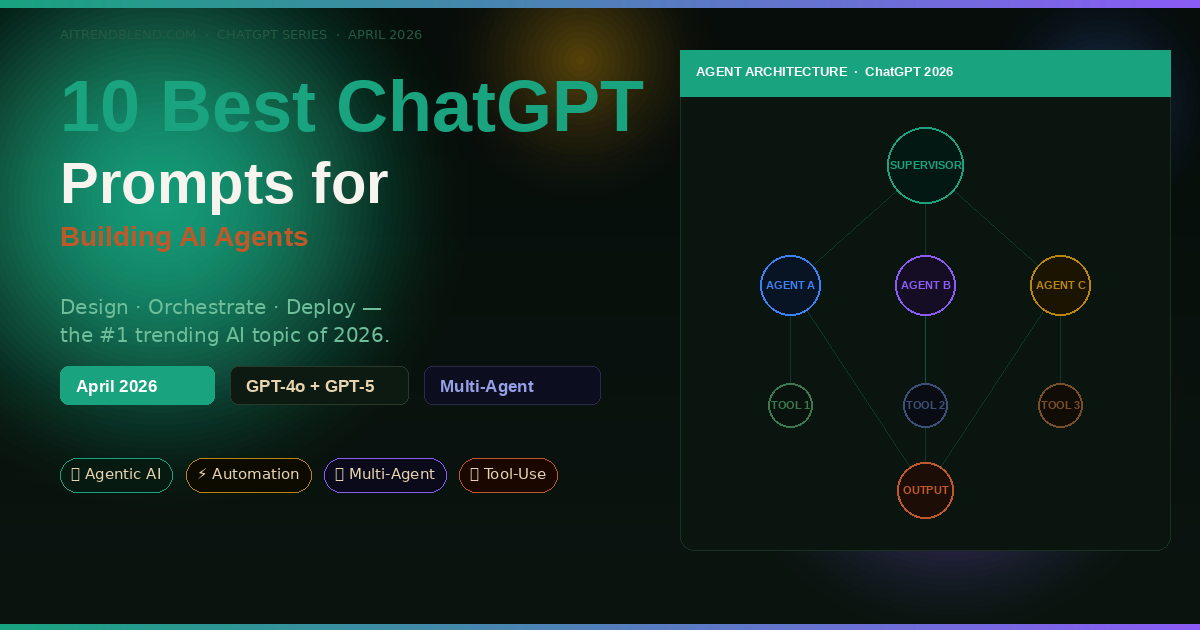
Everyone is talking about AI agents. The more interesting question — the one nobody’s actually answering — is how you get ChatGPT to help you design, structure, and orchestrate one without a computer science degree. These 10 prompts do exactly that.
Last Tuesday, a friend who runs a small e-commerce operation told me she’d spent three days trying to build an automated order-follow-up agent using ChatGPT. The agent was supposed to check order status, send personalised emails, and escalate problem orders to a human. Three days later, it still wasn’t working. “The AI keeps giving me generic code,” she said. “It doesn’t understand what an agent actually needs to do.”
That’s the gap this article closes. AI agents are now the dominant topic in every tech circle heading into mid-2026 — Google Cloud’s AI Agent Trends 2026 report found that 40% of enterprise applications will use task-specific agents by year-end, compared to less than 5% in 2025. But most ChatGPT users still don’t know the right way to prompt for agent design. They ask generic questions and get generic scaffolding back.
The prompts here are structured around how ChatGPT actually thinks about agentic systems — giving it the right framing, constraints, and output formats so what comes back is immediately usable. We start with the basics of single-task agents and work up to full multi-agent orchestration pipelines. By the end, you’ll have a reusable prompt toolkit for almost any agent use case you can think of.
Why ChatGPT Handles Agent Design Differently
ChatGPT has a structural advantage when it comes to agent design that’s easy to overlook: it reasons about processes. Ask Gemini to design an AI agent and you’ll get a polished overview with clean diagrams in your head but vague code. Ask Claude and you’ll get beautifully written explanations. ChatGPT — especially GPT-4o and GPT-5 — tends to produce immediately executable pseudocode and structured decision logic that translates directly into working pipelines.
The reason comes down to training emphasis. OpenAI has been building toward agentic use cases for longer than most AI labs. ChatGPT’s Operator mode, its tool-calling architecture, and the new AgentKit integration in GPT-5 all reflect this. When you prompt ChatGPT for agent design with the right structure, it produces outputs that fit real deployment patterns — not just academic descriptions of how agents work in theory.
That said, ChatGPT isn’t magic. It doesn’t automatically know your infrastructure, your data shapes, or your user’s actual needs. Every one of the prompts below is designed to close that context gap — giving ChatGPT the specific framing it needs to generate something genuinely useful rather than a boilerplate response it could give anyone.
ChatGPT excels at producing structured, executable agent logic when given clear role definitions, tool specifications, and output format constraints. The prompts in this guide are engineered to trigger exactly that response pattern.
Before You Start: How to Get the Best Results
A few quick setup notes before you paste any of these prompts.
Model choice matters here. GPT-4o is excellent for agent design, producing solid structured outputs with good reasoning about edge cases. GPT-5 (if you’re on Plus or Pro in 2026) goes further — it understands multi-agent patterns natively and is significantly better at generating error-handling logic. Use GPT-5 for prompts 7–10 if it’s available to you.
Start a fresh conversation for each agent project. ChatGPT’s context retention is a strength, but agent design prompts build on each other in this guide. If you carry in unrelated history, the model can get confused about which agent system you’re working on. New chat, clean slate.
Use the system prompt field if you have API access. For prompts 9 and 10 especially, the output is designed to drop straight into a system prompt. If you’re using the ChatGPT web interface, paste the generated system prompt into a new “Custom Instructions” entry. If you’re working via the API, it goes directly into the system role.
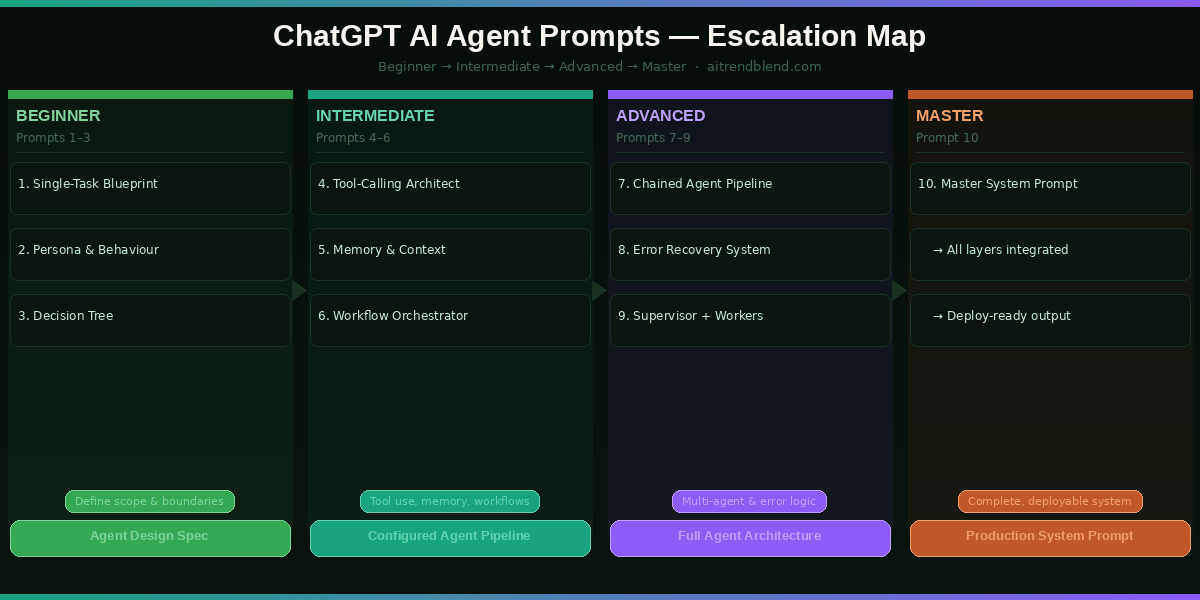
Keep the outputs — especially from prompts 3, 6, and 9. These produce decision frameworks and system logic you’ll reuse in later prompts. Copy them to a separate document as you go. By the time you reach prompt 10, you’ll be pulling elements from everything you built earlier.
The 10 Best ChatGPT Prompts for Building AI Agents
Prompt 1: The Single-Task Agent Blueprint
Most people start building AI agents by trying to do too much at once. The smarter move — and this is where experienced builders differ from beginners — is to nail one task completely before adding complexity. This prompt helps you define that first task with the precision ChatGPT needs to give you something useful back.
Think of this as your agent’s job description. A good job description tells the employee exactly what they’re responsible for, what they’re not responsible for, and what success looks like. This prompt does the same thing for your AI agent.
The explicit “will do / will NOT do” structure forces ChatGPT to define scope boundaries — the most common reason agent projects fail. Most people describe what they want the agent to do but skip the constraints entirely. ChatGPT will happily fill in assumptions on your behalf, and those assumptions are often wrong. This prompt eliminates that problem upfront.
Change “Environment” to “Zapier Zap” and “Users” to “my team’s Gmail accounts” to get a blueprint specifically designed for no-code automation workflows. The same prompt structure works for any deployment context.
Prompt 2: The Agent Persona and Behaviour Profile
A persona isn’t just about giving your agent a name. It’s about defining how the agent makes decisions when inputs are ambiguous — which they always are in the real world. This prompt gives ChatGPT the information it needs to build a coherent, consistent character for your agent that holds up under edge cases.
Asking for “communication rules” rather than just “tone” pushes ChatGPT past vague adjectives and into specific, testable behaviours. “Always confirms understanding before taking action” is a rule you can actually verify. “Be helpful and professional” is not.
Swap “small business owners” for “enterprise IT managers” and watch how differently ChatGPT calibrates the agent’s communication style and error-handling tone. The same agent blueprint can serve radically different audiences with just this one change.
Prompt 3: The Agent Decision Tree
When users send your agent unclear or unexpected inputs — and they will — the agent needs a decision framework rather than a panic response. This prompt gets ChatGPT to build that framework explicitly, so you can review it before it ever touches a user.
The “high-stakes action” node is the one most builders forget. ChatGPT will include a confirmation step only if you ask for it — and skipping this in real agent deployments is exactly how you end up with an agent that deletes the wrong records or sends emails to the wrong list. This prompt builds the safety check in from the start.
Add a specific “IF input is in a language other than English” node and specify how you want the agent to handle multilingual users. This is a gap most builders discover after launch rather than before.
Prompt 4: The Tool-Calling Agent Architect
Here is where it gets interesting. Tools are what separate a chatbot from an actual agent. A chatbot talks — an agent does things. This prompt moves you from defining what your agent is into specifying what it can actually touch: APIs, web search, file systems, databases, code executors. ChatGPT knows how OpenAI’s tool-calling architecture works from the inside, and this prompt taps that knowledge directly.
Asking for JSON schemas directly — rather than “explain how to connect tools” — pushes ChatGPT past conceptual explanations and into actual implementation specs. The description string field is what tells the LLM when to call which tool, and getting that wording right is 80% of the battle in tool-calling architecture.
Replace the tool list with “Tool 1: Python code interpreter” to get a tool-calling spec for a data analysis agent. The same prompt structure handles code execution environments as cleanly as web APIs.
Prompt 5: The Memory and Context Manager
One of the most common failures in agent deployments is the agent losing track of what it’s already done — or contradicting itself between sessions. This is not a technology limitation so much as a design gap: most builders never explicitly design the memory layer. This prompt fixes that.
The three-layer model maps directly onto how production AI memory systems actually work — working memory (in-context), episodic memory (external storage), semantic memory (system prompt). By mirroring this structure in the prompt, you get ChatGPT to reason in the right framework rather than inventing an arbitrary design.
Set “Users” to “Anonymous users” and watch the design shift significantly — the agent can no longer rely on user-level persistence and must handle every session as potentially stateless. This is the correct design for public-facing agents.
Prompt 6: The Multi-Step Workflow Orchestrator
Most things worth automating involve more than one step. This prompt gets ChatGPT to design a workflow where each step depends on the previous one’s output — the kind of orchestration that powers real-world agent pipelines from order processing to content publication to data reporting.
The “validation” field at each step is what most workflow designs omit. Without it, your agent will happily proceed through a multi-step process even when step 2 returned an error — producing confident-sounding nonsense at step 5. Explicit validation gates prevent silent failures.
Change the trigger from “user input” to “daily at 08:00 UTC” and the workflow becomes a scheduled agent — the same design approach applies to automated daily reports, social media scheduling, or data sync pipelines.
Prompt 7: The Chained Agent Pipeline
This is where single-agent thinking ends and multi-agent architecture begins. A chained agent pipeline passes outputs between specialised agents — Agent A researches, Agent B writes, Agent C reviews. This division of labour produces dramatically better results than one generalist agent trying to do everything. This prompt helps you design those handoffs.
The “quality check” field forces each agent to evaluate its own output before passing it downstream — mimicking the peer review principle that makes human teams produce better work than individuals. Without this, errors cascade through the entire pipeline and surface only at the final output, making debugging nearly impossible.
Specify “Agent 1: Web Researcher, Agent 2: Summariser, Agent 3: Content Writer” explicitly in the prompt instead of letting ChatGPT choose the agents. This gives you more control over the pipeline structure when you already have a specific architecture in mind.
Prompt 8: The Agent Error Recovery System
Production agents fail. Tools time out, APIs return unexpected formats, users send inputs the agent was never designed for. The difference between an agent that’s reliable and one that’s a liability comes down entirely to how gracefully it handles these moments. This prompt designs that grace.
“An agent that fails loudly and clearly is far safer than one that fails quietly and confidently.”
— Common principle in production AI systems design, 2026
Breaking errors into three explicit categories — tool, input, output — forces a systematic approach rather than a catch-all “if something goes wrong, apologise” response. Each category has different recovery paths, and mixing them up is what produces agents that handle API errors by asking the user to clarify their question.
Add “CATEGORY 4 — Safety Failures: user request violates content policy or data privacy rules” and define a specific escalation path. This is mandatory for any agent that handles sensitive user data or operates in a regulated industry.
Prompt 9: The Supervisor + Worker Agent Architecture
The most robust multi-agent systems running in 2026 use a hierarchical model: a supervisor agent that orchestrates and evaluates, plus one or more worker agents that execute specific tasks. The supervisor doesn’t do the work — it delegates, monitors, and integrates. This prompt designs that structure from scratch.
The communication protocol section — the part most tutorials skip entirely — is where multi-agent systems actually break down in practice. Defining message formats, metadata schemas, and stall detection logic before building prevents the most common integration failures. ChatGPT handles this level of specification very well when you ask for it explicitly.
Set “Scale” to “50 simultaneous tasks” and “Stakes” to “HIGH” to get an architecture designed for enterprise deployment — with significantly more conservative quality checks and explicit human-review gates at each major output.
Prompt 10: The Master Agent System Prompt
This is where everything comes together. Prompt 10 integrates role definition, tool specification, memory layers, decision logic, error handling, and output formatting into a single, deployable system prompt. You’re not designing an agent any more — you’re writing its brain. This prompt is designed to be dropped directly into the system role of a ChatGPT API call or into ChatGPT’s Custom Instructions field.
Most tutorials stop at “here’s a system prompt template.” This one doesn’t. The output from this prompt should be something you can actually run.
Writing in first person (“I am…”, “I will…”) isn’t stylistic — it’s functional. First-person system prompts produce more consistent agent behaviour because the model anchors its identity and constraints in the same frame it uses to generate responses. Third-person system prompts create a subtle identity gap that leads to inconsistency at scale.
After generating the system prompt, send a follow-up: “Now write 10 edge-case user inputs that would stress-test this system prompt, and show me how the agent should respond to each.” This stress-testing step catches design gaps before deployment — and it’s something the best agent builders do routinely.
Run these 10 prompts in sequence for any agent project. By prompt 10, you’ll have a blueprint, a behaviour profile, a decision tree, a tool spec, a memory design, a workflow, a multi-agent architecture, an error recovery system, and a deployable system prompt. That’s a complete agent design — built with nothing but ChatGPT and good prompting.
Common Mistakes and How to Fix Them
The mistakes below come up repeatedly when people start building agents with ChatGPT. None of them are obvious in advance — they only become painful in retrospect.
Mistake 1 — Asking ChatGPT to “build an agent” without specifying what it means by “agent.” ChatGPT will give you a complete, confident answer that could mean a Python script, a GPT with custom instructions, an n8n workflow, or a conceptual architecture. You’ll only discover which it chose when you try to implement it. Always specify the deployment target first.
Mistake 2 — Designing the happy path only. Most agent prompts cover what happens when everything works. The failure cases — ambiguous input, tool timeout, conflicting instructions — get a sentence or two at best. Use prompts 3 and 8 from this guide to force yourself to design the unhappy paths explicitly.
Mistake 3 — Treating the system prompt as a one-shot artifact. The first system prompt you generate is a draft, not a final. Run it against 10–20 real or simulated user inputs, observe where it breaks, and iterate. The best agent builders treat system prompts as living documents.
Mistake 4 — Over-engineering the memory layer on day one. Vector databases, episodic storage, semantic retrieval — these are powerful, but they’re also complex. Start with in-context memory (just tracking key facts in the conversation) and only add external memory when you have a specific proven need for it.
| Wrong Approach | Right Approach |
|---|---|
| “Make me an AI agent that manages my business.” | “Design an agent that performs this one task: [specific task]. Here is the trigger, the tools, and what success looks like.” |
| Designing the workflow without failure modes. | Using Prompt 8 to define recovery protocols for every failure category before building. |
| Writing a system prompt once and never testing it. | Generating the system prompt, running it against edge cases, and iterating based on where it breaks. |
| Building memory into the first version. | Starting stateless, proving the agent works, then adding persistence only where the data clearly shows it’s needed. |
| Using a generalist agent for everything. | Splitting complex tasks across specialised agents (Prompt 7 architecture) for dramatically better output quality. |
What ChatGPT Still Struggles With in Agent Design
Honesty matters here. ChatGPT in 2026 is genuinely powerful for agent design — but there are specific failure patterns worth knowing before you rely on it.
Long-horizon planning is still inconsistent. Ask ChatGPT to design an agent that runs a week-long research project with dozens of interdependent steps, and the output will look comprehensive but often contains subtle logical gaps in the later steps. The model tends to front-load its best reasoning into the first few steps and becomes less precise as the workflow extends. For complex long-horizon agents, break the design into phases and prompt each phase separately.
It overestimates its own tool integration knowledge. ChatGPT will confidently write API schemas for tools it has limited real-world data on. The JSON schemas it produces for obscure or recently updated APIs often contain plausible-looking errors that only surface during actual API calls. Always validate generated schemas against the actual API documentation before shipping.
Multi-agent coordination logic can have race conditions. When designing systems where multiple agents operate in parallel (as in prompt 9), ChatGPT sometimes misses timing edge cases — two agents attempting to write to the same resource simultaneously, for example. The architectural advice is sound, but the coordination logic needs careful human review for any system running true concurrency. This is a prompt engineering limitation, not a fundamental flaw — it just requires you to pressure-test the generated logic with “what if both agents complete at the same time?” style follow-up questions.
Where to Go From Here
What you now have is a complete agent design toolkit — a sequence of 10 prompts that takes you from blank page to deployable system prompt. The skill you’ve built isn’t just about AI agents. It’s about prompt architecture: knowing how to break complex systems problems into structured pieces that an LLM can reason about clearly. That skill transfers to every domain you work in.
There’s a deeper principle here about working with AI that the agent design problem illustrates well. The more precisely you define what you want — the inputs, the constraints, the failure modes, the output format — the more useful the AI becomes. Vague questions get vague answers. This is true in conversation and it’s true in agent design. The prompts in this guide aren’t magic — they’re just unusually specific.
Some of this still requires human judgment that no prompt can substitute for. Deciding which tasks are worth automating, evaluating whether an agent’s output is genuinely trustworthy in your specific context, making the call to escalate to a human — these aren’t prompting problems. They’re decisions that need a person behind them. The agent handles the execution. You handle the strategy.
ChatGPT’s trajectory over the next 18 months points toward tighter integration between agent design and deployment — the gap between prompting for an agent and actually running one is narrowing fast. GPT-5’s AgentKit is the first step in that direction, and it won’t be the last. The builders who will benefit most are the ones who understand the design principles now, before the tooling makes it trivially easy. You’re already ahead.
Try These Prompts Right Now
Open a fresh ChatGPT session and start with Prompt 1. By the time you reach Prompt 10, you’ll have a fully designed AI agent — tested against real failure modes and ready to deploy.
Disclaimer: aitrendblend.com is an independent editorial publication. We are not affiliated with OpenAI or any AI company. All product names are trademarks of their respective owners.