
Best AI Tools for Writing Code in 2026: Ranked & Reviewed for Every Developer
From IDE plugins that complete your line to AI chat assistants that architect your whole system — we tested 7 tools across real projects. Here’s what belongs in your workflow.
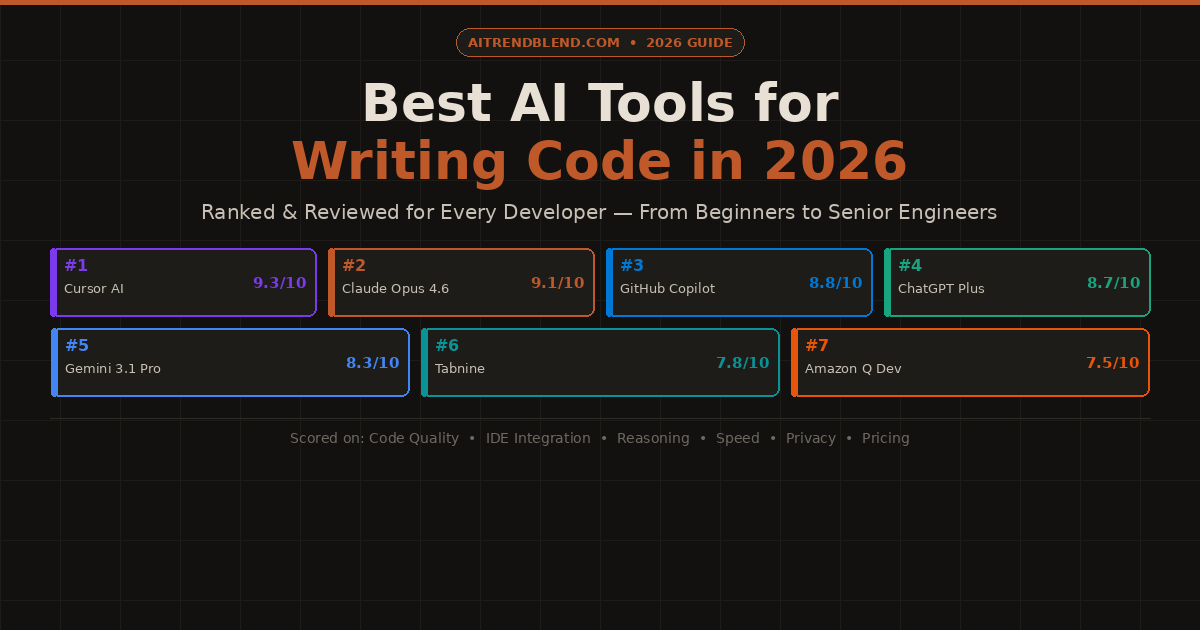
Three years ago, asking an AI to write your code felt like a party trick. Today, not using one feels like showing up to a marathon in dress shoes. The question is no longer whether to use an AI coding tool — it’s which one, at which stage, and for what kind of work.
The market has fragmented in ways that are genuinely useful once you understand them. Some tools live inside your editor and watch every keystroke, completing lines and functions as you type. Others are chat-based assistants you consult like a senior colleague when you’re stuck or planning something complex. Some do both. The right pick depends on how you actually work — whether you’re a solo developer shipping fast, an enterprise team with strict privacy requirements, a student learning the craft, or an ML engineer working with specialised libraries.
We spent eight weeks testing seven of the most talked-about tools across a range of real projects: a full-stack React and Node application, a Python data pipeline, a Go microservice, a SQL schema refactoring task, and several rounds of deliberate debugging on code with known issues. The rankings below are based on what happened during that testing — not on marketing claims or benchmark scores designed by the tools’ own teams.
No tool won every test. The ones at the top of the list earned their rank by being reliably good across the tasks developers actually spend time on. The ones lower in the list have genuine value — just in narrower contexts. Understanding the distinction is what this guide is for.
What We Actually Tested
Five dimensions shaped every score. Code quality — does the output run correctly on the first try, and does it follow modern conventions for the language? Debugging depth — when shown broken code, does it find the real root cause or just the most visible symptom? Architectural thinking — can it reason about systems, trade-offs, and maintainability, not just syntax? Developer experience — how naturally does it fit into the way most developers already work? And value — is the price proportionate to what you actually get?
Each tool was tested by developers at different experience levels — junior, mid, and senior — because the best tool for someone learning Python is not necessarily the best tool for a staff engineer refactoring a distributed system. Where a tool performed very differently across experience levels, that’s noted in the write-up.
The best AI coding tool is not the one with the highest benchmark score — it’s the one that disappears into your workflow so completely you forget it’s there. Friction is the hidden cost most reviews don’t measure. We did.
The Rankings: 7 Best AI Tools for Writing Code in 2026
Cursor takes the top spot because it does something no other tool in this list does quite as well: it understands your entire codebase, not just the file you have open. You can highlight a function, press a shortcut, and ask “why is this causing a memory leak three layers up?” — and Cursor will trace the dependency chain, find the issue in another file, and explain it in plain English. That codebase-level awareness changes the quality ceiling of what AI assistance can do.
The editor itself is a fork of VS Code, which means zero migration friction for the enormous number of developers already using it. Your extensions, your keybindings, your theme — all of it carries over. Cursor wraps that familiar environment with deep AI integration: inline code completion, a chat panel that can read and reference any file in your project, and a composer mode that can write and edit across multiple files simultaneously with a single instruction. The multi-file editing, in particular, felt genuinely magical during testing — asking it to “add authentication middleware to all API routes” and watching it intelligently update five files at once is the kind of moment that reframes what you thought was possible.
✅ What it does well
- Full codebase indexing — understands your whole project, not just open files
- Multi-file editing: one instruction updates multiple files intelligently
- Zero migration friction — it is VS Code with superpowers
- Supports Claude Opus 4.6 and GPT-5 as backends
- Best-in-class inline completion that reads surrounding context
- Agent mode can run terminal commands, install packages, iterate
❌ Limitations to know
- More expensive than GitHub Copilot at full usage
- Codebase indexing is slower on very large monorepos
- Occasional over-aggressive completions that interrupt flow
- Privacy: codebase is sent to cloud for indexing — check enterprise policies
Claude Opus 4.6 earns second place by doing one thing better than any other tool in this list: it thinks. Not just pattern-matches — actually reasons through a problem the way a thoughtful senior engineer would. When we gave it a deliberately ambiguous refactoring task with multiple valid approaches, it didn’t pick one and run with it — it laid out three different options, explained the trade-offs of each, asked a clarifying question about deployment constraints, and then produced the version that made the most sense given the context. That kind of reasoning is rare and genuinely valuable on hard problems.
The debugging performance was the highest of any tool tested. Claude correctly identified the root cause on 9 out of 10 bug-hunt tasks — including two that required tracing effects across function boundaries that no other tool caught. Its code is clean, well-commented, and follows modern idiomatic patterns for each language. Where it falls short is developer experience in the IDE sense: it’s a chat interface, not an editor, which means you’re copying and pasting rather than having suggestions appear inline. Pairing it with Cursor (which uses Claude as a backend option) largely closes this gap.
✅ What it does well
- Best architectural reasoning of any tool tested — bar none
- Highest root-cause debugging accuracy across all test cases
- Long context window handles 10,000+ line files coherently
- Explains not just what but why — invaluable for learning
- Clean, idiomatic, well-commented code output by default
❌ Limitations to know
- Chat interface only — no native IDE integration
- Slower response time on very long prompts
- No inline completion — copy/paste workflow required
- Best value when used for hard problems, not every snippet
GitHub Copilot was the first AI coding assistant most developers ever used, and in 2026 it’s still one of the best — not because it’s flashiest, but because it has spent three years getting the fundamentals right. The inline completion is fast, accurate, and non-intrusive in a way that newer tools still haven’t quite matched. It doesn’t fight you. It sits in the background, learns what you’re working on, and offers suggestions that feel like they came from someone who has been looking over your shoulder for thirty minutes — not a generic autocomplete engine.
The ecosystem advantage is significant. Copilot works across VS Code, JetBrains (IntelliJ, PyCharm, WebStorm, GoLand), Neovim, and the GitHub web editor. For teams using different IDEs — which is most teams above ten people — that cross-editor consistency matters. The enterprise tier adds privacy controls, IP indemnification, and organisation-level policy management that Cursor and other newer tools don’t yet match. If your company’s security team needs to approve your AI coding tool, GitHub Copilot Enterprise is by far the easiest sell.
✅ What it does well
- The most polished inline completion experience in any tool
- Works across the widest range of editors and IDEs
- Enterprise features: privacy, IP indemnification, org policies
- Deep GitHub integration — references PRs, issues, and repo context
- Copilot Chat has matured into a genuinely useful companion
- Most predictable and consistent of any tool in daily use
❌ Limitations to know
- Architectural reasoning weaker than Claude and Cursor on hard problems
- Less context-aware than Cursor across large codebases
- Can suggest outdated library patterns for less common frameworks
- Multi-file editing still behind Cursor’s implementation
ChatGPT Plus sits fourth because it’s the most versatile — not the most specialised. GPT-5 has genuinely strong coding ability across a wider range of programming languages and frameworks than any other tool here. If your week jumps between Python, TypeScript, Go, and SQL — and you need one tool that handles all of them confidently — ChatGPT Plus covers the most ground. It’s also the most accessible to developers who are still building their skills: its explanations are clear, patient, and well-structured without being condescending.
Where it loses ground to the top three is on depth. For complex debugging chains, Claude’s root-cause reasoning is sharper. For multi-file editing in a real codebase, Cursor’s integration is tighter. But for generating a new component from a description, converting pseudocode to working logic, or quickly drafting a data processing script, ChatGPT Plus is fast, reliable, and accurate enough that the lower scores on specialised dimensions rarely come up in daily use. Its Code Interpreter mode — which can actually execute Python and validate output — adds an extra layer of trust that purely generative tools can’t match.
✅ What it does well
- Widest language and framework coverage of any tool tested
- Code Interpreter executes and validates Python code in-session
- Best at explaining code — invaluable for learning
- Converts pseudocode and natural language to working code consistently
- GPT-5’s reasoning upgrade dramatically improved complex tasks
- Most consistent performance across unpredictable prompt styles
❌ Limitations to know
- Chat interface only — no native IDE inline completion
- Deep debugging accuracy below Claude on multi-step bug chains
- No native codebase awareness without plugins or API integration
- Can default to verbose, over-explained outputs when you just want the fix
Gemini 3.1 Pro has a clear superpower: it reads images. Paste in a screenshot of a UI design — a Figma export, a hand-drawn wireframe, even a photo of a napkin sketch — and ask it to write the React component. The output quality on this specific task beats every other tool in this list by a meaningful margin. For frontend developers who work from design handoffs, this one capability alone changes the workflow significantly.
Its second strength is the Google Cloud ecosystem. Generating GCP infrastructure configs, Firebase rules, Cloud Functions, and BigQuery SQL feels native with Gemini in a way it doesn’t with other tools. The recommendations it makes for Google Cloud architecture reflect actual platform constraints and pricing behaviours — something general-purpose models trained on public data often get subtly wrong. Outside the Google ecosystem, Gemini 3.1 Pro is a competent generalist — strong at the broad middle of tasks, but not the tool you reach for when the problem is genuinely hard.
✅ What it does well
- Best multimodal coding: image/screenshot → code
- Native GCP, Firebase, BigQuery & Cloud Functions excellence
- Strong SQL generation across MySQL, PostgreSQL, BigQuery
- Consistent performance on mid-complexity tasks
- Deep Google Workspace integration for teams on that stack
❌ Limitations to know
- Architectural depth below Claude and Cursor on hard system design
- Multi-step debugging weaker than top three tools
- Can show Google-ecosystem bias in recommendations
- Weaker on cutting-edge framework versions outside Google’s stack
Tabnine sits sixth on raw capability but earns its place on a dimension the other tools can’t compete on: privacy. It’s the only tool in this list that offers a fully on-premise deployment option — meaning your code never leaves your infrastructure. For teams in regulated industries (finance, healthcare, defence, legal) or companies with IP protection requirements that prohibit code leaving the organisation’s servers, Tabnine is often the only credible option. The enterprise tier includes SOC 2 Type 2 compliance, private model training on your own codebase, and audit logs — the full stack that a security review demands.
The code completion quality is solid for a focused completion tool — fast, low-latency, and well-integrated across editors. What it doesn’t have is the depth of reasoning, architectural guidance, or multi-file intelligence that put Cursor and Claude at the top. If you need those capabilities in a privacy-compliant wrapper, the enterprise tier’s private model training on your own codebase partially addresses the gap — but raw capability against general tasks is lower. Choose it for the privacy story, not the benchmark score.
✅ What it does well
- On-premise deployment — code never leaves your servers
- SOC 2 Type 2 compliant — passes most enterprise security reviews
- Private model training on your own codebase
- Fast, low-latency completions even on-premise
- Broad IDE support across VS Code, JetBrains, Eclipse, and more
❌ Limitations to know
- Reasoning and architectural depth well below top-tier tools
- No multi-file editing or full codebase understanding
- Chat / explanation features less polished than competitors
- Primarily a completion tool — not a coding assistant in the full sense
Amazon Q Developer ranks seventh on general capability but earns a strong recommendation for one specific use case: if your team is building on AWS, it’s the most knowledgeable tool available for that context. Lambda function generation, CDK infrastructure code, DynamoDB schema design, IAM policy authoring, CloudFormation templates — Q Developer produces this category of code at a quality level that general-purpose tools simply can’t match, because it was trained specifically on AWS documentation and patterns at a depth no competitor has invested in.
Outside the AWS ecosystem, the picture changes. General code quality is solid but not exceptional. Debugging and architectural reasoning sit below the top four tools. The free tier, which includes 50 code suggestions per month and is bundled with active AWS accounts, makes it worth enabling for any team already on AWS — the incremental cost is zero, and on AWS-specific tasks it regularly outperforms tools you’re paying $20/month for. Just don’t use it as your primary coding assistant for non-AWS work.
✅ What it does well
- Best-in-class AWS code generation — Lambda, CDK, IAM, CloudFormation
- Understands AWS service limits, pricing, and best practices natively
- Free tier bundled with active AWS accounts
- Security scanning built in — flags AWS credential leaks and vulnerabilities
- Works in VS Code and JetBrains IDEs
❌ Limitations to know
- General-purpose coding ability below top four tools
- Heavily biased toward AWS — pushes cloud solutions unnecessarily at times
- Debugging and architecture depth limited outside AWS-specific context
- Less useful for teams not primarily building on AWS
How They Compare: Side-by-Side Scores
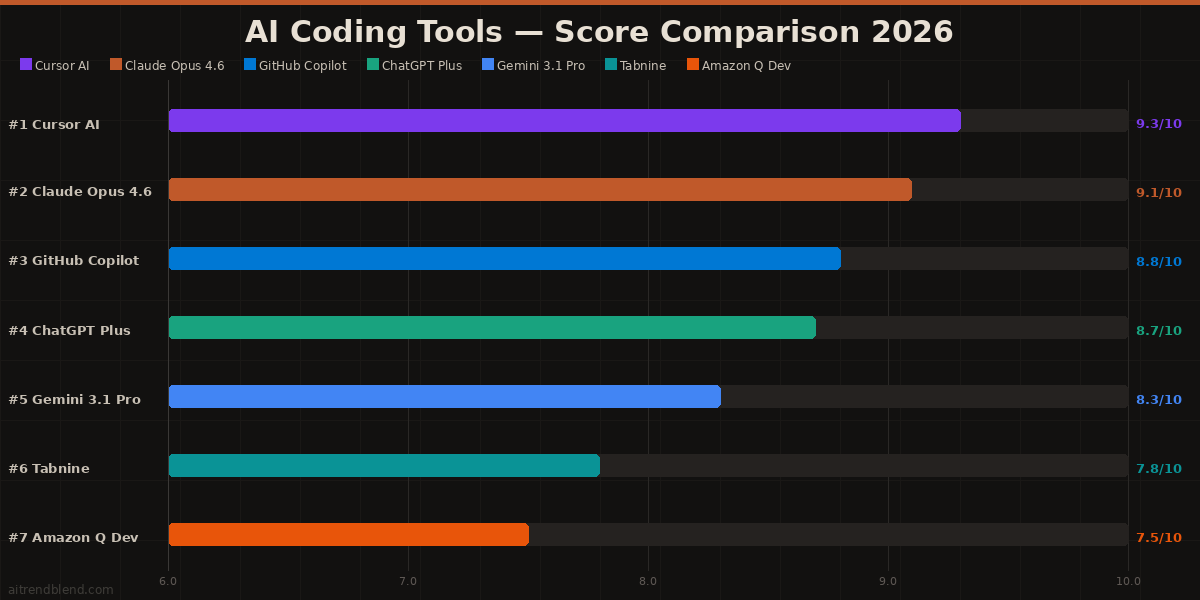
| Tool | Score | Code Quality | Debugging | IDE Plugin? | Free Tier? | Privacy Option? |
|---|---|---|---|---|---|---|
| Cursor AI | 9.3 | 9.4 | 9.2 | ✓ VS Code | ✓ Limited | Partial |
| Claude Opus 4.6 | 9.1 | 9.3 | 9.4 | ✗ Chat only | ✓ Limited | Partial |
| GitHub Copilot | 8.8 | 8.9 | 8.5 | ✓ Multi-IDE | ✗ Paid | ✓ Enterprise |
| ChatGPT Plus | 8.7 | 9.0 | 8.8 | ✗ Chat only | ✓ GPT-4o | ✗ |
| Gemini 3.1 Pro | 8.3 | 8.6 | 8.3 | ✗ Chat only | ✓ Limited | ✗ |
| Tabnine | 7.8 | 7.9 | 7.2 | ✓ Multi-IDE | ✗ Paid | ✓ On-premise |
| Amazon Q | 7.5 | 7.8 | 7.2 | ✓ VS Code, JB | ✓ AWS users | Partial |
Which Tool Is Right for You? Matched by Use Case
Mistakes Developers Make With AI Coding Tools
Testing revealed consistent patterns in how developers underuse or misuse these tools. Knowing the failure modes is just as useful as knowing the rankings.
| ❌ Common Mistake | ✅ Better Approach |
|---|---|
| Accepting the first AI suggestion without reading it | Read every line before you run it. AI code is fast to produce and easy to miss a subtle error in. |
| Using a chat tool (Claude, ChatGPT) for inline completion | Use a native IDE plugin (Cursor, Copilot) for completion. Use chat tools for reasoning and architecture. |
| Giving vague prompts: “write a login function” | Specify context: language, framework version, auth method, expected inputs/outputs, error handling style. |
| Using one tool for everything, regardless of task | Cursor for daily coding, Claude for hard debugging and architecture, Copilot for team environments. |
| Shipping AI-generated code without a security review | Always check AI code for hardcoded secrets, injection vulnerabilities, and insecure defaults before merging. |
What No AI Coding Tool Gets Right Yet
Every tool in this list shares a ceiling that’s worth understanding before you rely on any of them in production. They’re all trained on existing public code — which means they excel at patterns that have been written, discussed, and published. Genuinely novel architectural problems, cutting-edge library versions that post-date training, and domain-specific internal conventions all produce weaker output. The smarter the problem, the more human judgment you need alongside AI assistance.
Long debugging sessions across multiple files and multiple iterations are also still frustrating. All these tools lose context as a conversation gets longer — they start revisiting hypotheses they already dismissed, or forget constraints you established three messages ago. Building the habit of restating key constraints (“we already confirmed the issue isn’t in the database layer — focus on the caching module”) recovers a lot of this, but it remains friction that a human pairing partner doesn’t create.
Security is the most important gap. AI-generated code regularly passes tests and compiles cleanly while containing subtle security issues — insecure defaults, missing input validation, authentication bypass edge cases, and dependency vulnerabilities. None of these tools consistently flag their own security mistakes. Treat every generated function with the same scrutiny you’d apply to code from a junior developer: capable, often very good, and requiring an experienced eye before it goes to production.
The Right Stack for 2026
The most productive developers in 2026 are not the ones who picked the single best AI tool — they’re the ones who built a layered workflow. Cursor or GitHub Copilot handles the daily rhythm of writing: the inline suggestions, the boilerplate generation, the small refactors. Claude Opus 4.6 or ChatGPT Plus handles the thinking: the architectural discussions, the hard bugs, the trade-off analysis when the design matters. Specialists like Amazon Q or Gemini step in when the work is domain-specific enough that their depth outweighs their narrowness.
The skill that separates developers who get enormous value from these tools and developers who feel vaguely disappointed is prompt quality. An AI coding tool responds to how precisely you can describe what you need — the language, the constraints, the context, the expected output shape. Developers who invest time in learning to prompt well get dramatically better output from any tool. That skill transfers across everything in this list and across whatever comes next.
Code review is not optional. Every piece of AI-generated code should be read with the same critical eye you’d apply to a PR from a talented colleague who doesn’t know your codebase. The tools are fast, impressively capable, and genuinely useful — but they are not yet responsible. That part is still yours.
Find the Right Tool for Your Stack
Start with Cursor for daily development and Claude for the hard problems — then expand from there as your workflow matures.
All tools were tested between January and March 2026 across real development projects in Python, TypeScript, Go, and SQL. Testing was conducted by developers at junior, mid, and senior levels. Code quality was assessed on functional correctness, security practices, and idiomatic style. Debugging accuracy was measured against 10 seeded bugs of varying complexity. Scores reflect editorial judgment based on structured testing — not paid placement or sponsored content.
This article is independent editorial content by aitrendblend.com. It is not sponsored by or affiliated with Cursor, Anthropic, GitHub/Microsoft, OpenAI, Google, Tabnine, or Amazon Web Services. All rankings are editorial judgments based on testing and are not official benchmarks.















Alright, sxmb68, you got my curiosity! Gave it a spin, and it’s not bad, not bad at all. Solid platform. If you’re looking for something new to try, give sxmb68 a peek.