
What Is a Construction Site Actually Doing Right Now? TU Berlin Built a System That Reads Site Images With an Ontology and a GPT — No Training Required
Researchers at Technische Universität Berlin and Qingdao University of Technology achieved 73.68% construction activity recognition accuracy using pure prompting — no labeled training data, no fine-tuning, just a domain ontology, structured visual extraction, and carefully engineered in-context examples.
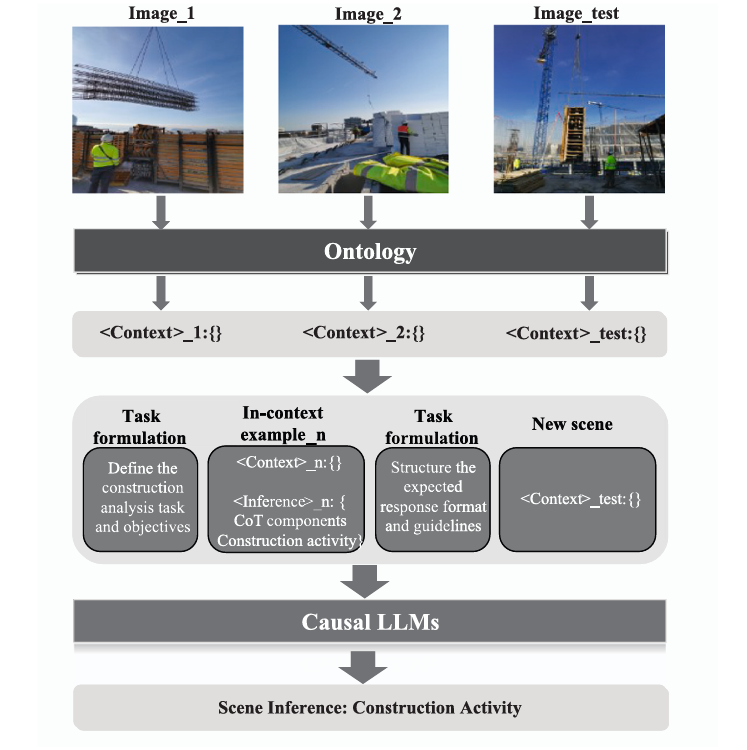
Construction sites are extraordinarily difficult to analyze automatically. The same physical scene — workers, cranes, concrete, steel — can represent a dozen different activities depending on who is doing what to what, in what spatial relationship, facing which direction. Training a supervised model to recognize “ConcretePouring” versus “ConcreteConsolidation” versus “ProcessMonitoring” requires dense, expensive annotation of hundreds of images. TU Berlin’s answer: don’t train at all. Use a domain ontology to translate visual observations into structured symbolic representations, then let a language model read those representations like an engineering manual — and reason from just three carefully chosen examples to new scenes it has never seen before.
The Problem With Every Existing Approach
Construction activity recognition is one of those problems that looks straightforward until you actually try to solve it at scale. There are two well-established computational approaches, and both have fundamental ceilings.
Supervised learning — deep neural networks trained on labeled images — works well when you have plenty of annotated data for every activity class. The trouble is that construction sites violate the core assumption of statistical learning: that training and test distributions are similar. Construction sites change rapidly over time and vary enormously across projects, geographies, and building types. A model trained on reinforcement assembly at a concrete tower project in Berlin may completely fail on the same activity at a timber-frame project in Tokyo. Collecting new labeled data for every new project is neither practical nor economical.
Knowledge-based approaches try to sidestep the data problem by encoding expert rules directly: “if a worker is holding a vibrator tool near a concrete region, that’s ConcreteConsolidation.” These systems are interpretable and don’t need labeled images. But they’re brittle by construction — the rules are static, and real construction sites are anything but. When a new tool category appears, or activity procedures change, someone has to manually update the rule base.
Large Language Models offer a genuinely different path. They encode an enormous amount of world knowledge — including substantial knowledge about construction processes and engineering conventions — through pretraining on text. They can recognize patterns in structured examples without needing explicit rules. And through in-context learning, they can generalize to new scenarios from just a handful of demonstrations. The catch is that LLMs can’t directly process images. You have to translate the visual scene into something the model can reason over.
Rather than training a model to recognize construction activities, or writing manual rules to infer them, this approach converts construction images into structured symbolic representations grounded in a domain ontology, then prompts a language model to reason over those representations using in-context learning. The LLM learns “what activities look like in this notation” from three examples and generalizes to 29 activity types it has never explicitly been trained on.
From Pixels to Symbols: The Full Pipeline
The pipeline has four conceptually distinct stages: visual information extraction, ontology-based formalization, prompt construction, and LLM-based inference. The key design choice — and the thing that distinguishes this work from earlier caption-based prompting approaches — happens in stage two: rather than describing the image in natural language, the system translates it into a structured symbolic representation grounded in a formally defined ontology.
Stage 1: Extracting Diverse Visual Information
The system extracts five categories of visual information from each construction image using standard computer vision algorithms. The paper is explicit that this was done manually for the experimental dataset due to the difficulty of reliable automated extraction on complex construction sites, but the framework is designed to eventually accommodate automated pipelines.
The five categories map naturally onto object-oriented modelling concepts. Entities (from object detection and semantic segmentation) are the fundamental objects in the scene — workers, excavators, concrete pump hoses, reinforcement regions. Attributes (from pose estimation) capture properties of entities — worker posture (standing, crouching, bending), body part positions, equipment orientation. Attentional cues (from gaze estimation) capture where workers are directing their attention — a worker facing an excavator is providing monitoring cues that are qualitatively different from a worker facing a shovel in their hand. Relative relationships (from spatial analysis) describe how entities relate to each other geometrically. And spatial position captures where in the image each entity is located.
Stage 2: The Ontology-Based Scene Representation
This is the heart of the approach. Rather than describing entities in free-form natural language (“there is a worker standing near a concrete pump”), the system maps everything to concepts defined in the ConSE ontology — a construction-specific semantic schema that formally defines entity classes, their attributes, and their permissible relationships.
The resulting representation is a set of relational triples in a JSON-like format. An entity named “Worker_1” is typed as a Worker class. Its posture is encoded as “Worker_1 hasPosture Standing.” Its attention is encoded as “Worker_1 hasAttentionOn ReinforcementRegion_2.” Its relative position to other objects is encoded as “Worker_Hand_1 isConnectedTo ReinforcementRegion_2.” These aren’t just labels — they carry the formal semantics of the ConSE ontology, which defines what these relationships mean in the construction domain.
To handle spatial information without an explosion of pairwise distance calculations, the approach partitions each image into a 3×3 grid (inspired by Vision Transformer patch decomposition) and appends a grid position index to each entity. An entity appearing in position 5 (center of the image) versus position 1 (top-left) carries meaningfully different spatial context for understanding activities like concrete pouring or soil excavation, where proximity to the material being worked is semantically important.
CONSTRUCTION IMAGE
         │
    ┌────▼────────────────────────────────────────────────┐
    │  VISUAL INFORMATION EXTRACTION                      │
    │                                                     │
    │  Object Detection   → Entity type + bounding box   │
    │  Semantic Seg.      → Region masks + class types   │
    │  Pose Estimation    → Worker posture + key joints  │
    │  Gaze Analysis      → Worker attention direction   │
    │  Spatial Analysis   → Relative entity positions   │
    └────┬────────────────────────────────────────────────┘
         │
    ┌────▼────────────────────────────────────────────────┐
    │  ONTOLOGY FORMALIZATION (ConSE)                     │
    │                                                     │
    │  Map to ontology triples:                           │
    │    Entity: {                                        │
    │      Worker_1 a Worker (5,8)                        │
    │      Hoist_1 a Hoist (1,2,4,5)                     │
    │      FormworkRegion_1 a FormworkRegion (2,3,5,6)   │
    │    }                                                │
    │    Attribute: {                                     │
    │      Worker_1 hasPosture Standing                   │
    │      Worker_1 hasBodyPart Worker_Hand_1             │
    │    }                                                │
    │    Relationship: {                                  │
    │      Worker_1 hasAttentionOn Hoist_1                │
    │      Hoist_1 isConnectedTo FormworkRegion_1         │
    │    }                                                │
    └────┬────────────────────────────────────────────────┘
         │  Structured  representation
    ┌────▼────────────────────────────────────────────────┐
    │  PROMPT CONSTRUCTION                                │
    │                                                     │
    │  1. Task Formulation Prompt (Role + Context + Task) │
    │  2. N in-context examples:                          │
    │     : ontology triples                     │
    │     : CoT → Interaction → Activity      │
    │  3. Output Formulation Prompt (format guidelines)   │
    │  4. Test : new image's ontology triples   │
    └────┬────────────────────────────────────────────────┘
         │
    ┌────▼────────────────────────────────────────────────┐
    │  GPT-3.5-TURBO (FROZEN)                            │
    │  In-context pattern learning:                       │
    │    Context representation → Activity inference     │
    └────┬────────────────────────────────────────────────┘
         │
    Activity: {
      Activity_1: {
        Activity type: FormworkSetUp
        Activity elements: Worker_1, Hoist_1, FormworkRegion_1
      }
    }
Stage 3: Three Layers of Prompt Engineering
The prompt architecture combines three strategies that are carefully designed to work together. The task formulation prompt establishes the model’s role (“You are a construction engineering professional”), explains the structure of the ontology-based representations, and provides explicit instructions for pattern learning. It tells the model that its job is to discover the implicit heuristics connecting
The in-context examples are the crucial learning signal. Each example follows a template with a
The output formulation prompt provides format guidelines: map activity predictions to terms defined in the ontology, ensure each activity includes at least one worker or heavy machine as a participant, allow multiple concurrent activities when the scene warrants it, and avoid over-inferring activities for entities with no clear involvement.
Stage 4: Chain-of-Thought — The Hidden Performance Driver
The Chain-of-Thought component is integrated into the in-context examples as an intermediate reasoning step. Rather than jumping directly from scene observation to activity label, each example includes an
This maps onto a well-established hierarchy in human activity analysis: gestures → actions → interactions → group activities. Construction activities are group activities — they require reasoning about which entities are interacting with which, in what roles. By including an explicit interaction inference step, the CoT component gives the model a structured reasoning scaffold that mirrors how a human expert would actually read the scene.
The ablation results confirm how important this is: removing CoT drops Activity Accuracy from 73.68% to 65.78% — an 8-point penalty — and reduces Activity + Elements Accuracy from 50.00% to 44.73%. The Miss Rate nearly doubles from 3.91% to 7.79%, meaning the model without CoT starts missing relevant activity labels significantly more often.
Results: What 73.68% Actually Means
The system was evaluated on 53 construction images covering 29 activity types from the ConSE ontology, using 3 images as in-context examples. The headline Activity Accuracy of 73.68% measures how often the predicted activity type exactly matches the ground truth. The Activity + Elements Accuracy of 50.00% measures how often both the activity type and all involved entities are correctly identified.
| Method | Activity Accuracy | Activity+Elements | Redundancy Rate | Miss Rate |
|---|---|---|---|---|
| Supervised GNN (Kim & Chi 2022) | 80.17% | — | — | — |
| Knowledge-based (Luo et al. 2018) | 57.19% | — | — | — |
| Proposed (Base, 3 examples) | 73.68% | 50.00% | 20.78% | 3.91% |
| w/o Chain-of-Thought | 65.78% | 44.73% | 45.45% | 7.79% |
| Entity only (w/ E) | 64.47% | 22.37% | 35.06% | 10.39% |
| Moderate randomness (mR) | 77.63% | 53.95% | 20.78% | 6.49% |
| High randomness (hR) | 68.42% | 42.11% | 24.68% | 5.19% |
A few things stand out in this table. First, the proposed approach sits squarely between the knowledge-based baseline (57.19%) and the best supervised method (80.17%), despite requiring zero labeled training data. The supervised GNN method requires full dataset annotation and cannot easily generalize to new projects; this approach needs three example images and an ontology.
Second, the 23-point gap between Activity Accuracy and Activity + Elements Accuracy tells an important story about what the model finds easy versus hard. Identifying that a scene depicts “ConcretePouring” is much easier than also correctly identifying the specific hoist, pump hose, and concrete region that are participating in that activity. The latter requires understanding multi-entity group relationships in detail.
Third, the moderate randomness experiment (mR: temperature=1.0, top_p=0.6) actually outperforms the base configuration at 77.63%. This is an interesting finding: some stochasticity in generation helps the model draw unexpected connections between scene elements. The failure mode of high randomness (hR: temperature=2.0, top_p=0.9) is equally informative — the model starts ignoring the format constraints entirely, producing outputs that don’t follow the structured response template.
“By requiring only a small number of task-specific exemplars during inference, the model is able to generalize to a wide range of previously unseen construction scenarios — which differ substantially from those provided in the prompt.” — Zeng, Hartmann & Ma, Advanced Engineering Informatics 2026
What the Ablation Study Reveals About Visual Information
Every additional type of visual information contributes positively, but some categories matter more than others. Removing attentional cues (where workers are looking) drops Activity + Elements Accuracy for ProcessMonitoring from 14.29% to 0.00% — effectively destroying the ability to identify monitoring activities. This makes intuitive sense: the difference between a worker who is “monitoring excavation” versus “performing soil transport” is almost entirely in their attentional focus and body orientation, not in the presence or absence of specific objects. Without gaze direction, these activities become impossible to distinguish.
Attribute and relative relationship information plays a similarly critical role. Without it, the model tends to over-rely on object co-occurrence patterns (if a shovel and soil are present, assume soil transport), missing the relational context that indicates the actual activity (the worker is holding the controller of the hoist, not operating the shovel).
Spatial information shows an interesting asymmetric effect: its absence hurts significantly more than its sole presence helps. This suggests spatial position is most valuable as a disambiguating signal in combination with other visual cues — knowing that a wooden board is in the far corner versus immediately adjacent to the worker changes the interpretation of the activity, but spatial position alone doesn’t tell you much without knowing what entities are present.
The Honest Limitations
The paper is refreshingly candid about what the approach cannot yet do. There are four specific limitations worth understanding in detail.
No depth information. The approach uses a 3×3 grid for spatial encoding, which provides coarse positional information but no depth. In wide-angle shots of large machinery operations — soil excavation with a full excavator, concrete pouring with a pump truck — the actual 3D distance between entities is critical for determining which entities are participating in the same activity. Two workers at very different depths from the camera might appear to be adjacent in a 2D grid cell, leading to incorrect activity grouping. This is why SoilRelatedActivity and ConcreteRelatedActivity show the worst entity identification performance in the results.
Complex multi-cue scenes confuse the model. When a single entity carries multiple conflicting visual cues, the model tends to prioritize the most visually salient object relationships rather than integrating all available evidence. A worker holding a shovel while watching an excavator — clearly in a monitoring role — gets incorrectly classified as SoilTransportation because the shovel-soil relationship dominates the attention. Humans resolve this ambiguity almost instantly because we intuitively weight attentional cues highly; the LLM hasn’t internalized that hierarchy without explicit CoT scaffolding.
Small dataset with manual annotation. The evaluation dataset contains only 53 images. This is small by any standard, and the authors acknowledge it: they manually annotated all visual information rather than using automated computer vision pipelines, because off-the-shelf algorithms fail frequently on construction imagery due to occlusion, equipment diversity, and domain shift. The 73.68% accuracy figure should be interpreted with the caveat that it reflects performance on a carefully curated dataset, not a real deployment scenario with noisy automated extraction.
GPT’s construction domain knowledge is inconsistent. Different LLMs trained on different corpora will have different levels of implicit construction engineering knowledge. GPT-3.5’s understanding of construction-specific concepts like “ConcreteConsolidation” or “ReinforcementAssembly” is unverified and potentially shallow in ways that don’t matter for general language tasks. The approach hasn’t been systematically compared across different LLM families, and it’s not clear how sensitive the results are to the base model’s construction domain knowledge.
The current system assumes accurate visual inputs — clean entity detection, reliable pose estimation, accurate gaze analysis. In real construction site deployment, these computer vision components will produce errors, and the paper provides no analysis of how robust the ontology-based reasoning is to noisy or incorrect visual inputs. A misidentified entity type in the Context representation could cascade into a completely wrong activity prediction, and the system has no built-in error correction mechanism.
Complete End-to-End Implementation (Python)
The implementation covers all components from the paper in 10 sections: the ConSE ontology data structures, 3×3 grid spatial encoder, scene context serializer producing ontology-grounded triples, task formulation and output formulation prompt builders, in-context example template, Chain-of-Thought interaction classifier, the full prompt assembler combining all components, OpenAI API client wrapper, evaluation metrics (Activity Accuracy, Activity+Elements Accuracy, Redundancy Rate, Miss Rate), and a complete end-to-end demo with synthetic construction scenes.
# ==============================================================================
# Ontology-Based LLM Prompting for Construction Activity Recognition
# Paper: Advanced Engineering Informatics 69 (2026) 103869
# Authors: Cheng Zeng, Timo Hartmann, Leyuan Ma
# Affiliation: TU Berlin / Qingdao University of Technology
# ==============================================================================
# Sections:
# 1. Imports & ConSE Ontology Data Structures
# 2. 3×3 Grid Spatial Encoder
# 3. Scene Context Serializer (ontology-grounded triples)
# 4. Task Formulation Prompt Builder
# 5. Output Formulation Prompt Builder
# 6. In-Context Example Template
# 7. Chain-of-Thought Interaction Classifier
# 8. Full Prompt Assembler
# 9. Evaluation Metrics (Activity Accuracy, A+E, Redundancy, Miss)
# 10. End-to-End Demo with Synthetic Scenes
# ==============================================================================
from __future__ import annotations
import json, re, warnings
from dataclasses import dataclass, field
from typing import Dict, List, Optional, Tuple
from collections import defaultdict
warnings.filterwarnings("ignore")
# ─── SECTION 1: ConSE Ontology Data Structures ────────────────────────────────
# ConSE-defined entity classes (Section 4.1)
CONSE_ENTITY_CLASSES = [
"Worker", "Excavator", "Crane", "Hoist", "ConcretePump", "Bulldozer",
"Scaffolding", "Formwork", "ReinforcementRegion", "ConcreteRegion",
"SoilRegion", "SteelRegion", "MasonryRegion", "WoodRegion",
"ConcretePumpHose", "ShovelTool", "DrillTool", "Column",
"FormworkRegion", "SoilGroundRegion", "SoilTrenchRegion",
"WoodenPlateRegion", "Controller",
]
# ConSE-defined construction activities (Level 2 — 41 types per paper)
CONSE_ACTIVITY_CLASSES = [
# Concrete-related
"ConcretePouring", "ConcreteLevelling", "ConcreteConsolidation",
"ConcreteTransportation", "ConcreteMixing", "ConcreteProcessing",
"ConcreteCuring",
# Formwork-related
"FormworkSetUp", "FormworkTransportation", "FormworkInspection",
# Reinforcement-related
"ReinforcementAssembly", "ReinforcementTransportation",
"ReinforcementProcessing", "ReinforcementInspection",
# Soil-related
"SoilExcavation", "SoilTransportation",
# Scaffolding-related
"ScaffoldingSetUp",
# Masonry-related
"MasonryInstallation", "MasonryFinishing", "MasonryInspection",
# Wood-related
"WoodProcessing", "WoodInstallation", "WoodTransportation",
# Steel-related
"SteelProcessing", "SteelTransportation",
# Wall-related
"WallPainting",
# MEP and drywall
"MEPInstallation", "DrywallInstallation", "MetalStudFrameSetUp",
# General
"ProcessMonitoring", "AuxiliaryActivity",
]
# Interaction subclasses used as CoT components (Table 2)
INTERACTION_SUBCLASSES = {
"WorkerBasicInteraction": [
"installing", "monitoring", "assisting", "transporting",
"assembling", "inspecting", "levelling", "painting",
],
"ToolAssistedInteraction": [
"drilling", "cutting", "grinding", "mixing", "processing",
],
"MachineryInteraction": [
"lifting", "concreting", "excavating", "bulldozing",
"pumping", "transporting_heavy",
],
}
@dataclass
class Entity:
"""A detected entity in a construction image."""
instance_id: str # e.g., "Worker_1", "Hoist_2"
entity_class: str # ConSE class, e.g., "Worker", "Hoist"
grid_positions: List[int] # Occupied cells in the 3×3 grid (1–9)
bounding_box: Optional[Tuple[float,float,float,float]] = None # x1,y1,x2,y2 normalized
@dataclass
class EntityAttribute:
"""An attribute of an entity (e.g., posture, body part)."""
subject: str # e.g., "Worker_1"
predicate: str # e.g., "hasPosture", "hasBodyPart"
value: str # e.g., "Standing", "Worker_Hand_1"
@dataclass
class EntityRelationship:
"""A relationship triple between two entities."""
subject: str # e.g., "Worker_1"
predicate: str # e.g., "hasAttentionOn", "isConnectedTo"
obj: str # e.g., "Hoist_1", "ReinforcementRegion_2"
@dataclass
class ConstructionScene:
"""
Complete symbolic representation of a construction image.
This is the fed to the LLM.
"""
image_id: str
entities: List[Entity] = field(default_factory=list)
attributes: List[EntityAttribute] = field(default_factory=list)
relationships: List[EntityRelationship] = field(default_factory=list)
image_width: int = 1000
image_height: int = 750
@dataclass
class ActivityPrediction:
"""A predicted construction activity with associated entities."""
activity_type: str # ConSE activity class
participants: List[str] # Entity instance IDs involved
@dataclass
class InContextExample:
"""A labeled example for in-context learning."""
scene: ConstructionScene
interactions: List[Dict] # CoT intermediate reasoning
activities: List[ActivityPrediction] # Ground truth activities
# ─── SECTION 2: 3×3 Grid Spatial Encoder ─────────────────────────────────────
class GridSpatialEncoder:
"""
Encodes entity spatial positions using a 3×3 grid partition.
(Section 3.2 — Ontology-based scene context)
Inspired by Vision Transformer patch decomposition, each image is
partitioned into a 3×3 grid. Each entity's bounding box is mapped
to the grid cell(s) it occupies, providing lightweight spatial
context without exponentially complex pairwise distance encoding.
Grid layout:
1 | 2 | 3
---------
4 | 5 | 6
---------
7 | 8 | 9
N=3 was chosen to balance simplicity (manageable context size)
and granularity (sufficient spatial discrimination for activity
understanding).
"""
def __init__(self, grid_size: int = 3):
self.grid_size = grid_size
def encode(
self,
bbox: Tuple[float,float,float,float], # x1,y1,x2,y2 normalized [0,1]
img_w: int = 1, img_h: int = 1,
) -> List[int]:
"""
Map a bounding box to the 3×3 grid cell indices it occupies.
A large entity (e.g., excavator) may span multiple cells.
Returns list of 1-indexed grid cell numbers.
"""
x1, y1, x2, y2 = bbox
N = self.grid_size
cell_w = 1.0 / N
cell_h = 1.0 / N
cells = []
for row in range(N):
for col in range(N):
# Cell boundaries
cx1, cy1 = col * cell_w, row * cell_h
cx2, cy2 = cx1 + cell_w, cy1 + cell_h
# Check overlap between bbox and cell
if x2 > cx1 and x1 < cx2 and y2 > cy1 and y1 < cy2:
cell_idx = row * N + col + 1 # 1-indexed
cells.append(cell_idx)
return cells if cells else [5] # Default to center if no overlap found
def describe_position(self, cells: List[int]) -> str:
"""Human-readable description of grid position."""
position_names = {
1: "top-left", 2: "top-center", 3: "top-right",
4: "middle-left", 5: "center", 6: "middle-right",
7: "bottom-left", 8: "bottom-center", 9: "bottom-right",
}
return " and ".join(position_names.get(c, str(c)) for c in sorted(cells))
# ─── SECTION 3: Scene Context Serializer ──────────────────────────────────────
class SceneContextSerializer:
"""
Converts a ConstructionScene into the ontology-guided JSON-like
Context representation that is embedded in the LLM prompt.
(Section 3.2 — Ontology-based scene context)
Output format mirrors the paper's Fig. 2 example:
Context: {
Entity: {
Worker_1 a Worker (5,8)
Hoist_1 a Hoist (1,2,4,5)
...
}
Attribute: {
Worker_1 hasPosture Standing
Worker_1 hasBodyPart Worker_Hand_1
...
}
Relationship: {
Worker_1 hasAttentionOn Hoist_1
Hoist_1 isConnectedTo FormworkRegion_1
...
}
}
"""
def serialize(self, scene: ConstructionScene) -> str:
"""Serialize a ConstructionScene to the ontology-guided Context string."""
lines = ["Context: {"]
# Entity section
lines.append("\tEntity: {")
for entity in scene.entities:
positions_str = ",".join(str(p) for p in entity.grid_positions)
lines.append(
f"\t\t{entity.instance_id} a {entity.entity_class} ({positions_str})"
)
lines.append("\t}")
# Attribute section
if scene.attributes:
lines.append("\tAttribute: {")
for attr in scene.attributes:
lines.append(f"\t\t{attr.subject} {attr.predicate} {attr.value}")
lines.append("\t}")
# Relationship section
if scene.relationships:
lines.append("\tRelationship: {")
for rel in scene.relationships:
lines.append(f"\t\t{rel.subject} {rel.predicate} {rel.obj}")
lines.append("\t}")
lines.append("}}")
return "\n".join(lines)
def serialize_inference(
self,
interactions: List[Dict],
activities: List[ActivityPrediction],
) -> str:
"""
Serialize the Inference section (CoT + activity labels).
Used for constructing in-context examples.
"""
lines = ["Inference: {"]
# CoT: Interaction layer (intermediate reasoning)
lines.append("\tInteraction: {")
for interaction in interactions:
subclass = interaction.get("subclass", "WorkerBasicInteraction")
entities_involved = interaction.get("entities", [])
action = interaction.get("action", "unknown")
entity_str = " and ".join(entities_involved)
lines.append(f"\t\t{subclass}: {{")
lines.append(f"\t\t\t{entity_str} {action}")
lines.append("\t\t}")
lines.append("\t}")
# Activities
lines.append("\tActivity: {")
for i, act in enumerate(activities):
lines.append(f"\t\tActivity_{i+1}: {{")
lines.append("\t\t\tActivity type: {")
lines.append(f"\t\t\t\t{act.activity_type}")
lines.append("\t\t\t}")
lines.append("\t\t\tActivity elements: {")
participants_str = ", ".join(act.participants)
lines.append(f"\t\t\t\t{participants_str}")
lines.append("\t\t\t}")
lines.append("\t\t}")
lines.append("\t}")
lines.append("}")
return "\n".join(lines)
# ─── SECTION 4: Task Formulation Prompt Builder ───────────────────────────────
def build_task_formulation_prompt(
activity_list: List[str],
grid_size: int = 3,
) -> str:
"""
Build the task formulation prompt.
(Section 3.3.1 — Task instruction prompting, Fig. 3)
Three components:
1. Role: Frame the LLM as a construction engineering professional
2. Context: Explain the ontology-based representation format
3. Task: Describe in-context learning directives and goal instructions
The prompt is deliberately domain-neutral in structure (patterns from
Context to Inference) to allow extension to other high-level semantic
inference tasks beyond activity recognition.
"""
activity_list_str = "\n".join(f" - {a}" for a in activity_list)
N = grid_size
prompt = f"""Task formulation:
Your role is that of a construction engineering professional, and I'm proposing a collaborative effort in understanding how visual data in a specific construction context leads to inferences.
To start, I'll provide you with images for in-context learning. I'll address your limitations associated with processing image inputs by presenting examples based on ontology-based knowledge graphs. The graph has two parts:
The : This section includes basic visual facts about a construction scene. Each image is divided into a {N}x{N} grid, and numerical annotations indicate the spatial location of each entity (using grid positions 1–{N*N}), whether fully or partially occupied, within the image.
The : This part encapsulates the results inferred by combining the visual facts with underlying engineering heuristics. The Inference contains two layers:
1. Interaction layer: the intermediate Chain-of-Thought component identifying interactions between entities. Interactions are categorized as:
- WorkerBasicInteraction: physical effort and skills (installing, monitoring, assisting)
- ToolAssistedInteraction: using hand tools (drilling, cutting, grinding)
- MachineryInteraction: heavy machinery actions (lifting, excavating, concreting)
2. Activity layer: the high-level construction activities inferred from the interactions.
All elements in the input are represented as triples and have explicit semantic meaning grounded in the ConSE construction ontology. To fully understand the input, your task is to carefully analyze each triple by considering both the given ontology and your expertise in construction engineering.
Your primary goal is to learn the implicit heuristics connecting the and the . This will require you to utilize the provided examples, the ConSE ontology, and your domain-specific knowledge.
The possible construction activity types you should consider are:
{activity_list_str}
"""
return prompt
# ─── SECTION 5: Output Formulation Prompt Builder ─────────────────────────────
def build_output_formulation_prompt(
activity_list: List[str],
) -> str:
"""
Build the output formulation prompt.
(Section 3.3.1, Fig. 4)
Two components:
1. Task: Transition from heuristic learning to inference generation
2. Format: Structural guidelines for response coherence
Key format constraints:
- Map activity type to exact ConSE ontology term (exact string match)
- Each activity must include at least one worker or heavy machine
- Multiple concurrent activities are allowed and encouraged
- Avoid inferring activities for uninvolved entities
"""
activity_list_str = "\n".join(f" - {a}" for a in activity_list)
prompt = f"""Output formulation:
I believe you have already grasped the implicit heuristics. Now you should apply your learnt heuristics to generate the , as per formatted in the examples, based on the new test I shall provide. Here are some guidelines to follow when generating your answer:
1. When generating the activity type for an , it's crucial to specifically map your understanding to the terms within the brackets that I will provide. Use ONLY the following activity types:
{activity_list_str}
2. When selecting participants for an activity, it's essential to ensure that each activity includes, at the very least, either a worker or a heavy machine.
3. When the given context involves concurrent activities, you are encouraged to include multiple activities in your response.
4. Please refrain from making excessive assumptions about the situation. Instead, strive to provide reasonable inferences based on the context provided. If certain entities are not actively participating in any activities, please avoid suggesting activities for them.
5. Always include the Chain-of-Thought Interaction layer before listing the Activity layer. Follow the exact same format as demonstrated in the in-context examples.
6. Generate your response in the following JSON-like format:
Inference: {{
\tInteraction: {{
\t\t[WorkerBasicInteraction / ToolAssistedInteraction / MachineryInteraction]: {{
\t\t\t[entity] [action verb]
\t\t}}
\t}}
\tActivity: {{
\t\tActivity_N: {{
\t\t\tActivity type: {{
\t\t\t\t[activity_type]
\t\t\t}}
\t\t\tActivity elements: {{
\t\t\t\t[entity1, entity2, ...]
\t\t\t}}
\t\t}}
\t}}
}}
"""
return prompt
# ─── SECTION 6: In-Context Example Template ───────────────────────────────────
class InContextExampleBuilder:
"""
Formats in-context learning examples from annotated scenes.
(Section 3.3.2 — In-context learning, Fig. 5 & 6)
Each example follows the template:
_N: { Entity: {} Attribute: {} Relationship: {} }
_N: { Interaction: {} Activity: {} }
Example selection strategy (from paper Section 4.3.1):
Prioritize frequently occurring activity types to reflect common
construction scenarios. Three examples are used in the base experiment,
limited by GPT-3.5 context window constraints.
"""
def __init__(self):
self.serializer = SceneContextSerializer()
def format_example(
self,
example: InContextExample,
example_idx: int,
) -> str:
"""Format a single labeled example for inclusion in the prompt."""
context_str = self.serializer.serialize(example.scene)
inference_str = self.serializer.serialize_inference(
example.interactions, example.activities
)
# Tag with example index for clarity
context_tagged = context_str.replace(
"Context: {", f"_{example_idx}: {{" , 1
)
inference_tagged = inference_str.replace(
"Inference: {", f"_{example_idx}: {{" , 1
)
return f"{context_tagged}\n{inference_tagged}"
def format_test_context(self, scene: ConstructionScene) -> str:
"""Format the test scene context (no inference label)."""
context_str = self.serializer.serialize(scene)
return context_str.replace(
"Context: {", "_test: {{" , 1
)
# ─── SECTION 7: Chain-of-Thought Interaction Classifier ───────────────────────
class CoTInteractionClassifier:
"""
Classifies entity interactions into CoT subclasses.
(Section 3.3.3 — Chain-of-Thought prompting)
In the paper, CoT prompting decomposes activity inference into two steps:
Step 1: Identify interactions (gestures/actions → interactions)
Step 2: Infer group activities from interactions
This mirrors the human activity hierarchy from [17]:
gestures → actions → interactions → group activities
Interactions are classified into three subclasses (Table 2):
- WorkerBasicInteraction: physical worker effort and skills
- ToolAssistedInteraction: worker using hand tools
- MachineryInteraction: heavy machinery action
The CoT component serves as a "cognitive bridge" between visual
observations and high-level activity labels. Ablation: removing CoT
drops Activity Accuracy from 73.68% → 65.78%.
"""
# Heuristic mapping from entity type pairs to interaction subclass and action
INTERACTION_HEURISTICS = [
# (subject_class, object_class, subclass, action)
("Worker", "Excavator", "MachineryInteraction", "monitoring"),
("Worker", "Hoist", "WorkerBasicInteraction", "operating"),
("Worker", "Controller", "WorkerBasicInteraction", "controlling"),
("Hoist", "FormworkRegion", "MachineryInteraction", "lifting"),
("Hoist", "ReinforcementRegion", "MachineryInteraction", "lifting"),
("Worker", "ConcreteRegion", "WorkerBasicInteraction", "levelling"),
("Worker", "ConcretePumpHose", "WorkerBasicInteraction", "operating"),
("Excavator", "SoilRegion", "MachineryInteraction", "excavating"),
("Worker", "DrillTool", "ToolAssistedInteraction", "drilling"),
("Worker", "Scaffolding", "WorkerBasicInteraction", "assembling"),
("Worker", "ReinforcementRegion", "WorkerBasicInteraction", "assembling"),
]
def infer_interactions(
self,
scene: ConstructionScene,
) -> List[Dict]:
"""
Infer likely interactions from scene relationships and attentional cues.
In production, this is derived from annotated ground truth.
This heuristic implementation approximates the manual annotation
process described in the paper.
"""
interactions = []
entity_map = {e.instance_id: e.entity_class for e in scene.entities}
# Process relationships for interaction inference
for rel in scene.relationships:
subj_class = entity_map.get(rel.subject, "")
obj_class = entity_map.get(rel.obj, "")
for (sc, oc, subclass, action) in self.INTERACTION_HEURISTICS:
if subj_class == sc and oc in obj_class:
# Avoid duplicate interactions
new_interaction = {
"subclass": subclass,
"entities": [rel.subject, rel.obj],
"action": action,
}
if new_interaction not in interactions:
interactions.append(new_interaction)
# Also process attentional cues (hasAttentionOn predicates)
for rel in scene.relationships:
if rel.predicate == "hasAttentionOn":
obj_class = entity_map.get(rel.obj, "")
# Worker attention on machinery → monitoring interaction
if obj_class in ["Excavator", "Hoist", "Crane", "ConcretePump"]:
interaction = {
"subclass": "WorkerBasicInteraction",
"entities": [rel.subject],
"action": f"monitoring {rel.obj}",
}
if interaction not in interactions:
interactions.append(interaction)
return interactions
# ─── SECTION 8: Full Prompt Assembler ─────────────────────────────────────────
class OntologyPromptAssembler:
"""
Assembles the complete prompt for LLM-based construction activity inference.
(Section 3 — Full pipeline from Fig. 1)
Prompt structure:
1. Task Formulation Prompt (sets role, context, task)
2. In-context examples (n examples: Context + Inference with CoT)
3. Output Formulation Prompt (format and inference guidelines)
4. Test Context (new scene to classify)
The approach uses in-context learning only — no fine-tuning.
GPT-3.5-turbo was used in the paper; the prompts are model-agnostic.
"""
def __init__(
self,
activity_classes: List[str] = None,
grid_size: int = 3,
):
self.activity_classes = activity_classes or CONSE_ACTIVITY_CLASSES
self.grid_size = grid_size
self.serializer = SceneContextSerializer()
self.example_builder = InContextExampleBuilder()
def assemble_prompt(
self,
test_scene: ConstructionScene,
in_context_examples: List[InContextExample],
) -> str:
"""
Assemble the full prompt for a test scene.
Args:
test_scene: The construction scene to classify
in_context_examples: Labeled examples for in-context learning
(paper uses 3 examples in base config)
Returns:
Complete prompt string ready to send to the LLM API
"""
sections = []
# 1. Task formulation prompt
sections.append(build_task_formulation_prompt(
self.activity_classes, self.grid_size
))
sections.append("=" * 60)
# 2. In-context examples (Context + Inference pairs)
for i, example in enumerate(in_context_examples):
sections.append(self.example_builder.format_example(example, i+1))
sections.append("-" * 40)
# 3. Output formulation prompt
sections.append(build_output_formulation_prompt(self.activity_classes))
sections.append("=" * 60)
# 4. Test context (the new scene to classify)
sections.append("Now classify the following new construction scene:")
sections.append(self.example_builder.format_test_context(test_scene))
return "\n\n".join(sections)
def call_llm(
self,
prompt: str,
temperature: float = 0.5,
top_p: float = 0.3,
model: str = "gpt-3.5-turbo",
) -> str:
"""
Call the LLM API with the assembled prompt.
Paper configuration (Section 4.3.1):
model = "gpt-3.5-turbo-0613"
temperature = 0.5, top_p = 0.3 (base experiment)
temperature = 1.0, top_p = 0.6 (moderate randomness mR → best result)
temperature = 2.0, top_p = 0.9 (high randomness hR → degrades format)
Requires: pip install openai
Set OPENAI_API_KEY environment variable before use.
"""
try:
import openai
client = openai.OpenAI()
response = client.chat.completions.create(
model=model,
messages=[{"role": "user", "content": prompt}],
temperature=temperature,
top_p=top_p,
)
return response.choices[0].message.content
except ImportError:
return "[openai package not installed — run: pip install openai]"
except Exception as e:
return f"[LLM API error: {e}]"
# ─── SECTION 9: Evaluation Metrics ────────────────────────────────────────────
class ConstructionActivityEvaluator:
"""
Evaluation metrics for construction activity recognition.
(Section 4.3.1 — Evaluation metrics)
Four metrics are computed:
1. Activity Accuracy (micro-average):
Fraction of predicted activity types that exactly match ground truth.
Computed as: TP / total_samples (case-sensitive exact string match)
2. Activity + Elements Accuracy:
Fraction of predictions where BOTH the activity type AND all
involved entity IDs exactly match ground truth.
Harder metric — reflects group activity recognition quality.
3. Redundancy Rate:
Proportion of "None" labels added to ground truth to match prediction
length / original ground truth count.
High redundancy → model predicts more activities than actually present.
4. Miss Rate:
Proportion of "None" labels added to predictions to match GT length /
original ground truth count.
High miss rate → model fails to predict relevant activities.
Evaluation protocol:
- If prediction has more labels than GT (or vice versa), pad the
shorter side with "None" for alignment.
- Synonyms and semantic equivalents are NOT counted as correct.
- All comparisons are case-sensitive.
"""
def evaluate(
self,
predictions: List[List[ActivityPrediction]], # Per image
ground_truths: List[List[ActivityPrediction]], # Per image
) -> Dict[str, float]:
"""
Compute all four evaluation metrics.
Returns dict with keys:
activity_accuracy, activity_elements_accuracy,
redundancy_rate, miss_rate
"""
total_gt_count = 0
tp_activity = 0
tp_activity_elements = 0
total_none_in_gt = 0 # For Redundancy Rate
total_none_in_pred = 0 # For Miss Rate
for pred_acts, gt_acts in zip(predictions, ground_truths):
n_gt = len(gt_acts)
n_pred = len(pred_acts)
total_gt_count += n_gt
# Pad shorter side with None-activity placeholders
max_len = max(n_gt, n_pred)
# Nones added to GT (when prediction has MORE activities)
none_added_to_gt = max(0, n_pred - n_gt)
# Nones added to pred (when GT has MORE activities)
none_added_to_pred = max(0, n_gt - n_pred)
total_none_in_gt += none_added_to_gt
total_none_in_pred += none_added_to_pred
# Align: try to find best pairing (greedy by activity type match)
# In the paper, padding is appended; we use simple positional alignment
for i in range(max_len):
pred = pred_acts[i] if i < n_pred else None
gt = gt_acts[i] if i < n_gt else None
if pred is None or gt is None:
continue
# Activity Accuracy: exact activity type match
if pred.activity_type == gt.activity_type:
tp_activity += 1
# Activity + Elements: activity type AND all participants match
pred_participants = set(pred.participants)
gt_participants = set(gt.participants)
if pred_participants == gt_participants:
tp_activity_elements += 1
total_samples = max(total_gt_count, 1)
activity_accuracy = tp_activity / total_samples
activity_elements_accuracy = tp_activity_elements / total_samples
redundancy_rate = total_none_in_gt / max(total_gt_count, 1)
miss_rate = total_none_in_pred / max(total_gt_count, 1)
return {
"activity_accuracy": activity_accuracy,
"activity_elements_accuracy": activity_elements_accuracy,
"redundancy_rate": redundancy_rate,
"miss_rate": miss_rate,
}
def parse_llm_response(self, response_text: str) -> List[ActivityPrediction]:
"""
Parse the structured LLM response into ActivityPrediction objects.
Looks for:
Activity type: { ActivityName }
Activity elements: { entity1, entity2, ... }
"""
activities = []
# Find all Activity blocks
activity_pattern = re.compile(
rr'Activity\s+type\s*:\s*\{([^}]+)\}.*?Activity\s+elements\s*:\s*\{([^}]+)\}',
re.DOTALL | re.IGNORECASE
)
for match in activity_pattern.finditer(response_text):
act_type = match.group(1).strip()
elements_str = match.group(2).strip()
participants = [e.strip() for e in elements_str.split(",") if e.strip()]
activities.append(ActivityPrediction(
activity_type=act_type,
participants=participants,
))
return activities
# ─── SECTION 10: End-to-End Demo ──────────────────────────────────────────────
def create_formwork_setup_scene() -> Tuple[ConstructionScene, List[Dict], List[ActivityPrediction]]:
"""
Create the FormworkSetUp example scene from Fig. 12 in the paper.
Worker_1 operates Hoist_1, lifting Formwork_1 near Column_2.
"""
encoder = GridSpatialEncoder()
scene = ConstructionScene(image_id="formwork_setup_example")
# Entities with spatial positions
scene.entities = [
Entity("Worker_1", "Worker", encoder.encode((0.55, 0.4, 0.7, 0.9))),
Entity("Hoist_1", "Hoist", encoder.encode((0.1, 0.0, 0.5, 0.6))),
Entity("Formwork_1", "FormworkRegion", encoder.encode((0.15, 0.3, 0.45, 0.75))),
Entity("Column_1", "Column", encoder.encode((0.35, 0.0, 0.5, 1.0))),
Entity("Column_2", "Column", encoder.encode((0.55, 0.0, 0.7, 1.0))),
]
scene.attributes = [
EntityAttribute("Worker_1", "hasPosture", "Standing"),
EntityAttribute("Worker_1", "hasBodyPart", "Worker_Hand_1"),
]
scene.relationships = [
EntityRelationship("Worker_1", "hasAttentionOn", "Hoist_1"),
EntityRelationship("Hoist_1", "isConnectedTo", "Formwork_1"),
EntityRelationship("Worker_1", "isNear", "Column_2"),
]
interactions = [
{"subclass": "WorkerBasicInteraction", "entities": ["Worker_1"], "action": "monitoring Hoist_1"},
{"subclass": "MachineryInteraction", "entities": ["Hoist_1"], "action": "lifting Formwork_1"},
]
activities = [
ActivityPrediction("FormworkSetUp", ["Worker_1", "Hoist_1", "Formwork_1"]),
]
return scene, interactions, activities
def create_soil_excavation_scene() -> Tuple[ConstructionScene, List[Dict], List[ActivityPrediction]]:
"""
Create the SoilExcavation + ProcessMonitoring example from Fig. 10.
Worker_2 operates Excavator_1; Worker_1 monitors with a shovel.
"""
encoder = GridSpatialEncoder()
scene = ConstructionScene(image_id="soil_excavation_monitoring")
scene.entities = [
Entity("Worker_1", "Worker", encoder.encode((0.7, 0.2, 0.9, 0.9))),
Entity("Worker_2", "Worker", encoder.encode((0.3, 0.3, 0.6, 0.95))),
Entity("Excavator_1", "Excavator", encoder.encode((0.0, 0.0, 0.65, 1.0))),
Entity("Shovel_1", "ShovelTool", encoder.encode((0.72, 0.4, 0.85, 0.9))),
Entity("SoilTrenchRegion_1", "SoilTrenchRegion", encoder.encode((0.1, 0.7, 0.6, 1.0))),
Entity("SoilGroundRegion_1", "SoilGroundRegion", encoder.encode((0.6, 0.5, 1.0, 1.0))),
]
scene.attributes = [
EntityAttribute("Worker_1", "hasPosture", "Standing"),
EntityAttribute("Worker_1", "hasBodyPart", "Worker_Hand_1"),
EntityAttribute("Worker_2", "hasPosture", "Sitting"),
]
scene.relationships = [
EntityRelationship("Worker_2", "isInsideOf", "Excavator_1"),
EntityRelationship("Worker_1", "hasAttentionOn", "Excavator_1"),
EntityRelationship("Worker_1", "isHolding", "Shovel_1"),
EntityRelationship("Worker_1", "isStandingOn", "SoilGroundRegion_1"),
EntityRelationship("Excavator_1", "isWorkingOn", "SoilTrenchRegion_1"),
]
interactions = [
{"subclass": "MachineryInteraction", "entities": ["Excavator_1"], "action": "excavating SoilTrenchRegion_1"},
{"subclass": "WorkerBasicInteraction", "entities": ["Worker_1"], "action": "monitoring Excavator_1"},
]
activities = [
ActivityPrediction("SoilExcavation", ["Worker_2", "Excavator_1", "SoilTrenchRegion_1"]),
ActivityPrediction("ProcessMonitoring", ["Worker_1", "Excavator_1"]),
]
return scene, interactions, activities
def create_reinforcement_transport_scene() -> Tuple[ConstructionScene, List[Dict], List[ActivityPrediction]]:
"""Test scene: ReinforcementTransportation from Fig. 13."""
encoder = GridSpatialEncoder()
scene = ConstructionScene(image_id="reinforcement_transport_test")
scene.entities = [
Entity("Worker_1", "Worker", encoder.encode((0.05, 0.5, 0.25, 0.95))),
Entity("Controller_1", "Controller", encoder.encode((0.1, 0.6, 0.2, 0.8))),
Entity("Hoist_1", "Hoist", encoder.encode((0.3, 0.0, 0.7, 0.5))),
Entity("ReinforcementRegion_1", "ReinforcementRegion", encoder.encode((0.35, 0.45, 0.65, 0.9))),
]
scene.attributes = [
EntityAttribute("Worker_1", "hasPosture", "Standing"),
EntityAttribute("Worker_1", "hasBodyPart", "Worker_Hand_1"),
]
scene.relationships = [
EntityRelationship("Worker_1", "isHolding", "Controller_1"),
EntityRelationship("Worker_1", "hasAttentionOn", "ReinforcementRegion_1"),
EntityRelationship("Hoist_1", "isConnectedTo", "ReinforcementRegion_1"),
EntityRelationship("Worker_Hand_1", "isConnectedTo", "Controller_1"),
]
# Test scene — no ground truth interactions/activities (model must infer)
return scene, [], []
def run_demo():
"""
End-to-end demonstration of the ontology-based prompting pipeline.
This demo:
1. Creates in-context examples from paper Figs 10 and 12
2. Assembles the full prompt for a test scene (Fig. 13)
3. Shows the assembled prompt structure
4. Demonstrates evaluation metric computation on synthetic data
5. (Optionally) calls GPT API if OPENAI_API_KEY is set
"""
print("="*65)
print(" Ontology-Based LLM Prompting — Construction Activity Demo")
print("="*65)
# 1. Build in-context examples
print("\n[1/4] Building in-context examples from annotated scenes...")
scene_fw, interactions_fw, activities_fw = create_formwork_setup_scene()
scene_se, interactions_se, activities_se = create_soil_excavation_scene()
examples = [
InContextExample(scene_fw, interactions_fw, activities_fw),
InContextExample(scene_se, interactions_se, activities_se),
]
print(f" Created {len(examples)} in-context examples")
for ex in examples:
acts_str = ", ".join(a.activity_type for a in ex.activities)
print(f" Scene '{ex.scene.image_id}': {acts_str}")
# 2. Build test scene
print("\n[2/4] Preparing test scene...")
test_scene, _, _ = create_reinforcement_transport_scene()
print(f" Test scene: '{test_scene.image_id}'")
print(f" Entities: {[e.instance_id for e in test_scene.entities]}")
# 3. Assemble prompt
print("\n[3/4] Assembling full ontology-based prompt...")
assembler = OntologyPromptAssembler(
activity_classes=CONSE_ACTIVITY_CLASSES[:15], # Subset for demo
grid_size=3,
)
prompt = assembler.assemble_prompt(test_scene, examples)
prompt_lines = prompt.split("\n")
print(f" Total prompt: {len(prompt_lines)} lines, ~{len(prompt)//4} tokens (est.)")
print("\n --- PROMPT PREVIEW (first 30 lines) ---")
for line in prompt_lines[:30]:
print(f" {line}")
print(" ... [truncated]")
# 4. Demonstrate evaluation metrics
print("\n[4/4] Demonstrating evaluation metrics...")
evaluator = ConstructionActivityEvaluator()
# Simulate base experiment results from Table 5
sim_predictions = [
[ActivityPrediction("SoilExcavation", ["Worker_2", "Excavator_1"])],
[ActivityPrediction("ConcretePouring", ["Worker_2", "ConcretePumpHose_1"])],
[ActivityPrediction("FormworkSetUp", ["Worker_1", "Hoist_1", "Formwork_1"])],
[ActivityPrediction("ReinforcementTransportation", ["Worker_1", "Hoist_1"])],
]
sim_ground_truths = [
[ActivityPrediction("SoilExcavation", ["Worker_2", "Excavator_1", "SoilTrenchRegion_1"])],
[ActivityPrediction("ConcretePouring", ["Worker_2", "Hoist_1", "ConcretePumpHose_1"])],
[ActivityPrediction("FormworkSetUp", ["Worker_1", "Hoist_1", "Formwork_1"])],
[ActivityPrediction("ReinforcementTransportation", ["Worker_1", "Hoist_1", "ReinforcementRegion_1"])],
]
metrics = evaluator.evaluate(sim_predictions, sim_ground_truths)
print("\n Evaluation Metrics (simulated):")
print(f" Activity Accuracy: {metrics['activity_accuracy']:.2%}")
print(f" Activity + Elements Accuracy: {metrics['activity_elements_accuracy']:.2%}")
print(f" Redundancy Rate: {metrics['redundancy_rate']:.2%}")
print(f" Miss Rate: {metrics['miss_rate']:.2%}")
# 5. Optional: call GPT if API key available
import os
if os.environ.get("OPENAI_API_KEY"):
print("\n[Optional] Calling GPT API (OPENAI_API_KEY found)...")
response = assembler.call_llm(
prompt=prompt,
temperature=0.5,
top_p=0.3,
model="gpt-3.5-turbo",
)
print(" LLM Response:")
print(response)
parsed = evaluator.parse_llm_response(response)
print(f"\n Parsed activities: {[(a.activity_type, a.participants) for a in parsed]}")
else:
print("\n [Skipping LLM API call — set OPENAI_API_KEY to enable]")
print("\n" + "="*65)
print("✓ Demo complete. Pipeline structure verified.")
print("="*65)
print("""
Next steps for deployment:
1. Implement computer vision pipeline:
- Object detection: YOLOv8 or Grounding-DINO for entity extraction
- Semantic segmentation: SAM or SegFormer for region masks
- Pose estimation: MediaPipe or ViTPose for worker body analysis
- Gaze estimation: OpenFace or specialized gaze model
- Spatial analysis: Relationship detection model
2. Upgrade to GPT-4o or Claude for stronger construction reasoning:
assembler.call_llm(prompt, model="gpt-4o", temperature=0.5)
3. Build the ConSE ontology reference:
pip install owlready2
# Load OWL file from ConSE paper (DOI: 10.1016/j.aei.2024.102446)
4. Expand in-context examples to cover all major activity types:
# Paper uses 3 examples; performance improves with more (Table 5)
# Prioritize frequently occurring activities in your target dataset
5. Add depth estimation for better spatial reasoning:
# MiDaS or DPT-Hybrid for monocular depth estimation
# Convert bounding boxes to approximate 3D positions
""")
if __name__ == "__main__":
run_demo()
Read the Full Paper
The complete study — including all prompt templates, full ablation tables, confusion matrices for all 29 activity classes, and the ConSE ontology reference — is published in Advanced Engineering Informatics.
Zeng, C., Hartmann, T., & Ma, L. (2026). Ontology-based prompting with large language models for inferring construction activities from construction images. Advanced Engineering Informatics, 69, 103869. https://doi.org/10.1016/j.aei.2025.103869
This article is an independent editorial analysis of peer-reviewed research. The Python implementation is an educational adaptation of the published methodology. For the exact ConSE ontology definitions and the full prompt templates used in the original experiments, refer to the paper and its companion work on the ConSE ontology. The approach was implemented and evaluated at Technische Universität Berlin and Qingdao University of Technology.