
10 Best Kimi 2.6 Prompts for Coding & Debugging in 2026
It is 2:14 a.m. and a unit test that has worked for nine months suddenly fails on a freshly pulled branch. You paste the stack trace into a chat window, ask three different models for help, and watch them confidently invent a function that does not exist in your codebase. If that scene feels familiar, you are not alone — and you are also exactly the person Kimi 2.6 was built for.
I have been pushing Moonshot AI’s flagship through real production work for the better part of a year now. Backend services in Go. A messy React Native app inherited from someone else. A 40,000-line Python monorepo where half the imports are circular and nobody remembers why. The model has a voice that is unusually grounded for an LLM — it asks clarifying questions before it writes, it admits when it cannot tell from context, and it almost never hallucinates an API surface that is not in front of it.
That last point is the one that matters. Most coding assistants fall apart the moment your project is bigger than what fits in a textbook example. Kimi 2.6 was tuned around that exact failure mode, and once you learn how to prompt it correctly, the difference is the difference between a junior who needs supervising and a senior who reads the code first.
This guide gives you the ten prompts I keep saved in a sticky note next to my keyboard. They escalate from copy-and-paste templates a beginner can use today, through structured multi-step prompts for refactors and code review, all the way to a single master prompt that handles a full debugging investigation end to end. By the bottom of this article, you should know exactly what to type when something breaks at 2 a.m. — and what to type when you just want a clean function written the first time.
Why Kimi 2.6 Handles Coding & Debugging Differently
The first thing to understand is the context window. Kimi has historically led the field on long context, and the 2.6 release pushes that further with a working window large enough to ingest most service-sized repositories without summarisation. In practical terms, you can paste a folder of files — or attach them directly — and the model genuinely reads them rather than skimming the first few thousand tokens and confabulating the rest. For debugging, this is the whole game. The bug is rarely in the file you think it is in.
The second thing is how the model reasons. Kimi 2.6 ships with an explicit “thinking” mode that exposes its working when you ask for it. You can watch it form a hypothesis, eliminate it, form another. For a noisy bug — the kind that only reproduces under load on Tuesday afternoons — being able to see the chain of reasoning matters more than the final answer. Compared to ChatGPT-5 or Claude Sonnet 4.6, Kimi tends to be more willing to say “I cannot confirm this without seeing X” rather than guessing. That sounds like a small thing. It is not.
The third thing is its agentic behaviour. Kimi 2.6 is comfortable being told it has tools — a shell, a test runner, a file editor — and orchestrating multi-step plans against them. If you are using it inside an IDE plugin or through the Moonshot API with tool use enabled, the prompts in this article become even more powerful. They were written so they still work in plain chat too.
Kimi 2.6’s edge for coding is not raw generation speed — it is grounding. Long context plus visible reasoning means it works with your actual code instead of a plausible imitation of it. Prompts that lean into that grounding outperform prompts that treat it like any other chatbot.
Before You Start: How to Get the Best Results
A few small habits before you type the prompt itself will dramatically change what comes back. First, attach files instead of pasting them when you can. Kimi 2.6 handles uploaded source files natively and preserves their structure, including filenames, which it uses to reason about imports and module boundaries. Pasting code into a chat strips that signal.
Second, tell it which version you are running. Kimi 2.6 has both a default mode and a deeper “Long Thinking” mode that takes longer but reasons more carefully. For complex debugging, switch it on. For boilerplate generation, leave it off — you do not need the philosophy.
Third, give it a budget. The model produces noticeably tighter output when you specify a target line count, a target time complexity, or a target file structure. Open-ended prompts produce open-ended answers. Constraints produce shippable code.
Last thing: do not be afraid to push back. If Kimi suggests a fix that looks wrong, tell it so directly. The model recovers gracefully from being told it is wrong. It does not double down the way some models do, and a quick “no, the bug is on line 47, not in the database call” usually gets it back on track inside one turn.
The 10 Best Kimi 2.6 Prompts for Coding & Debugging
What follows is the working set. Each prompt is paste-ready as written, with bracketed variables you can swap in. Difficulty rises as you go down the list — the first three are warm-ups, the middle four start using Kimi 2.6’s specific strengths, and the last three approach the ceiling of what is currently possible inside a single prompt.
Prompt 1: The “Explain This Code Like I Inherited It” Prompt
Most tutorials skip this part entirely, but the first thing you do with a new codebase is read it. Kimi 2.6 is unusually good at giving an honest plain-language tour of unfamiliar code without dressing it up. This prompt asks for a walk-through that names actual functions and flags the parts that look fragile.
Prompt 2: The “Why Is This Throwing?” Prompt
Stack traces are noisy. A good debugging prompt teaches the model to parse the trace before suggesting a fix. This one keeps the answer focused on the actual cause and not on a generic explanation of the error type.
Prompt 3: The “Write Me a Function” Prompt
The simplest prompt on this list, but the one most people get wrong. Beginners describe the function. Better is to describe the function plus the contract — inputs, outputs, edge cases, performance target. Kimi 2.6 reliably produces a single working function from this template, with type hints and a small test.
Prompt 4: The Senior Reviewer Prompt
Here is where it gets interesting. Once you assign Kimi 2.6 a clear professional role, the quality of feedback jumps noticeably. This prompt frames it as a senior engineer reviewing a pull request from a junior — exactly the tone you want for code review.
[RISK], [ASSUMPTION], [ALTERNATIVE].Prompt 5: The Refactor With Tests Prompt
Refactoring without tests is gambling. This prompt forces Kimi 2.6 to write characterisation tests before it touches the code, locking in current behaviour so the refactor cannot accidentally change it.
Prompt 6: The Bug Reproduction Script Prompt
The fastest way to fix a bug is to make it reproduce on demand. This prompt asks Kimi 2.6 to write a minimal failing script before it suggests any fix — which often surfaces the cause without needing the fix at all.
Prompt 7: The Cross-File Investigation Prompt
This is where Kimi 2.6’s context window earns its keep. Most bugs in real systems involve interactions across files that no other model can hold in working memory. This prompt is structured as a forensic investigation across an attached project.
Prompt 8: The Chain-of-Thought Algorithm Design Prompt
Algorithm work is the place where reasoning visibility pays off most. This prompt forces Kimi 2.6 to think through the problem out loud before writing a line of code, which catches the wrong-approach class of error before it becomes 200 lines you have to throw away.
Prompt 9: The Test Suite Architect Prompt
Most engineers who use AI for tests get a flat list of unit tests with no structure. This prompt asks Kimi 2.6 to architect a tiered test suite the way a tech lead would — fast unit tests at the bottom, integration in the middle, end-to-end at the top.
Prompt 10: The Master Debug Prompt
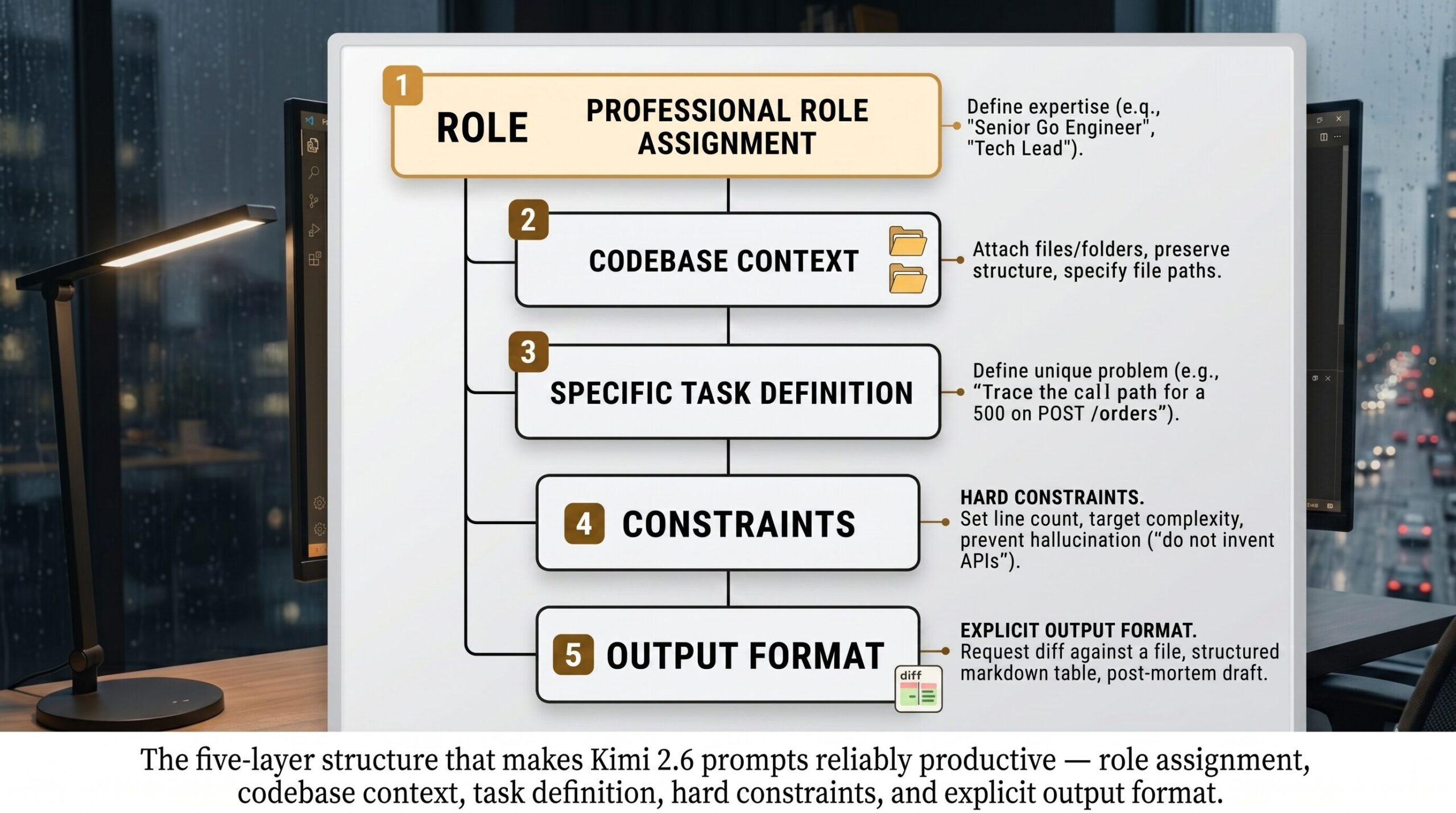
The last prompt on the list is the one I lean on when something is broken in production and I do not have time to think about how to ask. It combines role assignment, attached-context awareness, structured reasoning, format constraints, and an explicit iteration loop in one block. Read it, save it, customise the bracketed parts once, and use it forever.
[ASSUMPTION] marker keeps hallucinations visible. The verification gate prevents premature fixes. And the post-mortem seed turns the debugging session into shippable internal documentation. Kimi 2.6 is one of the few models that can actually carry all five constraints at once without dropping any.A good prompt for Kimi 2.6 is not a question. It is a contract. The clearer the contract, the cleaner the code that comes back. — from our editorial notes, after the fortieth rewrite
Common Mistakes and How to Fix Them
Even with the right templates, a few habits sabotage Kimi 2.6 specifically. These are the ones I see most often when reviewing other engineers’ chat logs.
Mistake one: pasting code as a screenshot or markdown image. Kimi 2.6 reads the file structure when source is attached as text or as actual source files. Images force OCR, which is lossy. Always paste as text or attach as a file.
Mistake two: dumping the entire repository into one prompt without asking a specific question. Long context is not the same as no context — the model still needs a question to anchor its reasoning. Attach the repo, then ask a sharp question.
Mistake three: accepting the first answer without pushback. Kimi 2.6 is unusually good at refining when challenged. If the answer feels off, say “I do not think that is right because X” and watch the second answer.
Mistake four: forgetting to specify the language version. “Python” and “Python 3.13” produce different code. Same for “TypeScript” and “TypeScript 5.6 with strict mode”.
Mistake five: asking for “the best” anything. The model has no idea what “best” means in your codebase. Ask for “the simplest”, “the fastest”, “the most readable”, or “the one with fewest dependencies” — concrete optimisation targets produce concrete code.
| Wrong Approach | Right Approach |
|---|---|
| “Fix this bug.” — followed by 400 lines of pasted code, no error message, no expected behaviour. | “Symptom: 500 on POST /orders. Expected: 200. Logs attached. Repro: payload below. Trace from handler to DB call and propose a fix.” |
| “Make this code better.” | “Refactor for readability. Keep public signature identical. Extract any function over 30 lines. Provide a diff.” |
| “Write tests for this function.” | “Write 6 pytest tests covering: happy path, empty input, single element, max-size input, malformed input, concurrent access.” |
| “Why is this slow?” | “This endpoint takes 2.4s p95. Target: under 400ms. Code attached. Trace the hot path and rank likely contributors with evidence.” |
| “Just give me the answer.” | “Show your reasoning before the answer. If you cannot verify a step, mark it [ASSUMPTION] and continue.” |
The single highest-leverage change you can make to your Kimi 2.6 prompts today is to replace every adjective (“better”, “cleaner”, “faster”) with a measurable target. Concrete targets produce concrete code. Vague targets produce vague code.
What Kimi 2.6 Still Struggles With
Honesty matters here, because nothing breaks reader trust faster than a prompt guide that pretends its tool is omnipotent. Kimi 2.6 has real limitations as of April 2026, and the prompts above will not paper over them.
It still struggles with deeply legacy stacks where the documentation is sparse and the idioms are non-standard. I have seen it write very confident COBOL that turns out to be a hallucinated dialect. If you are working on a system older than the model’s training data conventions assume, treat every output as a hypothesis. The same applies to recently released frameworks where the API has shifted in a way the training cutoff missed — always confirm method names against current docs.
It struggles with concurrency bugs that depend on real timing, because it cannot run your code. It can reason about race conditions in the abstract, but it cannot tell you whether your specific deadlock will fire on this hardware under this load. For those, the model is a great hypothesis generator, not a diagnostician. Pair it with a profiler and you are fine. Trust it without one and you are gambling.
And it has, like every model, a stubbornness blind spot when it comes to certain idioms it has seen too often. Ask it for an exception-handling pattern in Python and it will reach for a try/except block almost reflexively, even when a context manager would be cleaner. The fix is the same as everywhere else in this guide — name the constraint explicitly, and the model adapts.
Closing the loop
The skill you have just picked up is not really about Kimi 2.6. It is about expressing intent precisely enough that any sufficiently capable system — model, junior engineer, future you at 3 a.m. — can act on it without asking for clarification. The ten prompts above are scaffolding for that habit. After a few weeks of using them, you will find yourself rewriting them in your own voice, dropping the parts you do not need, adding the constraints that match your team’s style.
That is the deeper principle here. Good prompting is not magic words. It is engineering specifications written in English. The reason Kimi 2.6 rewards this discipline so well is that the model was tuned to follow specifications rather than vibes — which is precisely what coding has always demanded of humans, too.
Some things still need you. Choosing which problems are worth solving. Knowing when a refactor is procrastination. Spotting the moment a fix is treating a symptom rather than a cause. The model is fast, careful, and increasingly grounded — but it cannot tell you what your business actually needs, and it cannot push back against an unreasonable deadline. Those judgments stay yours. They are the part of the job that does not get easier with better tools, and arguably should not.
Looking forward, the next twelve to eighteen months are going to bring agentic coding workflows that go further than today’s chat-and-paste loop. Kimi 2.6 already supports tool use in API mode, and the next release line is openly aiming at long-running engineering agents that can complete multi-day tickets with checkpoints. The prompts in this guide are written so they survive that transition. The contract-style structure — role, context, task, constraints, output — is the same whether the model runs for ten seconds or ten hours. Learn it once, and the next model you sit in front of will already feel familiar.
Try These Prompts Right Now
Open Kimi 2.6, paste in any prompt from this article, and see the difference structured prompting makes. The first one is free.