
Kimi 2.6 vs Claude Opus 4.7 for Coding: 10 Real Prompts That Show You Who Actually Wins
You paste your broken async function into an AI chat. You get back something that runs — but it’s not quite what you wanted, and you’re not sure why. That experience depends enormously on which model you chose. Kimi 2.6 and Claude Opus 4.7 are two of the most capable coding AIs available right now. They think differently, explain differently, and fail in different ways. This guide runs 10 real coding prompts through both — so you can stop guessing and start choosing.
Benchmarks alone won’t tell you much. A model can score 90% on HumanEval and still produce code that’s technically correct but completely wrong for your use case. What actually matters is how these two models respond to the kinds of messy, half-described, real-world problems you throw at them every day. That’s what this comparison is about.
Kimi 2.6, from Beijing-based Moonshot AI, has built a serious reputation for handling massive context windows — we’re talking millions of tokens — without losing track of what it’s doing. Claude Opus 4.7, Anthropic’s most capable model as of early 2026, doubles down on careful reasoning, code that reads like a senior engineer wrote it, and explanations that actually teach you something. Neither is the clear winner for every task. Here’s where the line actually falls.
Why This Comparison Matters — and What Makes Each Model Different
The AI coding wars of 2026 are less about who can write a for-loop and more about who can hold an entire software project in their head. Kimi 2.6 leans into this with an extended context that’s genuinely useful when you need to paste in thousands of lines of legacy code and ask a sensible question about it. The model processes long inputs without the attention degradation you’d see in older architectures — feed it your whole repo structure and it won’t forget the beginning by the time it reaches the end.
Claude Opus 4.7 takes a different angle. Where Kimi 2.6 is often impressive on raw throughput and context retention, Claude Opus tends to produce code that’s more carefully structured — with meaningful variable names, proper error handling, and the kind of defensive programming that suggests the model actually thinks about what could go wrong. Ask Claude to build an API endpoint and you’ll typically get error states handled, edge cases noted, and a comment or two that explains why a decision was made, not just what it does. That combination of explanation and intention is Anthropic’s calling card.
The honest version of this comparison: if you’re working with enormous codebases, long documents, or tasks that require keeping a lot of context alive simultaneously, Kimi 2.6 has a real structural advantage. If you’re doing greenfield development, code review, architecture design, or anything that benefits from nuanced reasoning and clean output, Claude Opus 4.7 frequently pulls ahead.
Kimi 2.6 wins on context volume and long-file handling. Claude Opus 4.7 wins on code quality, explanation depth, and complex reasoning. The best developers in 2026 know when to use which — and this guide will show you exactly that.
Before You Start: Getting the Most From Both Models
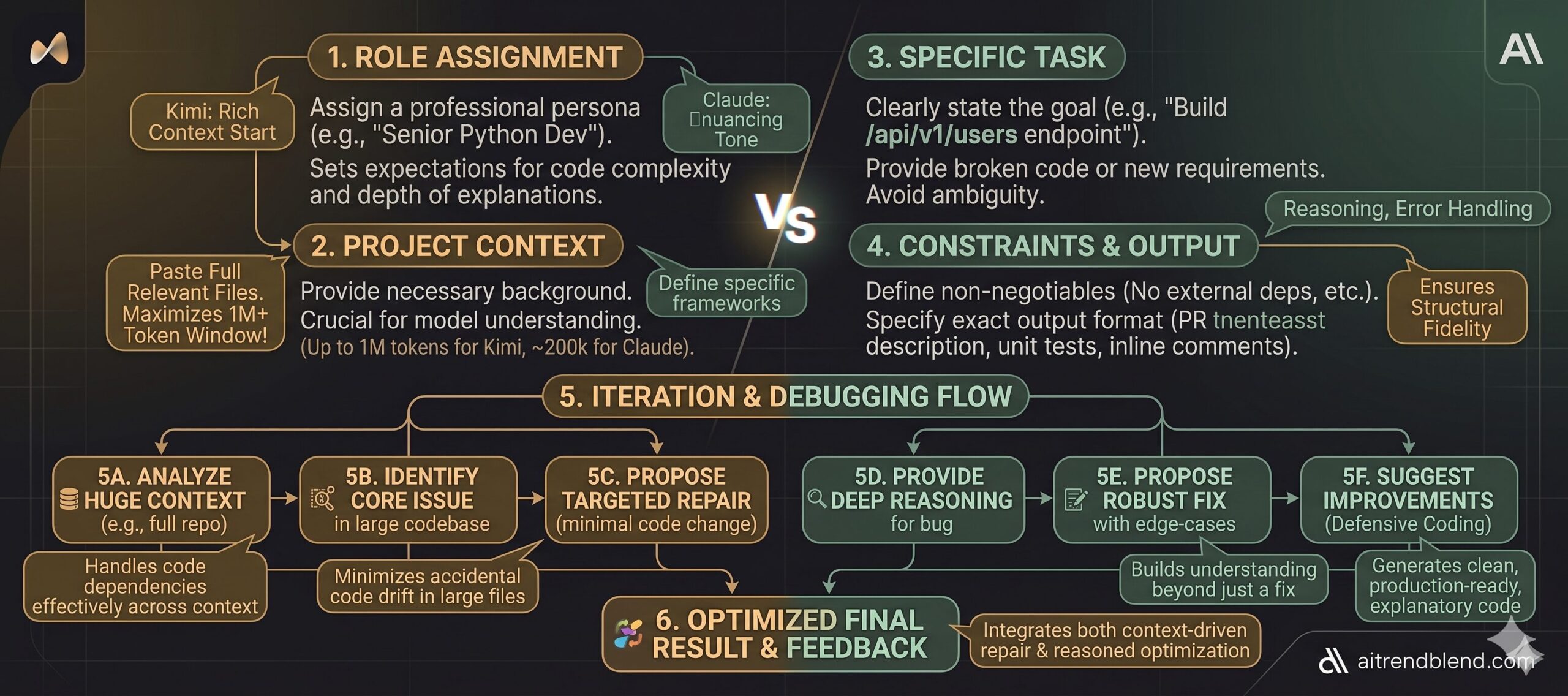
A few things will dramatically improve what you get from either model before you ever paste your first prompt. With Kimi 2.6, take advantage of what makes it genuinely unusual: paste the full relevant code, not just the snippet where you think the problem lives. The model can handle it, and more context consistently produces better output. Don’t prefilter for it — let it work with the whole picture.
With Claude Opus 4.7, the most reliable pattern is giving it a role and a brief summary of your project before you get into the specific task. Something like “You’re working on a Node.js e-commerce backend using Express and PostgreSQL” grounds the model and prevents it from making generic assumptions that don’t match your stack. Claude also responds well to explicit format instructions — if you want the code without the explanation, say so. If you want it to explain reasoning first and code second, say that too.
For either model, specificity around constraints makes a significant difference. Instead of “fix my function,” try “fix this function without changing the interface — the return type must stay the same and it can’t throw on null input.” That kind of constraint forces both models toward the answer that’s actually useful to you rather than the answer that’s technically defensible.
“The difference between a mediocre coding prompt and a great one isn’t complexity — it’s specificity. These two models both reward constraint-setting. The one that responds better to your constraints reveals which model is actually right for your workflow.” — aitrendblend.com editorial testing, April 2026
The 10 Coding Prompts — Head-to-Head
Each scenario below includes the prompt, how each model handles it, which one wins for that task, and how to adapt the prompt for your specific situation. The scenarios escalate from beginner-level tasks to the kind of complex, multi-layered work that separates capable AI assistants from truly exceptional ones.
Prompt 1: The Clean Function Generator
The first thing most developers reach for an AI to do is write a function they could write themselves but want to save 10 minutes on. The key is how much the model reads between the lines of a simple request.
Kimi 2.6: Produces clean, correct code quickly. Handles null checks adequately. Can feel slightly mechanical — the docstring often matches what you asked for but doesn’t add insight beyond it. Claude Opus 4.7: Tends to add defensive comments explaining edge cases you didn’t ask about (“Note: if end_date precedes start_date, this returns a negative integer — flip the abs() if that’s undesired”). That extra layer of intent often saves a debugging session later. Verdict: Claude edges ahead here for greenfield code.
Swap [LANGUAGE] for TypeScript and add “return type must be a discriminated union with an error state” to push both models toward more production-ready output. Kimi handles this cleanly at scale; Claude handles it with characteristic caution.
Prompt 2: The Bug Explainer
Debugging with AI is only as good as the model’s ability to explain what it’s finding. Getting the right fix is table stakes. Getting an explanation that prevents the same bug next week is what separates the two models here.
Both models find common bugs reliably. The instruction “explain the root cause” is where they diverge. Kimi 2.6 typically gives you a correct explanation but keeps it brief — sometimes too brief if the bug involves non-obvious state interaction. Claude Opus 4.7 tends to link the bug to a broader principle: “This is a classic closure-over-loop-variable issue, which is why the callback sees the final value of i rather than its value at each iteration.” That framing is genuinely useful for learning.
Add “also check for any other latent bugs in the function, even if they’re not causing the current failure” — this turns a repair into a review. Claude is stronger here; Kimi occasionally misses secondary issues.
Prompt 3: The Test Coverage Generator
Writing unit tests is the thing most developers know they should do and keep postponing. AI-generated tests are only useful when they cover the cases that actually matter, not just the happy path.
Kimi 2.6 generates tests quickly and covers the cases you listed. Claude Opus 4.7 does the same but often adds a comment explaining why a specific edge case is included — useful if you’re onboarding a junior developer to the test suite. Structurally, both are good here. The descriptive name instruction is essential for both models; without it, Kimi defaults to terse names and Claude defaults to verbose ones.
Replace [TEST_FRAMEWORK] with “pytest with parametrize” or “Jest with test.each” to force structured table-driven tests. Both models handle this well, but Kimi’s output tends to be more concise for parametrized patterns.
Prompt 4: The REST API Architect
The problem most people run into when asking AI to build API endpoints is that it makes decisions you didn’t authorise — it picks a database strategy, invents a schema, or skips error handling entirely. This prompt locks in the choices that matter.
This is where Claude Opus 4.7 starts to pull meaningfully ahead. The model respects constraints carefully — if you say “do not deviate,” Claude tends not to. The error envelope and status code requirements trigger Claude’s defensive programming instincts, and the output usually handles all five status codes with actual logic behind each. Kimi 2.6 handles this well too but occasionally elides the 422 case or conflates 400 and 422. For production API code, that distinction matters.
Add “write the corresponding OpenAPI 3.0 schema block for this endpoint” to the end — both models can produce it, but Claude’s output integrates more naturally with actual Swagger tooling because it matches the spec more precisely.
Prompt 5: The Legacy Code Refactorer
Nobody warns you that the hardest thing about asking AI to refactor code is getting it to not break the thing that currently works. This prompt solves that problem directly.
This is one of the clearest Kimi 2.6 victories in the comparison. When you paste long legacy files — 400, 600, 800 lines — Kimi reads the whole thing without losing the thread. The refactored output stays coherent end-to-end. Claude is excellent for shorter files but on longer inputs occasionally treats sections differently depending on where they appear in the context. For legacy codebases measured in thousands of lines, Kimi’s context architecture is a genuine advantage.
For very large files, split the task: first ask for a refactoring plan and a list of patterns to address, then refactor section by section. Both models improve with this approach, but Kimi handles the full-file version more reliably on its own.
Prompt 6: The Code Reviewer
The most useful code review is one that tells you the severity of each issue, not just a flat list of things to fix. This prompt enforces that structure on both models.
The four-section format with emoji anchors is understood well by both models. The “Praise” section is deliberately included — both models tend to produce more balanced and useful reviews when they’re forced to find something genuinely good. Without it, reviews skew negative and engineers stop reading them. Claude’s critical section tends to include reasoning (“this will fail under concurrent writes because…”); Kimi’s tends to identify the issue without always explaining why. Both patterns are useful; it depends on your team’s needs.
Add a fifth section: “🔵 Security-specific concerns” and watch both models sharpen considerably. Claude Opus 4.7 tends to produce more specific CVE-aware security feedback — Kimi’s is accurate but occasionally more generic.
Prompt 7: The System Architecture Designer
Here is where it gets interesting. Moving from writing code to designing systems is where model reasoning ability separates. A technically correct implementation built on a flawed architecture costs you weeks, not minutes.
The instruction “think through trade-offs before proposing” activates both models’ reasoning modes. Claude Opus 4.7 genuinely uses this space — it will consider eventual consistency vs. strong consistency, note the CAP theorem implications, and explain why it chose a message queue over a direct call. Kimi 2.6 produces solid architecture but tends to commit to a solution faster, with less visible deliberation. For novel or ambiguous system requirements, Claude’s more considered reasoning often produces better-fit designs.
Add “propose two alternative architectures and explain the conditions under which each is preferable” — this forces explicit trade-off reasoning from both models. Claude handles the two-option format with notable clarity.
Prompt 8: The Large Codebase Analyst
Most tutorials skip this part entirely — what do you actually do when you need to understand a codebase you’ve never seen before? This prompt is purpose-built for Kimi 2.6’s strength.
This is Kimi 2.6’s clearest win in the entire comparison. On large codebases, Kimi’s context handling is simply more reliable — it maintains coherence across thousands of lines and produces an accurate execution trace for question 2. Claude Opus 4.7 performs well within its context window but starts to show inconsistencies if you push significantly past 150k tokens. For any task that requires loading a full codebase at once, Kimi 2.6 is the right choice.
For particularly large codebases even beyond Kimi’s window, break the analysis into modules: send each module separately with “here is the context from previous modules: [summary]” to maintain continuity. Kimi handles these chained summaries better than most alternatives.
Prompt 9: The Security Auditor
AI-assisted security reviews are only useful when the model can name specific vulnerability classes, not just vague concerns. This prompt pushes both models toward that specificity.
Claude Opus 4.7 is notably stronger here. The OWASP/CWE framing activates a level of precision that Claude handles well — it links issues to specific CVE patterns, explains attack vectors in realistic terms, and the severity assignments tend to be accurate rather than conservative-by-default. Kimi 2.6 finds most of the same issues but occasionally grades severity inconsistently, and its attack scenarios can be too abstract to be immediately useful for a developer who’s never thought about SQL injection before.
Add “prioritise findings by exploitability, not just severity — assume a motivated external attacker with no prior access” to get triage-ready output that a team can act on without a separate prioritisation meeting.
Prompt 10: The Full-Stack Feature Builder (Master Prompt)
This is the prompt that integrates everything. It requires role assignment, project context, multi-layer output, constraints, iteration instructions, and format control — all at once. It’s designed to reveal each model’s ceiling.
The output sequence instruction — “complete each step in order, do not skip ahead” — is the critical element. It forces both models to reason before implementing, which catches misunderstandings before they cost you 300 lines of wrong code. Claude Opus 4.7 handles Step 1’s clarifying questions with real nuance, often surfacing assumptions about the data model or UX behaviour that you hadn’t thought to specify. Kimi 2.6 tends to confirm quickly and move to implementation — useful when the requirements are clear, but riskier when they’re not. For this master-level task, Claude’s careful pre-implementation reasoning consistently produces more complete, correctly scoped features.
To use this with Kimi 2.6 most effectively: paste the full relevant codebase in the project context section and skip Step 1 clarification by frontloading your requirements in maximum detail. Kimi’s strength is context retention, not requirement elicitation — so give it more upfront and it delivers more reliably.
The Running Scorecard
| Scenario | Kimi 2.6 | Claude Opus 4.7 |
|---|---|---|
| 1. Clean Function Generator | Runner-up | ✓ Winner |
| 2. Bug Explainer | Accurate, brief | ✓ Winner |
| 3. Test Coverage | Tie | Tie |
| 4. REST API Builder | Solid | ✓ Winner |
| 5. Legacy Refactoring | ✓ Winner | Strong for short files |
| 6. Code Review | Large file advantage | ✓ Edges ahead |
| 7. System Architecture | Solid | ✓ Winner clearly |
| 8. Large Codebase Analysis | ✓ Winner decisively | Within context limits |
| 9. Security Audit | Finds the issues | ✓ Winner |
| 10. Full Feature (Master) | Strong with rich context | ✓ Winner for ambiguous reqs |
Common Mistakes When Prompting AI for Coding
The prompts above will only get you so far if the underlying prompting habits are wrong. These are the mistakes that consistently produce bad output from both Kimi 2.6 and Claude Opus 4.7 — and how to correct them.
| Mistake | Wrong Approach | Right Approach |
|---|---|---|
| Vague task description | “Fix my authentication code” | “Fix the JWT token refresh logic in auth.py — it’s returning 401 after exactly 15 minutes even when the refresh endpoint is called at 14 minutes” |
| No constraints | “Refactor this to be cleaner” | “Refactor without changing the public interface, no new dependencies, and target Python 3.11 idiomatic style” |
| Skipping context | “Write a function that saves a user” | “I’m using SQLAlchemy with PostgreSQL. Write a function that upserts a user record — insert if not exists, update email and updated_at if it does” |
| Not specifying output format | “Explain what this code does” | “Explain what this code does in two parts: (1) a one-sentence summary for a PM, (2) a technical breakdown for a mid-level engineer” |
| Accepting first output | Copy-pasting the first response | “Good start. Now add error handling for the case where the database connection drops mid-transaction, and make sure it doesn’t silently swallow the error” |
Both models reward iteration. The first response is a starting point, not a final answer. Developers who treat AI like a vending machine — one prompt in, code out — get mediocre results. Those who treat it as a technical conversation get something worth shipping.
What Each Model Still Struggles With
None of this comes free. Kimi 2.6’s long-context strength has a trade-off: on shorter, more conversational tasks, the model can sometimes feel less nimble than Claude. Its explanations prioritise completeness over elegance, which is great when you’re debugging a 600-line data pipeline but slightly overkill when you just want to rename a variable correctly.
Claude Opus 4.7 has its own friction points. The model occasionally over-engineers solutions — it adds abstraction layers and error states that are technically correct but unnecessary for a quick internal script. It also tends to be slightly more conservative about making assumptions, which means you’ll sometimes get a list of clarifying questions when you’d prefer it to just make reasonable choices and explain them after. For experienced developers who know exactly what they want, this can feel like the model is second-guessing them.
Both models can hallucinate APIs, library methods, and even function signatures in less common ecosystems. If you’re working in a niche language or with a relatively obscure third-party library, always verify that the functions actually exist before running the output. This is not a solved problem in 2026 — it’s an area where human review remains non-negotiable. The workaround: paste the relevant library documentation or source into the context window alongside your prompt, forcing the model to work from ground truth rather than training-time knowledge.
After running these two models through 10 real coding scenarios, the pattern is clear enough to act on. Claude Opus 4.7 is the stronger daily driver for most developers — its code quality is higher, its explanations teach rather than just inform, and its reasoning under ambiguity is noticeably more careful. Kimi 2.6 is not a consolation prize, though. For the specific problem of working with large, complex, existing codebases, it has a structural advantage that Claude simply cannot match without breaking the work into smaller chunks.
The deeper lesson here is about what it means to work well with AI in 2026. The models are no longer the bottleneck — the prompts are. A well-structured prompt to either of these models will outperform a vague prompt to both of them combined. The developers who are getting the most out of AI coding tools aren’t the ones with access to the best model — they’re the ones who’ve learned to specify what they want precisely enough that the model has nothing to guess.
Some things still require a human in the loop. Architecture decisions that carry multi-year consequences, security reviews of code that handles real money or sensitive data, and anything where the requirements are genuinely ambiguous — these all benefit from AI assistance, but they’re not finished when the AI stops typing. The model gives you a strong first draft. The engineering judgment about whether that draft is right for your specific context is still yours to exercise.
The trajectory for both Kimi and Claude suggests the context gap will narrow over the next 12 to 18 months — Claude’s context is already growing, and Kimi is steadily improving its reasoning quality. The models are converging, which means the prompting skill you build today will matter even more as the raw capability difference shrinks. Start treating your prompts like code: version them, iterate on them, and keep the ones that work.
Try These Prompts Right Now
Copy any of the 10 prompts above and test them in Kimi 2.6 or Claude Opus 4.7. See for yourself which one fits your workflow — and share the results with us.