
Claude Code for Medical Research Pipelines: 10 Prompts for Clinical AI Engineering (2026)
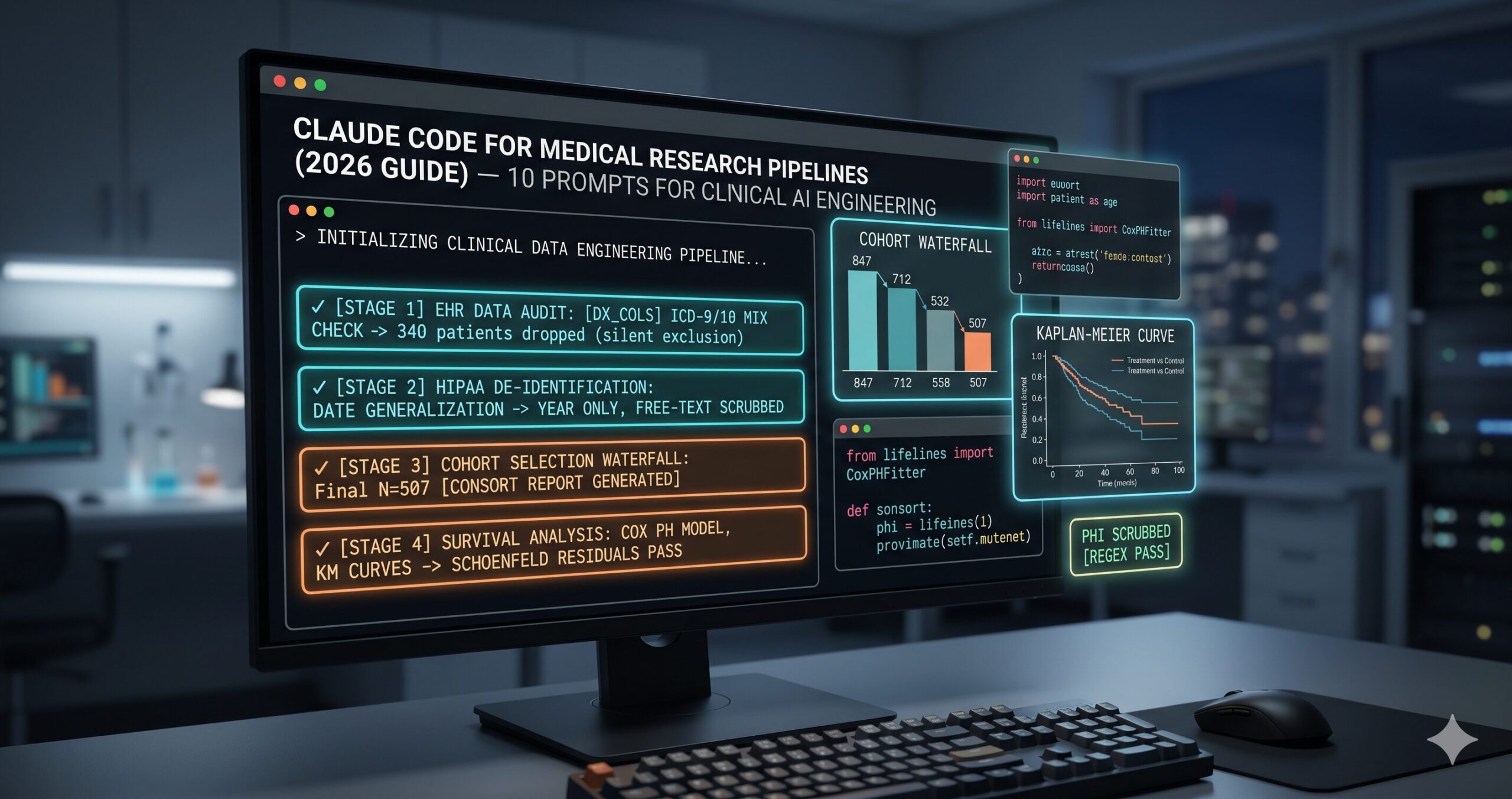
Pipelines with Claude Code
Clinical data is unlike any other data an engineer works with. It arrives from systems designed for billing and care coordination, not analysis — which means inconsistent coding schemes, free-text fields where structured data should live, observation timestamps that reflect when a nurse entered a value rather than when a condition changed, and measurement units that vary between departments. None of this is anyone’s fault. It’s the accumulated entropy of healthcare records built across decades, systems, and staff.
Claude Code is well-positioned for this work precisely because it operates inside your project. It reads your actual column names, your existing utility functions, your data dictionaries, your IRB documentation — and generates code grounded in that context rather than in assumptions about what a clean clinical dataset looks like. That grounding matters especially in medical research, where a wrong assumption about data structure is not a failed model but a biased analysis that shapes conclusions with real downstream impact on patients.
The ten prompts here cover the full clinical research pipeline — from raw EHR audit to regulatory compliance documentation. Each one is designed around the specific challenges of medical data: ICD coding heterogeneity, temporal ordering constraints, PHI handling, survival analysis methodology, and clinical NLP. They are not general data science prompts applied to healthcare. They are healthcare prompts, built for what clinical data actually is.
Why Claude Code Handles Medical Research Pipelines Differently
The problem most researchers run into using AI for clinical data work is domain-agnostic code generation. A tool that doesn’t know whether your dataset uses ICD-9 or ICD-10 codes, whether lab values are in SI or conventional units, or whether your time column represents observation time or record entry time will generate code that compiles cleanly and produces subtly wrong results. In medical research, subtle and wrong is worse than obviously broken. It passes your pipeline tests, looks reasonable in the output, and introduces a bias you find — if you find it — during peer review.
Claude Code’s project-wide context changes this dynamic entirely. Run claude in your project root and point it at your data dictionary, your existing preprocessing functions, your cohort definition logic — and the code it generates reflects what your data actually is. It uses your column names, your internal coding conventions, your existing utility functions for date parsing. The code fits. That fit matters more in clinical data engineering than in almost any other domain, because the cost of a mismatch is an analysis error, not a runtime error.
Gemini with Google Health integrations handles standardized clinical trial data formats well. GPT-4o is capable for general medical NLP tasks. Claude Code’s advantage is the agentic loop — reading your full project, running validation scripts, checking against your actual data schema, and fixing what breaks before presenting finished code. For the multi-file, multi-stage clinical pipeline work that real research requires, that loop produces more trustworthy output than any single-shot generation approach from a chat interface.
Medical research pipelines fail in domain-specific ways — ICD coding mismatches, temporal data leakage, silent cohort exclusions, PHI exposure in edge cases. Claude Code’s project-wide context means the code it generates handles your specific data structure. That specificity is the difference between code you can submit to a journal and code you have to audit line by line before trusting the results.
Before You Start: How to Get the Best Results
Medical research projects have compliance and governance requirements that shape every engineering decision. Getting these foundations right before your first prompt prevents a large class of avoidable problems — and produces a paper trail that your IRB will appreciate.
Build a thorough CLAUDE.md before your first session. For clinical work, this file should document: your IRB protocol number and data use agreement scope, the coding systems present in your data (ICD-9, ICD-10, CPT, LOINC, RxNorm, NDC — whichever apply), the canonical unit system for lab values, the date granularity you’re permitted to retain under your IRB, and any columns that contain or are derived from PHI. Claude Code reads this at session start and applies these constraints automatically rather than requiring you to re-specify them with each prompt.
Keep your data dictionary as a structured file — a data_dictionary.json or a schema.csv — and reference it explicitly in every data-handling prompt. Clinical datasets exported from EHR systems often have cryptic column names (dx1, proc_cd_3, adm_dt) that mean nothing without the dictionary. When Claude Code has the dictionary in context, it uses the semantic meanings to generate validation logic, feature engineering, and statistical analyses that are actually appropriate for each column.
Use strict permission scoping for medical project sessions. Claude Code’s bash execution permissions should be limited to read, write, and execute within your project directory — never granted direct access to the data source systems, network shares, or cloud buckets containing raw patient data. All raw data access should happen through the secure extraction processes your institution has approved. Claude Code works with locally extracted data that has already cleared the compliance boundary.
The 10 Best Claude Code Prompts for Medical Research Pipelines
Complexity escalates from beginner scripts you can run immediately to master-level frameworks for multi-investigator clinical research projects. All amber variables are yours to fill before running each prompt.
Prompt 1: The Clinical Dataset Auditor
Before any analysis, any cohort selection, any model building — you need to know what you actually have. Clinical EHR exports are notoriously inconsistent: date fields stored as strings in three formats, diagnosis codes mixed across ICD versions, lab values with units in some rows and absent in others. This prompt generates an audit script that surfaces all of it before it becomes a downstream problem.
The ICD-9 vs ICD-10 mixing check is the most commonly missed data quality issue in retrospective clinical studies. It’s invisible to generic profiling tools. Researchers who miss it end up with cohorts where a code means something entirely different in one patient’s record than another’s — and the analysis proceeds without anyone knowing. Finding this at the audit stage, not the analysis stage, is the right time.
Add “Scan free-text columns for residual PHI using regex patterns for date formats, phone numbers, names in notes fields, and MRN-format numbers” — a second-pass check that surfaces PHI surviving a pre-extraction de-identification step before your pipeline ever touches it.
Prompt 2: The HIPAA De-identification Pipeline
Here is where the stakes are highest. De-identification is not a checkbox — it’s a systematic process covering the eighteen PHI identifier categories under HIPAA Safe Harbor, plus whatever additional restrictions your data use agreement imposes. Getting it wrong is not a pipeline bug; it’s a compliance breach with institutional and legal consequences. This prompt generates a rigorous, auditable de-identification module that fails loudly rather than silently.
“Do not continue silently” is the most critical instruction in this prompt. Silent skipping of a PHI column — because an NLP tool fails on an unusual encoding, because a column is unexpectedly populated — is the failure mode that causes breaches. A pipeline that crashes loudly when de-identification encounters an error is dramatically safer than one that continues and produces a dataset believed to be clean but isn’t.
Add “Generate a test suite that verifies the output contains none of the original values from the dropped columns, using a small sample of known PHI values stored in a secure test fixture” — an automated verification that de-identification actually worked, not just that the code ran without errors.
Prompt 3: The Cohort Definition Engine
The problem most researchers run into when building cohorts is silent exclusion. A patient gets dropped because their diagnosis code is ICD-9 when your filter expects ICD-10, because a medication name uses an abbreviation your inclusion criteria don’t match, or because a date comparison fails on a timezone offset. None of these errors announce themselves. This prompt generates a cohort builder with explicit accounting — CONSORT-style — for every patient at every filter step.
The CONSORT waterfall log — patient count at every filter step — is what makes a cohort definition auditable by co-investigators, reviewers, and editors. It also makes debugging cohorts fast: when your final N is unexpectedly small, the log tells you exactly which filter excluded the most patients and whether the exclusion makes clinical sense. Generating it automatically means you have it for every cohort iteration at zero additional effort.
Add “Apply 1:1 propensity score matching on [TREATMENT_COL] using covariates [CONFOUNDERS] after cohort selection, then generate a Table 1 balance check using the tableone library” to extend the script into a matched case-control design with baseline characteristics reporting.
Prompt 4: The Clinical Feature Engineering Module
Think about what clinical features actually require. Lab values need normalization against reference ranges, not just standard scaling. Diagnosis histories need time-windowed counting by clinical category, not one-hot encoding. Medication exposures need dose and duration accounting, not a presence flag. Generic ML feature engineering misses all of this. This prompt generates transformations that understand the medical domain — including the temporal constraint that prevents leakage of future clinical events into training features.
The temporal constraint as an AssertionError — not a warning, not a log message — is the engineering choice that separates pipelines with reliable model performance from pipelines with inflated validation metrics that fall apart prospectively. Temporal leakage in clinical prediction is the single most common cause of models that look excellent in development and fail when deployed. An assertion that crashes is the right tool for a bug that cannot be allowed to pass silently.
Add “Build SOFA score components from available lab and clinical variables” for ICU datasets, or “Compute time-series windows at 30, 60, and 90 days pre-index for all lab columns” for trajectory prediction models. Claude Code extends the module cleanly when the schema is already in context.
Prompt 5: The Survival Analysis Pipeline
Survival analysis is the statistical workhorse of clinical outcomes research and one of the most frequently misimplemented methods outside biostatistics teams. Kaplan-Meier curves without competing risk adjustment, Cox models where the proportional hazards assumption goes untested, censoring that conflates administrative and informative events — these are common failures with publishable-looking output. This prompt generates survival analysis that runs the methodology correctly, not just the code.
Building the proportional hazards assumption test in as a required step — not an optional one — means every Cox model produced by this pipeline comes with a diagnostic rather than relying on the analyst remembering to run it. A Cox model where the PH assumption is violated produces hazard ratio estimates that are averages over a time-varying effect, which can substantially misrepresent the treatment relationship at any specific time point.
Add “Perform landmark analysis at [LANDMARK_DAYS] days to address immortal time bias” when your exposure is defined over a pre-index window. Claude Code implements the landmark restriction correctly in context — it’s a nuance that requires knowing the exposure definition, which is available in your project files.
Prompt 6: The Clinical NLP Extraction Pipeline
Most of the clinically meaningful information in an EHR lives in free text — physician notes, radiology reports, discharge summaries, pathology findings. Structured ICD codes capture what was billed. Clinical notes capture what the clinician observed. This prompt builds an NLP pipeline that extracts structured clinical information from unstructured text, with negation detection and temporality classification that make the extracted data actually usable for research.
Negation detection is where clinical NLP earns its domain specificity. A patient who “denies chest pain” does not have chest pain as a positive finding — but a naive NER extractor tags “chest pain” as present regardless. Combined with temporality classification, this transforms raw entity extraction into usable clinical signal: you know whether a finding is current, historical, or hypothetical, and whether it was affirmed or denied. That distinction is the difference between a feature that improves a model and one that adds noise.
Add “For [SEVERITY_ENTITY] extractions, capture the associated severity modifier (mild/moderate/severe) and map to numeric scores 1/2/3″ when building severity-stratified outcomes. Claude Code extends both the extraction schema and the output parquet schema together, keeping the pipeline consistent end to end.
Prompt 7: The Clinical Trial Data Chain
Most tutorials skip this part entirely. Clinical trial data arrives in CDISC SDTM or ADaM format — domain-specific standards that most data engineers encounter once and immediately want to avoid forever. Processing them correctly requires understanding the data model before writing any transformation code. The three-phase chain here builds that understanding explicitly, then uses it.
Reviewing the Phase 1 domain map before Phase 2 is what separates correct SDTM processing from confident but wrong SDTM processing. SDTM datasets frequently have non-standard variables, sponsor-specific naming conventions, and domain-level deviations that aren’t obvious from the file names. Phase 1 makes those visible before you build the transformation code that depends on them — a thirty-second review that saves hours of tracing unexpected nulls in the ADSL output.
Replace the SDTM source with FHIR R4 bundles: “Read Patient, Observation, Condition, and MedicationRequest resources from [FHIR_DIR] and apply the same three-phase approach.” Claude Code handles FHIR JSON structure well when given the full project context for what resources are available.
Prompt 8: The Medical Research Test Suite
Testing a clinical research pipeline is a different discipline from testing regular software. You’re not only verifying that functions return correct types — you’re verifying that statistical assumptions hold, that temporal constraints are enforced in practice, that PHI de-identification is complete, and that cohort definitions are applied consistently across patient subgroups. This prompt generates a test suite that covers all of it.
The temporal leakage injection test — inserting a known future value and asserting it is absent from the feature output — is the test that catches the failure most researchers never find until it’s too late. A temporal guard that logs a warning rather than raising, or has an off-by-one on the date comparison, will pass a code review. It will not pass this test. That distinction is exactly the one worth enforcing in code rather than trusting to convention.
Add “Run the full pipeline end-to-end on a 100-patient synthetic dataset with known outcomes and assert the effect estimate falls within the pre-computed confidence interval” as a regression test that catches breaking changes across pipeline refactors without requiring any real patient data.
Prompt 9: The Regulatory Compliance Validator
None of this comes free. Medical research pipelines that generate results for publication, FDA submission, or clinical deployment need compliance documentation that goes beyond code correctness. This prompt generates the audit trail, reproducibility report, and compliance attestations that IRBs, journal editors, and regulatory reviewers actually ask for — automatically, every time the pipeline runs.
Timestamped compliance reports generated automatically at every pipeline run create the audit trail that IRBs and journal editors need without requiring anyone to manually document the analysis after the fact. The lineage report — tracing each output back to its source files and transformations — is particularly valuable during regulatory review, where demonstrating that a specific result is traceable to specific data through specific steps is a documented requirement, not a nice-to-have.
Add “Generate a 21 CFR Part 11-compliant audit log with user, timestamp, action, and reason fields for each file modification” when the pipeline is part of an FDA-regulated clinical investigation. Claude Code will add the logging layer to existing pipeline functions without changing their core logic.
Prompt 10: The Medical Research Pipeline Architect
This is the master framework — the prompt you use when starting a new clinical research project from scratch, or when an existing pipeline needs a serious architectural overhaul. It integrates role assignment, full project context loading, compliance constraints, phased delivery with explicit review gates, and a quality evaluation loop. It’s slower to set up and worth every minute for studies where the results will influence clinical practice.
“Wait for my explicit approval before writing any code” is the line that prevents the most expensive class of wasted work in clinical research engineering. Architecture-level misunderstandings — wrong study design assumption, incorrect understanding of the index date definition, incorrect temporal window for features — are cheap to fix in a plan and expensive to fix in 2,000 lines of implemented pipeline code. The approval gate turns a potentially expensive rework into a thirty-second correction.
Add “Include a statistical analysis plan document in [OUTPUT_DIR]/SAP.md describing each analysis, the estimand, the handling of missing data, and the sensitivity analyses planned” — Claude Code will generate the SAP alongside the pipeline code, keeping the two in sync as the project evolves.
Prompts 1 through 3 handle the data quality and compliance foundations that every clinical research project needs before any analysis begins. Prompts 7 through 10 produce pipeline architectures that would take a senior clinical data scientist several days to build — and that generate the compliance documentation and test coverage needed to support a published study or regulatory submission.
Common Mistakes and How to Fix Them
These are the specific failure patterns that show up most consistently in clinical research pipelines — not hypothetical edge cases, but the habits that produce subtly wrong analysis in ways that often survive code review and appear only in peer review or prospective validation.
| Wrong Approach | Right Approach |
|---|---|
| Filter for patients with diagnosis code “I50” for heart failure. | Filter for patients with ICD-10 codes starting with I50 (3-char prefix match) OR ICD-9 codes 428.x — log which ICD version each patient’s code came from. Flag any patient with both, which may indicate a coding transition mid-record. |
| Use all available clinical data to predict 30-day readmission. | Define the index date as the discharge date. Assert that ALL feature columns use only data with encounter dates strictly before the index date. Inject a test future value and verify it raises an AssertionError. Any violation of this constraint must fail loudly. |
| Drop all rows with missing lab values before modeling. | Impute missing lab values using population median stratified by age group and sex. Add a binary missingness indicator column per lab. Verify the imputed values are within physiologically plausible ranges. Flag imputed rows in the output. Missing data is often informative — don’t discard that signal. |
| Run a Cox model on the treatment vs. control groups and report the hazard ratio. | Run the Cox model. Test the proportional hazards assumption with Schoenfeld residuals. If violated, use a time-varying coefficient model or stratified Cox. Report the PH test result alongside the HR. Readers need to know whether the assumption held. |
| De-identify the dataset by dropping the patient name and MRN columns. | Apply HIPAA Safe Harbor de-identification covering all 18 identifier categories. Generalize dates and geographic data. Apply NER-based PHI scrubbing to free-text fields. Generate an attestation report logging every transformation. Raise an error — do not warn — if any PHI column cannot be fully transformed. |
Mistake 1: Treating ICD-9 and ICD-10 as interchangeable. A cohort filtered on ICD-10 codes will silently exclude patients whose records were created before the ICD-10 transition in your health system, or patients transferred from institutions that hadn’t yet switched. The resulting cohort selection bias can be invisible in your data and substantial in effect. Always check for mixed ICD versions at the audit stage and handle both in your cohort definition.
Mistake 2: Confusing informative and administrative censoring. In survival analysis, administrative censoring — a patient’s follow-up ending because your study window closes — is handled differently from informative censoring, where the patient leaves your data for a reason related to their outcome. Treating informative censoring as administrative produces biased survival estimates. When the reason for censoring is available in your data, it belongs in the competing risks model, not folded into the censoring indicator.
Mistake 3: Skipping validation on free-text de-identification. Automated NLP-based PHI scrubbing has known failure modes: unusual name formats, abbreviated medication names containing initials, non-standard date representations. Running a regex scan for common PHI patterns on the scrubbed output — as a test, not just at de-identification time — adds a second check that catches the cases the NLP tool misses without requiring manual review of every note.
Mistake 4: Not versioning the cohort definition separately from the analysis code. Clinical research projects evolve: the PI refines inclusion criteria, a data quality issue prompts an exclusion change, a sensitivity analysis uses a modified cohort. Without version-controlling the cohort definition independently, you lose the ability to trace which analysis used which cohort — which matters when a reviewer asks why two result tables have slightly different N values.
What Claude Code Still Struggles With in Medical Research
Claude Code’s limitations for clinical research work are domain-specific, and understanding them prevents you from discovering them under deadline pressure.
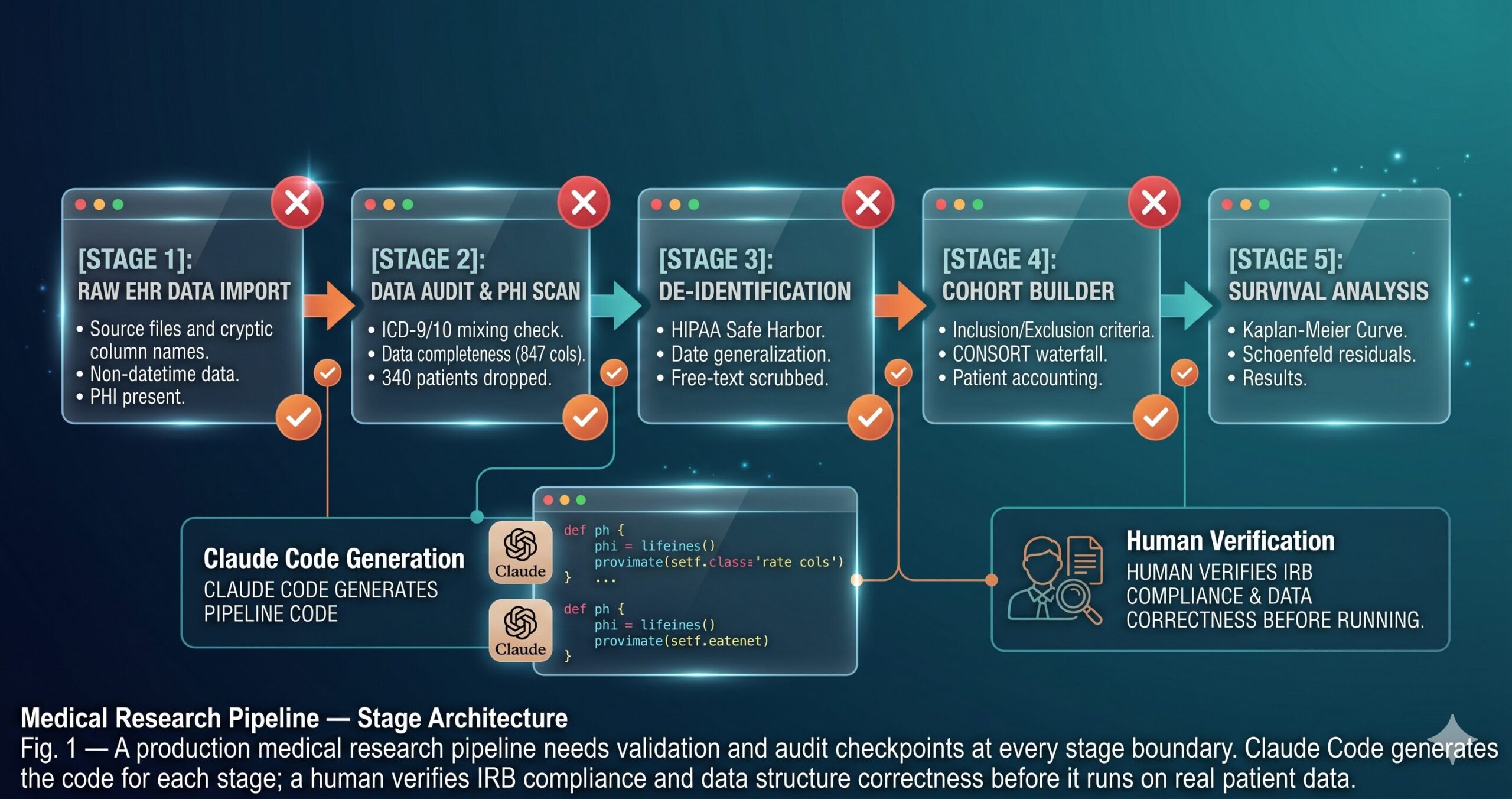
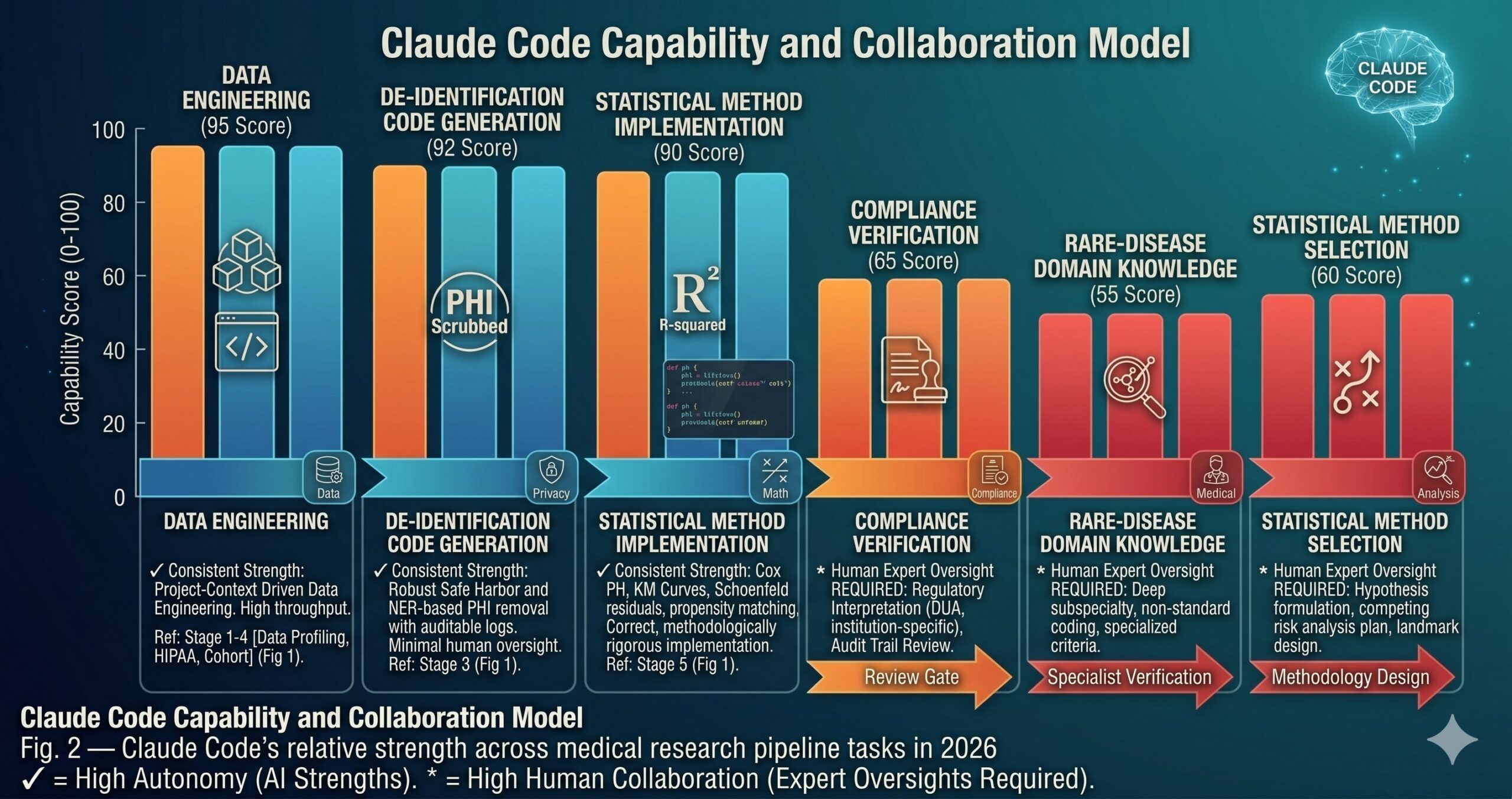
Claude Code cannot verify HIPAA compliance independently. It can generate code that implements HIPAA Safe Harbor de-identification correctly according to the standard — but it cannot tell you whether your specific data use agreement permits a particular transformation, whether your institutional review board’s approved variable list matches what’s in the dataset, or whether a rare edge case in your free-text data slipped through the PHI scrubbing. Human review of the compliance output is not optional for any pipeline that processes real patient data. The compliance validator in Prompt 9 generates documentation that supports that human review — it does not replace it.
Medical domain knowledge has gaps for rare conditions and subspecialty coding. Claude Code is well-grounded in common clinical coding conventions, standard lab reference ranges, and widely-used scoring systems like Charlson. For rare diseases, subspecialty-specific procedure coding, or highly specialized scoring instruments, the generated code may use plausible but incorrect reference values or miss condition-specific coding conventions. For any feature that requires specialized medical knowledge to validate, the output needs review from a clinician or biostatistician familiar with that domain before it runs on real data.
Statistical method selection requires human judgment. Claude Code can implement a Cox proportional hazards model correctly, test the PH assumption, and fit a competing risks model when told to. What it cannot do is decide whether those are the right methods for your specific research question, whether your study design introduces biases that require alternative estimators, or whether your sample size is adequate for the planned analysis. The analytical approach should be specified in a statistical analysis plan written or reviewed by a biostatistician — and that SAP should drive the prompts you use, not the other way around.
“Claude Code writes the pipeline. The biostatistician designs the analysis. The clinician validates the features. None of these roles can substitute for the others — and the best clinical research infrastructure in 2026 makes all three roles more efficient.”
— aitrendblend.com Editorial Team, 2026
What This Pipeline Enables — and What It Doesn’t Change
The skill this guide has built is clinical data engineering discipline backed by automated tooling: the ability to take a messy, PHI-laden, coding-inconsistent EHR export and transform it into a analysis-ready dataset that is auditable, reproducible, and defensible under peer review. The pipeline structure — audit, de-identify, define cohort, engineer features, analyze, validate compliance — is not new. What is new is the speed at which Claude Code generates the implementation for each stage, and the degree to which the generated code reflects your specific project structure rather than a generic template.
Good medical research infrastructure reflects something deeper about the field: the gap between “the analysis ran” and “the analysis is correct” is enormous in clinical data science, and bridging it requires attention to a class of domain-specific constraints that general-purpose engineering tools miss entirely. Temporal ordering. Coding system heterogeneity. Competing risks. Informative missingness. Compliance documentation. These are not edge cases in clinical research — they are the central challenges. A pipeline that handles them systematically produces results that hold up. One that doesn’t produces results that look fine until they don’t.
There is a category of judgment that these prompts cannot replace, and being clear about that boundary matters. Deciding whether a new exclusion criterion is scientifically justified or statistically motivated — that’s a methodological decision that requires domain expertise. Interpreting a hazard ratio in the context of clinical meaningfulness — that’s a clinical judgment. Determining whether an unexpected subgroup finding is a real signal or a multiple testing artifact — that’s a biostatistical call. Claude Code accelerates the engineering work that surrounds those decisions. It does not make the decisions themselves.
The trajectory for AI-assisted clinical research engineering in 2026 and beyond points toward tighter integration with EHR APIs, federated analysis platforms, and regulatory submission systems. The pipeline patterns in this guide will remain relevant as those integrations mature — the fundamental stages of clinical data processing do not change when the tooling improves. What will change is how much of the compliance and reproducibility documentation can be generated automatically, and how much of the engineering overhead shrinks so that the researchers who do this work can spend more time on the science that actually moves the field forward.
Try These Prompts Right Now
Open a terminal in your clinical research project root, run claude, and start with Prompt 1 pointed at your actual dataset. The audit report will surface data quality issues in your EHR export that most researchers only find midway through an analysis.
Disclaimer: aitrendblend.com is an independent editorial publication. We are not affiliated with Anthropic or any AI company. No sponsored content influenced the evaluations or recommendations in this article.