
Best AI Tools for Writing Code in 2026: Claude Opus 4.6 vs Kimi 2.5 Pro vs Gemini 3.1 Pro vs ChatGPT Plus 5
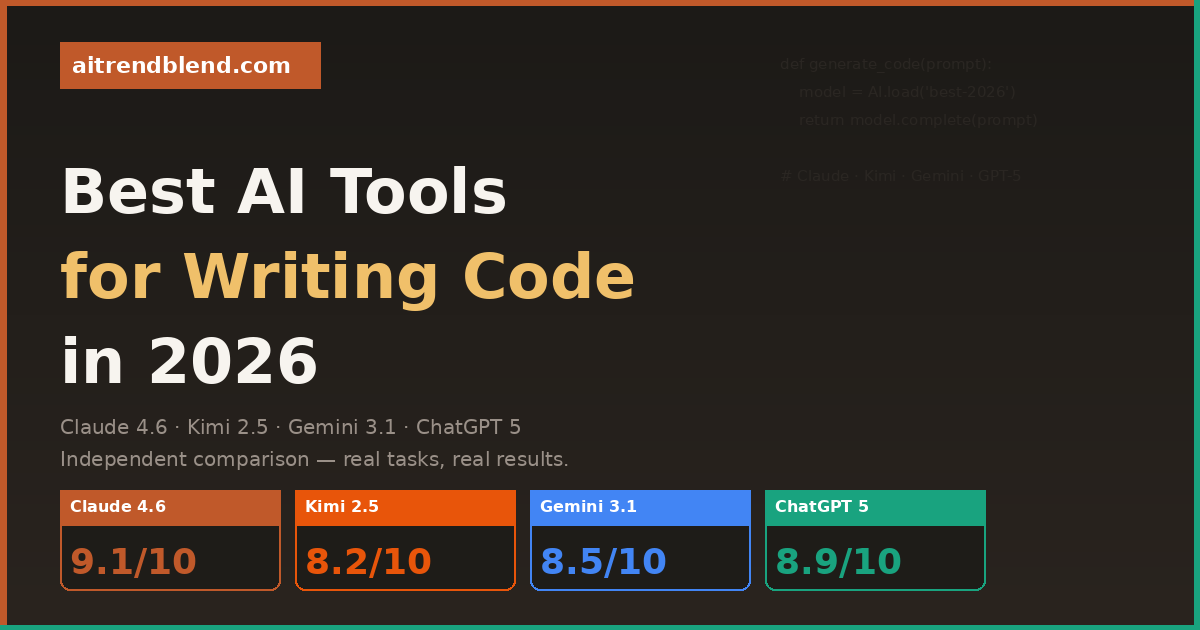
We put four of 2026’s most powerful AI coding assistants through real-world development tasks — debugging, architecture, refactoring, and full-stack generation. Here’s what actually happened.
You’re twenty minutes into a debugging session. The error is cryptic. Stack Overflow has three answers from 2019 that don’t match your version. You paste the code into your AI assistant — and whether what comes back is actually useful, or just plausible-looking nonsense, depends entirely on which tool you’re talking to.
The gap between the best and worst AI coding assistants in 2026 is not small. On a well-structured prompt with a clean codebase, most modern AI tools produce something usable. But real development isn’t well-structured: it’s a 4,000-line file with inconsistent naming conventions, a bug that only appears in production, or a refactoring job that requires understanding not just the code but why it was written that way in the first place. That’s where the differences become stark.
Four tools are in serious contention for the top spot right now: Claude Opus 4.6 from Anthropic, Kimi 2.5 Pro from Moonshot AI, Gemini 3.1 Pro from Google DeepMind, and ChatGPT Plus 5 from OpenAI. Each has a genuinely different approach to code — different strengths, different failure modes, different ideal use cases. None of them is the best at everything, and the one you should use depends on what you’re actually building.
We tested all four on the same tasks: generating full-stack components from a brief, debugging deliberately broken code across multiple languages, refactoring legacy code for readability, explaining unfamiliar codebases, and handling large-context architecture discussions. What follows is what we found — including the frustrating parts.
How We Evaluated These Tools
Testing AI coding tools properly is harder than it sounds. Most “comparisons” online amount to pasting the same hello-world prompt into four chat windows and picking whoever had the cleaner response. We tried to do something more representative of how developers actually work.
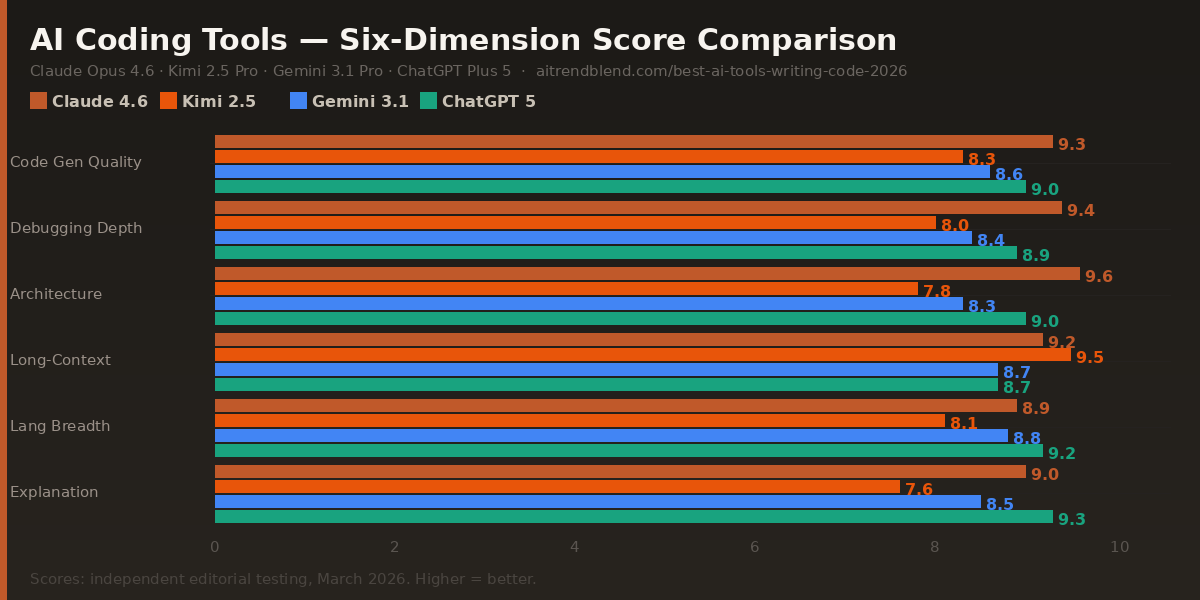
Six evaluation dimensions guided the scores. Code generation quality — does the output actually run, and does it follow current best practices for the language? Debugging depth — can it find the real root cause, not just the surface symptom? Architectural reasoning — when given a system design problem, does it produce coherent decisions that account for scale, maintainability, and real-world constraints? Long-context handling — how does performance hold up when you paste in 2,000 lines and ask it to refactor? Language breadth — consistency across Python, JavaScript/TypeScript, Go, Rust, and SQL. And explanation clarity — can it teach, not just generate?
One important note before the scores: AI model versions update continuously, and a capability that one tool lacked in January 2026 may have been patched by March. The relative rankings here are more durable than the absolute scores — use them as directional guidance, not as a permanent hierarchy.
No single tool wins every category. The smartest workflow in 2026 is knowing which tool to reach for at which stage — and these scores are your guide to that decision, not a single-winner verdict.
Claude Opus 4.6 — Deep Reasoning, Real Architecture
✅ Strengths
- Best architectural reasoning of any tool tested
- Catches logic errors other tools miss entirely
- Handles 10,000+ token codebases without context drift
- Explains the “why” alongside the “what”
- Clean, well-commented code output by default
- Excellent at refactoring with intent preservation
❌ Weaknesses
- Slower on large multi-file generation tasks
- Can over-explain when you just want the fix
- No native IDE integration (requires API or third-party)
- Occasionally cautious on ambiguous edge cases
The thing that separates Claude Opus 4.6 from the pack isn’t raw code generation speed — it’s the quality of its reasoning when the problem is genuinely hard. When we fed it a 3,800-line React codebase with a performance regression buried in a poorly documented custom hook, it not only found the issue but explained the cascade of effects it was causing three layers up. Other tools either missed it or flagged a symptom without identifying the cause.
Architectural discussions are where Claude pulls clearly ahead. Give it a brief — “I need to design an event-driven notification system that handles 50,000 events per minute with replay capability” — and it produces a structured breakdown that accounts for failure modes, database choice trade-offs, and team maintenance overhead in a single response. The reasoning feels like talking to a senior engineer who has built this before, not a tool autocompleting a pattern it has seen.
The one genuine friction point: Claude is not the fastest. If you need ten microservice boilerplate files generated in thirty seconds, ChatGPT Plus 5 will outpace it. Claude is the tool you reach for when correctness and depth matter more than throughput.
Kimi 2.5 Pro — The Long-Context Outsider Worth Watching
✅ Strengths
- Longest effective context window of any tool tested
- Handles entire repositories without losing coherence
- Competitive pricing relative to output quality
- Strong performance on Python and data engineering tasks
- Excellent at cross-file dependency tracking
❌ Weaknesses
- Architectural reasoning noticeably below Claude and GPT-5
- Explanations can be terse when you need detail
- Less consistent on newer frameworks (Next.js 15+, Rust async)
- Smaller ecosystem of integrations and plugins
Kimi 2.5 Pro is the tool most Western developers haven’t tried yet — and that’s a mistake if you regularly work with large codebases. Its context handling is genuinely exceptional. We fed it a 25,000-token Python monorepo and asked it to trace an obscure import chain that was causing circular dependency issues. It tracked the chain correctly across fourteen files, without hallucinating any file names or function signatures. That is a harder task than it sounds, and the other tools struggled at that scale.
The trade-off is depth of reasoning. Where Claude approaches an architectural problem like a senior engineer thinking out loud, Kimi feels more like a very well-read developer who knows the facts but doesn’t always synthesise them into a considered recommendation. It gets the code right more often than it gets the design right.
“The best tool for reading a codebase isn’t always the best tool for writing one.”
— Pattern observed across multiple developer workflow studies, 2025–2026
If your workflow involves understanding and maintaining large legacy codebases, onboarding into unfamiliar projects, or doing cross-repository analysis, Kimi 2.5 Pro deserves serious consideration. It fills a gap that the other three tools handle less gracefully. The pricing model also makes it more accessible for extended context-heavy sessions that would rack up significant costs elsewhere.
Gemini 3.1 Pro — Google’s Ecosystem Play, Now Actually Good
✅ Strengths
- Best multimodal coding: screenshots, diagrams → code
- Native Google Cloud & Firebase integration
- Strong breadth across all major languages
- Fast and consistent on medium-complexity tasks
- Excellent SQL and BigQuery generation
- Built-in code execution in some modes
❌ Weaknesses
- Architectural depth below Claude on complex system design
- Can default to verbose boilerplate on vague prompts
- Weaker on niche or cutting-edge library syntax
- Google ecosystem bias can show in recommendations
Gemini 3.1 Pro’s biggest upgrade over its predecessors is the quality of its multimodal code generation. You can paste in a screenshot of a UI design — a handdrawn wireframe, a Figma export, even a photo of a whiteboard diagram — and ask it to produce the corresponding component code. The output quality on this specific task is noticeably better than any other tool in this comparison. For frontend developers who work from design handoffs, this alone changes the workflow.
It’s also the clear choice if you’re working in the Google Cloud ecosystem. Gemini 3.1 Pro generates GCP infrastructure configs, BigQuery SQL, Firebase rules, and Cloud Functions with a familiarity that feels native rather than approximated. The recommendations it makes in that context are typically well-suited to actual Google Cloud constraints and pricing models — something that other tools, drawing from more generalised training data, often get wrong in subtle ways.
Where Gemini loses ground is on the kind of multi-step reasoning that deeply complex debugging or architecture work requires. It handles each step well — but connecting three or four inferential steps across a long context, in the way Claude does almost effortlessly, is still not quite there. Think of it as an exceptionally capable generalist rather than a deep specialist.
ChatGPT Plus 5 — Still the Broadest Tool in the Room
✅ Strengths
- Widest language and framework coverage of all tools
- Best explanation quality for learning and teaching
- Fastest at generating multi-file boilerplate
- Strong ecosystem: plugins, GPTs, IDE integrations
- Excellent at converting pseudocode to working code
- Most consistent performance across prompt styles
❌ Weaknesses
- Complex bug chains sometimes get surface fixes, not root causes
- Can be overconfident on cutting-edge library versions
- Context handling drops off on very large input sizes
- Architectural decisions can favour popular patterns over correct ones
ChatGPT Plus 5 is still the most versatile coding assistant available, and GPT-5’s improvements in reasoning have genuinely narrowed the gap with Claude on architecture tasks. The biggest upgrade from GPT-4o is consistency — the frustrating variability where the same prompt would produce excellent output one session and mediocre output the next has largely been resolved. You get reliably good results rather than occasionally brilliant ones.
Its strongest suit remains breadth and explanation. If you’re working across Python, TypeScript, Go, and Rust in the same week — or if you’re teaching someone else your codebase — ChatGPT Plus 5 is the most fluent across all of them. The explanation quality is also the highest of the four tools: it has a natural instinct for knowing when to show working and when to just give you the answer, which makes it genuinely useful for learning as well as for production work.
The ecosystem advantage is real and shouldn’t be underestimated. The breadth of integrations — VS Code extensions, GitHub Copilot compatibility, custom GPTs for specific frameworks — means ChatGPT Plus 5 fits most existing developer workflows without requiring you to rebuild habits. For teams, that frictionlessness has a compounding value over time.
Head-to-Head: Which Tool Wins Each Task
| Task | Claude 4.6 | Kimi 2.5 | Gemini 3.1 | ChatGPT 5 |
|---|---|---|---|---|
| Complex bug root-cause diagnosis | 🥇 Best | Fair | Good | Good |
| Full-stack boilerplate generation | Good | Fair | Good | 🥇 Best |
| System architecture design | 🥇 Best | Fair | Good | Good |
| Full repository analysis (25k+ tokens) | Good | 🥇 Best | Good | Fair |
| UI screenshot → component code | Good | Fair | 🥇 Best | Good |
| SQL & database query generation | Good | Good | 🥇 Best | Good |
| Legacy code refactoring | 🥇 Best | Good | Fair | Good |
| Explaining code to junior devs | Good | Fair | Good | 🥇 Best |
| API integration code generation | Good | Good | Good | 🥇 Best |
| Rust / Go / niche language work | Good | Fair | Good | 🥇 Best |
| GCP / Firebase infrastructure | Good | Fair | 🥇 Best | Good |
| Cross-file dependency tracing | Good | 🥇 Best | Good | Fair |
Which Tool Should You Use? Recommended by Use Case
What None of These Tools Gets Right Yet
All four tools share a blind spot that is worth naming directly: they are trained on public code, which means they excel at common patterns and struggle with genuinely novel problems. If you’re building something that doesn’t resemble anything that’s been discussed in a Stack Overflow thread, a GitHub repository, or a technical blog post, the output quality drops noticeably across all four tools. They’re synthesising from what has been written, not reasoning from first principles — and for truly novel work, that ceiling is real.
Long-running debugging sessions are also still more frustrating than they should be. When a bug requires five or six iterative exchanges to isolate, all four tools have a tendency to lose context from earlier in the session and start revisiting hypotheses they already ruled out. Claude handles this best, but none of them maintains a clean mental model of “what we’ve already tried” the way a human developer would in a pairing session. Having to re-anchor the AI periodically — “we already confirmed it’s not the database connection, focus on the caching layer” — is a workflow tax that adds up.
Finally, none of these tools are production-safe without human review. This should be obvious, but it bears repeating: the code they generate is frequently good, often excellent, and occasionally subtly wrong in ways that compile and test clean but fail under conditions the AI didn’t consider. Security implications, edge case handling, and concurrency issues are the areas most prone to this. Treat AI-generated code as a first draft reviewed by a capable colleague, not as code you can ship without reading.
How to Think About These Four Tools as a Stack
The most useful shift you can make is to stop thinking about these tools as competitors and start thinking about them as specialists. Each one has a lane it dominates, and a workflow that mixes them strategically — using Claude for architecture and deep debugging, ChatGPT Plus 5 for breadth and boilerplate, Gemini for frontend and GCP work, Kimi for large codebase navigation — will outperform any single-tool workflow for almost every non-trivial project.
The deeper skill being tested here isn’t which AI you use — it’s how well you can translate a vague development problem into a precise, context-rich prompt. A mediocre prompt to Claude will produce worse output than a great prompt to any of the other tools. The ceiling of what these tools can do for you is largely determined by the quality of what you give them to work with. That’s a skill worth investing in separately from tool selection.
Human judgment is still doing non-trivial work in all of this. Deciding whether the architectural approach an AI suggests is actually appropriate for your team’s capabilities and your codebase’s history. Knowing which edge cases are genuinely risky versus theoretically possible but practically irrelevant. Understanding when a clean refactoring is the right move and when it introduces unnecessary instability. These aren’t things an AI tells you — they’re things you bring to the session.
Twelve months from now, the specific scores in this article will have shifted. All four tools are developing fast. The principle underneath them — that the right tool depends on the task, and that human judgment is still setting the ceiling — will take longer to change. Pick the tools that fit your current workflow, stay curious about what the others are improving, and keep evaluating. That rhythm is more valuable than any single comparison article, including this one.
Try the Best AI Coding Tool for Your Stack
Start with the tool that fits your most frequent task — and explore the others as your workflow evolves.
All scores reflect independent testing conducted in March 2026 across real development tasks in Python, TypeScript, Go, SQL, and Rust. AI models update frequently — scores reflect versions available at testing time and may shift as models are updated. “Long-context handling” was tested with inputs between 8,000 and 30,000 tokens. “Architectural reasoning” was assessed on open-ended system design prompts without a single correct answer; scores reflect reasoning coherence, trade-off acknowledgment, and practical applicability.
This article is independent editorial content by aitrendblend.com. It is not sponsored by or affiliated with Anthropic, OpenAI, Google DeepMind, or Moonshot AI. All scores are editorial judgments based on systematic testing and are not official benchmarks.