
AI Tools Ranking
Key Points
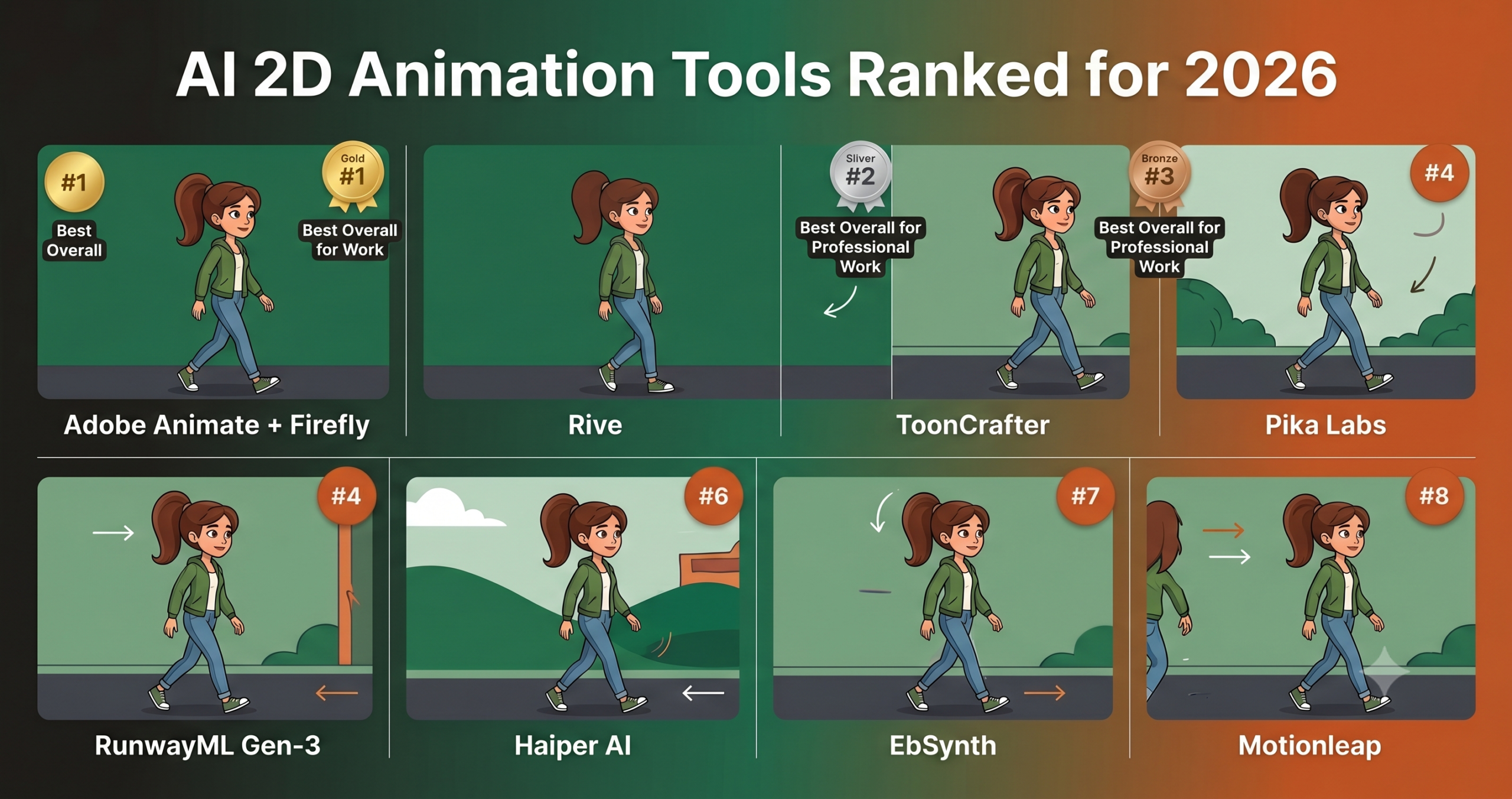
- Adobe Animate with Firefly AI ranks first for professional studio work despite a $55 a month price tag.
- Rive is the only tool here built for interactive animation that runs inside games and apps in real time.
- ToonCrafter and EbSynth are free specialist tools that beat paid generalists at their one job.
- Pika Labs and Haiper AI suit quick social content but lose consistency past five or six seconds of footage.
- Lip sync and secondary motion such as hair, capes, and ponytail physics remain unsolved across every tool tested.
- The best results come from combining tools into a pipeline rather than picking a single winner.
The 2D animation space has attracted more AI investment than almost any other creative category over the past two years. That investment produced a scattered landscape of tools making overlapping promises. Some are specialized enough to be genuinely useful for specific workflows. Some are broad enough to be mediocre at everything they attempt. Figuring out which tool belongs in your pipeline requires understanding what type of 2D animation you actually need, because the answer changes completely depending on whether you need 2D or 3D animation, and whether you are making a game cutscene, a YouTube explainer, a mobile app UI, or a short animated film.
We tested eight tools and ranked them honestly. The ranking rewards tools that do what they claim reliably and penalizes tools that over promise. A specialized tool that excels in one area places higher than a general tool that does several things poorly. You will notice that some of the most heavily marketed options do not top this list. That is intentional.
We evaluated each tool on output quality for its stated purpose, ease of use across different skill levels, how much manual work the output actually requires before it is usable, consistency across a project rather than in a single generated clip, and pricing relative to real world value. Where a tool has a narrow but genuine strength, we named it clearly.
Why 2D Animation Specifically Is a Hard Problem for AI
The average person assumes that because AI art generators can produce a convincing still image of a cartoon character in two seconds, animating that character should be a natural next step. The assumption is understandable. It is also completely wrong about how the problem works.
Still image generation is a single output problem. You describe what you want, the model produces one result, and the quality of that result is what you evaluate. Animation is fundamentally a problem of staying coherent across time. You need not one output but dozens or hundreds of frames. A character’s face, the physics of a moving cape, and the timing of a bouncing object all need to remain consistent and believable across the full sequence. The probability of getting any given frame right is high. The probability of getting all frames right at once is much lower, and it compounds with every additional frame you add.
The tools that handle this well in 2026 do so by constraining the problem in different ways. Some tools take an existing illustration and warp or morph it across time rather than regenerating each frame independently. Others use motion diffusion models that were specifically trained on animation data to understand how objects move rather than just what they look like. A third group focuses on interactive or vector based animation where the motion is defined procedurally and the AI assists with the art direction rather than the motion itself.
Understanding which approach a tool uses is the most important thing you can know before you open it. Matching the right architecture to your actual animation task is the difference between a tool that feels like cheating and a tool that makes you feel like you have been wasting your time.
Key Takeaway
The best AI 2D animation tool for you is almost certainly not the most famous one. It is the one whose underlying approach matches your specific animation task. Tools built around morphing existing art solve a different problem than tools built around generating motion from text. Use the wrong one and no amount of prompt refinement will compensate.
What We Tested and How We Scored
Each tool was evaluated against four animation categories. Character animation meant testing walk cycles, facial expressions, and lip sync where the tool supported it. Motion graphics meant testing text animation, logo reveals, and abstract motion sequences. Cartoon and illustrated content meant testing anime style and flat design character animations. Interactive animation meant evaluating tools where the output is intended for game or app use rather than video export.
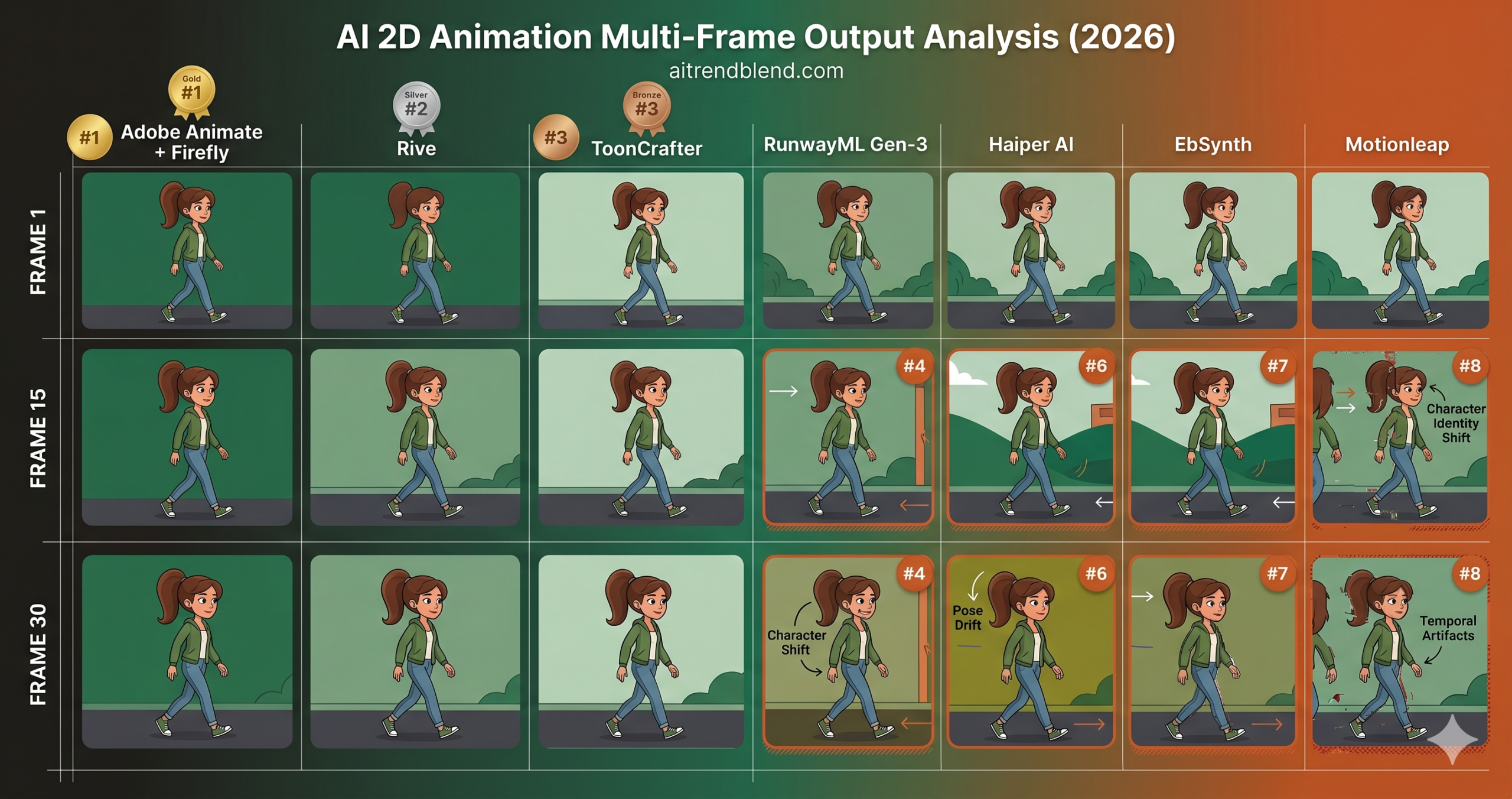
Scoring dimensions were output quality within stated use case, temporal consistency across a full animation, workflow efficiency from blank canvas to usable output, pricing relative to output quality, and active development trajectory, because a tool that received its last major update eighteen months ago scores lower than one that is visibly improving.
One caveat matters more in this category than most others. AI animation tools are developing faster than any other segment of the creative AI space right now. Several tools on this list received significant updates during our testing period. Where we observed an update meaningfully change our assessment, we incorporated it. Some scores here will look different by the end of 2026.
AI 2D Animation Tools Ranked from Best to Most Disappointing
Adobe Animate’s Firefly integration, which landed properly in the 3.0 update, changed what this tool is capable of in ways that are genuinely difficult to overstate. What was previously a capable animation environment that demanded heavy manual work on every single frame now has AI assisted inbetweening that actually understands character motion rather than just interpolating pixels between keyframes. Feed it a starting pose and an ending pose, tell it how many frames to fill in, and the result is far more natural than the mathematical tweening the software used to rely on.
The automatic rig feature is the other piece that matters. Drawing a character and rigging it for animation used to be one of the most technically demanding parts of the entire 2D animation pipeline. Firefly’s automatic rig analyzes your original artwork, identifies limb structures and pivot points, and proposes a rig that you review and adjust. It is not perfect, and I want to be clear about that because the demo videos make it look more reliable than it is in practice, but it reduces what used to be a process spanning multiple hours to something that takes twenty to forty minutes for a straightforward character.
Most tutorials skip the part about what the automatic rig struggles with. Characters with unusual proportions, heavily stylized anatomy, or overlapping costume elements still require significant manual intervention. If your character has a flowing coat that crosses over a sword hilt, the rig proposal will need correction. Factor that into your time estimates.
The reason Adobe Animate tops this ranking rather than one of the newer entrants is reliability and depth. The Firefly integration is built on top of a mature, stable animation environment that professionals have depended on for over a decade. The AI features augment that environment rather than replacing it, which means when the AI does something wrong, you have professional grade tools to fix it. That combination of AI assistance and human control is what production pipelines actually need.
The price is the obvious friction point. At $55 per month as part of a Creative Cloud package, it is not a casual purchase. For studios already in the Creative Cloud ecosystem the math is simple. For independent animators or students, it requires a genuine cost benefit calculation against the alternatives below.
Rive occupies a category of its own, and this is not a small distinction. While every other tool on this list produces video or image sequence output, Rive produces interactive animation that runs in real time inside games, apps, and websites. The output is a state machine, a live animation system that responds to user input, game logic, or application events rather than playing as a linear clip. For game UI, onboarding screens, interactive characters in mobile apps, and any animation that needs to react to something rather than just play from start to finish, Rive has no meaningful competitor in 2026.
The AI assisted features in Rive’s current version focus on three things. Motion path suggestion generates smooth paths between keyframes based on physics aware interpolation rather than simple easing curves. Style generation lets you describe an animation style in natural language and applies consistent motion characteristics across your entire project. The third feature is automatic state machine generation, which takes a set of animation clips you have created and proposes a logical state graph connecting them, handling transitions, blend states, and interrupt logic. This last feature saves the most time for complex interactive animations.
The consistency score is the highest on this list because Rive’s architecture makes consistency a structural property rather than a generation quality concern. When you animate in Rive, you are editing vector objects on a canvas. The same character looks the same in every state because it is literally the same object being transformed, not regenerated. AI assists the motion rather than generating the visuals, which sidesteps the frame coherence problem that plagues every video output tool below.
What Rive requires from you is a willingness to learn its paradigm. State machine thinking is not intuitive if you come from a traditional timeline based animation background. The first three to four hours with the tool feel counterintuitive. After that, the model clicks and the workflow becomes fast. Budget for that learning curve and do not let it discourage you in the first session.
ToonCrafter started as an academic research project and has become one of the most practically useful tools for a specific animation task, generating smooth interpolation between two illustrated frames in cartoon or anime visual styles. The problem it solves is real and it solves it better than anything else we tested.
Here is where it gets interesting. Traditional animation interpolation generates inbetween frames based on pixel blending or motion estimation algorithms that were designed for photorealistic video. Applied to illustrated art with flat colors, strong outlines, and intentional stylization, those algorithms produce results that look blurry, ghosted, and wrong. ToonCrafter was trained specifically on illustrated and animated content, so its interpolation understands that an animated character’s outline should remain crisp, that flat color areas should not blur into gradients, and that stylized motion has different physics than real world motion.
Feed it a starting frame and an ending frame, a character standing still and then mid jump, for example, and ToonCrafter generates the frames between them with a fidelity that genuine inbetween artists would recognize as structurally correct. Not perfect. The generated frames sometimes show subtle anatomy errors or outline wobble that requires correction. But the baseline quality is significantly above what any other interpolation approach produces for illustrated content.
The limitation worth naming clearly is scope. ToonCrafter does inbetweening. It does not do character design, background generation, lip sync, or any of the broader tasks that a full animation pipeline requires. It is a specialist tool doing one job extremely well. Build your pipeline around it rather than trying to make it do everything.
Pika Labs holds the accessibility crown in 2026 and it earned it. The interface is genuinely intuitive for people who have never animated anything before. You describe what you want, optionally provide a reference image, and receive a short animated clip within a minute. For social content, YouTube thumbnails that need a subtle motion treatment, and explainer video assets, this workflow is legitimately fast and the output quality holds up at web resolution.
The 2.2 update introduced what Pika calls Animate Anything. This feature takes a still image you provide and applies motion to it guided by your text description. Upload an illustration of a character, type the phrase character waves hello with right hand and subtle wind in hair, and the model applies that motion to your specific image rather than generating a new character from scratch. For animators who have existing illustrated assets they want to bring to life without rebuilding them in a different tool, this is genuinely useful.
Consistency is where the score drops and it drops for specific reasons. Pika is fundamentally a text to video generation tool, and the 2D animation feel it produces comes from style prompting rather than from architecture designed specifically for illustrated content. On short clips under five seconds, it holds together well. On longer clips, or when you need multiple clips of the same character to cut together coherently, the visual drift between generations becomes a problem that takes meaningful effort to manage.
The problem most people run into with Pika is expecting it to replace a 2D animation pipeline when it is actually a rapid content generation tool that happens to work in animated formats. For its actual use case, quick, compelling short form content that does not need to hold up under close scrutiny, it is fast and affordable. Frame it correctly in your workflow and it earns its price without difficulty.
Runway produces the most visually impressive output in this comparison. None of the other tools generate animation with the same level of cinematic quality and motion coherence per clip. If you judge these tools purely by the quality of a single generated sequence without considering price, Runway wins.
The value score tells you why it ranks fifth. At $95 per month for a plan with enough credits to do meaningful production work, Runway’s cost requires clear justification. For a studio producing commercial animation content, that justification exists. For an indie developer, a small content team, or a solo animator, the math rarely works out in its favor compared to the combination of a mid tier tool for the bulk of work and Runway reserved for specific high quality shots.
This is not a small distinction for 2D animation work specifically. Runway’s architecture is built natively for video and leans photorealistic by default. Getting it to produce output that looks truly hand drawn or illustrated, rather than live action footage with a filter applied, requires careful style prompting and reference image conditioning. The results when you get it right are exceptional. Getting it right consistently takes more iteration than the cleaner illustrated first tools below it in this ranking.
None of this means you should not use Runway. It means you should use it for the specific cases where its quality ceiling matters, hero sequences, trailers, and cutscenes with high production value, and not as your primary animation generation tool for everything in a project.
Haiper arrived later than most of the tools on this list and it shows in certain places, but it also reflects what the team learned by watching every tool before it. The generation speed is the fastest we tested at any comparable quality level. Clips arrive in under twenty seconds where Runway and even Pika take longer. For a workflow built around rapid iteration and rejection of outputs that do not work, that speed genuinely changes how the generation process feels.
The features in Haiper built specifically for 2D animation are not as deep as the tools above it in this ranking. There is no specialized illustrated content mode, no character locking based on a reference image, and no interactive output option. What Haiper does offer is consistent improvement across updates. The tool we tested in April and the tool we retested in June were measurably different in output quality, which suggests an active development trajectory that the current score does not fully reflect.
Think about where Haiper fits in practical terms. It is the right choice for teams that want a fast, affordable alternative to Pika for short form social animation content, and for developers who want to experiment with AI animation without a significant monthly commitment while the category continues to evolve. Its current ranking reflects its current state, not its likely state by the end of this year.
EbSynth has been around long enough that many people assume it is old news. That assumption is worth revisiting. For a specific and common workflow, taking reference video footage and converting it into an illustrated or painted animation style, EbSynth still does something that newer tools have not overtaken. You paint one or a few keyframes in whatever artistic style you want, and EbSynth propagates that style through the rest of the video footage with temporal consistency that most generative tools cannot match.
The consistency score of 8.9 is not a typo. Because EbSynth works by warping a painted reference across footage rather than regenerating frames, style consistency is structurally guaranteed in a way it cannot be for tools that generate each frame independently. The painted style you establish in your keyframe is the style you get throughout the animation. The model cannot decide to add a detail or shift a color because it is not generating anything. It is transferring.
The ease of use score reflects reality honestly. EbSynth requires you to have video footage to start with, understand how to paint keyframes in external software, and manage the image sequence workflow manually. For someone expecting a prompt and receive experience, it will feel archaic. For a motion reference workflow, performance captured on video and then painted into illustrated style, it is genuinely excellent and genuinely free. That is a combination no other tool on this list can match for this specific task.
Motionleap earns the highest ease of use score on this list because it is genuinely accessible to people with no animation background. You load a photo or illustration, paint motion direction onto specific areas of the image, and the app loops that motion convincingly. For social media content, a waterfall moving in a landscape photo, clouds drifting behind a logo, a character’s hair flowing, it produces results that look impressive in a three second clip on a phone screen.
The problem most people run into is that those results do not hold up past the context of a phone screen at social resolution. Loop artifacts appear on close inspection. The motion physics, while convincing for simple elements, breaks down on anything with complex structure or interacting parts. And Motionleap is fundamentally a photo animation tool rather than an animation generation tool. It animates what you give it. It does not create character motion or generate scenes from a description.
For professional 2D animation work, it is the wrong category of tool and ranks accordingly. The audience that gets real value from Motionleap is content creators who need quick animated social assets that look polished and are not trying to produce animation in the traditional sense. That is a legitimate use case, and within it the tool is effective. Outside of it, the score reflects what it can actually do.
“The most common mistake I see teams make with AI animation tools is trying to replace their pipeline with one instead of adding it to their pipeline strategically.”
aitrendblend editorial, 2026 AI animation workflow survey
Full Feature Comparison Table
| Tool | Character Animation | Illustrated Style | Interactive Output | Lip Sync | Free Tier | Starting Price |
|---|---|---|---|---|---|---|
| Adobe Animate + Firefly | Yes (strong) | Yes | HTML5 canvas | Yes | No | $55/mo |
| Rive | Yes (state machine) | Yes (vector) | Yes (native) | No | Yes | Free / $16/mo |
| ToonCrafter | Inbetweening only | Yes (specialized) | No | No | Yes (open source) | Free |
| Pika Labs 2.2 | Partial | Style prompt only | No | Beta | Yes (limited) | $8/mo |
| RunwayML Gen-3 | Yes (cinematic) | With prompting effort | No | No | Yes (limited) | $95/mo |
| Haiper AI | Partial | Style prompt only | No | No | Yes (limited) | $8/mo |
| EbSynth | Yes (from footage) | Yes (keyframe paint) | No | No | Yes (fully free) | Free |
| Motionleap | No | Photo animation only | No | No | Yes (limited) | $14/mo |
Key Takeaway
No single tool here handles every type of 2D animation well. The strongest workflow for most teams in 2026 combines tools rather than picking one. Use Adobe Animate or Rive for primary production, ToonCrafter or EbSynth for specific interpolation tasks, and Pika or Haiper for quick social content. Treating this as a pipeline decision rather than a single tool decision produces significantly better results.
What None of These Tools Handle Well Yet
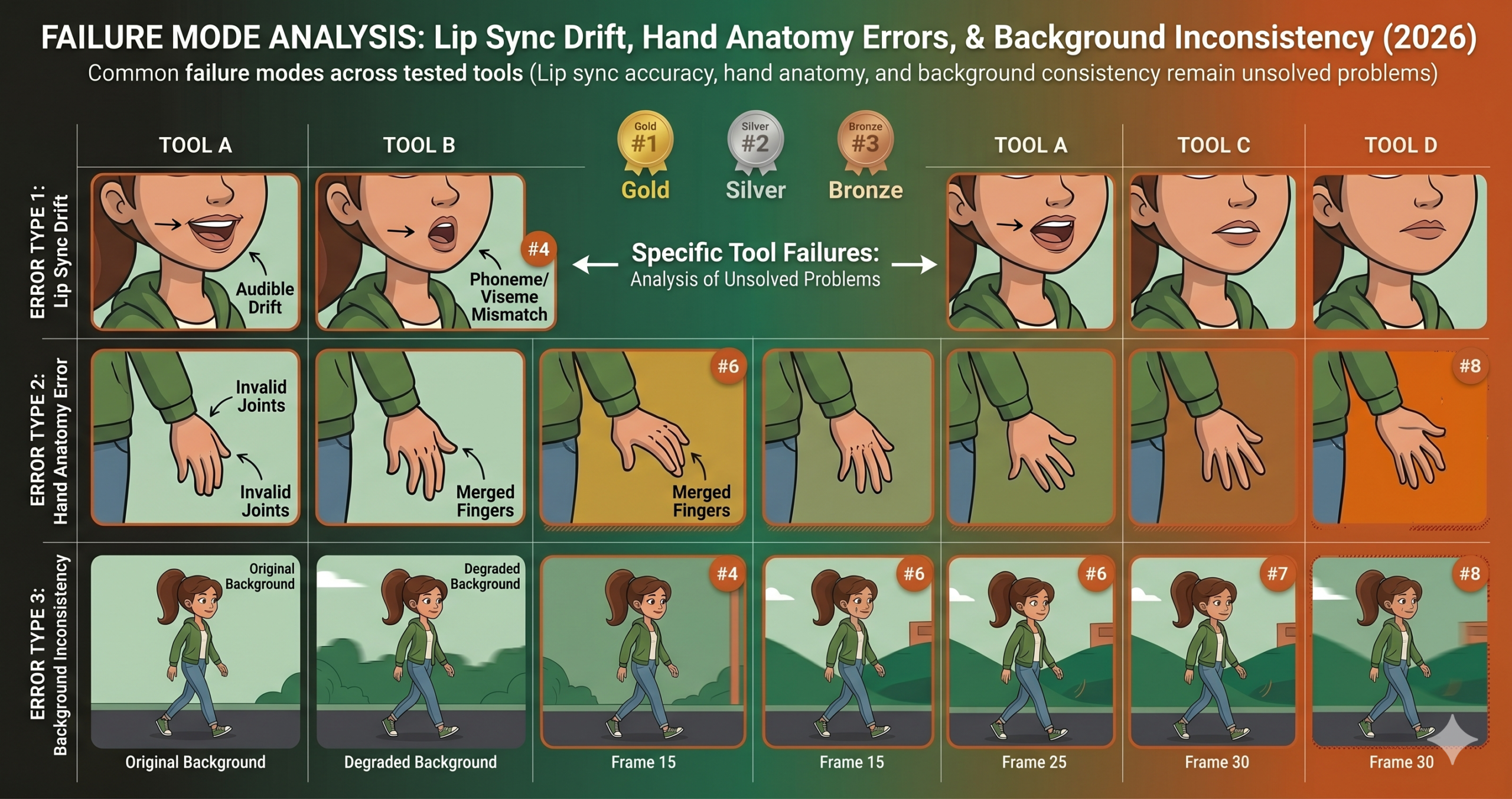
Lip sync is the most visible unsolved problem in AI 2D animation right now. Every tool that claims to offer it produces results that range from approximate to embarrassing when scrutinized frame by frame. The mapping from phonemes to mouth shapes exists in all of them, but the organic secondary animation that makes lip sync feel real, the way jaw movement pulls on cheeks, the way lips stretch and compress with tension, is not present in any of the outputs we tested. AI generated lip sync in 2026 looks like the mouth is moving in front of the face rather than as part of it. For animation built around heavy dialogue, all of these tools still require significant manual cleanup or a dedicated tool built specifically for the problem.
Complex secondary motion is the second category that remains genuinely difficult. Secondary animation refers to the way parts of a character react to the primary motion, a ponytail bouncing when a character runs, a cape trailing behind a jump, a belt pouch swinging with each step. Every tool struggles with this to some degree. The ones that handle it best, Adobe Animate with physics simulation and Rive with procedural constraints, handle it through traditional simulation rather than generation. Pure generation tools produce secondary motion that is either absent or inconsistent across frames.
The temporal consistency problem also resurfaces for generation based tools the moment a sequence runs longer than roughly six seconds. Short clips can look coherent even when the generation is not perfectly controlled. Longer sequences expose drift in character appearance, background detail, and lighting that accumulates over time. Until generation tools have a stronger mechanism for maintaining identity across long sequences, character animation built for production will continue to require hybrid approaches that combine generation with traditional frame correction.
How to Choose the Right Tool for Your Project
The answer is more specific than most comparison articles admit, so here is a direct routing guide rather than a vague recommendation to consider your needs.
If you are building a game or app and need animation that responds to user interaction or game state, use Rive. Nothing else on this list outputs in a format that a game engine or web app can use as interactive animation rather than video playback. That constraint narrows the choice to one.
If you are producing traditional frame animation or character focused 2D work where quality, control, and a professional output pipeline matter, Adobe Animate with Firefly is the clearest recommendation despite the price. The AI assistance is meaningful and it builds on a mature, reliable environment.
If your content is anime or illustrated style and you already have your keyframes drawn, ToonCrafter handles inbetweening better than any other option at any price point. Its narrow scope is also its strength. It does exactly one thing and does it extremely well.
For social content, YouTube explainers, or any project where quick turnaround matters more than frame by frame precision, Pika Labs at $8 per month is the right starting point. Move to Runway for the shots where quality truly matters and the budget allows for it.
If you have video footage and want to turn it into illustrated animation without paying for anything, EbSynth is the answer that most developers and animators overlook because it has been around long enough to seem unremarkable. The quality it produces for style transfer work is not unremarkable. It is excellent and it is free.
What the next eighteen months will likely bring is a consolidation of these capabilities into fewer tools with broader scope. The gap between what a specialized tool like ToonCrafter does for illustrated interpolation and what a general tool like Pika does for it is large enough that general tools will be under significant pressure to close it. The specialized tools will respond by expanding into adjacent tasks. By late 2027, this ranking will probably look significantly different. Right now, as of mid 2026, the specialized tools still hold a meaningful quality advantage in their domains, and the decision to use the right specialized tool for the right task continues to pay off in output quality and reduced correction time.
The human judgment that no tool in this category replaces is knowing when the AI output is good enough versus when it will undermine the overall quality of what you are making. That calibration is a skill, and it takes time to develop. Develop it early in your AI animation workflow and it will save you significant rework further down the line.
Frequently Asked Questions
What is the best AI tool for 2D animation in games?
Rive is the strongest choice for game and app animation because it outputs interactive state machines that respond to gameplay rather than rendering a fixed video clip.
Is Adobe Animate worth the monthly price for indie animators?
For most solo creators the math is tight. Adobe Animate earns its $55 a month price for studios already inside the Creative Cloud ecosystem, but independent animators should weigh it against free specialist tools like Rive and EbSynth first.
Can AI animation tools handle lip sync reliably yet?
Not consistently. Every tool tested produces lip sync that looks approximate rather than natural once you watch it frame by frame, so projects with heavy dialogue still need manual cleanup.
What is the difference between ToonCrafter and Pika Labs?
ToonCrafter is a specialist that interpolates between two illustrated keyframes with strong fidelity to anime and cartoon style. Pika Labs generates short clips from text or an image and favors speed and accessibility over frame level control.
Is EbSynth still useful in 2026?
Yes. For turning existing video footage into a painted or illustrated animation style, EbSynth still delivers stronger temporal consistency than newer generative tools, and it remains free.
Should a team rely on a single AI animation tool?
No. The strongest workflows combine a primary production tool such as Adobe Animate or Rive with specialist tools such as ToonCrafter or EbSynth for specific tasks, rather than expecting one tool to do everything well.
Start Animating with AI Today
Every top ranked tool here offers a free tier or trial. Start with Rive for interactive work or ToonCrafter for illustrated animation. Both are free, and both show what AI assisted 2D animation actually feels like in practice.
All tools in this ranking were tested independently by the aitrendblend editorial team between April and June 2026. Scores reflect our specific testing methodology and use cases. Pricing information was accurate at the time of testing. Active development in this space means tool capabilities may have changed since publication. This is independent editorial content. We are not affiliated with any of the tools reviewed.
Pingback: AI 3D Animation Tools Ranked 2026 — What Actually Delivers on the Promise - aitrendblend.com