
Game Dev AI • 2026 Guide
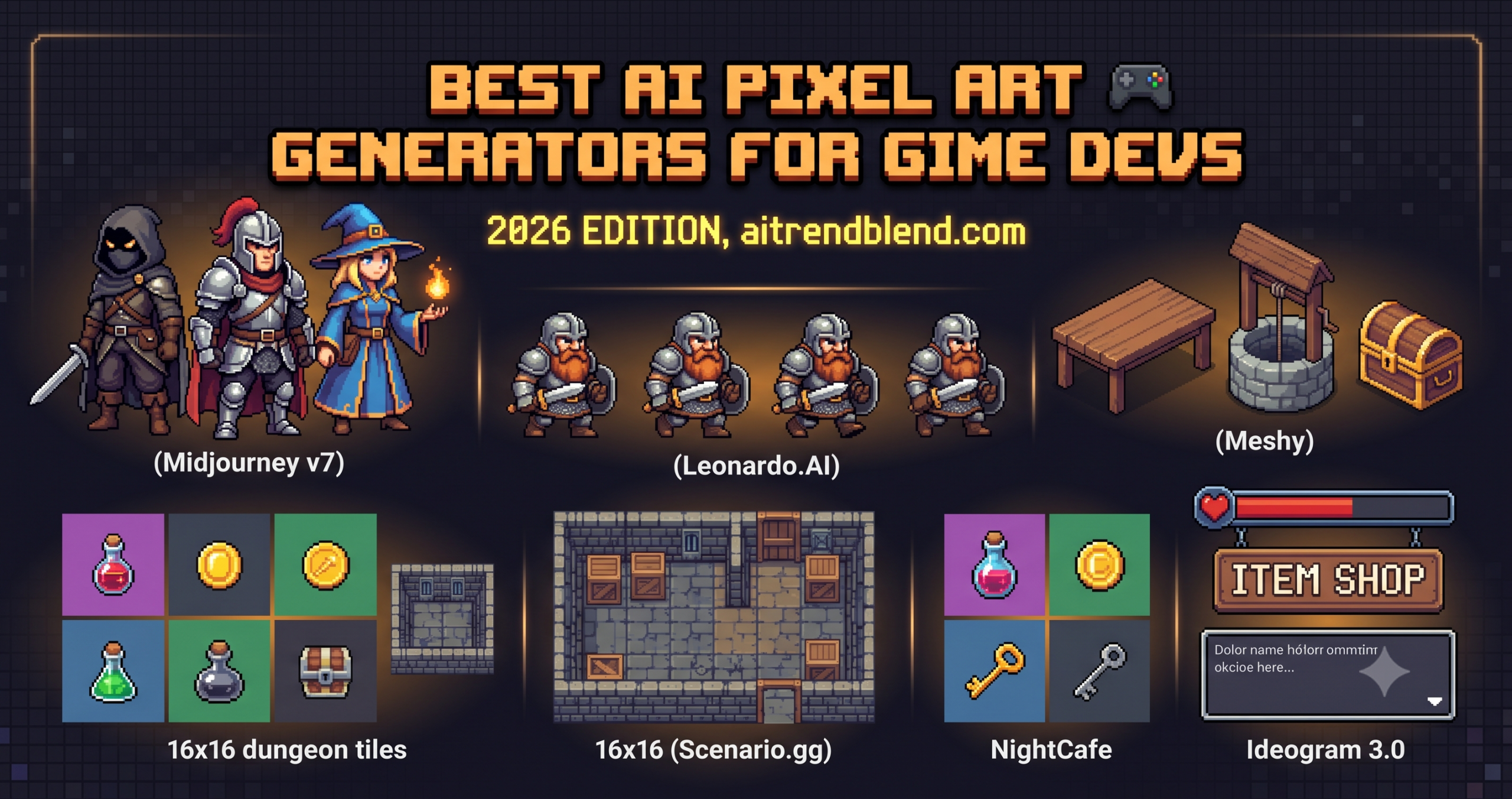
Key Points
- Midjourney v7 gives the best raw visual quality, but it needs careful prompting to stay consistent across an asset set.
- Leonardo.AI’s Game Assets model is the strongest free to start option for sprite sheet animation frames.
- Scenario.gg solves cross asset consistency by training a custom model on your own art, the closest thing to a house style for an AI pipeline.
- Stable Diffusion with pixel art LoRAs gives total control and no usage caps, at the cost of needing a capable GPU.
- Animated sprite consistency and exact palette enforcement remain unsolved across every tool tested in 2026.
- Export five test sprites into your actual game engine before subscribing to any tool, a browser preview is not how it looks in a scene.
The gap between tools has widened considerably over the past year. Some generators nail a consistent 16×16 dungeon tileset and then completely fall apart when you ask for a 64×64 character with four directional frames. Others produce gorgeous atmospheric backgrounds and generate enemies that look like they escaped from a completely different game. Picking the wrong tool does not just waste an afternoon. It can lock you into a visual style you cannot sustain across your whole asset library.
This guide covers the ten AI pixel art generators worth your time right now. Each entry includes honest notes on where the tool performs, where it quietly struggles, and a tested workflow prompt you can adapt for your own project. By the time you reach the end, you will have a clear framework for matching tool capabilities to your specific game’s requirements, not a vague list of “great options.”
Beginner tools first, professional pipelines last. Pick up wherever your current skill level sits.
Why AI Pixel Art Tools Are a Different Beast
Here is where it gets interesting. Generating a photorealistic landscape with AI has become almost trivially easy in 2026, since diffusion models trained on billions of photographs handle it without much prompting effort. Pixel art is genuinely different. It is a deliberately constrained visual language, and most image generation models learned from datasets dominated by photography and fine art, not sprite sheets from a 1993 SNES RPG. The typical model treats pixel art as an aesthetic filter to approximate rather than a set of hard technical rules to follow.
The best tools on this list have addressed this problem in one of three ways. Fine tuning on curated pixel art datasets, building game specific generation modes, or providing architecture that lets you train custom models on your own reference material. Midjourney v7 produces excellent results through careful prompting, but Scenario.gg, built specifically for game asset consistency, operates from entirely different assumptions about what the output is for. Neither approach is wrong. They solve different problems for different stages of a project.
Compared to 2024, the most significant improvement has been in sprite sheet coherence. Generating a character walk cycle where the same sprite does not mysteriously gain or lose a hat between frames was nearly impossible two years ago. Several tools on this list now handle it reasonably well, though “reasonably well” still demands knowing what you are doing on the prompting side.
Generic image generators can approximate pixel art visually. Tools purpose built for game assets understand palette constraints, transparent backgrounds, and cross frame consistency, which saves you hours of manual cleanup per asset.
“The bottleneck for indie developers is no longer writing the game. It is producing enough coherent visual content to ship something that looks intentional. AI has not eliminated that problem, but the right tool choice makes it manageable.”
Composite observation from developer discussion threads, itch.io and indie game forums, 2026
Before You Start, What Actually Matters in a Pixel Art Generator
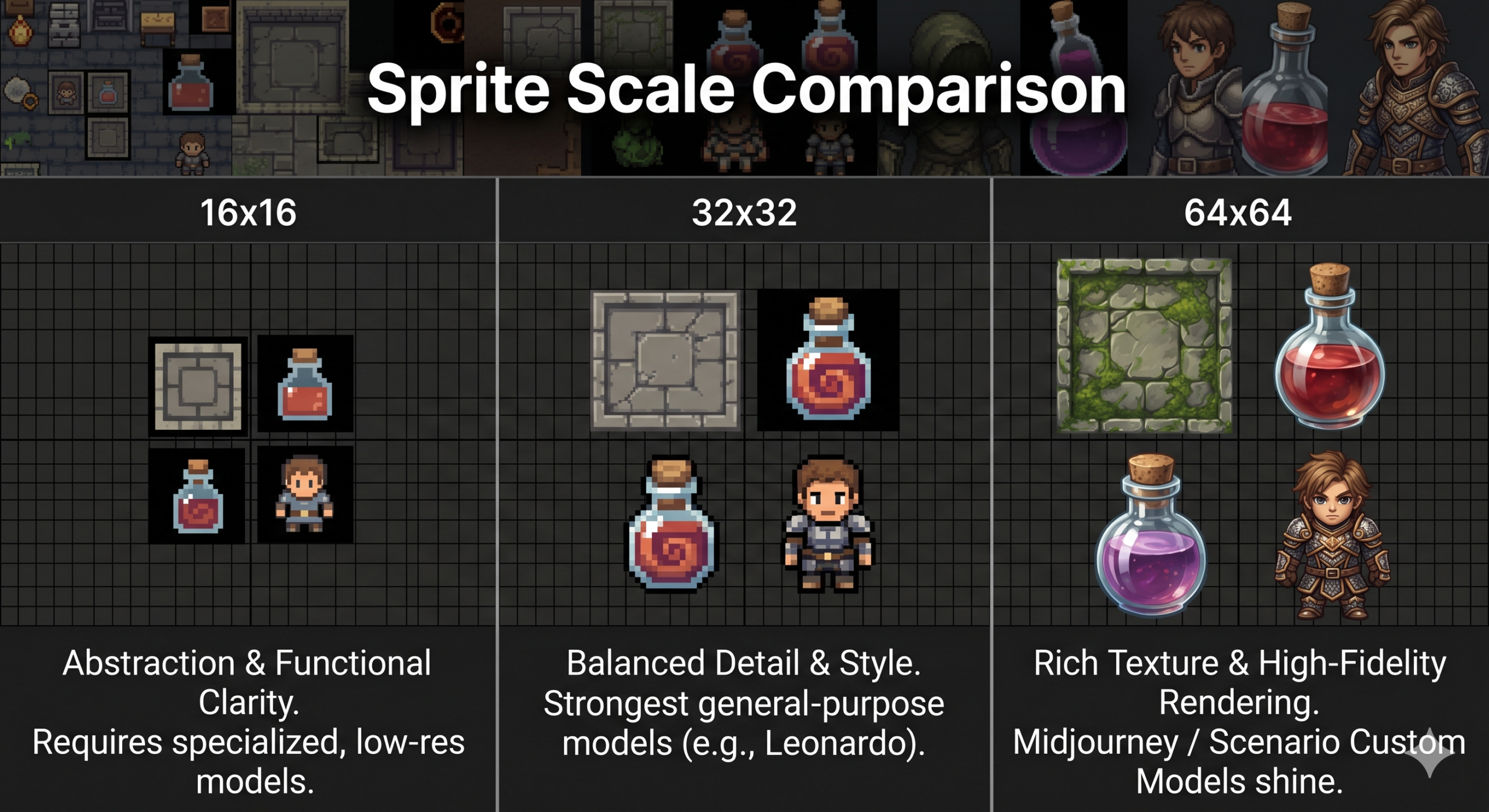
Most tutorials skip this part entirely. Before picking a tool, you need honest answers to three questions about your own project. What is your target sprite resolution? Do you need animation frames, or just static assets? Does cross asset visual consistency matter more to you than the absolute quality of any single image?
A top down RPG with 16×16 tiles and a strict 16 colour palette has completely different requirements from a 64×64 character platformer or an isometric builder with hundreds of unique props. The tools that excel in one scenario can actively hurt you in another. The problem most people run into is choosing a generator based on impressive screenshots, which are almost always cherry picked single outputs, not representative samples from a full asset production run.
One thing worth flagging before the list itself is transparent background support. Many generators output pixel art on white or gradient backgrounds, which means manual cleanup on every single asset. Check this before committing to any paid plan. It sounds like a minor inconvenience. It is not minor when you are working through a 200 asset tileset at 11pm before a jam deadline.
Export five test sprites into your actual game engine at your actual sprite resolution before subscribing to any tool. How it looks in a browser preview is not how it looks in a scene.
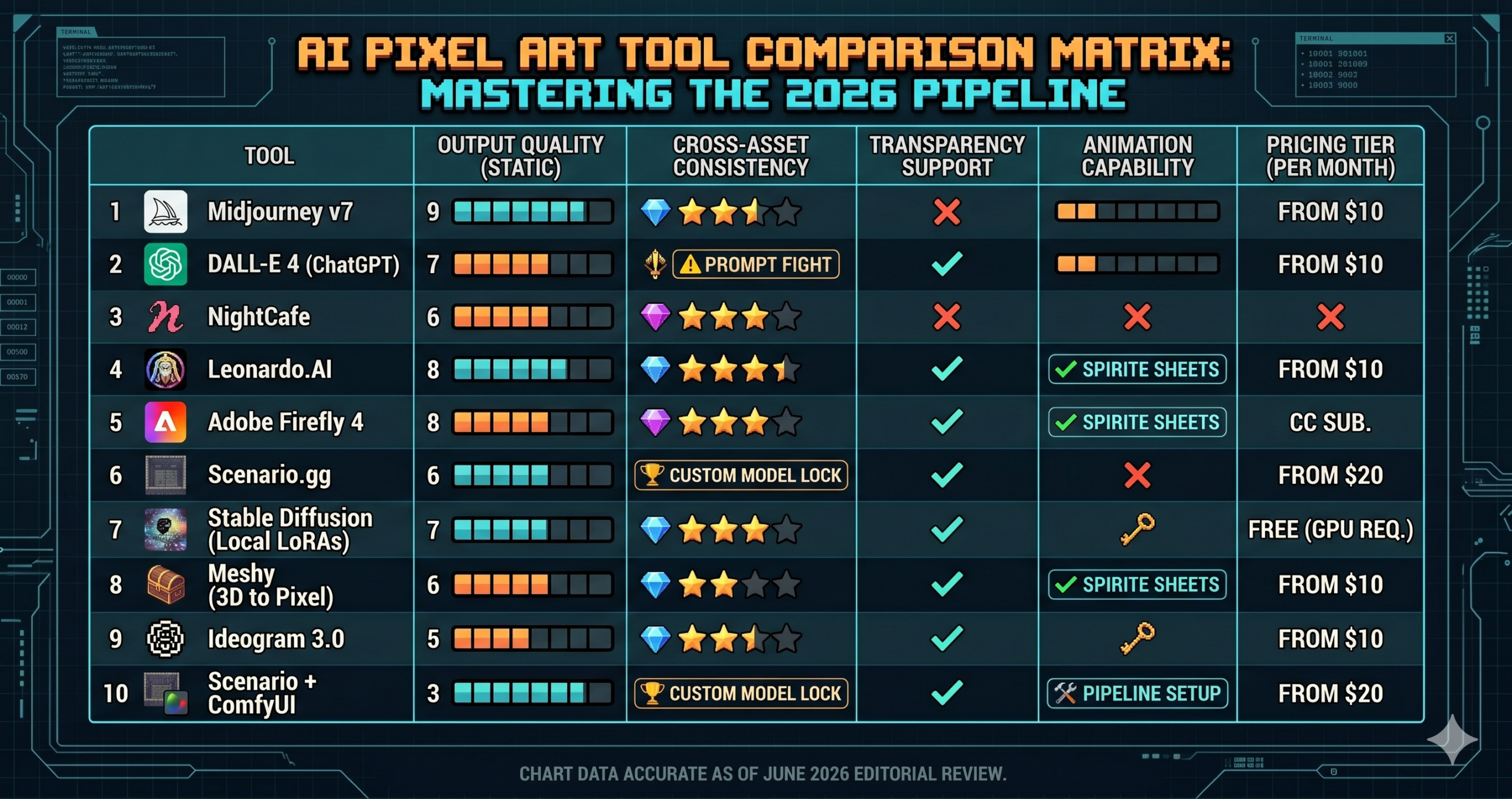
| # | Tool | Best For | Level | Price |
|---|---|---|---|---|
| 1 | Midjourney v7 | Raw visual quality | Beginner | From $10/mo |
| 2 | DALL-E 4 / ChatGPT | Zero-setup drafts | Beginner | Free / $20/mo |
| 3 | NightCafe Creator | Free browser experiments | Beginner | Free credits |
| 4 | Leonardo.AI | Sprite sheet generation | Intermediate | From $10/mo |
| 5 | Adobe Firefly 4 | Commercially safe assets | Intermediate | CC subscription |
| 6 | Scenario.gg | Full-game visual consistency | Intermediate | From $20/mo |
| 7 | Stable Diffusion + LoRAs | Total control, no limits | Advanced | Free (GPU req.) |
| 8 | Meshy | 3D-to-pixel isometric | Advanced | Free / $16/mo |
| 9 | Ideogram 3.0 | UI elements with legible text | Advanced | Free / $8/mo |
| 10 | Scenario + ComfyUI | Production-scale pipeline | Master | Combined cost |
The 10 Best AI Pixel Art Generators for Game Devs
Midjourney v7, Best Overall for Visual Quality
For raw visual quality, Midjourney v7 remains the benchmark. The model’s understanding of deliberate art styles has improved enough that it now handles pixel art with real fidelity, consistent dithering, believable limited palette shading, and a sense of depth that earlier versions missed entirely. The catch is that it requires careful prompting to stay visually consistent across an asset set, and its default output size is not game ready without post processing.
The problem most people run into with Midjourney is treating it like a search engine, typing “pixel art knight” and expecting something usable. What you actually need is to specify palette depth, approximate sprite dimensions, background treatment, viewing angle, and a style era. Midjourney v7’s internal understanding of “pixel art” spans everything from 8 bit Atari chunky sprites to detailed modern indie character art. That breadth is its strength when you know how to constrain it.
Why it works. The --style raw flag suppresses Midjourney’s default aesthetic beautification and forces closer adherence to your textual constraints. Keeping --stylize below 150 prevents the model from drifting toward what it thinks “good art” looks like, staying anchored to the pixel style you specified instead. The explicit “no anti-aliasing” instruction is doing real work. Without it, the model defaults to smooth edges that look terrible at game resolution.
How to adapt it. For environment tiles instead of characters, replace the pose instruction with “seamlessly tileable, top-down perspective, flat perspective” and add “–tile” to the end of the prompt to generate a repeating tile directly.
- Best raw image quality of any tool on this list
- Handles complex scenes and environmental art well
- Huge community sharing tested pixel art style codes
- No local hardware required
- No native transparency support, manual background removal needed
- Character identity drifts across a large asset set
- Discord first workflow is friction for rapid iteration
DALL-E 4 via ChatGPT, Best for Zero Setup Quick Drafts
If you need a rough prototype sprite in under two minutes with no platform setup, DALL-E 4 through ChatGPT is the fastest path available. The conversational interface is genuinely useful for iteration. You can request changes in plain English, and the model remembers context from earlier in the conversation in a way that a standalone image generator does not. “Make the helmet more ornate but keep everything else” actually works.
Where it falls short is precision. Asking DALL-E 4 to produce an 8 colour limited palette sprite gets you something in the right direction, not a strict 8 colour output. Asking it to switch palette while maintaining exact character proportions takes considerably more conversation than a specialised tool would require. Use it for concept validation, not production assets.
Why it works. ChatGPT interprets the “no smooth gradients” constraint aggressively, which is exactly what you need to prevent the model from producing a watercolour approximation of pixel art. The explicit pixel count anchors the visual density even though DALL-E 4 does not render at exactly that resolution.
How to adapt it. Follow up your first generation with “Now show the same character facing right, walking pose, keep the same palette and proportions.” The conversational context means you do not need to repeat the full specification. This iteration loop is faster than re-prompting from scratch in any other tool.
- Conversational iteration is genuinely fast
- No extra subscription if you already have ChatGPT Plus
- Excellent for rapid concept validation
- Palette control is approximate, not enforced
- Not built for batch asset production
- Outputs consistently need manual pixel cleanup
NightCafe Creator, Best Free Browser Option for Experimenting
NightCafe does not get enough credit as an entry point for game developers who are testing whether AI pixel art fits their pipeline at all. The daily free credits mean you can genuinely experiment without financial commitment, not a three image trial, but enough daily generations to evaluate the tool seriously over a week. The Stable Diffusion backend combined with NightCafe’s model selection interface makes it accessible to people who have no interest in running a local Python environment.
Think about what this actually requires of a complete beginner. No local GPU, no Python dependencies, no ComfyUI node graphs. You select a style preset, adjust a few sliders, and generate. For game jams or proof of concept work, that low friction accessibility matters more than hitting the absolute quality ceiling.
Why it works. Naming a specific reference game rather than describing a style abstractly gives the model a much tighter target. “Stardew Valley style” triggers pixel art associations that “retro 2D game” does not. The negative prompt is doing the heavy lifting in keeping Stable Diffusion’s photorealistic defaults from bleeding through.
How to adapt it. For environment tiles, add “seamlessly tileable texture” to the main prompt and test the output by placing four copies in a 2×2 grid. Seam visibility tells you immediately whether the generation is usable without extra correction work.
- Genuinely free to start, real daily credits
- No technical setup whatsoever
- Supports multiple Stable Diffusion model versions
- Free tier generation speed is slow
- Less parameter control than local SD installations
- Output resolution caps can frustrate at higher sprite sizes
Leonardo.AI, Best for Sprite Sheet Generation
Leonardo.AI has carved out a genuine niche in game asset generation, not as an afterthought feature, but as a design priority. The platform includes a dedicated Game Assets model trained specifically on sprites, tilesets, and UI elements. That means outputs look like they belong in a game without fighting the model’s photorealistic instincts on every generation.
The sprite sheet capability is where Leonardo separates itself from the previous three tools. The platform can generate multiple frames of a character animation with reasonable consistency, the character does not morph into a different entity between frames. That sounds like a low bar until you try to do it with a general purpose image generator and spend forty minutes cleaning up a walk cycle where the left arm became a wing by frame three.
Why it works. The Game Assets model was fine tuned specifically on sprite sheet formats, which means it has a much stronger prior for the “horizontal strip” layout instruction than a general model would. Specifying frame count, facing direction, and pixel dimensions in a single prompt gives it enough constraints to stay coherent across frames rather than treating each one as an independent composition.
How to adapt it. For a four directional character set, run four separate generations, one per direction, using identical prompts except for the facing direction parameter. The Game Assets model maintains enough style consistency across separate generations that the results usually read as the same character.
- Purpose built Game Assets model, trained on sprites
- Reasonable animation frame consistency
- Transparent background support is native
- Canvas Editor for in-platform cleanup
- Multi frame consistency still needs manual review
- Credit system gets restrictive on the free tier quickly
- Advanced ControlNet features gated behind paid plans
Adobe Firefly 4, Best for Commercially Safe Game Assets
None of this comes free, but Adobe Firefly’s key advantage is not image quality. It is legal clarity. Firefly was trained exclusively on licensed content, Adobe Stock, and openly licensed images, which means every output is cleared for commercial use without the intellectual property ambiguity that hangs over tools trained on scraped internet data. For a solo developer launching on Steam or a studio shipping a commercial title, that matters.
Firefly 4’s pixel art output is competent rather than spectacular by comparison to Midjourney or Scenario. The generative fill and Generative Expand tools are where it genuinely earns its place in a game dev workflow. You can generate an environment background and extend it seamlessly to fit your exact game aspect ratio, something no other tool on this list handles as smoothly. The Photoshop integration collapses the pipeline from generation to cleanup dramatically.
Why it works. Specifying “parallax scrolling game background layer” activates Firefly 4’s understanding that this is a functional game asset, not decorative art. The model responds by biasing toward horizontal scene composition with clear depth separation, foreground, midground, and background, which is exactly what a parallax system needs.
How to adapt it. After generating, use Photoshop’s Generative Expand to extend the canvas width by 50% on both sides. Firefly fills the extension seamlessly. For wide format side scrolling levels, this is significantly faster than generating multiple panels and stitching them manually.
- Licensed training data, commercially safe outputs
- Seamless Photoshop integration via Generative Fill
- Background extension workflow is best in class
- Requires Creative Cloud subscription
- Character sprite quality behind Midjourney and Scenario
- Limited value outside an Adobe workflow
Scenario.gg, Best for Visual Consistency Across an Entire Game
This is not a small distinction. Scenario was built to solve exactly one problem that every other tool on this list handles poorly, generating dozens or hundreds of different assets that look like they were made by the same artist for the same game. You train a custom generator on a handful of your own reference images, existing characters, your tileset style, a mood board, and every subsequent generation inherits that visual identity automatically. We cover the full setup in our Scenario.gg custom model training guide.
For a solo developer building a cohesive game world with limited art resources, Scenario’s model training workflow changes what is actually possible to ship. The setup takes longer than typing a prompt into Midjourney, since training a model takes 20 to 45 minutes depending on your dataset size. The payoff is an asset library that looks like it belongs together, which is the thing photogenic AI demos almost never demonstrate honestly.
Why it works. The custom model absorbs the visual rules embedded in your reference images, palette tendencies, line weight, shading style, and proportional conventions, and applies them to every new generation. This is fundamentally different from prompting a generic model to “match style X,” which is an approximation. The trained model knows your style because it learned from your style directly.
How to adapt it. Once your model is trained, use Scenario’s batch generation API to produce variations. Request ten variations of the same prompt, then filter manually. At scale, this workflow is 5 to 8 times faster than prompting one at a time in any other tool.
- Best cross asset visual consistency of any tool available
- Custom model training from your own reference material
- Production API for automated batch generation pipelines
- Model training takes time and platform credits
- Higher cost than one-off generators
- Overkill for single asset requests or jam sprints
Stable Diffusion with Pixel Art LoRAs, Best for Total Control
Running Stable Diffusion locally with pixel art specific LoRA models is doing something none of the cloud tools can match. It gives you complete creative control over every generation parameter, for free, with no usage caps. The pixel art LoRA ecosystem has matured considerably. Models like PixelArt XL and specialised character LoRAs produce output that competes seriously with the best cloud generators, at zero per image cost. For the full local setup, see our Stable Diffusion game assets guide.
The tradeoff is real. You need a capable GPU, 12 GB VRAM is the comfortable minimum for SDXL based models, a working Python environment, and enough patience to learn how LoRA weight values interact with base model behaviour. Most tutorials skip this part entirely. A LoRA at weight 0.5 blends softly with the base model’s output, while at weight 0.9 it dominates nearly completely. Finding the right value for your specific target style takes deliberate experimentation, not guessing.
Why it works. Generating at 512×512 and downscaling with Nearest Neighbor interpolation, rather than bicubic or bilinear, preserves hard pixel edges during the resize. This single workflow decision is responsible for the difference between AI art that looks vaguely pixel ish and something that actually reads as pixel art in an engine.
How to adapt it. For batch generation of asset variations, use AUTOMATIC1111’s X/Y/Z plot script with a fixed seed and vary the LoRA weight between 0.5 and 1.0. Generate a grid comparing weights at 0.5, 0.65, 0.8, and 0.95. Pick the weight that hits your target style, then use it consistently across your entire asset run.
- Complete control over every generation parameter
- No usage caps, generate thousands of variations freely
- Massive open source community for shared models and LoRAs
- Steep setup curve for non-technical developers
- Requires dedicated GPU hardware investment
- LoRA quality varies wildly, model curation takes real time
Meshy, Best for 3D to Pixel Art Isometric Workflows
Meshy operates from a completely different angle than everything else on this list. Rather than generating pixel art directly, it generates 3D models from text descriptions. You then render those models from the exact camera angle your game requires, isometric, top-down, or side-scrolling, at the exact lighting conditions you specify, and downscale the render to pixel art resolution in post. The results look structurally coherent in a way that flat 2D generation often does not, because the perspective is geometrically accurate rather than a model’s best guess. Our complete Meshy AI guide covers the 3D side of this pipeline in more depth.
For isometric games specifically, this pipeline is compelling enough to justify the extra steps. Getting isometric pixel art from a direct text to image generator almost always introduces perspective inconsistencies, objects that look right in isolation but sit at slightly wrong angles relative to each other in a scene. Generating a 3D model, placing a true isometric camera, and rendering it eliminates that problem at the source.
Why it works. Orthographic projection removes perspective distortion entirely, which means every object rendered through the same camera setup will sit at geometrically identical angles. An isometric tileset generated this way has no perspective drift between tiles, something practically impossible to achieve consistently in direct 2D generation.
How to adapt it. Once you have your Blender scene set up with the correct isometric camera, save it as a template. Importing new Meshy exports into that scene takes under a minute per asset. For props and environment objects, this pipeline produces a full 360 degree asset set by simply rotating the model in 45 degree increments.
- Geometrically accurate perspective, eliminates isometric drift
- All rotation angles from a single 3D model
- Excellent for props, furniture, environment objects
- Multi step pipeline requires 3D software knowledge
- Characters with complex clothing lose fine detail in conversion
- Not suitable for games that need purely hand drawn character art
Ideogram 3.0, Best for UI Elements with Legible In-Sprite Text
Every other generator on this list fails badly at one specific task, pixel art that includes legible text. Shop signs, health bar labels, dialogue box frames with custom pixel fonts, and collectible item name tags are common game UI assets, and almost every AI image generator produces garbled, unreadable letterforms at pixel scale. Ideogram 3.0’s text rendering architecture, originally built to solve this problem for general image generation, translates surprisingly well to game UI contexts.
This is not a general purpose pixel art generator. The character and creature generation is mediocre compared to the other tools at this level. Use Ideogram specifically for assets where in-asset text legibility is the priority, title screens, shop UI chrome, in-world signage, and tutorial prompt boxes. Combined with Scenario or Leonardo for character work, Ideogram fills the gap that every other tool leaves open.
Why it works. Ideogram’s text rendering model was trained to treat letterforms as structural elements of an image, not as decorative approximations. At pixel art scale, this distinction produces legible characters where other generators produce visual noise. Specifying the font style category gives the model additional typographic context for how tight the letterform spacing should be.
How to adapt it. For a complete game HUD, generate each UI element separately, health bar, mana bar, minimap frame, and inventory panel, using a consistent colour palette specification across all prompts. The visual consistency achieved through shared palette terms across separate Ideogram generations is significantly better than trying to generate a full HUD in one prompt.
- Best legible pixel scale text of any generator available
- Strong results for UI frames, buttons, shop signs
- Affordable entry tier
- Weak character and creature generation
- Style precision less controllable than Scenario or SD
- Free tier generation speed is slow at peak times
Scenario.gg API with ComfyUI Post Processing, the Professional Production Pipeline
This is the top of the stack, not a single tool, but the pipeline that serious indie studios and solo developers with production ambitions are actually running in 2026. Scenario handles style consistent batch generation through its API. ComfyUI handles local upscaling, palette enforcement, automated sprite sheet assembly, and export to your game engine’s asset folder structure. The two systems communicate through a custom ComfyUI node workflow you configure once and run indefinitely. Our guide on automating game asset production with ComfyUI covers the node side of this setup in detail.
Think about what this actually requires. You need to understand Scenario’s model training well enough to build a reliable style anchor from your reference material. You need ComfyUI node graph logic to understand how a pixel art upscaler connects to a palette quantization node connects to a batch export node. You need a file naming convention that works with your game engine’s asset importer. None of this is approachable for beginners. It is also the only setup that produces a professional, scalable pixel art production pipeline driven primarily by AI, and keeps your asset library looking like it was made by one person with a singular vision.
Why it works. The Scenario API provides style consistent generation at scale. ComfyUI’s node pipeline enforces the technical constraints, palette size, exact sprite resolution, and transparency, that no cloud generator currently handles automatically. The separation of concerns is the key idea. Scenario is responsible for “looks right for this game,” and ComfyUI is responsible for “meets technical specification.” Neither tool tries to do both.
How to adapt it. Once the ComfyUI workflow is stable, add a simple Python wrapper that watches the Scenario output folder and triggers the ComfyUI pipeline automatically. At that point, you input a text description and the production ready sprite appears in your game engine’s asset folder without any manual intervention. The whole pipeline runs while you write game logic.
- Production scale generation at consistent quality
- Fully automated palette and resolution enforcement
- Integrates directly into game engine asset pipelines
- No per asset manual cleanup once workflow is configured
- Significant upfront configuration investment
- Requires coding knowledge for API integration
- Combined Scenario and local hardware costs add up for solo devs
Common Mistakes Game Devs Make with AI Pixel Art
The problem most people run into is not a bad tool choice. It is a set of repeatable mistakes that will undermine any tool on this list. Here are the five that show up most consistently.
Mistake 1, prompting for “pixel art” without specifying resolution. To a diffusion model, “pixel art” means anything from an 8×8 icon to a 256×256 detailed scene. The model picks something visually pleasing at preview scale that is completely unusable at your actual sprite size. Always specify the target pixel dimensions and name a reference game whose visual density matches what you are after.
Mistake 2, generating at full size and scaling down naively. A 1024×1024 image scaled to 32×32 with bicubic interpolation is not a pixel art sprite, it is an antialiased blur. Generate close to your target size, or downscale using Nearest Neighbor interpolation specifically. The interpolation method is the difference between looking like pixel art and looking like a photograph with a filter on it.
Mistake 3, skipping the negative prompt entirely. Diffusion models default to smooth, photorealistic output. Anti aliasing, gradient blending, and painterly shading are their natural tendencies. Without a negative prompt explicitly rejecting these, you will spend more time cleaning up than generating.
Mistake 4, using different tools for different asset types with no style anchor. Characters generated in Midjourney, UI in Firefly, and tilesets in Leonardo will not look like they belong in the same game. Either pick one primary tool and accept its constraints, or use Scenario’s training workflow to create a unified visual identity that all your generation tools reference.
Mistake 5, judging a tool by its demo screenshots instead of your actual use case. Every tool looks better in the developer’s showcase than it does inside your game engine at your actual sprite resolution on your actual background colour. Export five test sprites into your project before spending money or committing to any workflow.
| Mistake Pattern | Wrong Approach | Right Approach |
|---|---|---|
| Resolution targeting | “pixel art warrior character” | “pixel art warrior, 32×32 sprite, 16 colours, NES era, hard pixel edges, no anti-aliasing” |
| Downscaling method | Scale 1024px output down in Photoshop with bicubic or bilinear | Downscale with Nearest Neighbor, or use a pixel art specific upscaler at target size |
| Negative prompting | No negative prompt, just the positive description | Negative prompt reading “anti-aliasing, smooth gradients, blurry, photorealistic, oil painting, 3D render” |
| Multi tool consistency | Different generators for characters, UI, and backgrounds | One trained style anchor, a Scenario model or single SD base, applied across all primary asset types |
| Tool evaluation | Select a tool based on platform showcase screenshots | Export five test sprites into your actual game engine at your actual resolution before any subscription |
What AI Pixel Art Tools Still Struggle With in 2026
Honest limitations here are more useful than confident optimism. Static sprites, under the right prompting conditions, are handled reasonably well by all ten tools on this list. Animated sprites are a fundamentally different problem. Diffusion models generate each frame independently. They do not understand that a frame is part of a sequence where the character’s belt buckle should remain on the same side and the sword hilt should not quietly change shape between frame two and frame three. Every frame is a fresh generation that happens to resemble the previous one. Resembling is not the same as being consistent, and animation is exactly where that gap becomes painful in practice. The Scenario plus ComfyUI pipeline comes closest to solving this, but closest still means human frame review on every walk cycle.
Palette enforcement is the second persistent limitation. You can prompt for a strict 16 colour palette, but no current text to image tool actually constrains its output to exactly 16 colours. The output will be close. It will not be exact. Post processing with palette quantization tools, Aseprite’s indexed mode, GIMP’s Posterize, or ComfyUI automation, is still required for games with hard palette requirements. This is not a solvable prompting problem. It is an architectural constraint of how diffusion models work.
The third honest gap is character identity stability across a large library. Generating one excellent knight character sprite is achievable with most tools on this list. Generating thirty NPCs, enemies, bosses, shop items, and collectibles that all feel like they came from the same artist, for the same game, is still genuinely difficult. The custom model training in Scenario gets you closest. Even there, subtle visual drift accumulates across a large asset library. The workflow that actually functions in production right now runs like this. AI generates candidate assets, a human art director reviews and flags inconsistencies, and flagged assets get regenerated or manually corrected. AI handles volume, humans maintain coherence.
Making the Call, a Practical Verdict
The actual skill you have built reading this is not a list of tools. It is a decision framework. Midjourney wins on raw visual quality but loses on asset to asset consistency. Scenario wins on consistency but requires real investment in setup and training. Stable Diffusion local wins on control and cost but demands hardware and technical patience. Ideogram wins on UI text legibility and nothing else. Meshy wins on isometric geometric accuracy for developers comfortable with a 3D pipeline. Apply those tradeoffs to your specific project constraints and budget, and the right choice becomes much less ambiguous.
There is a deeper principle at work in effective AI art prompting for games. Specificity is how you communicate intent. A vague prompt asks the model to guess, and models guess toward whatever their training data made most probable, which is rarely exactly the visual style this specific game needs. Every constraint you add is you telling the model what you actually want rather than hoping it infers it. Learning to write specific prompts is learning to think precisely about what you are trying to build, which is useful regardless of which tool you end up using.
Human judgment remains non negotiable at two points in any AI art pipeline. First, deciding which generated outputs are actually good, since models produce variation, not quality guarantees, and no generator has taste. Second, catching subtle visual inconsistencies that make a game world feel disjointed even when no single asset is obviously wrong. AI can now produce individually impressive assets. Feeling whether a collection of assets tells a coherent visual story is still a human task.
Over the next 18 months, the most likely advances are tighter animation frame coherence, better palette enforcement at generation time, and custom model training becoming cheaper and faster to run. Scenario’s approach of baking your game’s visual identity directly into the generator is moving from advanced technique toward standard practice. The developers building that workflow knowledge now will have a head start when those improvements arrive. Start with the simplest tool that meets your actual current needs. Graduate up the stack when you hit a real ceiling.
Frequently Asked Questions
What is the best AI tool for pixel art game sprites in 2026?
It depends on your stage. Midjourney v7 gives the best raw visual quality for single sprites, Leonardo.AI is strongest for sprite sheet animation frames, and Scenario.gg wins once you need dozens of assets that all look like the same artist made them.
Can AI generate a consistent walk cycle animation yet?
Not reliably. Diffusion models generate each frame independently, so a character’s belt or sword hilt can quietly change shape between frames. The Scenario plus ComfyUI pipeline comes closest, but every walk cycle still needs human frame review.
Why does my AI pixel art look blurry instead of crisp?
Almost always a downscaling problem. Generating at a large size and scaling down with bicubic or bilinear interpolation produces an antialiased blur. Generate close to your target size, or downscale specifically with Nearest Neighbor interpolation.
Is there a free way to start with AI pixel art generation?
Yes. NightCafe Creator offers genuine daily free credits with no technical setup, and Stable Diffusion with pixel art LoRAs is free with no usage caps if you have a capable local GPU.
Can AI tools enforce an exact color palette for pixel art?
Not exactly. You can prompt for a strict colour count, but no current text to image tool constrains its output to that exact count. Post processing with a palette quantization tool such as Aseprite’s indexed mode is still required for hard palette requirements.
Which tool should a game studio use for legible in game text in pixel art?
Ideogram 3.0. It is the only tool on this list with text rendering strong enough for shop signs, health bar labels, and dialogue box frames at pixel scale, though its character and creature generation is weaker than the other tools.
Try These Workflows Right Now
The beginner workflows for Midjourney and Leonardo.AI need no setup. Open the platform and paste the prompt. When you are ready to go deeper, the aitrendblend.com prompt library has tested workflows for every tool on this list.