
AI Tools Ranking
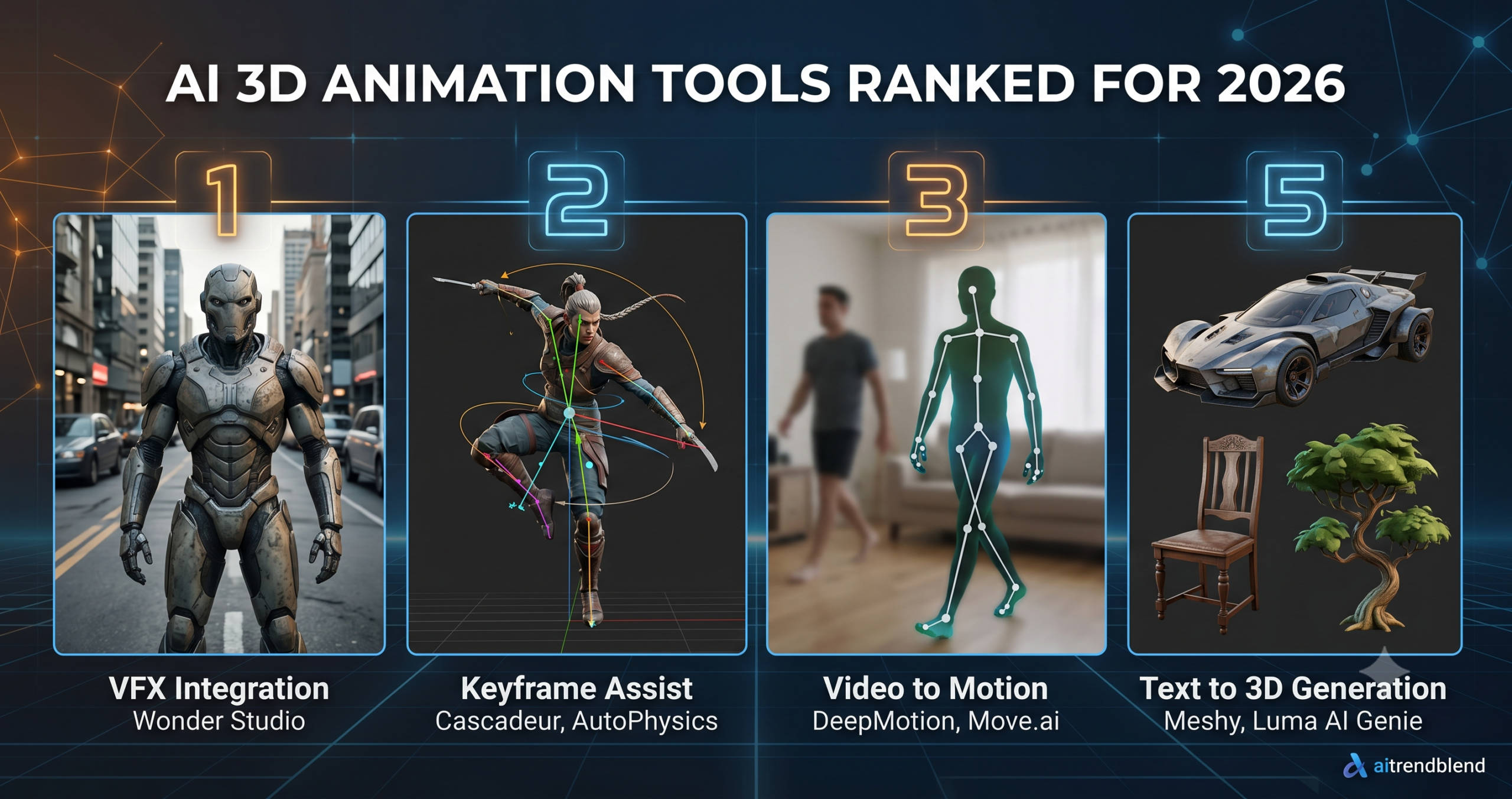
Key Points
- Wonder Studio ranks first because it automates an entire VFX pipeline, tracking, lighting, and compositing, rather than just one step of it.
- Cascadeur is the strongest pick for artists who want direct control with physics aware AI assistance rather than motion pulled from video.
- DeepMotion and Move.ai both turn video into usable motion data, the difference is single camera convenience versus multi camera accuracy.
- Meshy generates usable 3D props and environment assets from text, but character faces and hands still need manual cleanup.
- Foot contact with terrain, hand to object grasping, and facial performance remain unsolved problems across every tool tested.
- The strongest pipelines combine several tools by task instead of expecting one tool to cover the whole production.
The AI 3D animation space in 2026 is one of the most genuinely exciting and most aggressively overhyped segments of creative technology. The demos are almost always better than the reality. The pricing structures range from free and open to enterprise rates that require a budget conversation. The workflows vary so dramatically between tools that knowing how to use one teaches you almost nothing about using another.
We tested eight tools over seven weeks and ranked them by what matters in production conditions, not what looks best in a controlled sixty second demo clip. We evaluated output quality for the specific tasks each tool claims to handle, how realistic the workflow is for a small team or solo creator, how much correction and cleanup the raw output demands, the pricing relative to what you actually get, and how actively the tool is developing compared to where it was six months ago.
The tools in this ranking cover four distinct categories of 3D animation work. Motion capture and retargeting covers tools that extract animation data from video or sensor input and apply it to 3D characters. AI assisted keyframe animation covers tools that help artists create and refine traditional keyframe animation more efficiently. Text and image to 3D asset generation covers tools that create rigged or animatable 3D objects from text descriptions or reference images. VFX integration covers tools that composite 3D animated characters into live footage using AI to handle the lighting and blending. Each category solves a different problem, and the best tool in one category can be irrelevant to someone working in another.
Why 3D Animation Specifically Is Where AI Has Made the Biggest Leap
There is a genuine argument that AI has moved 3D animation forward more than any other creative discipline over the past two years. The reason comes down to data and structure.
3D animation has always carried more usable data than 2D animation. Motion capture sessions produce dense numerical data about how human bodies move. Joint angles, velocities, acceleration curves, and weight distribution are all part of that data, and that is exactly the kind of thing large models learn from well. When a model is trained on millions of frames of motion capture data across thousands of different movement types, it develops something that functions like an intuition for how bodies move through space. The AI assisted motion tools that work best in 2026 are drawing on that accumulated understanding of human kinematics in ways that genuinely surpass what simulation built on fixed rules could produce.
The second reason is that 3D animation has a clearly defined intermediate representation, the skeleton and its joint rotations, that AI can target directly. Rather than generating pixels, motion AI can generate bone transforms that any standard 3D application can read and retarget onto any compatible rig. This is a structural advantage that 2D animation does not have. The skeleton format creates a shared language between AI output and traditional 3D pipelines that makes integration significantly smoother than most workflows that cross between unrelated tools.
None of this means the problems are solved. They are not. But the problems that remain are more specific and more tractable than they were two years ago, and the tools that are making real progress in 2026 are the ones that understand where that progress is happening and where it is not yet.
Key Takeaway
AI has genuinely transformed motion capture and retargeting. It has made meaningful but less dramatic progress on keyframe animation assistance. It has produced exciting early results in text to 3D generation that are promising but not yet ready for production with complex characters. Knowing which category your work falls into before choosing a tool saves significant time and disappointment.
Testing Methodology and Scoring
We put each tool through a consistent set of tasks where the tool’s feature set allowed it. For motion related tools we tested walking, running, combat animations, and subtle character acting movements such as looking around and picking up objects. For generation tools we tested character creation, prop generation, and environmental asset generation. For VFX tools we tested character replacement in handheld footage, drone footage, and controlled studio plate footage.
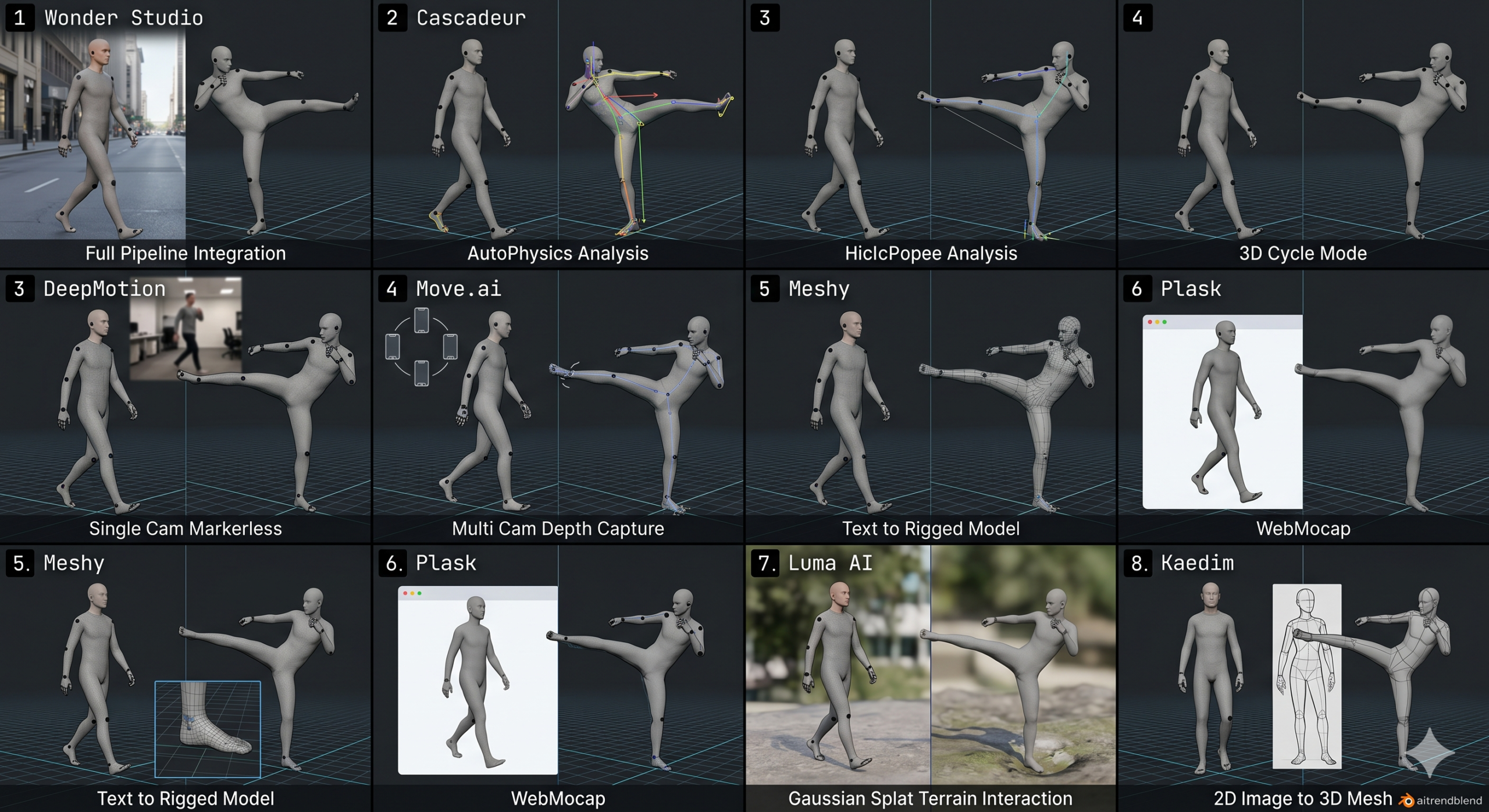
Scoring used five dimensions. Output quality assessed the visual and technical accuracy of what each tool produced. Workflow efficiency covered how many steps it took to go from raw input to something usable in a 3D application. Integration assessed how cleanly the output worked in standard pipelines including Blender, Unreal Engine, and Maya. Value scored the output quality against the actual cost. Development trajectory scored whether the tool showed clear signs of active improvement based on recent update history.
One note about the development trajectory score. This is a category where AI tools can change dramatically in short windows. A tool that scored a 6 on output quality in March and released a major model update in May might reasonably score an 8 by the time you read this. Where we observed that kind of jump during our testing window we incorporated it. Where we did not have visibility into updates that happened after our scoring period, we note that in the relevant tool section.
AI 3D Animation Tools Ranked for 2026
Wonder Studio does something that sounds impossible until you see it working. You upload video footage of a human actor performing, assign a 3D character model to that actor, and Wonder Studio automatically tracks the actor’s motion, removes them from the footage, lights the 3D character to match the scene’s real lighting conditions, and composites the result. What traditionally required a motion capture stage, a team of compositors, and weeks of work comes out of Wonder Studio in hours, and it comes out looking genuinely good.
The technology behind this is not magic. It is a combination of pose estimation, scene lighting analysis, and learned compositing that Wonder has spent years refining. The reason it ranks first overall is that it solves a complete production problem rather than one step of a pipeline. When a tool handles tracking, motion extraction, lighting analysis, and compositing in a single automated workflow, the reduction in pipeline complexity is significant enough to change what small teams can actually produce.
Most tutorials skip the part about what Wonder Studio requires from you upfront. The 3D character model needs to be rigged in a specific way to receive the extracted motion cleanly. The input footage needs to maintain consistent lighting and avoid extreme motion blur that confuses the pose estimator. Shots where the actor’s full body is visible throughout perform considerably better than shots where limbs leave the frame frequently. Understanding these requirements before you start saves the frustration of discovering them mid project.
The output quality we measured scored highest on shots filmed with good production discipline, controlled lighting, a stable camera, and an unobstructed actor. On handheld footage with variable lighting it dropped meaningfully but remained better than any other automated compositing approach we tested. For indie filmmakers and small studios who cannot afford traditional VFX pipelines, it represents a genuine step change in what is achievable.
The value score is lower than the quality score because the pricing model charges per second of processed footage at the paid tier. For long projects the cost accumulates. For short form content, commercials, and game cutscenes where total footage length is measured in minutes rather than hours, the math is manageable.
Cascadeur occupies a genuinely unique position in this ranking. Every other tool here either generates motion automatically from video or text input or creates 3D assets from scratch. Cascadeur is a keyframe animation application built around a physics based AI system that helps the animator create motion that is physically believable, weight, balance, momentum, and follow through, without the animator needing to understand the physics math behind those principles.
The core feature is called AutoPhysics and it does what the name implies. You set keyframes for a character’s primary poses, the anticipation, the action, and the landing, and Cascadeur fills the space between them with motion that respects physics. A character jumping actually builds momentum in the takeoff, actually weights the landing, actually shows the balance correction that happens when someone comes down from height. These are the details that separate animation that looks alive from animation that looks constructed, and they take experienced animators significant time to add manually.
The AI pose prediction feature is the second major component. Draw a rough pose sketch or click a point in space where you want the character’s hand or foot to land, and the model suggests a full body pose that achieves that goal in a physically plausible way while maintaining character balance. For action sequences, combat choreography, and acrobatic animation where the body needs to make sense at every keyframe, this cuts the initial blocking pass time by a measurable amount.
Cascadeur exports to FBX, BVH, and USD formats that work cleanly with Blender, Maya, Unreal, and Unity. This is not a tool that produces output you then have to fight to use. The export pipeline is mature and the output requires minimal retargeting adjustment in most standard rigs. The free tier is genuinely usable for noncommercial work, which makes it an easy recommendation to try before committing to the paid plan.
The learning curve sits between accessible and demanding. Cascadeur has its own animation paradigm that differs from both traditional keyframe tools and motion capture pipelines. The first project in it takes longer than it will once you understand the system’s logic. Budgeting two to three days to learn the fundamentals before starting production work is realistic advice.
DeepMotion does one thing and it does it extremely well. You upload a video of a human performing a movement, filmed on your phone, pulled from stock footage, recorded in your living room, and DeepMotion extracts 3D motion data from it. The output is a BVH or FBX animation file that maps the performer’s movement onto a standard humanoid skeleton, ready to retarget onto any compatible 3D character. We cover the full process in our DeepMotion workflow guide.
The accuracy of the motion extraction is what earns the third rank on this list. For locomotion, walking, running, and jogging at various speeds, the output quality is high enough that it goes directly into a Mixamo retargeting pipeline or Unreal’s control rig without meaningful cleanup. For upper body acting and hand gestures the quality drops somewhat but remains far above what you would spend creating the same motion in a keyframe tool from scratch.
Here is where it gets interesting in terms of practical application. A performer you film yourself in a well lit room with clear contrast between their clothing and the background gives DeepMotion better input than a professionally shot but complex background scene. The AI is solving a pose estimation problem, and the factors that make pose estimation easier, consistent lighting, an uncluttered background, full body visibility, are things any developer can control without a production budget. This means the democratization argument here is genuine rather than theoretical.
The integration score of 9.3 reflects how cleanly the output works across different applications. DeepMotion supports direct export to formats that Unreal Engine, Unity, Blender, and iClone all accept natively. The retargeting process in each of those applications is straightforward because DeepMotion’s skeleton hierarchy follows industry convention rather than a proprietary structure. This is a more important feature than it sounds when you consider how much time nonstandard skeleton outputs can waste.
Combat and fast action sequences are where the quality score comes down. Rapid limb movement, occlusion between body parts during grappling or fighting moves, and extreme poses outside the distribution of the training data all produce output that needs cleanup. For those specific motion types, a combination of DeepMotion for the base motion and Cascadeur for cleanup and refinement produces better results than either tool alone.
Move.ai competes in the same space as DeepMotion but takes a different approach that produces different results for different use cases. Where DeepMotion works from single camera video and estimates 3D position from 2D information, Move.ai uses multi camera setups, including configurations using consumer iPhone cameras in a ring around the performer, to capture genuine 3D position data rather than estimating it. The difference in output quality for complex motion is measurable and significant.
Set up four iPhones on stands around your performer, run the Move.ai sync process to coordinate the cameras, capture your performance, and the multi view reconstruction produces motion data with depth accuracy that single camera systems cannot match. Finger tracking, subtle weight shifting, and complex body overlaps that cause single camera systems to guess are resolved by the multi view geometry. For studios that need motion with production level quality without the cost of a traditional optical marker system, Move.ai sits in a price bracket that was not available before AI made this kind of reconstruction feasible.
The workflow score reflects the setup complexity honestly. Configuring a multi camera session, managing the sync, and processing the capture through Move.ai’s cloud pipeline takes longer than uploading a video to DeepMotion. For teams doing ongoing performance capture this setup cost amortizes quickly. For a team that needs motion for one or two sequences in a project, DeepMotion’s simpler workflow may produce better value despite the lower absolute quality ceiling.
The output quality score of 8.8 reflects what we observed in good capture conditions, performer in fitted, high contrast clothing, cameras placed with overlapping coverage, and a stable capture environment. Move.ai is more sensitive to capture conditions than DeepMotion precisely because it relies on multi view geometry that degrades when camera placement is suboptimal. The documentation for optimal setup is good, but following it adds time that a simpler system does not require.
Meshy is the text to 3D generation tool that has come closest to being genuinely useful for game and animation asset pipelines. Type a description of an object or environment asset, choose a style reference, and Meshy produces a 3D mesh with textures in a format that drops directly into Unreal, Unity, or Blender. For props, architectural elements, furniture, vehicles, and environmental details where the geometry does not need to deform for animation, the output quality in 2026 is frequently good enough to use with modest cleanup. We go deeper on the full pipeline in our Meshy AI guide for game developers.
The reason Meshy ranks fifth rather than higher is the limitation that text to 3D generation still carries at this stage of development. Topology quality remains unpredictable for complex organic forms. The meshes Meshy generates are often dense and irregular in ways that matter if you need the asset to deform cleanly for animation or need it optimized for real time rendering at scale. For static props and background assets these topology issues are less significant. For character models that need clean edge loops for facial animation or body deformation, they require meaningful retopology work before the mesh is animatable.
The animation rigging features that Meshy introduced this year are worth specific attention. For humanoid and creature models the automatic rig pipeline generates a usable skeleton with weight painting that gets the major deformation zones roughly right. The shoulders and hips need adjustment in most outputs. The hands need significant correction if fine finger movement is required. For a game character that needs locomotion, combat, and idle animations without extreme close up scrutiny, the automatic rig gets you to a working starting point faster than building it from scratch.
None of this comes free of caveats. Meshy excels at hard surface and semi organic assets at medium complexity. Highly detailed character faces, realistic human hands, and fine fabric simulation remain areas where the output requires more work than it saves. Within its actual strengths the tool is fast, affordable, and improving with each update. For a closer look at the text to 3D generation quality specifically, see our Meshy text to 3D review.
Plask earns the highest workflow score in this ranking and it earns it honestly. You open a browser tab, upload a video, and within a few minutes receive a 3D animation that you can preview, edit, and export without downloading or installing anything. For someone encountering AI motion capture for the first time, or for a team that needs quick prototype motion without setting up a local pipeline, that simplicity has genuine value.
The output quality score reflects an honest gap between Plask and the deeper tools above it in this ranking. Running everything in a browser means computational constraints are real. The pose estimation model is smaller than what DeepMotion or Move.ai run on their infrastructure, and the difference shows in how the output handles edge cases. Fast motion, occlusion, and unusual poses produce more artifacts in Plask than in competing tools.
The problem most people run into is starting with Plask because of its accessibility and then needing to migrate to a heavier tool when quality requirements increase. That transition is not difficult, the BVH export from Plask goes into the same retargeting pipelines as any other motion source, but the motion data will need correction passes that were not necessary when you were prototyping. Factor that into planning if you intend to use Plask output in a final product rather than a rough animatic.
For educators, students, and developers doing rapid prototyping of animation systems before production quality motion has been acquired, Plask is the most accessible entry point in this category and the free tier is usable enough to do real work in it. Those are significant strengths. The quality ceiling simply does not reach what the paid tools above it deliver.
Luma AI captures real world 3D scenes with striking fidelity using NeRF and Gaussian splatting techniques that have matured considerably over the past year. Walk around an object or environment filming it with your phone, upload the footage, and Luma reconstructs a navigable 3D representation that looks genuinely photorealistic from captured viewpoints. The output quality for scene capture is among the best available at any price point in 2026. We walk through the full capture process in our Luma AI 3D scene capture guide.
The integration score tells a more complicated story about why it ranks seventh. Luma’s outputs are excellent for visualization, virtual production backgrounds, and cinematic rendering applications. They are significantly more difficult to use in a traditional 3D animation pipeline that requires clean polygon meshes with sensible topology. NeRF and Gaussian splat representations do not behave like normal 3D geometry. You cannot rig a character captured this way, you cannot easily place other 3D objects into the scene and have them interact with the geometry correctly, and export to game engines is constrained by the format’s nature.
This is not a small distinction. Luma AI solves a scene capture and visualization problem at a high level. It does not solve a character animation or rigging problem at all. The reason it ranks in an AI 3D animation comparison is that its Genie feature generates 3D objects from text prompts and has genuine utility for environment and prop assets in animation pipelines. The Genie output quality for simple to moderate complexity objects is good. The character generation capability remains early and the output requires substantial cleanup for animation use.
Use Luma for what it does exceptionally well. It captures and reproduces real environments, generates reference objects, and builds visual backgrounds for animation and virtual production. Do not use it as a character animation tool. That is a straightforward recommendation that the marketing does not always make clear.
Kaedim’s proposition is compelling on paper. Upload a 2D concept image or photograph of an object and receive a clean, game ready 3D model with good topology and textures. For certain asset types, vehicles, architectural elements, and hard surface props with well defined geometry from 2D references, this workflow delivers output that genuinely reduces asset production time. The technology is real, and for those specific asset types the results justify attention.
For character models that need to animate, the situation is more complex. Kaedim’s strength is mesh cleanliness and topology quality compared to pure generative approaches like Meshy. The edge flow is more deliberate and the mesh density is more appropriate for game use. The weakness is that translating a 2D concept image into a 3D character with accurate proportions, correct anatomy inference for parts not visible in the reference, and surface detail that holds up at game distances requires more than a clean mesh. It requires semantic understanding of what the character is supposed to look like from angles the reference does not show.
The pricing model adds friction that the other tools in this ranking avoid. Kaedim targets studios and operates on custom pricing discussions rather than a self serve subscription. For a solo developer evaluating tools, the barrier to even knowing what Kaedim costs is higher than for every other tool listed here. That pricing structure reflects who Kaedim is building for and it is a reasonable business decision, but it means the tool is not meaningfully accessible to the independent developer or small team market where most of the discovery in this category happens.
Watch Kaedim’s development over the next twelve months. The underlying technology is promising and the team has shown a clear trajectory of improvement. As a current recommendation for 3D animation work at any level it belongs at the bottom of this ranking. As a tool to check back on in six months, it belongs on your radar.
“The tools at the top of this ranking do not replace animators. They change what an animator’s time is worth, and the difference is enormous.”
aitrendblend editorial, 2026 AI 3D animation tools survey
Full Feature Comparison at a Glance
| Tool | Motion Capture | Keyframe Assist | Text to 3D | VFX Integration | Free Tier | Starting Price |
|---|---|---|---|---|---|---|
| Wonder Studio | Yes (from video) | Assisted | No | Yes (core feature) | Trial only | $48/mo |
| Cascadeur | No | Yes (core feature) | No | No | Yes | Free / $24/mo |
| DeepMotion | Yes (single cam) | Edit tools | No | No | Yes (limited) | Free / $12/mo |
| Move.ai | Yes (multi camera) | No | No | No | No | $65/mo |
| Meshy | No | Automatic rig only | Yes (core feature) | No | Yes | Free / $16/mo |
| Plask | Yes (browser) | Basic edit | No | No | Yes | Free / $10/mo |
| Luma AI | No | No | Genie (objects) | Scene backgrounds | Yes | Free / $10/mo |
| Kaedim | No | No | Image to 3D | No | No | Custom pricing |
Key Takeaway
The strongest 3D animation pipelines in 2026 combine tools by task rather than relying on any single tool for everything. A practical combination for a small studio is Wonder Studio for VFX integration, DeepMotion for rapid motion capture from video reference, Cascadeur for refining and cleaning that motion, and Meshy for generating environment and prop assets. Each handles a specific part of the pipeline where it is genuinely strong.
Gaps That Still Define the Limits of AI 3D Animation
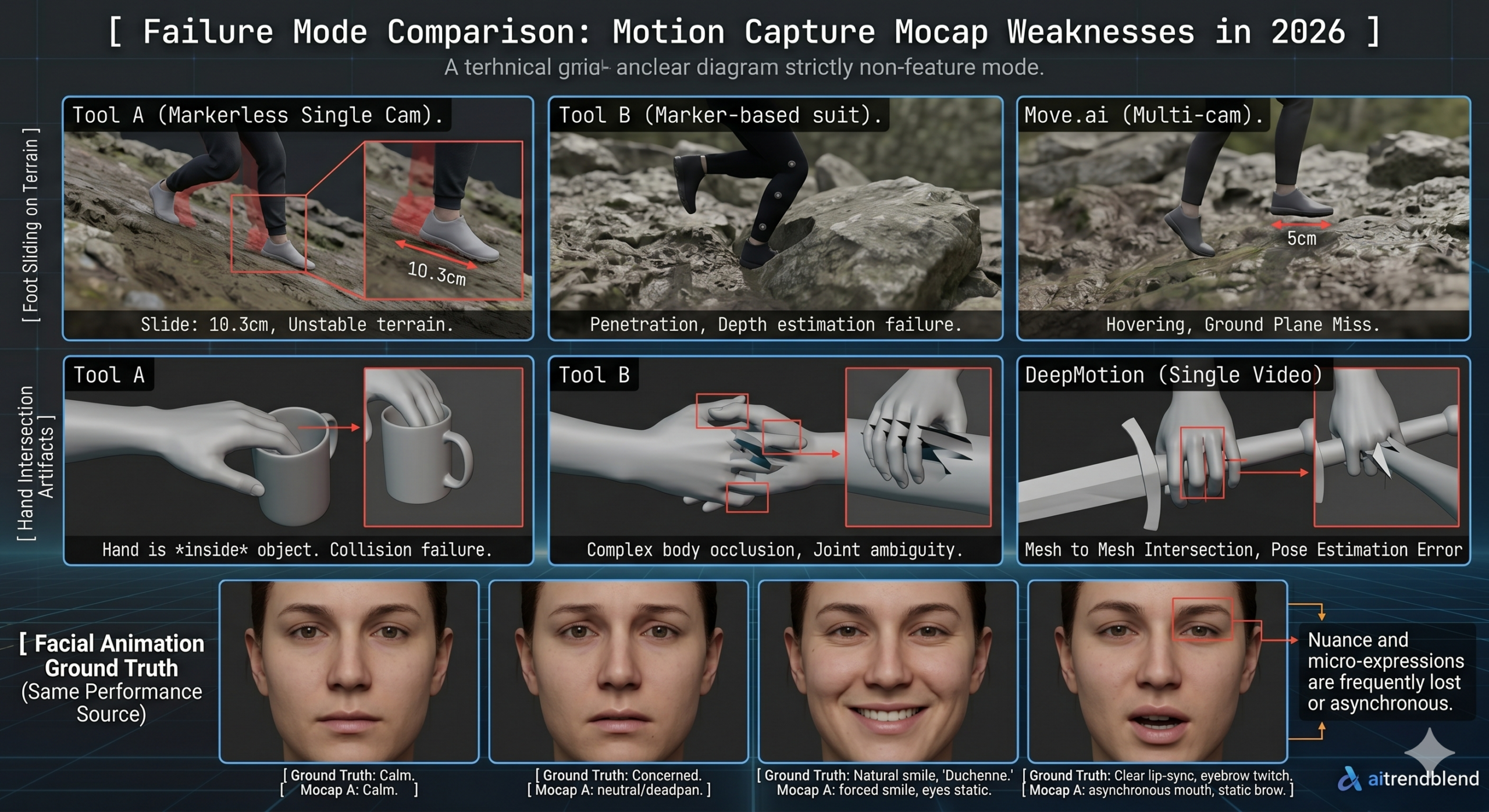
Foot contact with terrain is the most visible unsolved problem across every motion capture and generation tool we tested. When a character walks across uneven terrain, the foot needs to conform to the surface at the moment of contact, not float above it, not penetrate through it, but land precisely on whatever geometry exists at that location. AI motion tools generate locomotion in a neutral space without terrain awareness. The result is foot sliding, floating, and penetration that requires manual correction or procedural inverse kinematics applied afterward. Every serious game engine has IK foot placement systems that can help, but they require setup and do not solve every case.
Hand to object interaction remains genuinely difficult for all generation approaches. A character reaching for and grasping a specific prop requires the fingers to close around that particular shape at the right distance and angle. Current tools produce grasping poses that look approximately right in isolation but rarely account for the exact geometry of the object being held. This matters most in cutscenes and close up shots where the interaction is visible to the viewer. For background action and wide shots, the gap is less apparent.
Facial animation from AI sources is at an early stage relative to body motion. The best outputs we saw from any tool for facial performance required more cleanup than the body motion by a significant margin. Subtle acting, the kind of small expression variation that makes a character feel present rather than mechanical, remains a domain where hand animated facial rigs outperform every AI approach we tested. This will likely look different in twelve to eighteen months as models trained specifically on facial performance data mature, but for production work in 2026 facial animation is still a manual discipline.
Real time generation for interactive applications is an area where the gap between what exists and what is needed remains large. Every tool in this ranking processes motion after it is captured rather than generating it in real time in response to game state or player input. Procedural animation systems in engines like Unreal handle some of this through physics simulation and blending, but AI generated 3D character motion that responds to runtime conditions in real time does not yet exist as a system ready for production for most developers.
Choosing the Right Tool for Your Specific Situation
If you are making a film, a game cinematic, or any project where a human actor’s performance needs to drive a 3D character and the finished output needs to look composited into live footage convincingly, Wonder Studio is the clear starting point. Its workflow is the most complete single tool solution for that specific production type and it justifies the subscription cost for any project of meaningful scope.
If you are a game developer who needs high quality character animation and wants to create or refine motion with direct artistic control rather than extracting it from video, Cascadeur should be the first tool you try. The free tier allows you to fully evaluate it for noncommercial work, and the physics based AI assistance is genuinely useful rather than being a feature that sounds better in marketing copy than it performs in practice.
For teams that have reference video they want to convert to usable animation data quickly and affordably, DeepMotion at the entry level and Move.ai for higher quality multi camera capture represent the two tiers of the same workflow. Start with DeepMotion to prototype, graduate to Move.ai if the motion quality requirement warrants it.
Meshy earns its place in almost any 3D production pipeline as a prop and environment asset generator. At the entry price point the output quality for hard surface assets is frequently good enough to use with modest cleanup, and the workflow from text description to textured mesh is fast enough to meaningfully accelerate asset production timelines. If you are assembling a broader pipeline, see our guide on automating game asset production for how generation tools like this fit into a repeatable process.
What is coming over the next twelve to eighteen months is worth being aware of before making long term tool commitments. Several teams are working on models that understand 3D spatial relationships well enough to generate character animation that responds to scene context, a character ducking under a specific ceiling height, stepping around an obstacle that exists in the scene geometry, reacting to another character’s motion in physically plausible ways. These capabilities exist in research settings. They are not production tools yet. When they become production tools, several of the scores in this ranking will change substantially.
The judgment that no tool replaces right now is knowing when motion is good enough for the specific shot you are cutting to, in a specific context, at a specific screen size. That calibration is something you build by watching your AI generated output in context next to reference, over and over, until the gap between acceptable and unacceptable becomes obvious. Develop that eye early and it will save you significant rework time at the end of every project.
Frequently Asked Questions
What is the best AI tool for 3D character animation in 2026?
It depends on your starting material. Wonder Studio wins for turning a filmed actor performance into a composited 3D character, Cascadeur wins for artists who want direct keyframe control with physics assistance, and DeepMotion wins for quickly converting plain video into retargetable motion data.
Is Move.ai worth the extra setup compared to DeepMotion?
Only if the project needs it. Move.ai’s multi camera setup produces more accurate motion for complex movement and finger tracking, but DeepMotion’s single camera workflow is faster to start and is good enough for most locomotion and acting shots.
Can AI generate game ready 3D characters from text alone?
Not reliably yet. Tools like Meshy and Kaedim produce usable props and hard surface objects from text or images, but character faces, hands, and rigging for animation still need manual correction before they are production ready.
What is Luma AI actually good for in a 3D animation pipeline?
Scene capture and visual backgrounds, not character animation. Luma reconstructs real environments with strong photorealism but its output does not behave like riggable game geometry, so it works best for virtual production backdrops and reference objects.
Why does foot sliding still happen in AI generated animation?
AI motion tools generate movement in a neutral space without awareness of the terrain a character will actually walk on, so the feet do not automatically conform to uneven ground. Studios still rely on inverse kinematics systems in the game engine to correct foot placement after the fact.
Should a small studio rely on one 3D animation tool or several?
Several. The strongest pipelines in this ranking combine tools by task, such as Wonder Studio for VFX integration, DeepMotion or Cascadeur for motion, and Meshy for environment assets, rather than asking one tool to cover the entire production.
Start Building Your AI 3D Animation Pipeline
All top ranked tools here offer free tiers or trials. Start with Cascadeur for keyframe animation or DeepMotion for video to motion. Both have accessible free tiers that let you evaluate them properly before spending anything.
All tools in this ranking were tested independently by the aitrendblend editorial team between April and June 2026. Scores reflect our testing methodology and specific production use cases. Pricing information was accurate at the time of testing and may have changed. Active development in this space means tool capabilities may differ from what is described here. This is independent editorial content. We are not affiliated with any of the tools or companies reviewed.
A modest masterpiece in its own quiet way, and a look at thisdomainisabdu confirmed the same quiet quality across the rest of the site, calling something a masterpiece is usually overstating but for content this carefully crafted the word feels appropriate even if the writers themselves would probably resist the label honestly.
Genuinely useful read, the points are practical and easy to apply right away, and a quick look at vesseltame confirmed that this site is consistent in that approach, looking forward to digging through the rest of it when I get the chance to sit down properly later in the week or this weekend.
Thanks for sharing this with the open internet rather than locking it behind a paywall like so many sites do now, and a stop at uptonshade kept the same vibe going, generous helpful and clearly written by someone who actually wants people to learn from it rather than just charge them.
Appreciate the thoughtful approach, the writer clearly took time to make this readable for someone who is not already an expert, and a look at oceanriders kept that going nicely, easy on the eyes and easy on the brain which is always a winning combination when reading on a busy day.
Bookmark added without hesitation after finishing, and a look at unityharbor confirmed I should bookmark the homepage too rather than just this page, the rare site that earns category level trust rather than just single article approval is the kind I want to rely on across many different topics over time.