
The Rise of Specialized AI Agents: Moving Beyond LLMs to Autonomous Systems That Run Complex, Multi-Step Work

That scenario isn’t hypothetical anymore. Versions of it are running in production at logistics firms, financial institutions, and mid-size manufacturers right now. What changed isn’t the underlying AI — the language models powering these agents aren’t dramatically different from what existed two years ago. What changed is the architecture around them: the specialized tooling, the domain-specific training, the multi-step workflow orchestration, and the careful design of when to act autonomously and when to pause for a human.
This is what “specialized AI agents” actually means — and it’s a different category of thing than a chatbot, a co-pilot, or even a general-purpose agent. General-purpose agents can browse the web and run code. Specialized agents can run your business operations. That distinction deserves a careful look, because the gap between those two things is where most teams get lost when they try to build this.
What follows is an honest account of how specialized agents work, where they’re being deployed with real results, what the architecture looks like, where they still fail, and ten prompt templates to help you design, specify, and deploy your own. No hype, no vague promises. Just the current reality of a genuinely significant shift in what AI can do inside an organization.
Why General-Purpose LLMs Hit a Wall for Operational Work
The problem most people run into is assuming that a powerful general LLM — even one with tool access — can handle complex operational workflows with minimal customization. The assumption is understandable. These models are capable of extraordinary things. But operational workflows have properties that expose exactly where general models struggle.
Consider a month-end accounting close. It involves: pulling transaction data from multiple systems, categorizing exceptions by rule sets your company has spent years defining, reconciling intercompany balances across entities with different currencies, flagging discrepancies for review, updating journal entries in your ERP, generating the close checklist status report, and producing variance commentary in your CFO’s preferred format. Each step depends on the previous one. Each step requires access to specific internal systems. Several steps require applying judgment using context that exists nowhere on the public internet — your company’s specific chart of accounts, your materiality thresholds, your naming conventions, your exceptions history.
A general-purpose LLM, even a brilliant one, cannot handle that workflow. It doesn’t have access to your ERP. It doesn’t know your materiality thresholds. It has no memory of last month’s exceptions. And critically, it treats every step as a fresh conversation rather than as one action in a continuous, stateful operation. You’d spend more time managing the LLM than doing the work yourself.
General LLMs fail at operational workflows not because they’re not intelligent enough — they often are — but because they lack the four things operational work actually needs: domain-specific tool access, persistent state across steps, institutional knowledge about your specific business, and reliable judgment about when to act and when to stop and ask.
Specialized agents address all four. They are built for a specific domain, connected to the specific systems that domain requires, trained or prompted with the institutional knowledge of your business, and designed with explicit policies about autonomy boundaries. They are, in a sense, colleagues who happen to be AI — not assistants you’re drafting instructions for.
What “Specialized” Actually Means — and Why It Changes Everything
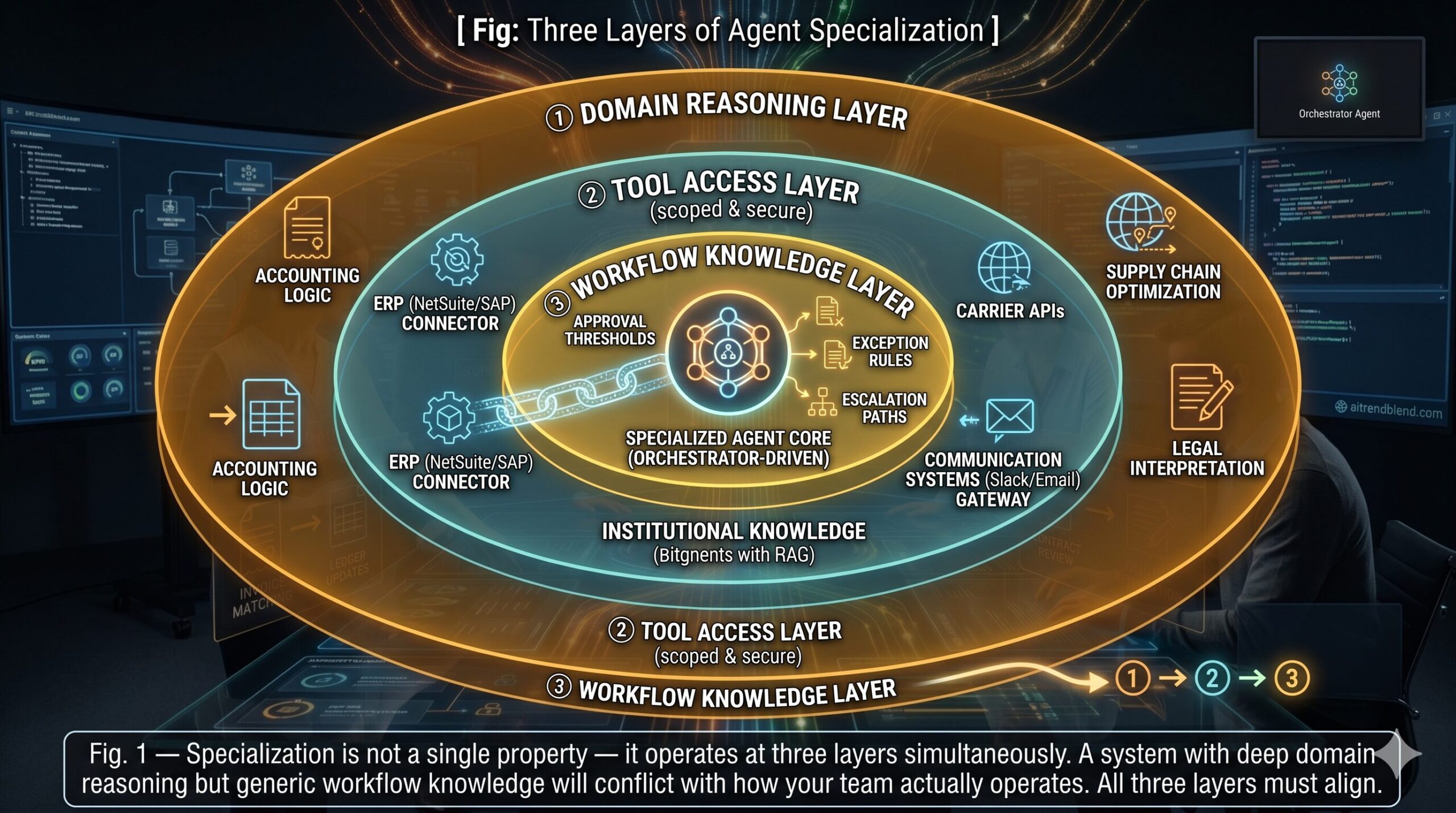
This is not a small distinction. Specialization in AI agents operates at three levels simultaneously, and all three have to be present for the system to work reliably in production.
Domain specialization means the agent’s reasoning capabilities are tuned for a specific field. A specialized accounting agent understands double-entry bookkeeping, GAAP principles, reconciliation logic, and the difference between a timing difference and a genuine discrepancy. It has been fine-tuned or prompted with enough domain context that it reasons the way an experienced accountant reasons — not the way a generalist AI reasons about accounting. That distinction matters because the failure modes are different. An accountant who makes a mistake usually makes an accountant’s mistake — a recognizable error a reviewer can catch. A generalist AI making a mistake on accounting work often produces something that looks plausible but violates a principle an accountant would never violate.
Tool specialization means the agent has access to the specific APIs, databases, and systems its domain requires — and only those. A supply chain agent can read inventory levels from your WMS, query carrier APIs for rate and availability data, write purchase orders to your ERP, and send notifications through your communication stack. It cannot access your HR system. Tool scoping is not just about capability — it’s about trust and security. Limiting which systems an agent can touch limits the blast radius of errors.
Workflow specialization means the agent understands the specific sequence of steps your organization follows for a given process — not the generic industry version, but your version, with your approval thresholds, your exceptions history, your escalation paths. This is encoded in system prompts, retrieved from your knowledge base via RAG, or baked in through fine-tuning. Without it, the agent will execute the generic version of the workflow and conflict with the actual way your team operates.
Where Specialized Agents Are Running in Production Today
Here is where it gets concrete. The domains where specialized agents have crossed from experiment to production are clustering around three properties: high transaction volume, well-defined rules with structured exceptions, and significant cost to getting it wrong. That pattern shows up repeatedly across the early-adopter industries.
Accounting & Finance
- Invoice processing & three-way matching
- Month-end reconciliation
- Expense categorization & policy enforcement
- Intercompany elimination
- Variance commentary generation
Supply Chain
- Demand forecasting & inventory reorder
- Disruption detection & rerouting
- Supplier communication & negotiation drafts
- Inbound logistics tracking
- Customs documentation prep
Legal & Compliance
- Contract review & redlining
- Regulatory change monitoring
- Due diligence data room analysis
- Policy exception requests
- Compliance audit trail generation
Human Resources
- Resume screening & shortlisting
- Onboarding task orchestration
- Benefits enrollment guidance
- Policy Q&A & handbook navigation
- Performance review coordination
Customer Operations
- Tier-1 support resolution end-to-end
- Order modification & returns processing
- Renewal outreach & churn intervention
- SLA monitoring & escalation
- CSAT follow-up & case closure
Regulatory Reporting
- ESG data collection & report generation
- AML transaction monitoring
- FDA / SEC filing preparation
- Incident report generation
- Audit evidence collection
The pattern across all of these is the same: large volumes of structured work that follows rules most of the time, with a minority of exceptions that require escalation to a human. Specialized agents handle the bulk of the structured volume autonomously, identify the exceptions reliably, and surface them to humans with enough context pre-loaded that the human decision takes seconds rather than minutes.
“The accounting agent doesn’t replace the controller. It eliminates the four days of transaction grinding before the controller’s judgment is actually needed — and gives them four extra days of actual analysis.”
— Observed across enterprise accounting agent deployments, aitrendblend.com editorial, 2026
The Architecture: How Specialized Agents Are Actually Built
Think about what this actually requires at a technical level. A specialized agent that handles end-to-end accounting close isn’t a single model responding to prompts. It’s a system with at least five distinct layers working together — and the design of each layer is what determines whether the thing works reliably or fails unpredictably.
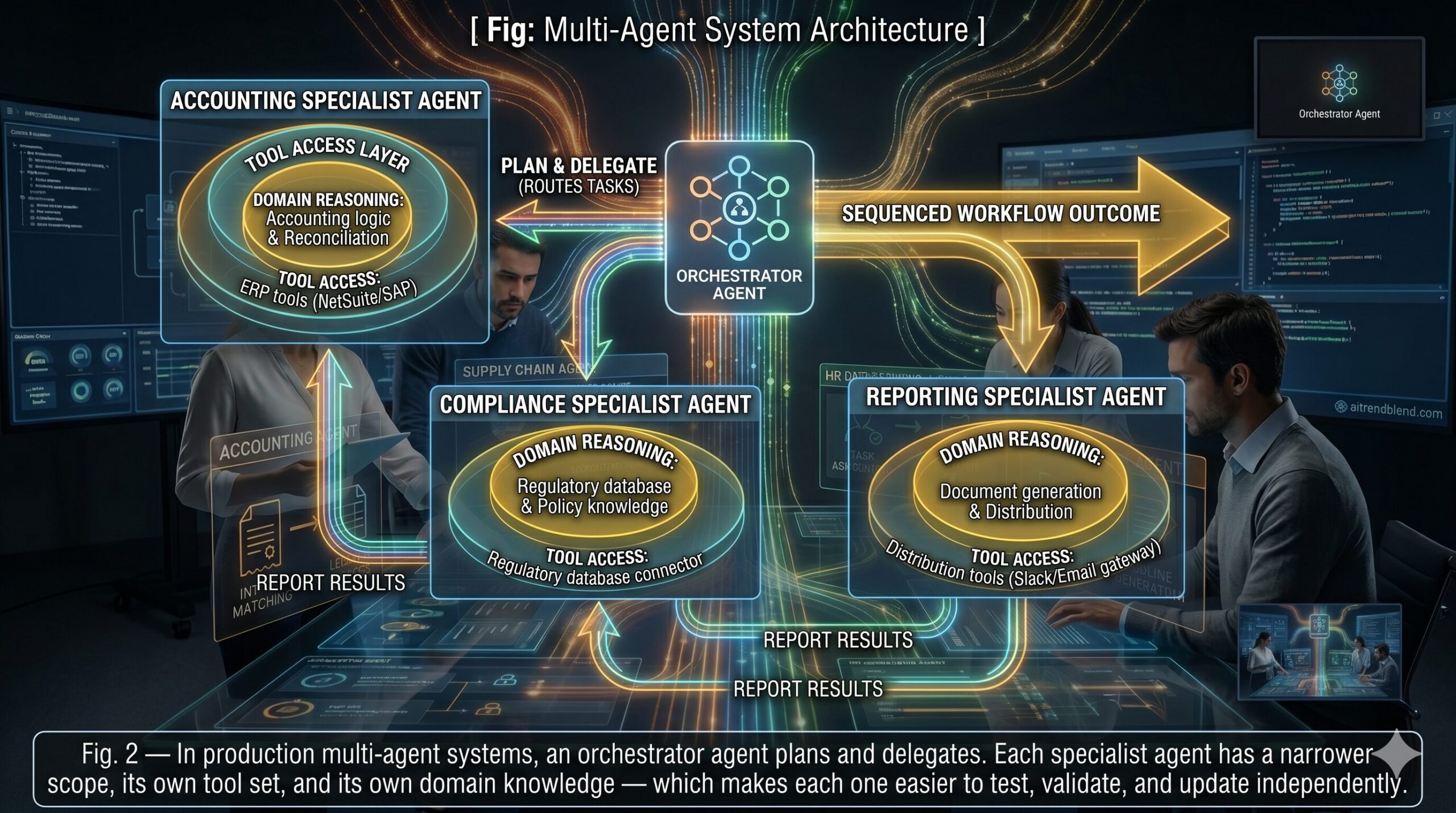
The multi-agent architecture — one orchestrator delegating to multiple specialists — is the pattern that’s emerged as the most robust for complex operational workflows. Single monolithic agents attempting to handle an entire accounting close or supply chain disruption response tend to accumulate context and drift over long task horizons. Breaking the workflow into specialist sub-agents, each responsible for a bounded domain of the problem, gives you smaller components that are easier to test, easier to debug when they fail, and easier to improve without touching the rest of the system.
Specialized agents are systems, not models. The LLM reasoning core is one component of five. Companies that treat agent deployment as a model selection problem and ignore orchestration, memory architecture, and guardrail design are the ones that end up with agents that work in demos and fail in production.
Before You Deploy: The Setup That Actually Matters
Most organizations that struggle with specialized agent deployments don’t fail at the AI part — they fail at the operational design that has to happen before any model is involved. Getting these four things right before deployment is the difference between a system that runs reliably and one that becomes a maintenance burden.
Map the workflow at the task level, not the goal level. “Handle month-end close” is not a workflow specification. You need every discrete step, the inputs and outputs of each step, the decision criteria at each branch point, and the definition of “done” for the whole process. Agents cannot infer your workflow from a high-level description — they need to be told the actual sequence, including the exception handling logic for the cases that aren’t in the textbook.
Define your autonomy thresholds before writing a line of code. Which actions can the agent take without approval? Which require a human sign-off? The answer should not be “it depends” — it should be a written policy with specific criteria. Dollar thresholds for financial actions. Counterparty sensitivity rules for communications. Reversibility criteria for system writes. Organizations that skip this step end up making these decisions reactively, after an agent has done something consequential that nobody had thought to prohibit.
Build the audit trail first, not last. Every action a specialized agent takes should be logged with: what it did, why (the reasoning), what information it was working from, and what the outcome was. This isn’t optional for regulatory reasons — it’s also how you diagnose failures, catch drift, and improve the system over time. The teams that build audit infrastructure from day one have a dramatically easier time when something goes wrong, because they have a complete record of what the agent was doing and why.
Design the human handoff carefully. When an agent decides a situation requires human judgment, the quality of that handoff determines whether the human can act quickly or has to reconstruct context from scratch. The agent should surface: what it was trying to do, what it found, why it stopped, what the options are, and what it recommends. A well-designed handoff takes a human thirty seconds to review and decide. A poorly designed one takes twenty minutes to understand.
10 Prompts for Designing, Specifying, and Deploying Specialized AI Agents
These prompts are designed for use with Claude Opus 4.7, GPT-4o, or equivalent frontier models. They help technical leads, operations managers, and AI architects design the components of a specialized agent system — from initial workflow mapping through full multi-agent architecture. They escalate from beginner orientation through master-level system design.
Prompt 1: Workflow Decomposition — Breaking Business Processes into Agent Steps (Beginner)
You cannot hand an agent a vague goal and expect reliable results. This prompt takes any business process and breaks it into the precise, sequenced, atomic steps an agent can actually execute — the foundational specification work before any architecture decision is made.
Why It Works: The “exception cases” field per step is where most workflow specs fail to go deep enough. Agents follow happy paths easily. It’s the 15% of transactions that don’t fit the standard pattern where autonomous systems go wrong — and having exception logic specified at the step level forces you to design for those cases before they become production incidents.
How to Adapt It: Add “identify which steps could be parallelized to reduce total workflow duration” to get a performance optimization layer built into the spec from the start.
Prompt 2: Agent Scope and Constraint Definition (Beginner)
The problem most people run into when deploying agents for the first time is not the agent doing too little — it’s the agent doing too much. Defining what an agent won’t do is as important as defining what it will. This prompt produces the constraint document that makes an agent safe to run autonomously.
Why It Works: The “Emergency Stop Conditions” section is rarely written explicitly by teams building their first agents — and it’s exactly what you want to have thought through before something unexpected happens in production. An agent that doesn’t know when to stop is more dangerous than one that’s overly cautious.
How to Adapt It: For regulated industries, add “Section 6 — Regulatory Constraints: list specific regulations (GDPR, HIPAA, SOX) that affect what the agent may access, store, or transmit and what controls are required.”
Prompt 3: Tool Manifest — Specifying What an Agent Can Access (Beginner)
Every specialized agent needs a precisely defined tool manifest — the exact set of APIs, databases, and system capabilities it can call, with their inputs, outputs, and any access restrictions. Vague tool access creates security exposure. This prompt generates a complete manifest ready for engineering implementation.
Why It Works: Specifying “requires human confirmation” as an access restriction level on individual tools is more precise than blanket approval policies. It means the agent can move quickly on low-risk tool calls and pause only for the specific actions that warrant it — rather than pausing for entire workflow stages.
How to Adapt It: Add “include a data classification row per tool — does this tool expose PII, financial data, proprietary IP, or regulated records?” to integrate data governance into the manifest from the start.
Prompt 4: End-to-End Accounting Agent — Month-End Close Specification (Intermediate)
This prompt generates a specific, detailed operational specification for an accounting agent handling month-end close — one of the most common and highest-value early targets for specialized agent deployment. The output is designed to be handed directly to an engineering team.
Why It Works: Specifying the autonomous-versus-human boundary per component — rather than per workflow — gives the controller granular control over risk exposure. The reconciliation can be fully autonomous. The journal entry posting might require sign-off above $50k. That nuance is impossible to express without component-level specification.
How to Adapt It: Add “include the SOX control implications of each autonomous action — which actions would require additional controls or documentation to satisfy audit requirements” for publicly traded companies.
Prompt 5: Supply Chain Disruption Response Agent (Intermediate)
Supply chain disruption is one of the clearest use cases for specialized agents — the problem is time-sensitive, data-intensive, and highly structured, even though the disruptions themselves are unpredictable. This prompt designs an agent that handles disruption response from detection through resolution.
Why It Works: The “resolution tracking” section at the end is often the missing piece in disruption response designs. Agents that generate good responses but don’t monitor whether those responses actually worked create a false sense of resolution — the human approved option B, moved on, and never found out option B also failed.
How to Adapt It: Add “design a supplier reliability scoring mechanism — how does the agent update its model of supplier reliability based on disruption history, to inform future sourcing recommendations?”
Prompt 6: Human-in-the-Loop Decision Gate Design (Intermediate)
The human-in-the-loop design is the least glamorous and most critical part of any specialized agent deployment. Done poorly, it creates bottlenecks that defeat the purpose of automation. Done well, it provides a safety net that lets the agent operate with real autonomy on the 85% of cases that don’t need review. This prompt generates that design.
Why It Works: The “60-second review” constraint on the approval package design forces the agent to pre-compute and surface exactly what a reviewer needs — rather than producing a data dump that requires the reviewer to do their own analysis before they can make a decision. That distinction determines whether your approval flow has a one-minute response time or a twenty-minute one.
How to Adapt It: Add “design a feedback mechanism — when a human overrides or modifies an agent recommendation, how is that correction captured and used to improve future recommendations?” to close the learning loop.
Prompt 7: Multi-Agent Orchestration Architecture (Advanced)
Single agents handling complex end-to-end workflows hit context and reliability limits. The architecture that scales is an orchestrator-and-specialists pattern — a coordinating agent that plans and delegates to domain-specific sub-agents, each responsible for a bounded piece of the problem. This prompt designs that architecture.
Why It Works: Defining failure modes per specialist — not just per system — is what makes multi-agent systems debuggable. When a complex orchestration fails, knowing that the legal specialist stalled on step 4 of 7 is infinitely more actionable than knowing “the onboarding workflow failed.” Failure granularity is observability.
How to Adapt It: Add “design a shadow mode for each specialist — a configuration where the agent runs and produces outputs but does not execute them, allowing the team to validate quality before enabling autonomous execution.”
Prompt 8: Exception Handling and Escalation Protocol (Advanced)
Most tutorials skip this part entirely — what happens when the agent encounters something it hasn’t seen before, can’t resolve with its tools, or produces an output it isn’t confident about. How an agent handles exceptions determines whether it fails gracefully (pausing and handing off cleanly) or fails catastrophically (proceeding with a wrong answer and compounding the error). This prompt designs that protocol.
Why It Works: Separating “reasoning uncertainty” from “novel situations” is non-obvious but important. An agent can be uncertain about a known type of situation (high-value transaction that looks normal but is at the threshold). It can also encounter a situation that is genuinely outside its training distribution. Those two cases require different handling — the first is a confidence gate, the second is a fundamentally different kind of escalation.
How to Adapt It: Add “design a learning protocol — when a human resolves a novel situation, how does that resolution get incorporated into the agent’s future behavior: retraining, RAG update, or system prompt update?”
Prompt 9: Agent Audit Trail and Compliance Framework (Advanced)
An agent that takes actions without leaving a clear, interpretable audit trail is not deployable in any regulated industry — and is significantly harder to improve in any industry. This prompt designs the audit and compliance infrastructure that turns a functional agent into one that’s defensible to auditors, regulators, and your own leadership.
Why It Works: The plain-English reasoning summary requirement addresses a real gap in most agent audit implementations. Engineers build log tables with timestamp, action, and JSON payloads. Auditors and compliance officers need to understand why an agent made a decision in language they can evaluate — not parse raw JSON. Building the translation layer in from the start avoids a retrofit that is always painful.
How to Adapt It: Add “design an immutable audit log — one that cannot be modified or deleted even by system administrators, with cryptographic verification” for environments where audit integrity is a regulatory requirement.
Prompt 10: Master — Full Specialized Agent System Design Blueprint
This is the complete system design prompt — the one you use when you’re ready to commission a full specialized agent build and need a comprehensive blueprint to align engineering, operations, legal, and leadership before a single tool is connected. It integrates every layer: workflow spec, tool manifest, multi-agent architecture, HITL design, exception handling, and audit framework into one document. Use your most capable available model and budget at least 30 minutes for the output review.
Why It Works: The phased deployment plan — Shadow Mode first, then Limited Production, then Full Deployment — is the single most risk-reducing structure you can impose on a specialized agent deployment. Shadow mode runs the agent in parallel with existing human processes, comparing outputs without taking action. It surfaces wrong decisions before they become real consequences, and it builds the team’s confidence in the system before any autonomy is granted.
How to Adapt It: For board or investor presentations, add “Section 10 — Strategic Value Analysis: quantify the estimated hours saved per month, error rate reduction, and cost impact at full deployment scale, with assumptions clearly stated.”
The Mistakes That Keep Specialized Agent Projects in Pilot Purgatory
“Pilot purgatory” is a real phenomenon — the state where an agent demo looks great, the pilot runs, and then nothing moves to production for six months while the organization debates trust, liability, and edge cases it didn’t think through. These are the patterns that cause it.
| Mistake | What Teams Do | What Works Instead |
|---|---|---|
| Skipping shadow mode | Jump straight to autonomous execution after a successful demo, discover edge cases when they cause real problems | Run shadow mode for 4-6 weeks, accumulate comparison data between agent decisions and human decisions before any autonomy is granted |
| Treating guardrails as optional | Deploy an agent with vague “it will ask when unsure” instructions, discover it’s not asking when it should | Define explicit numerical thresholds for every autonomy decision before deployment. “When unsure” is not a threshold. |
| Over-scoping the first agent | Attempt to automate an entire department’s workflow in v1, hit complexity limits, stall | Automate one bounded task end-to-end and get it to 90% autonomous operation before expanding scope |
| Ignoring the edge case backlog | Accept that the agent handles 80% of cases and leave the 20% as manual, never improving the exception rate | Build a systematic log of every exception and human override. Review weekly. Feed back into agent improvement continuously. |
| No one owns the agent post-launch | Deploy and walk away. Agent degrades as business processes evolve without agent updates. | Assign an agent owner responsible for monitoring, retraining triggers, and workflow spec updates as the business changes. |
The fifth mistake is the most common killer of successful pilots. An agent that’s working at 90% autonomous operation in month one will be at 65% by month six if nobody is updating its workflow knowledge as the business evolves. Assigning an owner — someone who monitors performance metrics, reviews the exception log, and coordinates updates — is the organizational change that makes the technical investment pay off over time.
What Specialized Agents Still Cannot Do Well in 2026
The realistic picture includes constraints that are worth naming directly, because teams that don’t understand them build systems that encounter them unexpectedly in production.
Deep contextual judgment across novel situations remains hard. Specialized agents are excellent at the cases they’ve been designed for. When a genuinely novel situation arises — one that doesn’t match any pattern in the workflow spec, the training data, or the institutional knowledge base — the best agents recognize they’re out of their depth and escalate. The less well-designed ones proceed with a confident-sounding wrong answer. Detecting the boundary of one’s own competence is a capability that requires careful design, not just a powerful underlying model. Most production agents err on one of two sides: too many false escalations (alert fatigue, defeats the purpose) or too few (misses edge cases that matter).
Multi-system transaction atomicity is still an unsolved engineering problem for most teams. When an agent needs to write data to three systems simultaneously — say, updating inventory in the WMS, posting a journal entry in the ERP, and sending a confirmation to the supplier portal — and one of those writes fails, the rollback logic is non-trivial. Human operators handle partial failures intuitively. Agents need explicit rollback protocols for every transaction pattern, and building those correctly is the kind of engineering work that tends to be underestimated significantly in initial project scoping.
Trust calibration between humans and agents is a genuinely hard organizational problem, not a technical one. The teams that deploy specialized agents successfully spend as much time managing the human side of the transition as the technical side. Employees whose work is being automated often surface exceptions they would previously have resolved quietly on their own — because now they’re watching an agent do the work and are more alert to anything that looks wrong. That increased vigilance is ultimately healthy, but it creates a period of elevated escalation rates that teams need to plan for and not misinterpret as agent underperformance.
The Shift From Tools to Colleagues
The pattern running through every successful specialized agent deployment is a fundamental reframing of what AI is doing in the organization. General-purpose LLMs are tools — you pick them up, use them for a task, and put them down. Specialized agents are something closer to colleagues: entities that have ongoing responsibilities, persistent knowledge of how your business works, relationships with your systems, and a track record of decisions you can review and learn from. That shift in framing changes how you design them, how you deploy them, and how you think about accountability when they make mistakes.
There’s a broader principle here about organizational capability that goes beyond any specific technology. The companies that will operate most effectively with specialized agents are the ones that invest in the operational design work — the workflow specs, the autonomy policies, the exception protocols, the audit frameworks — not the ones that simply buy the most sophisticated models. The models are, increasingly, a commodity input. The institutional knowledge of your workflows, your thresholds, your exceptions history, your judgment about what requires human oversight — that is the asset that makes specialized agents actually valuable. You provide it; the model executes against it.
Human expertise doesn’t disappear in this architecture. It shifts upstream. The accountant who spent three days grinding through month-end transactions is now the person who designed the workflow spec the agent follows, reviews the exception log weekly, and applies judgment to the 8% of cases the agent flags for human decision. That’s a more interesting job than the original one — and a more strategically valuable one to the organization.
The 18 months ahead will see specialized agent capabilities improve substantially in two areas: multi-system coordination (the atomicity problem gets engineering attention it currently lacks) and edge case recognition (models get better at knowing when they don’t know). Neither is fully solved today, but the trajectory is clear. The organizations that will benefit most are not those waiting for the technology to be perfect — they’re the ones building the operational infrastructure, the institutional knowledge bases, and the governance frameworks now, so that better models slot into a system that’s already designed to use them well.
Build the system around the workflow, not around the model. That principle survives every model generation change. The one who designed the factory wins, not the one who bought the newest machine.
Design Your First Specialized Agent
Use Prompt 10 above with Claude Opus 4.7 to generate your full agent blueprint — then explore our AI Factory guide for the infrastructure layer that supports specialized agent deployment at scale.
Disclaimer: aitrendblend.com publishes independent editorial content. No sponsored content. Not affiliated with Anthropic, OpenAI, SAP, Oracle, or any other company referenced in this article.