
AI Agents vs Chatbots: What Is the Real Difference?
aitrendblend.com — 2026 Explainer
Your product manager wants “an AI thing that answers customer questions automatically.” Your developer quotes a price based on a chatbot. Your AI consultant sends a proposal for an agent architecture that costs five times more. All three of you are picturing something completely different, and nobody in the room has said so out loud.
This happens constantly in 2026. The terminology around AI has collapsed under its own weight. “AI assistant,” “AI agent,” “chatbot,” “co-pilot,” “AI workflow” — these terms get used interchangeably in product pitches, press releases, and team meetings until they mean almost nothing. The gap between building a chatbot and building an AI agent is not a matter of marketing language. It is an architectural difference that determines what the system can do, what it costs to build, how it fails, and whether it can even solve the problem you have in mind.
This guide cuts through the terminology and explains the actual distinction — not in theory, but in terms of what each type of system does with intelligence, where each one is the right tool, and what it costs you in practice when you pick the wrong one. By the end, you will have a clear mental model you can apply to any AI product decision immediately.
They Sound the Same — Because Everyone Keeps Calling Them the Same Thing
The confusion is not accidental. Vendors have strong incentives to call their chatbots “AI agents” — the term sounds more capable and commands a higher price. Meanwhile, genuinely agentic systems often have “assistant” or “chat” in their interfaces, which makes them look like glorified chatbots to anyone who hasn’t looked under the hood. The surface experience can be nearly identical: you type something, the AI responds. What happens between those two events is where everything diverges.
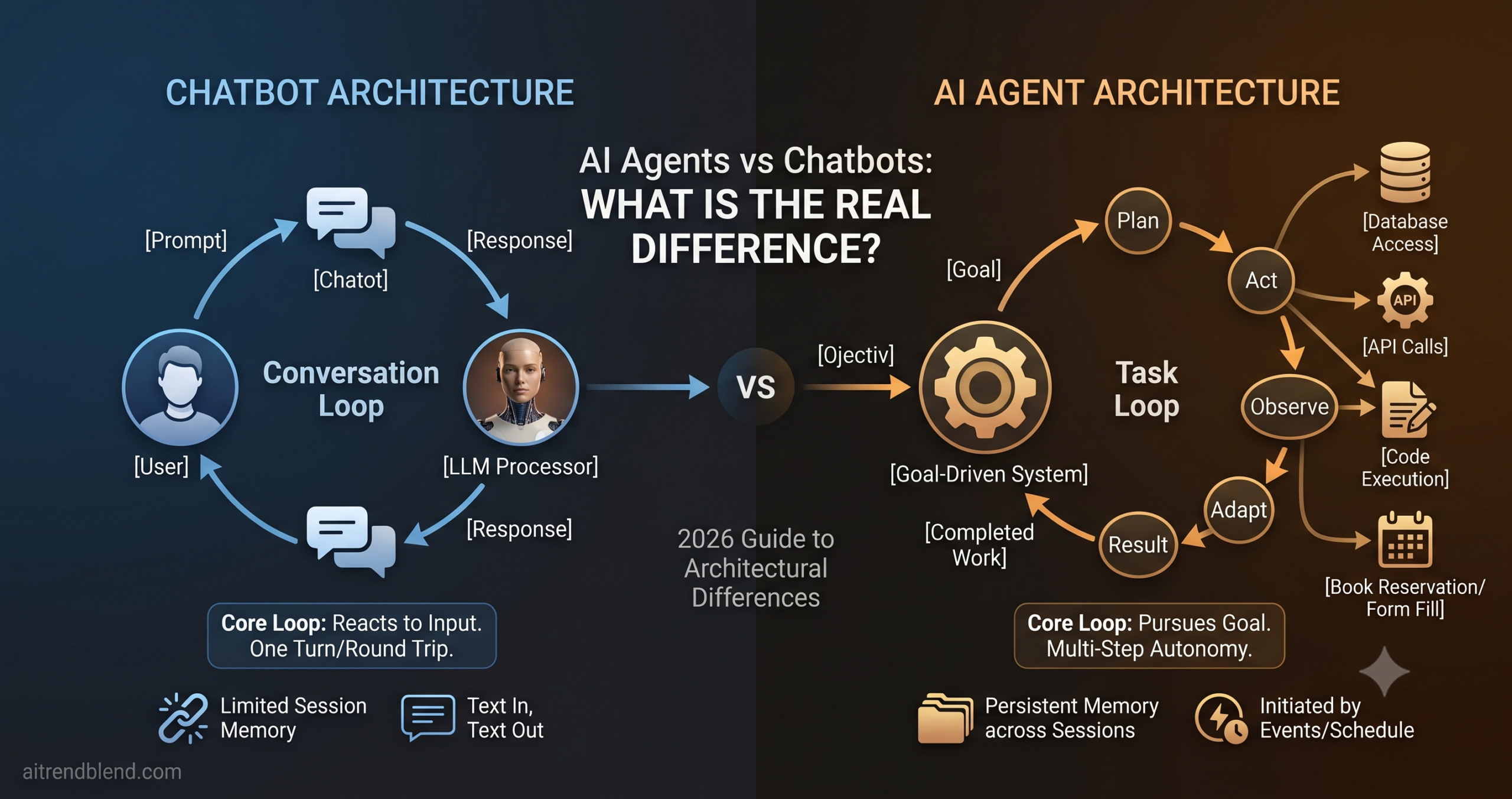
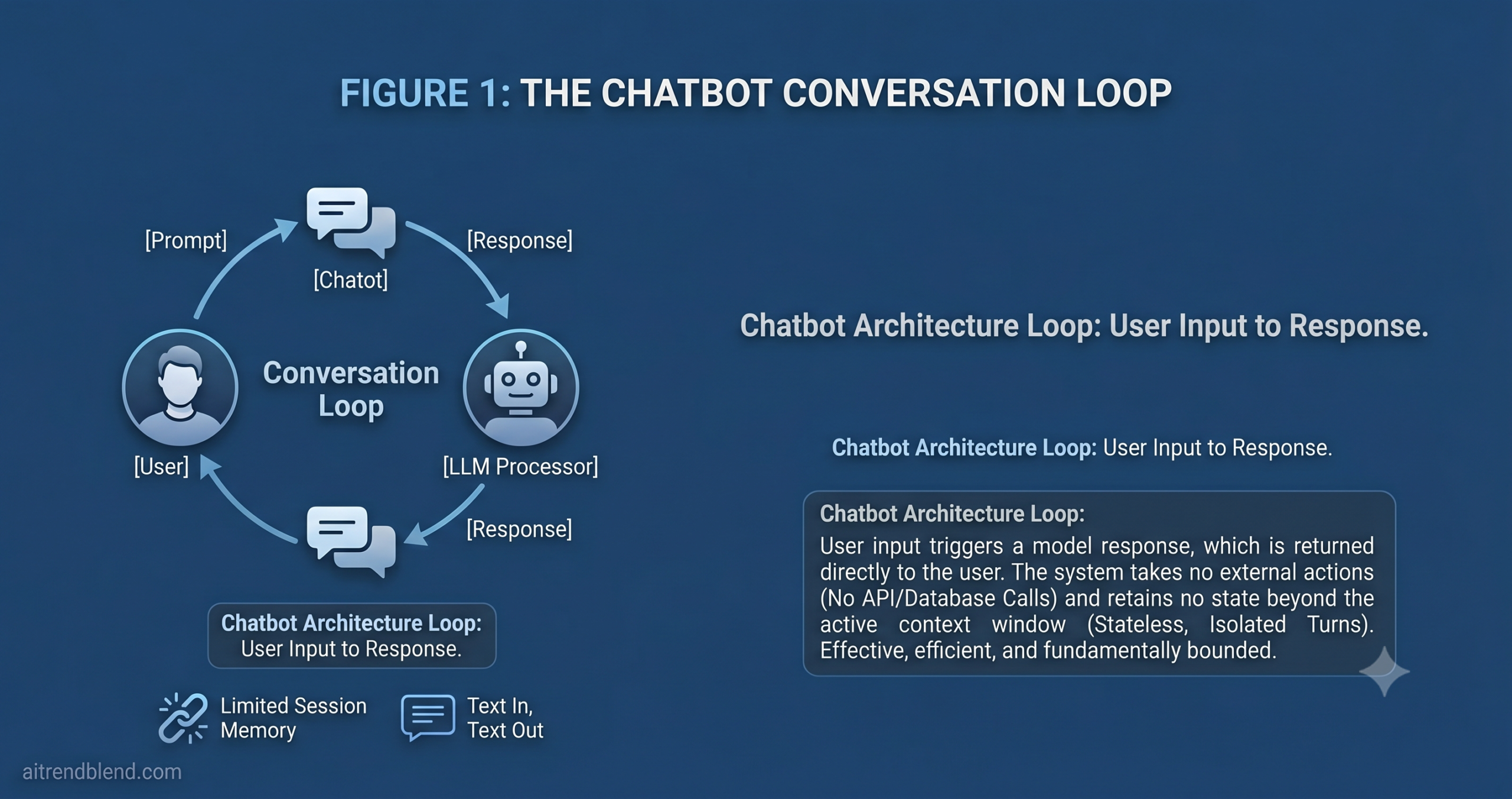
The cleanest way to draw the line is this. A chatbot is built around a conversation loop: user says something, system responds, exchange ends or continues. A chatbot lives entirely within this turn-by-turn rhythm. An AI agent is built around a task loop: given a goal, the agent plans how to achieve it, executes steps, checks results, adapts, and repeats — surfacing to the user only when it needs input or has a final result to report.
That is not a subtle distinction. It is the difference between a system that talks about doing things and a system that does them.
A system that responds
Reactive by design. Receives a message, generates a reply. Each turn is largely independent. The user drives every step. Memory is limited to the current conversation window.
A system that acts
Goal-driven by design. Receives an objective, plans steps, executes them using tools, evaluates results, and adapts before surfacing an answer. Can operate autonomously across time.
The One-Sentence Test
Ask the system to “book me a flight to Tokyo next Tuesday under $800.” A chatbot tells you how to do it or shows you options. An AI agent searches live inventory, compares prices, fills the booking form, and confirms the reservation — without you being involved in each step.
What a Chatbot Actually Is — and What It Does Well
The term “chatbot” has been stretched so far it now covers everything from a 2015 decision-tree flow in a Facebook Messenger widget to a GPT-4o-powered customer service interface with context awareness and soft personalization. These are not the same thing, but they share a core architecture: the system is fundamentally reactive and conversational.
A modern LLM-powered chatbot is genuinely impressive. It understands natural language, handles ambiguity, maintains context within a session, and generates responses that feel human-quality. The best ones can handle nuanced follow-up questions, remember what you said three messages ago, and adjust their tone to match the conversation. That is real capability — and for the problems chatbots are designed for, it is exactly enough.
The problem most organizations run into is treating chatbot capability as a foundation to build more ambitious workflows on top of. Chatbots are excellent at answering questions, routing inquiries, and providing information from a knowledge base. They fall apart the moment the task requires taking action in an external system, recovering from a failure mid-process, or running for longer than a single conversation without losing state. Those are not chatbot use cases. They are agent use cases — and trying to shoehorn them into a chatbot architecture produces brittle, frustrating systems that users quickly learn to route around.
What an AI Agent Actually Is
An AI agent is a system that pursues a goal by deciding what to do next, taking action, observing what happened, and continuing until the goal is achieved or it cannot proceed without human input. The conversation interface — if there is one — is incidental. The agent may spend most of its working time doing things that never appear in the chat window: calling APIs, querying databases, writing and running code, reading files, spawning other agents, waiting for external events.
Think about what this actually requires from the system. It needs to hold a goal across multiple steps without losing it. It needs to know which tools it has access to and when to use them. It needs to detect when a step has failed and decide whether to retry, try a different approach, or escalate to a human. It needs to produce useful output at the end, even when intermediate steps did not go as planned. None of that is part of a conversation loop. All of it is part of a task loop.
The key architectural components that make a system an agent rather than a chatbot are: tool access (the ability to call external systems and act on results), persistent state (memory that outlasts a single session), autonomous decision-making across multiple steps, and some form of goal representation. Remove any one of these and you move closer to chatbot territory. Add all of them and you have something qualitatively different — a system that can complete work, not just discuss it.
The Architecture Gap
The difference is not about which language model powers the system. The same underlying model can run a chatbot or an AI agent depending on the architecture around it. The model provides the intelligence — the architecture determines what that intelligence can do in the world.
The 7 Real Differences Between Chatbots and AI Agents
Here is where it gets concrete. These seven dimensions are where the architectural gap between chatbots and agents shows up in practice — not in the marketing brochure, but in what the system can and cannot do when it is actually running.
Memory Architecture
Memory is limited to the active context window — typically the current conversation. When the session ends, the state is gone. The next conversation starts from zero, with no knowledge of what was discussed, decided, or attempted before.
Agents can write to and read from persistent memory stores — databases, vector stores, file systems. A well-built agent remembers that this customer already attempted a refund twice, that a previous code deployment failed at step 3, or that the research task from last week identified three gaps worth revisiting.
Why it matters: Persistent memory is what makes an agent useful across time. Without it, every interaction is a cold start. For any task that spans more than one session — or requires learning from prior attempts — a stateless chatbot is architecturally incapable of helping, regardless of how capable the underlying model is.
Goal Orientation
Each message is its own objective. The chatbot responds to what is directly in front of it. It has no concept of a goal that spans multiple turns, let alone multiple sessions. It is optimized to give a good response to the current message, full stop.
Agents work backward from an end state. Given the goal “compile a competitive analysis of the top 5 vendors in this space,” the agent plans the sub-steps, executes them in order, tracks progress toward the goal, and delivers a coherent result — not a response to a prompt, but a completed piece of work.
Why it matters: Goal orientation is what enables agents to handle complex, multi-step tasks without requiring the user to manage every intermediate decision. A user who must manually guide a chatbot through each step of a ten-step process is doing most of the agent’s job themselves.
Tool and System Access
Text in, text out. A pure chatbot generates language — it does not take actions in external systems. Some modern chatbots have limited integrations (web search, calendar lookup), but these are constrained, user-initiated, and do not change anything in the world.
Agents have genuine tool access: they call APIs, query and write to databases, execute code, manipulate files, trigger webhooks, spawn sub-agents, and interface with external services. The agent’s tool set is the boundary of what it can change in the world — and that boundary is configurable.
Why it matters: Tool access is the dividing line between a system that describes and a system that does. An agent that can call your CRM, update a ticket, send a notification, and log the interaction has fundamentally different utility from a chatbot that can tell you how those steps would theoretically be done.
Decision-Making Loop
User → Model → User. One round trip per action. The user is the decision-maker for every next step. If the task requires ten sequential decisions, the user makes all ten — the chatbot executes none of them without being asked.
Goal → Plan → Act → Observe → Adapt → Repeat. The agent runs many internal loops before surfacing to the user. Intermediate decisions — which tool to call, how to handle an unexpected result, whether to retry — are made autonomously. The user sees the result, not the deliberation.
Why it matters: For any task with more than two or three steps, requiring user approval at each decision point makes automation meaningless. The agent’s ability to run internal loops without pausing for permission is the core of what makes it useful for genuine automation — not just assisted interaction.
Error Recovery
When something goes wrong — an API fails, a query returns no results, the input is malformed — the chatbot surfaces the error to the user and stops. The user must decide what to do next and re-initiate. Recovery is a human responsibility.
A well-designed agent detects failures, classifies them, and responds adaptively: retry with different parameters, fall back to an alternative approach, log the error and continue with partial results, or escalate with a clear diagnostic. Only failures that genuinely require human judgment reach the user.
Why it matters: In any real-world workflow, things go wrong at the tool level constantly — rate limits, timeouts, malformed responses, empty results. A system that stops every time and hands the problem back to the user is not automation. An agent that handles routine failures silently and escalates meaningfully is genuinely valuable.
Time Horizon
Measured in seconds to minutes. A chatbot interaction is a conversation — bounded by the user’s attention span and the session window. Tasks that take longer than a few minutes of human time are impractical because the user must remain present throughout.
Agents can run in the background for minutes, hours, or days. A competitive analysis task, a codebase audit, a document processing pipeline — these take real time. Agents work asynchronously, report back when done, and can be configured to run on a schedule or in response to an event trigger.
Why it matters: “Research our top 10 competitors and generate a report” is a legitimate 30-minute task. No user will sit in a chat window for 30 minutes. Agents make background, long-horizon work possible. Chatbots make it impossible by design.
Initiation — Who Starts the Work
Always user-initiated. Always reactive. A chatbot cannot decide on its own that it is time to do something. It waits. The user asks a question, the chatbot answers. This is not a limitation for the use cases chatbots are designed for — it is an appropriate constraint.
Agents can be triggered by events: a scheduled time, a webhook, a threshold being crossed in a monitoring system, a new file appearing in a folder, another agent completing its task. This event-driven initiation is what makes agents useful for autonomous monitoring, proactive outreach, and pipeline automation.
Why it matters: Proactive AI behavior requires event-driven initiation. An agent that notices a key metric has dropped below threshold and investigates before anyone asks is qualitatively different from a chatbot that answers questions about that metric when prompted. The former can prevent problems. The latter can only describe them after the fact.
“A chatbot is a system that responds. An agent is a system that acts. The gap between those two words is where most AI product decisions go wrong.”
— aitrendblend editorial team, May 2026
At a Glance: Chatbot vs AI Agent
| Dimension | Chatbot | AI Agent |
|---|---|---|
| Memory | Session-only context window; resets between conversations | Persistent state across sessions; reads and writes to memory stores |
| Goal Orientation | Responds to the current message; no multi-turn goal tracking | Works toward a defined objective across many steps and sessions |
| Tool Access | Text generation; limited or no external system integration | Full API, database, code execution, and file system access |
| Decision Loop | One round trip: user prompt → response → user acts | Autonomous multi-step loops; user sees result, not deliberation |
| Error Recovery | Surfaces errors to user; recovery is a human responsibility | Retries, adapts, uses fallbacks; escalates only when genuinely stuck |
| Time Horizon | Seconds to minutes; requires user present throughout | Minutes to days; runs in background; async delivery of results |
| Initiation | Always user-triggered; always reactive | Can be event-triggered; operates proactively on schedule or signal |
| Complexity to Build | Lower; well-established patterns, fast to deploy | Higher; requires orchestration, tool integration, state management |
| Cost to Run | Lower per interaction; predictable cost model | Higher; multi-step tool calls and longer context accumulate cost |
| Security Surface | Narrow; text generation is the main risk vector | Wider; tool access creates new attack surfaces and permission concerns |
When to Use Each: Real-World Scenarios
The most expensive mistake in AI product design is choosing based on what sounds more impressive rather than what the task actually requires. Chatbots are underrated for the jobs they are designed for, and agents are routinely overbuilt for tasks that a well-designed chatbot would handle more reliably and at a fraction of the cost.
- Users need fast answers from a knowledge base or FAQ
- First-contact customer support triage and routing
- Lead capture and qualification on a marketing site
- Simple appointment scheduling via calendar integration
- Internal HR or policy Q&A for employees
- Product recommendation within a defined catalog
- Onboarding guidance for a SaaS product
- Competitive research and report generation from live sources
- Multi-system order processing with conditional logic
- Code writing, testing, and deployment pipeline automation
- Financial analysis requiring data from multiple live APIs
- Autonomous monitoring with proactive alerting and diagnosis
- Document ingestion, extraction, and structured output pipelines
- Complex customer issue resolution spanning multiple systems
The pattern is clear when you look at it this way. Chatbots are for information retrieval, routing, and guided interaction. Agents are for task completion, automation, and proactive work. The moment a use case requires the system to take action in an external system, remember state across sessions, or run without constant user involvement, you are outside chatbot territory.
The Hybrid Zone: Where Things Get Blurry
Most production AI systems in 2026 sit somewhere between a pure chatbot and a full agent. A customer service bot that can look up order status in a database is technically an agent — it has tool access — but it behaves like a chatbot in practice: user-driven, single-session, reactive. A sales assistant that can draft an email and send it is performing an agentic action (sending), but within a conversational interface that looks and feels like a chatbot to the user.
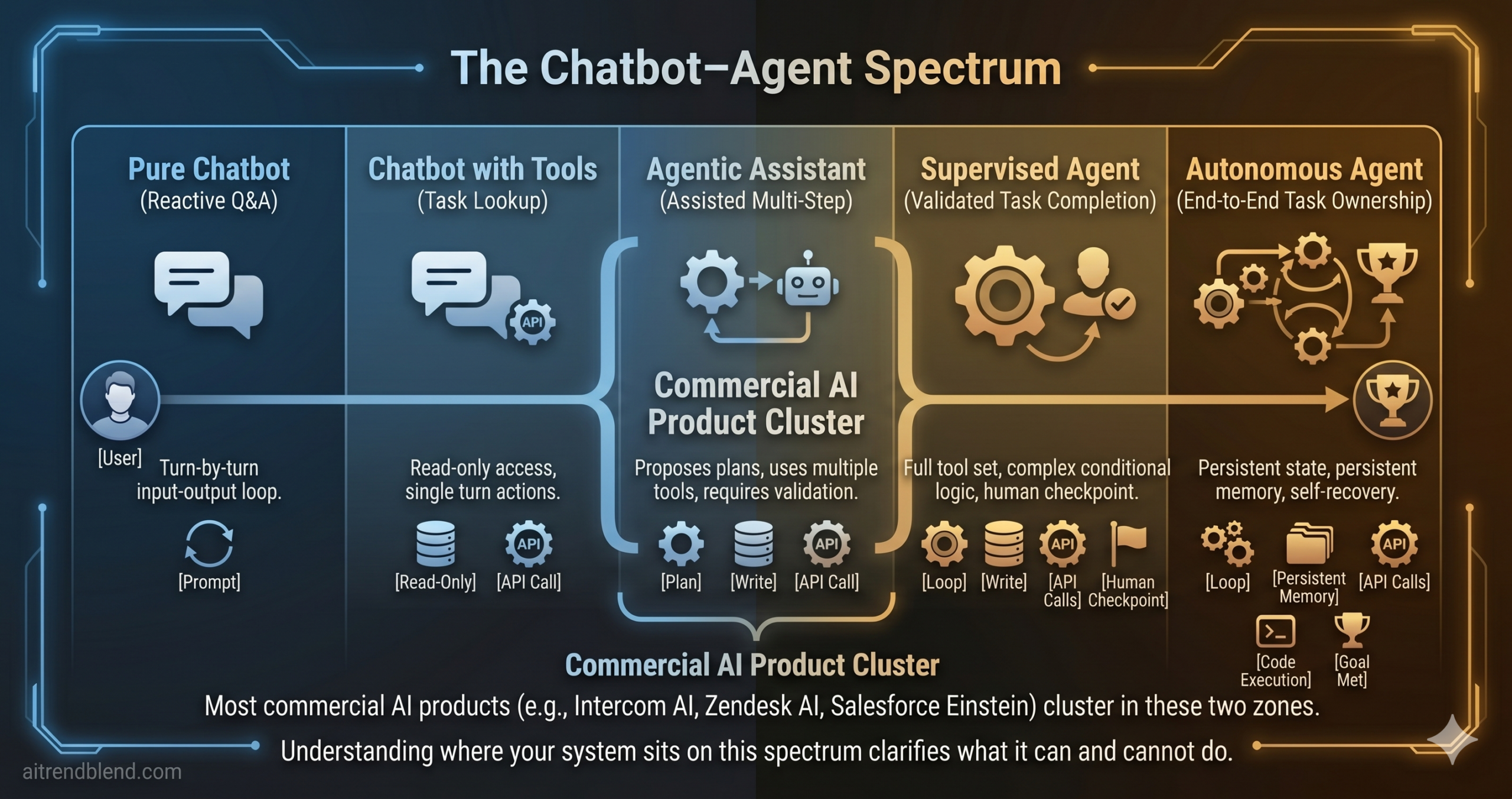
This middle zone is genuinely useful, and it is where most real-world AI products live. The important thing is to be explicit about where on the spectrum your system operates — because the middle zone has the failure modes of both ends. A “chatbot with tools” that takes irreversible actions (sending emails, making purchases, deleting records) without appropriate safeguards inherits the agent’s risk profile without the agent’s full planning and error-recovery architecture. That is a dangerous combination.
The practical rule for the hybrid zone: the more consequential and irreversible the actions your system can take, the more your architecture needs to look like an agent — with confirmation steps, escalation paths, audit logging, and clear scope boundaries — regardless of how conversational the interface looks.
The Hybrid Rule
Any system that can take irreversible actions — sending messages, making purchases, modifying records — needs agent-level safeguards: explicit scope boundaries, confirmation checkpoints, and audit trails. A chatbot interface does not reduce the risk of an action that cannot be undone.
What the Confusion Costs You
Picking the wrong architecture is not just a technical inconvenience. It creates expensive problems that compound over time, in both directions.
Building a Chatbot When You Need an Agent
The immediate symptom is an endless series of user complaints about “the AI not being able to actually do anything.” The team adds workarounds — manual handoffs, a human queue for anything the bot cannot handle, a growing backlog of edge cases. Each workaround is a sign that the architecture is wrong for the job. The sunk cost of the chatbot investment makes it politically difficult to rebuild as an agent, so the workarounds multiply. Six months later the system is held together by duct tape, and the users have learned not to trust it.
Building an Agent When You Need a Chatbot
Less common but genuinely costly. Agent architectures require tool integration, state management, orchestration logic, error-handling pipelines, and security reviews around every system the agent can touch. For a use case that simply needs to answer questions from a knowledge base, all of this is overengineering — more failure points, a larger attack surface, significantly higher operating costs per interaction, and a system that is harder to maintain and audit. Simplicity is not a compromise when simplicity is what the task requires.
Building a Hybrid Without Recognizing the Risk
This is the most common mistake in 2026. A team adds tool access to a chatbot incrementally — first read-only lookups, then the ability to send a confirmation email, then the ability to process a refund. Each addition seems small. Collectively, the system now has the action scope of an agent with the safeguard architecture of a chatbot. An off-script user input, an edge case the team didn’t anticipate, or a prompt injection in retrieved data can trigger irreversible actions with no escalation path. The risk profile changes faster than most teams notice.
The Distinction That Drives Better Decisions
The core thing to take away from this is not a definition — it is a decision filter. When someone proposes an AI-powered feature, the right first question is: does this task require the system to act autonomously over time, or does it require the system to respond helpfully in the moment? The first is an agent problem. The second is a chatbot problem. Answering that question clearly before design begins saves months of rework and prevents the hybrid-without-safeguards trap that catches most teams off guard.
There is a broader principle here about how to work with AI tools generally. The temptation is always to reach for the most powerful option, and in 2026 “AI agent” is the most powerful-sounding option in the room. Resisting that temptation — choosing the architecture that fits the job, not the architecture that sounds most impressive in the roadmap — is a sign of technical maturity. Chatbots are not a lesser version of agents. They are optimized for a different set of problems, and when those problems are what you have, a chatbot is the right answer.
Human judgment remains essential at the boundary between these two architectures. Deciding when an agent’s autonomous action should require human confirmation, recognizing when a chatbot’s limitation is a product problem versus a fundamental constraint, knowing when to escalate from one architecture to the other as a product evolves — these are not decisions that can be fully encoded in a system prompt or an architecture diagram. They require someone who understands both what the technology can do and what the business actually needs.
The distinction between chatbots and AI agents will remain meaningful for the foreseeable future, even as the boundary blurs at the edges. Models will improve, orchestration frameworks will mature, and the hybrid zone will expand. But the fundamental architectural question — does this system respond, or does it act? — will stay relevant as long as consequential decisions are involved and someone has to be accountable for what the AI does in the world. Knowing which one you’re building, before you start building it, is the most useful thing this article can give you.
Ready to Build the Right Thing?
Now that you know the difference, explore our prompt guides for building real AI agents with Claude, ChatGPT, and Gemini — with tested prompts and honest assessments.