
Tool Review
Meshy Text-to-3D Generation Honest Review 2026
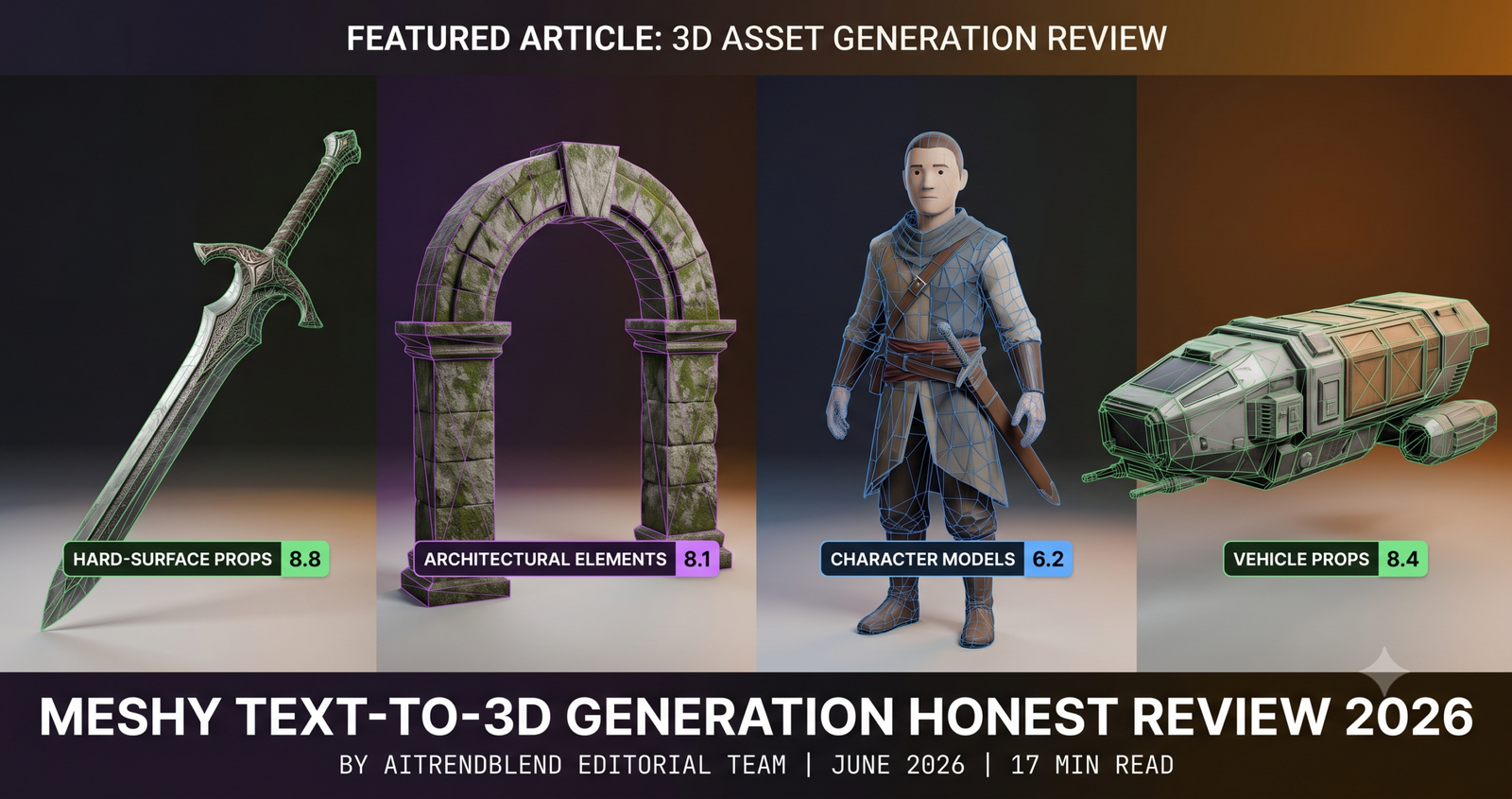
Text-to-3D generation has been a category full of impressive demos and disappointing practical results for several years. Something meaningfully changed in the transition from 2025 to 2026, and Meshy is the tool that changed most visibly. The output quality on certain asset types, and I will be specific about which ones, has crossed a threshold where it is genuinely faster to generate and clean up a Meshy output than to model the equivalent from scratch or source it from an asset store. That threshold is not universal. For some asset types Meshy still produces output you would spend more time fixing than the time saved is worth.
This review is structured to give you a clear picture of where Meshy belongs in your pipeline and where it does not. We tested text-to-3D generation, image-to-3D conversion, the AI texturing system, and the auto-rig feature across hard-surface props, architectural elements, organic environmental assets, and humanoid characters. Each category gets an honest score and an honest explanation of what that score means in practice. The pricing section covers what each tier actually gives you rather than just listing the numbers.
We used the outputs in Blender, Unreal Engine 5, and Unity 2026 LTS to test real-world integration, and any integration-specific issues are noted where they appeared. No affiliate arrangement exists with Meshy. The scores here reflect our testing, not their marketing materials.
The Meshy Scorecard
What Meshy Is and What It Is Not
Meshy is an AI-powered 3D asset generation platform with four distinct capabilities. Text-to-3D generates a mesh from a written description. Image-to-3D converts a photograph or illustration into a 3D model. The AI texturing system applies materials to an existing mesh, either one you generated in Meshy or one you upload from elsewhere. The auto-rig feature adds a skeleton and basic weight painting to humanoid or creature models for animation use.
What it is not is a replacement for a 3D artist on a project that requires high-fidelity character work, bespoke hero assets, or output with specific technical requirements around polygon budget and topology flow. That distinction matters because the marketing does not draw it clearly enough. Meshy is a tool for accelerating certain parts of a 3D production pipeline, not for removing the need for 3D expertise from that pipeline entirely. The developers who get the most value from it are the ones who understand where it fits rather than where they wish it fit.
The generation process for text-to-3D takes between ninety seconds and four minutes depending on the complexity of the requested asset and the current server load. You receive four variations of each generation, which is a meaningful design choice, seeing four different interpretations of the same prompt frequently surfaces one that requires less cleanup than any single generation would reliably produce.
Key Takeaway
Meshy’s output quality varies significantly by asset category. Hard-surface props and architectural elements produce output that is often production-ready with minor cleanup. Character models and organic creatures require substantially more work and the auto-rig adds a starting point rather than a finished result. Knowing this before your first session sets accurate expectations that the demos do not.
Text-to-3D Output Quality by Asset Type
The most important information in this review is not a single quality score, it is how that quality breaks down across different kinds of assets. We tested over eighty distinct prompts across six asset categories and the variance in output quality between categories was the most significant finding of the entire evaluation.
This is Meshy’s strongest category and it is not close. Swords, axes, shields, crates, barrels, chairs, tables, lanterns, keys, chests, essentially any hard-surface object with defined geometric structure and no organic curves, generates at a quality that frequently requires only a single cleanup pass before it is ready for a game scene. The topology is generally clean enough for game use, the UV mapping is sensible, and the AI texturing on these assets produces PBR materials that hold up well at standard game view distances.
We generated forty-two different weapon and prop assets and used thirty-one of them in a game prototype scene with minimal correction. The remaining eleven required retopology or UV correction before they were usable, mostly on assets with complex interlocking geometry like chain armor or ornate scabbards. That is a better success rate than we expected going into the test.
Stone arches, crumbling walls, rock formations, wooden fences, pillars, market stalls, and dungeon door frames all generated at a quality that surprised us positively. Environmental modular assets are one of the most time-consuming categories for 3D artists to produce at volume, and Meshy’s ability to generate them quickly at acceptable quality represents a genuine pipeline benefit for any game with a large world to populate.
The scoring drops slightly from hard-surface props because large environmental assets occasionally produce topology that tessellates unevenly, areas of the mesh with very high polygon density adjacent to areas that are underdetailed. This is rarely a problem for assets that will be viewed from standard game distances, but it can cause issues with lightmap baking in Unreal Engine if the UV shells have significant size variation. A remesh pass in Blender before baking solves the problem cleanly.
Trees and large plants are the weakest point of the organic category. Meshy generates the silhouette correctly and the texturing is often attractive, but the branch and trunk topology is typically far too dense for a real-time tree asset and lacks the billboard-leaf structure that games use for performance reasons. Using Meshy tree outputs in a real-time scene requires significant geometry optimization that mostly offsets the time savings from generation.
Mushrooms, corals, root systems, and mid-scale organic elements do better. These assets have more forgiving topology requirements because they are typically static props rather than vegetation that needs LOD optimization. We used several Meshy mushroom and fungal environment assets in a prototype forest scene with only minor cleanup, and they held up well alongside traditionally modeled assets in the same scene.
Fantasy creatures at the level of wolves, bears, and large insects produced outputs that work as game-distance props but not as hero assets. The surface detail reads correctly from a distance and the silhouette is believable. Close up, the facial structure and fine surface detail on creatures consistently required correction before the asset looked finished rather than AI-generated.
This is the most important score to understand and it requires context. A 6.2 does not mean Meshy is useless for character generation, it means the output consistently requires a meaningful amount of work before it is suitable for production use as a humanoid character. The silhouette and proportions of generated characters are generally correct. The surface topology, particularly around the face, hands, and any articulation-heavy areas like elbows and knees, is frequently too dense and irregular for clean deformation during animation.
The face is the specific problem area. Meshy’s character face outputs in 2026 have improved substantially from where they were twelve months ago, but they still carry an uncanny quality at close distances that makes them inappropriate for any character the player will spend significant time looking at directly. For background NPCs, crowd assets, and distant character silhouettes, the output is usable. For player characters, companion characters, or any character in dialogue scenes, the current quality requires facial retopology and likely a full sculpt pass to bring it to an acceptable level.
The practical recommendation is to use Meshy for rough character blocking and costume exploration, then build the production character using the Meshy output as reference rather than as a foundation. That workflow is faster than starting from nothing, but it is not the automated pipeline the demos suggest.
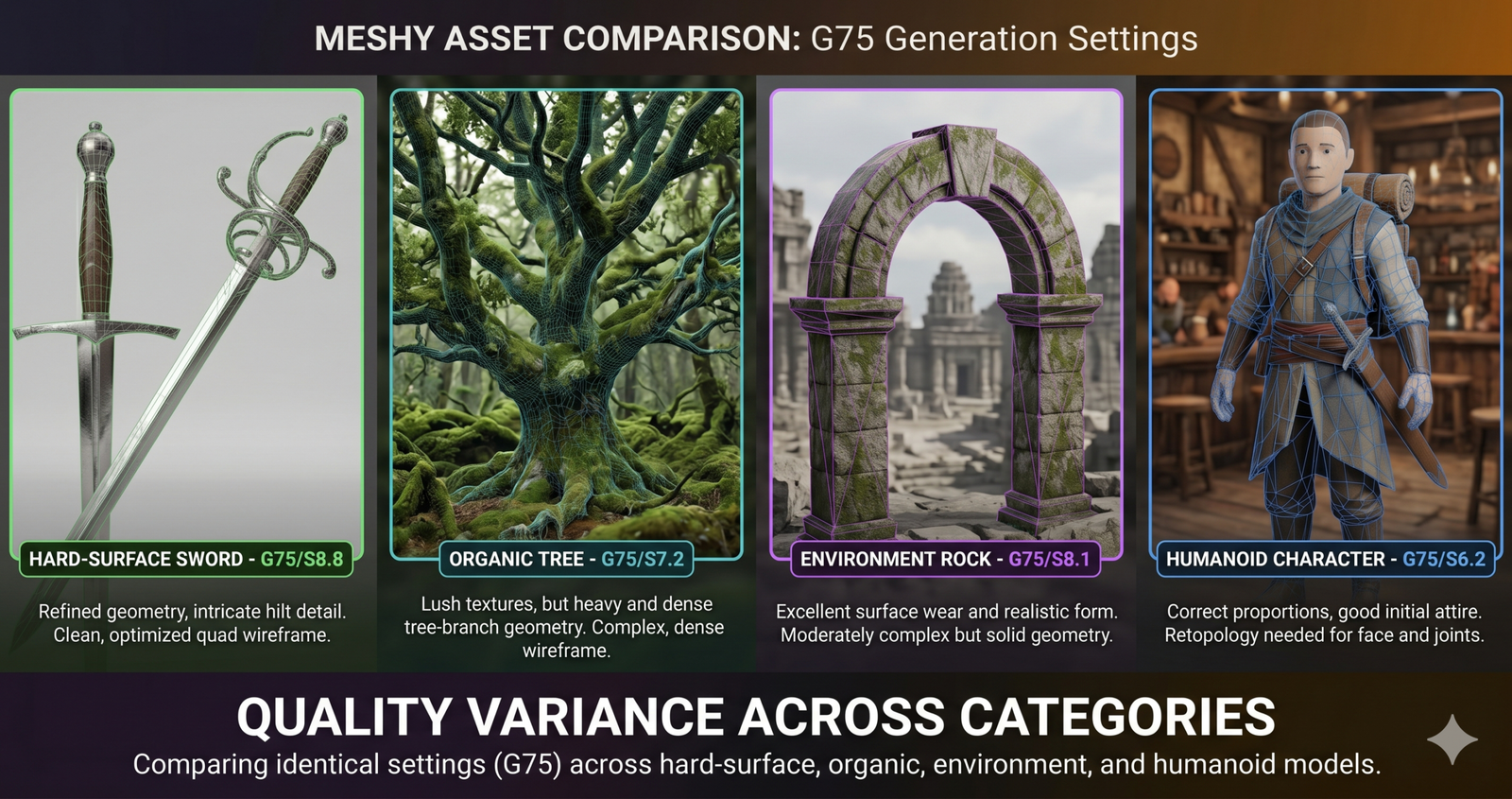
Image-to-3D, Turning Concept Art into Meshes
The image-to-3D feature takes a photograph or illustration as input and attempts to reconstruct a 3D model that matches it. This is a fundamentally harder problem than text-to-3D because the model must infer 3D geometry from 2D information, estimating what the back of an object looks like from a front-facing reference image.
For hard-surface objects with clear geometric reads, a sword with a visible cross-guard, a chair photographed at a three-quarter angle, a vehicle with distinguishable front and side surfaces, image-to-3D works well enough to be genuinely useful. Feed it a concept art illustration of a fantasy weapon and you receive a 3D interpretation of that design in under three minutes. The result is not a precise reproduction of the concept but a reasonable 3D approximation that preserves the design’s character and proportions.
For organic objects and characters photographed straight-on, the back-face inference is where the quality drops. Meshy has to guess what the rear of the object looks like from the front reference, and for asymmetric or complex organic shapes those guesses are frequently wrong in ways that require correction. The more information the reference image contains about the full object, a three-quarter view rather than a straight front view, multiple reference images if the interface allows them, the better the output.
The most practical use we found for image-to-3D was converting product photographs and scanned reference objects into rough 3D proxies for scale and composition testing. For this use case the output quality is more than sufficient and the speed benefit is significant. For converting concept art directly into production-ready models, it works for simple designs and requires substantial cleanup for complex ones.
AI Texturing, the Feature That Earns Its Price
Most reviews of Meshy spend most of their words on the geometry generation and treat texturing as a footnote. This is the wrong emphasis. The AI texturing system is the feature we would pay for even if the geometry generation did not exist, and it works on meshes you upload as well as meshes you generate inside Meshy.
Upload any 3D mesh with proper UV unwrapping, your own model, a Meshy-generated asset after retopology, an asset store model you want to restyle, and describe the material treatment you want in plain language. A stone wall with moss growing between the blocks and water staining near the base. A leather satchel worn at the edges with brass buckle tarnish. A sci-fi panel with emissive trim and surface oxidation. The AI generates a full PBR material set, albedo, roughness, metalness, and normal map, that matches the description and fits the UV layout of the provided mesh.
The output quality on texturing is genuinely impressive across most material types. The normal maps carry credible surface detail that reads correctly under lighting, the roughness variation between material types is handled well, and the AI’s ability to interpret descriptive language about surface aging and wear produces results that would take a texture artist significant time to achieve manually.
“Upload a mesh, describe the surface treatment you want, and get a full PBR material set back in two minutes. That is a genuine workflow change for any studio doing volume asset production.”
aitrendblend editorial, Meshy 2026 extended testing notes
The limitation worth naming is resolution. The standard AI texturing output comes at 1024×1024 per map, which is appropriate for background assets and mid-range props. For hero assets and close-up surfaces at 4K display resolutions it is sometimes insufficient. The pro plan unlocks 2048×2048 output, which covers most game-resolution requirements. For cinematic rendering or architectural visualization where 4096 textures are common, Meshy’s texturing output needs upscaling through an external tool.
Auto-Rig, Useful Starting Point, Not Finished Result
The auto-rig feature attempts to identify joint locations in a humanoid or creature mesh and generate a skeleton with weight-painted deformation zones. For a tool that did not exist in this form two years ago, the results are legitimately useful. For a tool being evaluated against what a production pipeline actually needs, the scores need to be honest.
The skeleton placement is generally correct for the major joints, hips, spine, shoulders, elbows, knees, ankles. The system correctly identifies these locations in the vast majority of humanoid models we tested regardless of proportions, costume volume, or stylistic exaggeration. This alone saves meaningful time compared to manually placing skeleton joints from scratch.
Weight painting is where the auto-rig needs the most attention. The deformation zones around shoulders and hips, the most complex areas of humanoid rigging, are consistently the weakest point in the auto-rig output. Shoulder deformation in particular tends to pull the chest geometry when the arm raises, which is the classic sign of weight painting that did not account for the transition zone between shoulder and pectoral muscles correctly. Hands are painted as single units rather than individual fingers, which means any animation requiring distinct finger movement requires a full hand weight repaint before it will work correctly.
The practical summary is that auto-rig gets you to a point where you can run basic locomotion animations on a character in under ten minutes, which is genuinely valuable for prototyping and game jams. It gets you to a point where the character deforms correctly for a production game in under an hour of cleanup. It does not get you to production-quality facial deformation at all, that requires a dedicated face rig that Meshy does not currently generate.
Key Takeaway
The auto-rig is best understood as a skeleton placement tool rather than a complete rigging solution. It handles the part of rigging that is tedious and mechanical, placing joints in the right anatomical locations, and leaves the part that requires artistic judgment, weight painting, corrective shapes, auxiliary joints, for a human to complete. That division of labor is genuinely useful even if the total automation the name implies is not yet here.
Export Formats and Integration Quality
Meshy’s export pipeline is one of the strongest aspects of the tool and it earns the 9.0 integration score directly. The platform exports FBX, OBJ, GLB, USDZ, and STL from every generated asset, with the FBX and GLB exports including embedded texture maps rather than separate files requiring manual reconnection. For a workflow that needs to move assets across multiple applications without an asset management system in place, this is a meaningfully convenient default.
Blender import using the FBX pipeline brings in geometry, UV maps, and all PBR texture channels in the correct slots without manual material setup. The material nodes that Meshy FBX creates in Blender follow a standard principled BSDF setup that is easy to modify and extend. Geometry cleanup, remeshing for density normalization, retopology for deformable characters, works on the imported mesh without compatibility issues.
Unreal Engine 5 import handles Meshy FBX cleanly for static mesh assets. The auto LOD generation in Unreal works on the imported meshes without the manual polygon reduction steps that poorly structured imported geometry often requires. Nanite works on Meshy assets for architectural and environmental props where polygon counts can be allowed to remain high. For skeletal mesh imports using the auto-rig output, the same retargeting pipeline that works with other external skeletons applies here.
Unity import via GLB or FBX works without additional plugins and maintains material assignments correctly. The standard Unity shader setup on import produces correct PBR results without manual shader reassignment.
Pricing, What Each Tier Actually Gives You
- 200 credits/month
- Text-to-3D generation
- Image-to-3D (limited)
- 1024px textures
- FBX, OBJ, GLB export
- No commercial license
- 1,500 credits/month
- All generation modes
- 2048px textures
- Auto-rig feature
- All export formats plus USDZ
- Commercial license
- 8,000 credits/month
- Priority generation queue
- 2048px textures
- Batch generation
- API access
- Commercial license
- Unlimited credits
- Custom fine-tuning
- 4096px textures
- Dedicated pipeline
- SLA guarantee
- Custom integration
The free tier is genuinely useful for evaluation and for projects without commercial requirements. Two hundred credits per month amounts to roughly forty to sixty text-to-3D generations depending on asset complexity, which is enough to get a real feel for the tool’s strengths and weaknesses on your specific asset types before committing.
The Pro tier at $16 per month is the right entry point for any commercial project. The commercial license alone justifies the upgrade cost for professional use, and the jump to 1,500 credits supports serious production volume. The auto-rig feature is locked to Pro and above, which means if rigged character assets are part of your requirement, the free tier will not give you a complete picture of what Meshy can do for your workflow.
The Max tier at $48 per month makes sense for studios generating assets at high volume, if you are building a large game world and intend to generate hundreds of props and environment assets through the platform, the batch generation and priority queue at this tier meaningfully change how you integrate Meshy into the production schedule. For smaller projects the Pro tier has more than enough capacity.
How Meshy Compares for Specific Tasks
| Task | Meshy | Luma AI Genie | Kaedim | Traditional Modeling |
|---|---|---|---|---|
| Hard-surface props at volume | Best choice | Competitive | Slower workflow | Too slow for volume |
| Environmental tile sets | Strong | Acceptable | Varies | Manual but precise |
| Hero character models | Not recommended | Not recommended | Better topology | Only reliable option |
| AI texturing on own meshes | Best choice | Not offered | Not offered | Manual substance work |
| Concept to rough 3D proxy | Fast and practical | Competitive | Photo input required | Too slow for exploration |
| Rigged character for prototyping | Usable with cleanup | No rigging | No rigging | Best for production |
Where Meshy Still Falls Short
The topology quality issue deserves more space than a score in a table. Meshy generates meshes using a volumetric approach that prioritizes surface accuracy over edge flow. The resulting topology is dense and irregular in ways that matter for specific downstream tasks. Subdivision surface modeling, which smooths a low-polygon cage into a high-polygon result, does not work well on Meshy meshes because subdivision assumes a clean quad topology that most Meshy outputs do not have. Facial animation on character models requires edge loops that follow the muscle directions of the face, Meshy’s character topology does not follow these conventions and deforms incorrectly without retopology.
Polygon budgets for real-time use are the second structural issue. Meshy tends to generate meshes with more polygons than a comparable game asset would use, not so many that modern hardware struggles, but enough that the mesh requires optimization before it fits into a performance budget alongside many other assets in the same scene. The auto-decimation tools available in Blender and inside Unreal handle this reasonably well, but it is an additional step that a hand-modeled game asset built to spec would not require.
Prompt interpretation accuracy is inconsistent for highly specific designs. Describing a generic broadsword produces reliable output. Describing a sword with a specific combination of design elements, a swept hilt with a wire-wrapped grip, a fuller that runs two-thirds of the blade length, and a wheel pommel, produces results that capture the spirit of the description but rarely the precise design intent. Meshy interprets prompts statistically rather than procedurally, which means very specific design requirements are better served by image-to-3D from a reference drawing than by text description alone.
The platform does not yet offer animation generation, morph target creation, or any output that goes beyond the static mesh with basic rig and textures. For studios whose pipeline requires blend shapes for facial animation, corrective shapes for extreme poses, or any kind of procedural or physics-based geometry, Meshy’s output is a starting point for work that happens in other tools rather than a pipeline endpoint.
None of these limitations are disqualifying. They are scope boundaries that define where Meshy fits and where it does not. A tool that does what it does well within clearly defined limits is more valuable than a tool that promises everything and delivers little of it reliably. Meshy in 2026 knows what it is good at, and within those areas it genuinely delivers.
The trajectory from where this tool was a year ago to where it is now suggests that the character quality and topology gaps are being actively worked on. The hard-surface and texturing quality improvements between 2025 and 2026 were significant enough that revisiting the character scores in another year seems worthwhile. The AI texturing system in particular has evolved from a feature that produced interesting results to a feature that produces production-usable results, and that kind of leap can happen in other feature areas on a similar timeline.
For the developer who builds it into their pipeline correctly, deploying it for prop and environment generation, using the texturing system on their own meshes, and treating character generation as a blocking and exploration tool rather than a production endpoint, Meshy in 2026 genuinely earns a place in a professional 3D workflow. The overall score of 7.8 reflects a tool that is excellent in specific areas and honest about where it is not yet ready, which is a more valuable combination than a tool that scores 6.5 across everything equally.
Try Meshy on Your Next Asset
The free tier includes enough credits to test Meshy across your specific asset types before committing to a subscription. Start with a hard-surface prop description to see the tool at its strongest before testing its limits.
This review was conducted independently by the aitrendblend editorial team using Meshy version 4.2 between April and June 2026. All generated assets were tested in Blender 4.3, Unreal Engine 5.4, and Unity 2026 LTS. Scores and assessments reflect our specific testing methodology and may not reflect results for other use cases or asset types. Pricing was accurate at the time of publication. This is independent editorial content, we have no commercial relationship with Meshy or any company mentioned in this review.
Reading this in pieces during a long afternoon and finding it consistently rewarding, and a stop at thisdomainisabdu fit naturally into the same fragmented reading pattern, sites whose posts can be read in segments without losing the thread are well suited to how I actually read these days and this one is built well.
If I am being honest this is the kind of site I quietly hope my own work will someday resemble, and a stop at vesseltame extended that aspirational feeling, finding work that models what I want to produce is part of why I read carefully and this site has been performing that modelling function for me lately consistently.
Adding to the bookmarks now before I forget, that is how good this is, and a look at starlitvixen confirmed the rest of the site is worth saving too, this is one of those rare finds that justifies the time spent searching the web for once which is a relief in the current environment.
Honestly this was the highlight of my reading queue today, and a look at trenchtwist extended that across more pages I will return to, ranking what I read against what else I read each day is something I do informally and this site keeps moving up in those rankings the more I explore it.
Just dropping by to say thanks for the effort, it does not go unnoticed when a writer cares this much about the reader, and after I went through tritonstyle I was certain this is one of the better corners of the internet for this particular kind of content which is genuinely refreshing.
A thoughtful read in a week that has been mostly noisy, and a look at syruptarot carried that thoughtful quality across more pages, finding pockets of considered writing in a week of distractions is one of the small wins of careful curation and this site is providing those pockets at a sustainable rate.
Picked up a couple of new ideas here that I can actually try out, and after my visit to uptonshade I have even more notes saved, this is the kind of resource that pays you back for the time you spend on it which is rare to come across in this corner of the web.
Picked up two new ideas that I expect will come up in conversations this week, and a look at urbanfamilia added another, content that arms me with talking points rather than just filling time is the kind that provides ongoing value beyond the moment of reading and this site is generating that kind of ongoing value.
A clean piece that knew exactly what it wanted to say and said it, and a look at rapidnexus maintained the same clarity of intention, knowing the goal of a piece before writing is something most blog content lacks and the clarity of purpose here shows up in every paragraph for any careful reader to notice.
Came in for one specific question and got answers to three I had not even thought to ask, and a look at wisdomvertex extended that bonus value pattern, the kind of resource that anticipates reader needs rather than just answering the literal question asked is the gold standard and this site reaches it.
I really like how the writer keeps the tone friendly without sounding fake or overly polished, and after a stop at trumpetsixth the same calm pace was there, no rushing to make a point and no padding either, just clean honest writing that I can respect and come back to later again.