
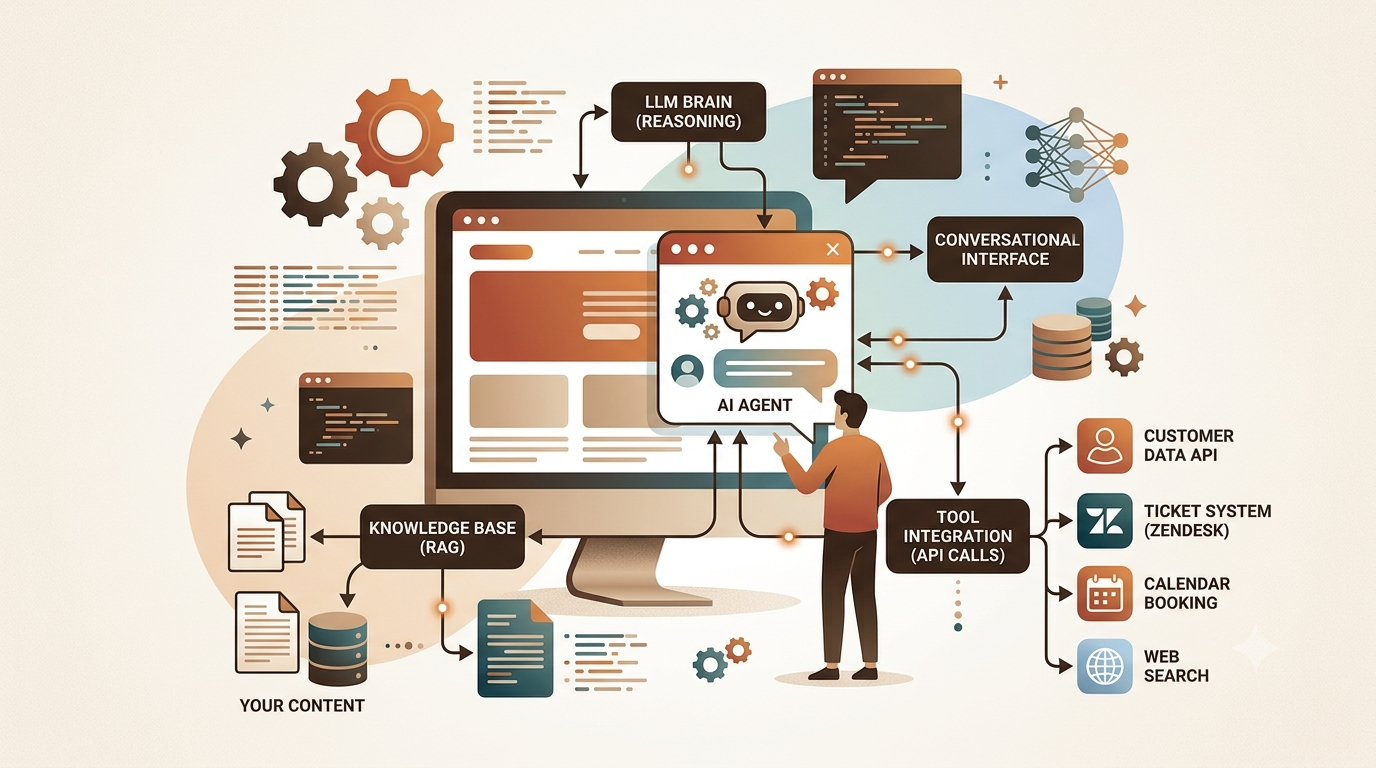
Key Points
- An AI agent goes beyond a chatbot by reasoning, calling tools, and taking actions across multiple steps to complete a task.
- The core loop of any agent is perceive, think, and act, with memory threading the context across turns.
- Retrieval Augmented Generation (RAG) grounds the agent in your own content so it stops hallucinating facts it was never trained on.
- Tool use is what separates a conversational agent from a genuinely useful one: APIs, databases, calendars, and search all become reachable.
- Deployment choices (embedded widget, full page chat, voice) shape the experience more than people expect, so pick the pattern that fits your users before writing a line of code.
- Evaluation and guardrails are not optional extras. An agent that works 90 percent of the time and goes wrong 10 percent of the time in public is a support ticket waiting to happen.
What an AI Agent Actually Is (and Is Not)
The word agent gets used for everything from a simple FAQ popup to a fully autonomous workflow system. Worth drawing a clear line. A rule based chatbot follows a decision tree. A generative chatbot produces fluent responses but has no memory and cannot act. An AI agent can reason about what step to take next, call external tools to gather information, remember what happened earlier in the session, and chain multiple actions together to reach a goal.
The difference is not just semantic. When you build an agent for your website, you are building something that can retrieve a live product price, check a user’s order status, and escalate to a human queue, all in one unbroken conversation. That requires a distinct architecture from a simple prompt and response setup.
The mental model used by most practitioners today traces back to the ReAct pattern (short for Reason and Act), introduced by Yao et al. at Google and Princeton. The agent thinks out loud in an internal monologue, decides which tool to call, observes the result, and reasons again. You can read the original ReAct paper on arXiv if you want the academic grounding. In practice, modern frameworks like LangChain, LlamaIndex, and the OpenAI Assistants API have packaged this loop so you do not have to implement the plumbing yourself.
Planning the Architecture Before Writing Any Code
The biggest mistake people make is jumping to an API key and a few function calls without first mapping what the agent actually needs to do. The architecture decisions you make in the first hour will constrain everything for months. Take the time here.
The Four Components Every Website Agent Needs
Think of it as four interlocking pieces. The language model is the brain. The memory layer holds context across turns. The tool set is the list of actions the agent can take. The retrieval system is where it looks for knowledge specific to your product or service.
None of these four is optional once you move past toy demos. A model with no memory forgets the user’s name the moment a new message arrives. A model with no tools can reason but cannot act. A model with no retrieval will confidently answer questions about your pricing with information it invented during training.
Choosing the Right Model
For website agents in 2025, the practical choices cluster around GPT-4o and Claude Sonnet for tasks needing strong reasoning, and GPT-4o mini or Gemini Flash for high volume, latency sensitive applications where cost matters. If your agent mostly answers straightforward questions from a fixed knowledge base, the lighter models are more than capable and roughly ten times cheaper per token.
Function calling support is non-negotiable. Every major model now supports it, but the quality of the JSON the model produces when calling a tool varies. GPT-4o and Claude 3.5 Sonnet are consistently reliable here. Gemini 1.5 Flash has improved substantially but still occasionally malforms complex tool call payloads under pressure. Test your specific tools with a realistic distribution of user inputs before committing.
Setting Up Retrieval Augmented Generation for Your Content
Here is where most website agents either earn their keep or fall apart. RAG is the technique of pulling relevant chunks of your own documentation, product descriptions, or knowledge base into the prompt so the model answers from facts rather than from whatever it absorbed during training about companies like yours.
The pipeline has three stages. First, ingest your content. Scrape your help docs, export your product catalog, pull your blog posts, convert PDFs. Second, chunk and embed. Split the text into segments of roughly 300 to 500 tokens, then run each segment through an embedding model (OpenAI’s text-embedding-3-small is cheap and excellent) to produce a vector. Store those vectors in a vector database. Third, at query time, embed the user’s question with the same model, find the most similar vectors in the database, and inject those text chunks into the system prompt.
The similarity lookup uses cosine distance between query vector \( q \) and each stored document vector \( d_i \):
$$\text{similarity}(q, d_i) = \frac{q \cdot d_i}{\|q\| \cdot \|d_i\|}$$The top \( k \) results (typically \( k = 5 \) to \( 8 \)) are inserted into the prompt as grounding context.
For the vector store, Pinecone is the managed option that requires zero infrastructure work. Weaviate and Qdrant are strong open source alternatives you can self host. If you are already in the Supabase ecosystem, its pgvector extension handles moderate scale perfectly well without adding another service.
Chunking Strategy Matters More Than People Admit
A flat character count split at 500 tokens is fine for a proof of concept. In production it produces retrieval failures because a chunk might cut a sentence in half or split a question from its answer. Recursive character splitting (the default in LangChain’s text splitters) is meaningfully better. For structured docs like your pricing table or your API reference, semantic chunking by heading level beats character based splitting by a significant margin. A/B test your chunking strategy against real user queries before launch.
“An agent that retrieves the wrong chunk with high confidence is more dangerous than one that admits it does not know.”Common observation among RAG practitioners
Building the Tool Set
Tools are what give the agent its hands. Without them, it is a very knowledgeable conversationalist that cannot change anything in the world. The tools you build depend entirely on what your website actually does, but there are patterns that recur across almost every deployment.
Common Tool Categories for Website Agents
| Tool Type | What It Does | Typical API |
|---|---|---|
| Knowledge lookup | Searches the RAG index for relevant docs | Vector DB query |
| Account data | Fetches order status, subscription tier, recent activity | Your own REST API |
| Ticket creation | Logs a support request when the agent cannot resolve the issue | Zendesk, Intercom, Freshdesk |
| Calendar booking | Books a call or demo slot for the user | Calendly, Google Calendar |
| Live web search | Answers questions about current events or recent changes | Tavily, Bing Search API |
| Human handoff | Routes conversation to a live agent when confidence is low | Intercom, Crisp |
Each tool is defined as a JSON schema that describes its name, what it does, and what parameters it expects. The model reads these schemas and decides which tool to call based on the user’s intent. The key insight is that the tool description is not just documentation. It is part of the prompt, so the quality of your description directly affects whether the model chooses the right tool. Be specific, be concrete, and test each description with edge case queries that could plausibly match multiple tools.
Tool Safety and Validation
Every tool that writes data or takes an irreversible action needs a confirmation step before execution. An agent that can create support tickets, book meetings, or update account settings must not do so based on an ambiguous user message. The standard pattern is to have the tool return a preview and ask the user to confirm, then actually execute on the next turn. LangChain’s HumanApprovalCallbackHandler implements this cleanly.
The Memory Layer
Memory in an agent context means two different things, and conflating them causes bugs. Short term memory is the conversation history, the running list of messages in the current session. Long term memory is information about the user that persists across sessions, their name, their preferences, their past issues.
Short term memory is easy. Keep a messages array and append each turn. The constraint is the model’s context window. For a 128k window like GPT-4o, you can hold quite a long conversation before you need to worry about summarization. For lighter models with 8k or 16k contexts, you need a rolling window or a summarization step that compresses older turns into a paragraph before they fall off the edge.
Long term memory is genuinely harder. The most pragmatic approach is to store key facts extracted from the conversation in a simple database row keyed to a session or user ID, then inject them into the system prompt on the next session. Something as simple as “User’s name is Amara. She is on the Pro plan. Last session she asked about invoice download.” makes the next interaction feel continuous rather than amnesiac.
Implementing the Agent Step by Step
With the architecture clear, here is a concrete build sequence using Python, LangChain, and the OpenAI API. The same logic applies in JavaScript using LangChain.js or the Vercel AI SDK.
Step 1. Set Up Your Environment
# Install the core dependencies
pip install langchain langchain-openai langchain-community \
    openai pinecone-client python-dotenv fastapi uvicorn

# .env file
OPENAI_API_KEY=sk-...
PINECONE_API_KEY=...
PINECONE_INDEX=website-agent-docs
Step 2. Build the RAG Index
from langchain_community.document_loaders import WebBaseLoader, DirectoryLoader
from langchain.text_splitter import RecursiveCharacterTextSplitter
from langchain_openai import OpenAIEmbeddings
from langchain_community.vectorstores import Pinecone
import pinecone

# Load your site's help docs or any text content
loader = WebBaseLoader([
    "https://yourdomain.com/docs/getting-started",
    "https://yourdomain.com/docs/pricing",
    "https://yourdomain.com/docs/api-reference",
])
docs = loader.load()

# Chunk with overlap so context is not lost at boundaries
splitter = RecursiveCharacterTextSplitter(
    chunk_size=500,
    chunk_overlap=60,
    separators=["\n\n", "\n", " "]
)
chunks = splitter.split_documents(docs)

# Embed and store
embeddings = OpenAIEmbeddings(model="text-embedding-3-small")
vectorstore = Pinecone.from_documents(
    chunks,
    embeddings,
    index_name="website-agent-docs"
)
Step 3. Define the Tools
from langchain.tools import Tool
from langchain_core.tools import tool
import requests

# Tool 1: knowledge base retrieval
retriever = vectorstore.as_retriever(search_kwargs={"k": 6})

@tool
def search_knowledge_base(query: str) -> str:
    """Search the company knowledge base for product info, pricing,
    features, and help documentation. Use this before answering
    any factual question about the product."""
    results = retriever.invoke(query)
    return "\n\n".join([doc.page_content for doc in results])

# Tool 2: look up order status via internal API
@tool
def get_order_status(order_id: str) -> str:
    """Fetch the current status of a customer order by its ID.
    Returns order status, estimated delivery date, and tracking link."""
    response = requests.get(
        f"https://api.yourdomain.com/orders/{order_id}",
        headers={"Authorization": f"Bearer {INTERNAL_API_KEY}"}
    )
    if response.status_code == 200:
        data = response.json()
        return f"Order {order_id}: {data['status']}. Estimated delivery: {data['eta']}."
    return "Order not found. Please verify the order ID."

# Tool 3: escalate to human support
@tool
def escalate_to_human(issue_summary: str, user_email: str = "") -> str:
    """Create a support ticket and notify a human agent when the AI
    cannot resolve the issue. Use when the user is frustrated,
    the question is too complex, or sensitive account changes are needed."""
    ticket_payload = {
        "subject": "Website Agent Escalation",
        "description": issue_summary,
        "requester_email": user_email,
        "priority": "medium"
    }
    # Replace with your actual support API call
    return "Ticket created. A human agent will reach out within 2 hours."

tools = [search_knowledge_base, get_order_status, escalate_to_human]
Step 4. Wire the Agent Together
from langchain_openai import ChatOpenAI
from langchain.agents import AgentExecutor, create_openai_tools_agent
from langchain_core.prompts import ChatPromptTemplate, MessagesPlaceholder

llm = ChatOpenAI(model="gpt-4o", temperature=0.1)

system_prompt = """You are a helpful assistant for [Your Company Name].
You have access to a knowledge base with all product documentation,
pricing, and help guides. You can also look up order status and
escalate issues to a human agent when needed.

Always search the knowledge base before answering product questions.
If the user seems frustrated or has an issue you cannot resolve,
use the escalation tool.
Keep answers concise and friendly. Never guess at pricing or policies."""

prompt = ChatPromptTemplate.from_messages([
    ("system", system_prompt),
    MessagesPlaceholder(variable_name="chat_history", optional=True),
    ("human", "{input}"),
    MessagesPlaceholder(variable_name="agent_scratchpad"),
])

agent = create_openai_tools_agent(llm, tools, prompt)
agent_executor = AgentExecutor(
    agent=agent,
    tools=tools,
    verbose=True,
    max_iterations=5,
    handle_parsing_errors=True
)

# Run a test query
response = agent_executor.invoke({
    "input": "What is included in the Pro plan and how much does it cost?",
    "chat_history": []
})
print(response["output"])
Step 5. Expose via a FastAPI Backend
from fastapi import FastAPI
from fastapi.middleware.cors import CORSMiddleware
from pydantic import BaseModel
from langchain_core.messages import HumanMessage, AIMessage
import uuid

app = FastAPI()

app.add_middleware(
    CORSMiddleware,
    allow_origins=["https://yourdomain.com"],
    allow_methods=["POST"],
    allow_headers=["*"],
)

# In-memory session store (use Redis in production)
sessions: dict = {}

class ChatRequest(BaseModel):
    message: str
    session_id: str = ""

@app.post("/api/chat")
async def chat(req: ChatRequest):
    sid = req.session_id or str(uuid.uuid4())
    history = sessions.get(sid, [])

    response = agent_executor.invoke({
        "input": req.message,
        "chat_history": history
    })

    history.extend([
        HumanMessage(content=req.message),
        AIMessage(content=response["output"])
    ])
    sessions[sid] = history[-20:]  # keep last 10 turns

    return {"reply": response["output"], "session_id": sid}
Step 6. The Frontend Widget
// Minimal vanilla JS chat widget — paste before
const chatWidget = {
  sessionId: null,

  init() {
    const btn = document.createElement('button');
    btn.id = 'atb-chat-btn';
    btn.textContent = 'Chat with AI';
    btn.style.cssText = 'position:fixed;bottom:24px;right:24px;z-index:9999;'
      + 'background:#c04a2b;color:#fff;border:none;padding:12px 20px;'
      + 'border-radius:50px;cursor:pointer;font-size:15px;box-shadow:0 4px 16px rgba(0,0,0,.2)';
    btn.addEventListener('click', () => this.openChat());
    document.body.appendChild(btn);
  },

  openChat() {
    /* Build and inject the chat panel DOM */
    /* Full implementation at /docs/widget-guide */
  },

  async sendMessage(text) {
    const res = await fetch('/api/chat', {
      method: 'POST',
      headers: { 'Content-Type': 'application/json' },
      body: JSON.stringify({ message: text, session_id: this.sessionId })
    });
    const data = await res.json();
    this.sessionId = data.session_id;
    return data.reply;
  }
};

chatWidget.init();Evaluation and Guardrails
This section is where most tutorials stop short, and it is the section that determines whether your agent is a genuine product or a demo that works on the first three questions anyone asks it.
Build an eval set before you ship. Take 50 real questions your support team gets every week and write the expected answer for each. Run your agent against them and score. Track the percentage that get the correct tool call, the percentage that retrieve the right chunk, and the percentage that produce a factually correct final answer. Those three numbers, tracked over time as you iterate, are your north star metrics.
For guardrails, there are two layers to implement. The first is at the prompt level. An explicit instruction like “Never reveal pricing that is not in the knowledge base. Never make commitments about features that do not appear in the documentation. If you are unsure, say so and offer to connect the user with a human” goes a long way. The second is at the system level. A simple confidence routing rule, where low similarity retrieval results trigger an escalation rather than a generation, catches many cases where the model would otherwise hallucinate.
The Guardrails AI library provides a composable framework for defining and enforcing these rules programmatically. For content moderation at scale, the OpenAI moderation endpoint is free and fast enough to run on every incoming user message with negligible latency cost.
Deployment Options and Tradeoffs
Where and how you deploy depends on your existing stack and expected volume. For most companies below a million monthly active users, a single Python API server behind a load balancer is sufficient. Above that threshold, streaming responses become important for perceived latency, and a queue based architecture that decouples the LLM call from the HTTP response lifecycle starts to matter.
If you want to avoid managing infrastructure entirely, the OpenAI Assistants API and Anthropic’s API both support tool use natively, and your backend becomes a thin relay rather than a full agent runtime. The tradeoff is less control over the retrieval and memory layers. For many website use cases, that tradeoff is worth making to get to production faster.
Railway, Fly.io, and Render all offer cheap containerized deployments that handle autoscaling without the overhead of AWS or GCP for early stage products. Vercel works well if your backend is entirely serverless functions, but watch for cold start latency on the first call after an idle period. An LLM call that already takes two seconds feels much worse when it sits behind a 800ms cold start.
Real Limitations to Plan Around
Context windows are generous today but not infinite. A very long conversation will eventually push early messages out of the window. Design for this by summarizing older turns explicitly rather than hoping it never happens in production.
RAG retrieval fails when users ask questions that span multiple documents or require synthesizing information that no single chunk contains. The fix is to retrieve more chunks and use a re-ranking step (Cohere Rerank is worth the API cost here) to surface the most relevant subset.
Latency is a real user experience problem. A response that takes six seconds feels broken to most users even if the answer is correct. Streaming, response caching for common questions, and model downgrades for simple queries are the main levers. Do not ship without measuring P95 latency under realistic load.
Hallucination is reduced by RAG but not eliminated. A grounded agent can still misread a retrieved chunk or combine two partially matching chunks into an incorrect answer. The eval set and confidence routing described above are your practical mitigations, not theoretical safety features.
Conclusion
Building an AI agent for your website is genuinely within reach for any engineering team that can deploy a Python API. The primitives are stable, the managed services are mature, and the patterns described here have been tested in production across thousands of deployments over the past two years.
The conceptual shift worth internalizing is that you are not building a smarter FAQ page. You are building something that reasons, that decides what information to gather before responding, and that can hand off gracefully when it reaches the edge of its competence. That shift in framing changes how you design the tool set, how you write the system prompt, and how you measure success.
RAG plus function calling is the architecture that covers the vast majority of website agent use cases. The vast majority of the work after that is in the details of chunking strategy, tool description quality, and the guardrails that keep the agent reliable under adversarial or edge case inputs. These are not glamorous problems, but they are the ones that determine whether your agent gets used or gets turned off after a month.
The transferability of this architecture is real. The same pattern that works for a SaaS support agent works for an e-commerce shopping assistant, a real estate inquiry bot, a legal research tool, or an internal HR knowledge base. The model changes. The tools change. The retrieval content changes. The loop stays the same.
Start with one well defined use case, build an honest eval set from day one, and resist the temptation to expand the agent’s scope before the first use case is reliable. The most impressive demo in a board meeting is the one where the agent does a small number of things correctly every single time, not the one that attempts everything and succeeds at half.
Frequently Asked Questions
What is the difference between an AI chatbot and an AI agent for a website?
A chatbot responds to messages using fixed rules or a generative model but cannot take actions outside the conversation. An AI agent can call external tools such as your database, a booking system, or a support ticketing API, retrieve live information, and chain multiple steps together to complete a task on the user’s behalf.
How much does it cost to run an AI agent on a website?
For a low to medium traffic site handling a few thousand conversations per month, the total API cost typically falls between 20 and 150 US dollars monthly using GPT-4o mini or a similar efficient model. Higher traffic or heavier use of GPT-4o level models can push this to several hundred dollars. Infrastructure costs on managed platforms add a further 10 to 50 dollars for a basic deployment.
Do I need to fine-tune a model to make an agent know about my products?
No. Retrieval Augmented Generation is almost always the better approach. You embed your documentation into a vector database and retrieve relevant chunks at query time. Fine-tuning is expensive, requires large amounts of training data, and does not update dynamically when your content changes. RAG handles updates instantly because you simply re-index the changed document.
What vector database should I use for a website AI agent?
Pinecone is the lowest friction managed option for teams that want to skip infrastructure entirely. For self-hosted deployments, Qdrant and Weaviate are both production ready. If you already run Supabase, the pgvector extension handles moderate scale well without adding another service to manage.
How do I prevent the AI agent from giving wrong answers or making up information?
Ground the agent in your own content via RAG so it answers from retrieved facts rather than training memory. Add explicit instructions in the system prompt to say so and offer a human handoff when the agent is unsure rather than guessing. Implement confidence based routing so low similarity retrievals trigger escalation. Build an eval set of expected answers and measure factual accuracy before and after every change.
Can I build a website AI agent without using LangChain?
Yes. LangChain simplifies the plumbing but is not required. The OpenAI Assistants API, Anthropic’s tool use API, and Google’s Gemini API all support tool calling natively. You can build a fully functional agent by calling these APIs directly, managing the message history in a simple array, and implementing tool dispatch with a switch statement. The result is lighter and easier to debug than a framework based solution for straightforward use cases.
Build Your First Website AI Agent
Explore the full OpenAI function calling documentation and the LangChain agent quickstart to go from zero to a working prototype in an afternoon.
Technical references: Yao et al., “ReAct: Synergizing Reasoning and Acting in Language Models,” arXiv:2210.03629 (2022). This article represents independent analysis and synthesis by the author. Specific API pricing and model capabilities change frequently; verify current details at the respective provider’s documentation before building.