
10 Best ChatGPT Prompts for AI Video Creation in 2026
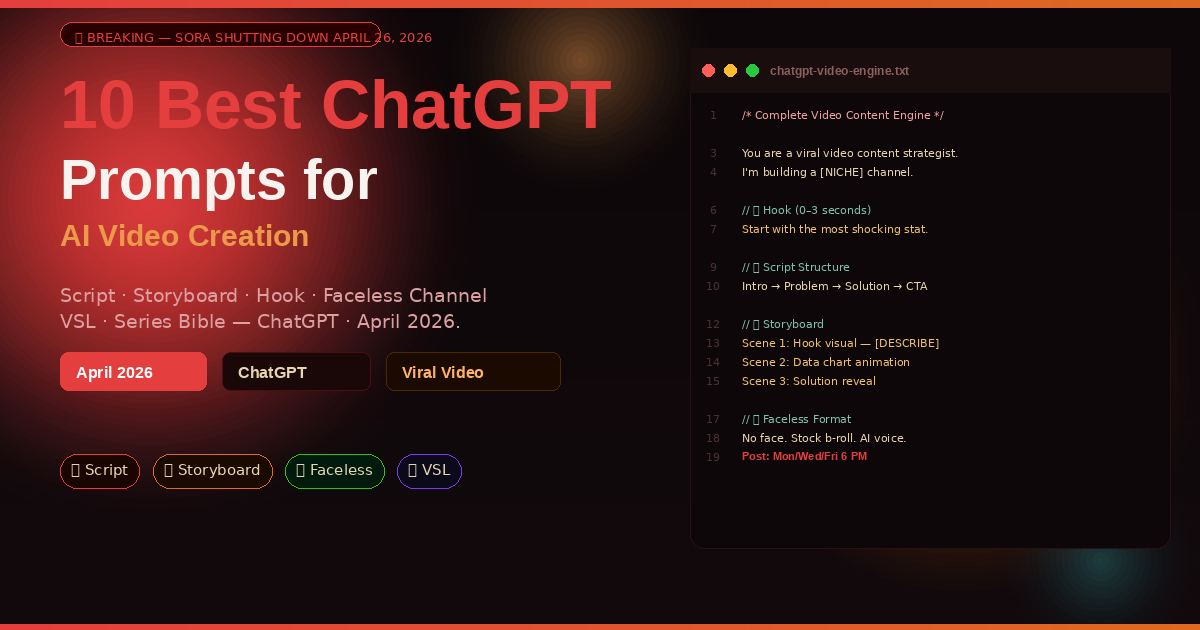
Sora is shutting down on April 26, 2026. OpenAI is integrating video generation directly into ChatGPT. The AI video landscape is reshaping in real time — and the creators who understand how to use ChatGPT as their video production brain are already ahead. These 10 prompts show you exactly how.
A content creator I know produces five videos a week across YouTube, TikTok, and Instagram Reels. She has no video editor, no scriptwriting team, and no production budget. She uses ChatGPT to write every script, plan every storyboard, generate visual prompts for her AI b-roll, and repurpose each long-form video into six short-form clips. Her YouTube channel crossed 100,000 subscribers in eight months. When people ask what her secret is, she says: “I stopped trying to do it all myself and started treating ChatGPT like a production team.”
Video is now the dominant content format across every platform, and ChatGPT has become the brain behind almost every viral AI video in 2026. It doesn’t render footage — tools like Runway, Kling, and Seedance do that. But it writes the script, designs the shot list, engineers the hook, plans the narrative arc, and generates the exact text prompts that video AI tools need to produce usable footage. The workflow is: ChatGPT thinks, AI video tools execute.
With Sora shutting down on April 26 and OpenAI moving video directly into ChatGPT, this workflow is about to become even more seamless. The prompts in this guide work for the current setup and will work better as ChatGPT’s video capabilities expand.
Why ChatGPT Is the Engine Behind AI Video Creation
The instinct when building a video is to go straight to the tool that generates the footage. That instinct produces mediocre results. The quality of any AI-generated video is determined almost entirely by the quality of the script and the prompt — the conceptual work that happens before a single frame is rendered.
ChatGPT is where that conceptual work lives. It understands narrative structure, pacing, platform algorithms, audience psychology, and the specific technical requirements of AI video generation prompts. Ask it to write a 60-second TikTok script and it knows that the hook must land in the first three words, the value must be front-loaded, and the CTA must feel organic rather than bolted on. Ask it to write video generation prompts for Runway or Kling and it knows which visual descriptions produce stable motion, which camera movements these tools handle well, and which requests produce uncanny artefacts.
No standalone video generation tool does all of this. Runway generates footage. Kling generates footage. ChatGPT thinks about what the footage should be, why it should be that, and how to communicate that to the tools that render it. That thinking layer is what most creators skip — and it’s where almost all the quality difference lives.
ChatGPT is your video production brain. AI video tools (Runway, Kling, Seedance) are your rendering engine. The prompts in this guide cover the thinking layer — the part that determines whether your video is forgettable or viral before a single frame is generated.
Before You Start: Setting Up Your Video Workflow
A quick orientation before running any of these prompts.
Define your platform first. A YouTube long-form video, a TikTok, an Instagram Reel, and a LinkedIn video are four completely different products. They have different optimal lengths, different hook structures, different audience expectations, and different algorithmic preferences. ChatGPT adjusts its output significantly based on platform — always specify it upfront. Several prompts below include this as a required field; never leave it blank.
Know the difference between a script and a video prompt. A script is what a human or voiceover reads. A video generation prompt is the visual description fed to Runway, Kling, or Seedance to generate footage. They’re written completely differently. This guide covers both — make sure you know which you’re generating before you start.
Build your channel context document. The single most time-saving thing you can do before running Prompt 10 is create a one-page channel context document: your niche, your target audience, your brand voice, your posting schedule, and your top-performing video formats. Paste it at the top of your ChatGPT session and every subsequent prompt benefits from that context without you having to re-explain it.
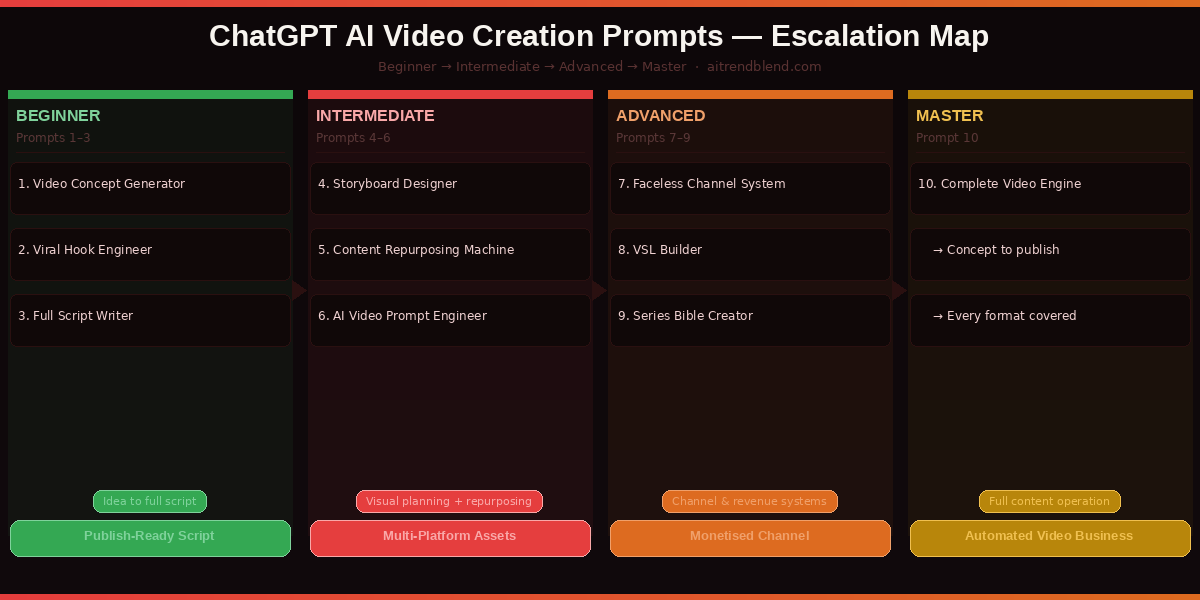
The 10 Best ChatGPT Prompts for AI Video Creation
Prompt 1: The Video Concept Generator
Most video ideas never make it past the “I should make a video about this” stage. They stay vague because turning a topic into an actual video — with a hook, a structure, a narrative, and a reason for someone to watch to the end — requires specific creative work that most creators either skip or struggle with. This prompt does that work in thirty seconds.
The key is giving ChatGPT not just the topic but the audience and the platform. The same topic produces entirely different video concepts for a 45-year-old business owner on LinkedIn and a 22-year-old on TikTok. Specify both and the concept arrives already calibrated for who’s watching and where.
Asking for three title options using different hook styles gives you a strategic choice rather than a single answer to accept or reject. Curiosity-gap titles (“Why Nobody Talks About This”) perform differently from bold-claim titles (“I Tried X For 30 Days”) and how-to titles. Having all three lets you A/B test or choose based on what’s trending in your niche.
Add “Based on this concept, suggest 4 follow-up video ideas that extend the topic into a mini-series” after the main output. ChatGPT will produce a natural content arc that builds audience retention across multiple videos — the compound interest of content strategy.
Prompt 2: The Viral Hook Engineer
The first three seconds of any video determine whether the next three minutes happen. On TikTok and Reels, the algorithm uses watch time and scroll-through rate as the primary ranking signals — meaning a video with a weak hook is algorithmically dead before it has a chance to prove itself. This prompt generates five competing hook options for the same video and explains the psychological mechanism behind each one.
Naming the five hook strategies explicitly pushes ChatGPT past its default responses — which tend toward variations of the same hook type — and forces five genuinely different creative approaches. The psychological trigger explanation is what makes this a learning tool as well as a production tool. After running this prompt ten times, you’ll internalise the patterns and start writing better hooks instinctively.
Test this prompt against your last three videos — run it for each topic and compare ChatGPT’s Hook 3 (relatable pain point) against the hook you actually used. If the AI hook is consistently stronger, you’ve identified a pattern in your own hook writing that’s worth fixing.
Prompt 3: The Full Video Script Writer
A complete video script — not just bullet points or an outline, but a word-for-word script with timing notes, emphasis markers, and breathing pauses — is what separates confidently delivered videos from rambling ones. This prompt produces a script you can read directly or adapt as speaking notes, formatted for the specific platform and length you need.
The formatting rules section — pauses, emphasis, B-roll notes, timing markers — transforms the output from a piece of writing into a production document. Most script prompts produce text that reads well but sounds stilted when spoken aloud. Specifying “write exactly how you’d speak it — contractions, short sentences, natural rhythm” triggers ChatGPT to write in spoken rather than written register, which is the difference between a script that reads well and one that sounds natural on camera.
After generating the script, send: “Rewrite this script at half the length while preserving the hook, the core value, and the CTA.” This produces a short-form version of the same video — meaning one script session generates both a long-form YouTube video and a TikTok/Reels cut.
Prompt 4: The Storyboard and Shot List Designer
Most creators wing their visuals. The result is B-roll that feels generic, shots that don’t match the script’s energy, and talking-head sections that go on too long because there’s nothing else to cut to. A proper shot list — even a rough one — changes the feel of a video entirely. This prompt turns any script into a professional-grade storyboard with specific shot descriptions, camera movements, and visual notes.
The “unexpected creative shot” request at the end consistently produces the most memorable suggestion in the entire storyboard. ChatGPT defaults to technically correct but conventional shot choices — asking explicitly for one surprising element triggers genuinely creative thinking that elevates the video above the standard visual language of its niche.
For AI-generated video workflows, take every shot marked “could be replaced with AI-generated video” and run Prompt 6 on each one to generate the exact text prompt for Runway or Kling. The storyboard and the video generation prompts become one integrated production document.
Prompt 5: The Content Repurposing Machine
One long-form video is the raw material for an entire week of content. Most creators either repost the same video unchanged or manually create separate pieces from scratch. Neither approach is efficient. This prompt takes a single video or transcript and automatically generates a full repurposing suite — short-form clips, social posts, a blog article, an email newsletter, and a podcast episode brief.
“The creators winning in 2026 aren’t making more content — they’re making one great piece and distributing it ten ways.”
— Fliki.ai, Best ChatGPT Prompts for Video Scripts 2026
Specifying six distinct formats in one prompt forces ChatGPT to adapt the source material’s voice and framing for each platform’s specific audience and format conventions — not just copy-paste the script into different containers. The LinkedIn post sounds like LinkedIn. The tweet thread sounds like Twitter. This contextual adaptation is what makes repurposed content perform rather than feel recycled.
Remove any formats you don’t need and add “Pinterest description” or “YouTube Community post” to tailor the repurposing suite to your specific platform mix. ChatGPT adapts seamlessly to any combination of output formats.
Prompt 6: The AI Video Generation Prompt Engineer
This is the most technically specialised prompt in the guide — and the one that most directly bridges ChatGPT to AI video tools. Writing prompts for Runway, Kling, or Seedance is a distinct skill. Good video generation prompts are not the same as good image prompts, and they are nothing like a video script. They require specific technical vocabulary about motion, camera behaviour, and temporal consistency. This prompt generates them correctly.
Describing action as “ongoing motion” rather than a static scene description is the single most important technique for AI video generation. Models trained on video need temporal cues — they need to know what is moving, not just what is present. “A woman walks through a neon-lit Tokyo alley at night” produces better video generation than “a woman in a neon-lit Tokyo alley at night” because it gives the model a temporal direction to animate toward.
Add “All shots should maintain the same colour grade: [your grade]” to the consistency requirements to force ChatGPT to embed the same colour language across every individual shot prompt. This is the most effective way to produce a visually coherent sequence from separate AI video generation calls.
Prompt 7: The Faceless Channel Content System
Faceless YouTube channels — channels where no human presenter appears on camera — are growing faster than any other content category in 2026. They require a specific production approach: strong voiceover scripts, detailed B-roll directions, and a consistent on-screen text strategy that compensates for the absence of a presenter’s personality. This prompt builds all three simultaneously.
Bundling the voiceover, B-roll direction, thumbnail brief, and SEO package into a single prompt produces a complete production document rather than four separate assets that need reconciling. The B-roll direction — matching specific visuals to specific voiceover lines — is what makes faceless videos feel intentional rather than assembled.
Add “Include a natural sponsor integration at the [BEGINNING / MIDDLE / END] of the script for [PRODUCT/SERVICE TYPE]” to generate a monetisation-ready episode from the first draft. ChatGPT writes sponsor reads that match the channel’s voice rather than feeling like inserted advertisements.
Prompt 8: The Video Sales Letter (VSL) Builder
A Video Sales Letter is the highest-converting video format in digital marketing — a structured video that takes a viewer from problem awareness to purchase decision in 5–15 minutes. VSLs follow specific psychological frameworks, and the copy structure is completely different from a content video or tutorial. This prompt builds a VSL framework for any product or service, structured around the principles that convert viewers into buyers.
The “Failed Solutions” section is what separates high-converting VSLs from average sales videos. Most people have already tried to solve their problem — acknowledging that shows understanding rather than ignorance, and positions your product as the solution that succeeds where others failed. ChatGPT writes this section particularly well when you describe the specific things your customer has already tried.
After generating the VSL, send: “Now write a 60-second version of this for a TikTok or Reels ad. Keep the hook and CTA. Compress the middle sections ruthlessly.” This produces a paid social ad script from the same creative foundation as the full VSL.
Prompt 9: The Video Series Bible Creator
Single videos build views. Series build audiences. A series bible — a document that maps out the narrative arc, episode structure, recurring elements, and progression of a multi-part content series — is what transforms a content calendar into a content strategy. This prompt creates one for any topic and platform.
The growth strategy section — specifically how episodes 1, 5, and 10 differ strategically — is what makes this prompt different from a simple episode list generator. Episode 1 needs to establish the premise and convert new viewers into subscribers. Episode 5 needs to reward subscribers who stayed. Episode 10 needs to create a shareable moment that brings new people into the series. ChatGPT plans all three when you ask for it explicitly.
Add “Identify the one episode in this series that has the highest viral potential and explain why” to get a prioritisation decision for where to put your best production effort. Not all episodes in a series need to be produced to the same standard — the viral-potential episode deserves your best work.
Prompt 10: The Complete Video Content Engine
This is the master prompt — the system that turns ChatGPT into your personal video content director. Run once at the start of your content strategy, it establishes a persistent creative framework that informs every video you make. Every subsequent script, hook, storyboard, and repurposing task runs faster and produces more consistent results because everything is built on the same foundation.
This prompt is designed to be saved as a ChatGPT Custom Instruction — set it once and it activates for every video-related session you run.
The operating rule “if a topic doesn’t suit my channel, tell me before writing” is the line that makes this a genuine creative partner rather than a yes-machine. ChatGPT’s default is to execute whatever you ask. This instruction gives it permission to push back — which is exactly what a good content director does when a brief doesn’t serve the audience you’ve spent time building.
After the system activates, run this follow-up: “Based on my channel profile, what are the 10 video ideas most likely to go viral in my niche in the next 30 days? For each one, tell me why it has viral potential right now.” This triggers a trend-aware content audit based on your specific channel positioning.
Run these 10 prompts as a complete system, not as isolated tools. The concept from Prompt 1 feeds the hook in Prompt 2. The hook feeds the script in Prompt 3. The script feeds the storyboard in Prompt 4. The storyboard feeds the AI video prompts in Prompt 6. Every output becomes an input for the next stage — and by Prompt 10, you have a content engine that runs itself.
Common Video Prompt Mistakes and How to Fix Them
These are the errors that consistently produce underwhelming video content even when ChatGPT is doing all the right things structurally.
Mistake 1 — Treating ChatGPT as a scriptwriter, not a strategist. The most valuable thing ChatGPT does for video isn’t writing words — it’s thinking about structure, audience psychology, and platform dynamics. Use it as a strategist first (what should this video be?) and a writer second (write this video). Running Prompt 1 before Prompt 3 is not optional — the concept shapes everything about the script.
Mistake 2 — Generic audience descriptions. “My audience is people interested in fitness” produces generic fitness content. “My audience is women aged 28–40 who have tried every popular diet, feel guilty about their relationship with food, and want sustainable health without restriction” produces content that those specific people feel was made for them. Specificity in the audience brief is the most undervalued input in any video prompt.
Mistake 3 — Writing video generation prompts the same way as image prompts. Video needs motion. “A bustling Tokyo street at night” is an image prompt. “A camera slowly dollies forward through a crowded Tokyo street at night, neon signs reflecting off wet asphalt, pedestrians passing in both directions” is a video prompt. The motion description is what AI video tools need to generate stable, intentional footage rather than jittery noise.
Mistake 4 — Skipping the repurposing step. Every video you make has six other pieces of content inside it. Prompt 5 takes ten minutes and can generate a week of social posts, a thread, a blog post, and an email. Skipping it means leaving most of your content’s potential value unrealised.
| Wrong Approach | Right Approach |
|---|---|
| “Write me a YouTube script about productivity.” | Run Prompt 1 first. Define the audience, platform, hook strategy, and emotional arc before any script is written. |
| Describing the audience as “people who like [TOPIC].” | Describing the audience’s specific frustration, failed attempts, and desired outcome. One paragraph minimum. |
| Using image generation prompts for video tools. | Using Prompt 6 to write motion-first video prompts with camera movement, temporal direction, and negative constraints. |
| Posting the video and moving on to the next one. | Running Prompt 5 immediately after finishing the script to generate a full repurposing suite before the video is even edited. |
| Starting each session by explaining the channel from scratch. | Using Prompt 10 as a Custom Instruction so ChatGPT knows the channel context before you type a single word. |
What ChatGPT Still Struggles With in Video Creation
The limitations here are real and worth planning around rather than discovering mid-production.
It doesn’t know what’s trending on your specific platform right now. ChatGPT’s training has a knowledge cutoff, and platform trends — trending audio, viral formats, current meme language — move on weekly cycles. The concepts and structures it generates are sound, but the specific cultural references and trend-riding moments need a human layer. Before publishing any script ChatGPT writes, spend five minutes on the platform it’s designed for. One trend reference swapped in can be the difference between content that feels current and content that feels like it was written by someone who doesn’t use the app.
It cannot watch videos. ChatGPT can analyse transcripts, discuss video concepts, and evaluate scripts — but it cannot watch your existing content and tell you why video 7 performed better than video 3. That analytical feedback loop, which is where real channel growth knowledge lives, requires a human who has watched both videos critically. Use ChatGPT for production; use your own critical watching for performance analysis.
AI video generation tools still struggle with consistent character identity. The video generation prompts from Prompt 6 will produce beautiful individual shots, but if a specific person needs to appear across multiple shots looking recognisably the same, current AI video tools including Runway and Kling handle this inconsistently. For videos where character continuity matters — narrative videos, brand character videos — plan for the shots to use different characters per clip or use stock footage for continuity-dependent moments.
The New Video Production Workflow for 2026
Ten prompts that cover the full production cycle — from first concept to complete content engine — because that full cycle is what separates creators who grow from creators who plateau. The hook and the script matter. The storyboard and the shot list matter. The repurposing system and the series bible matter. Each piece compounds the effectiveness of the others when they come from the same strategic foundation.
The shift that these prompts represent is not just about efficiency — though they do save significant time. It is about the type of thinking that goes into every video. Most creators make content reactively: something happens, or a trend appears, and they make a video about it. The system these prompts build turns video creation into a proactive practice. You know your audience’s emotional journey. You know your channel’s narrative arc. You know which video in your series has the highest viral potential. You make fewer videos, but the ones you make are built on real strategic foundations.
ChatGPT cannot replace the instincts you develop from watching your audience respond to your specific content over time. It does not know that your audience laughs when you make self-deprecating jokes, or that they reliably share your videos when you include a surprising statistic in the first 30 seconds. That knowledge comes from you, from paying attention, from the unglamorous work of actually reading every comment. What ChatGPT provides is the production scaffolding that lets you spend more time on that unglamorous work and less on blank-page paralysis.
With Sora shutting down and video generation moving directly into ChatGPT, the gap between “I have an idea” and “I have a published video” is narrowing faster than it ever has before. The creators who already understand how to brief that production process — using prompts like the ones in this guide — will be the ones who benefit most from every capability improvement that follows.
Start Your Video Production Session Now
Open ChatGPT, run Prompt 10 to set your channel system, then use Prompt 1 for your next video idea. Your first complete production package in under an hour.
Disclaimer: aitrendblend.com is an independent editorial publication. Not affiliated with OpenAI, Runway, or any AI company. All product names are trademarks of their respective owners.