
AI Tools Comparison
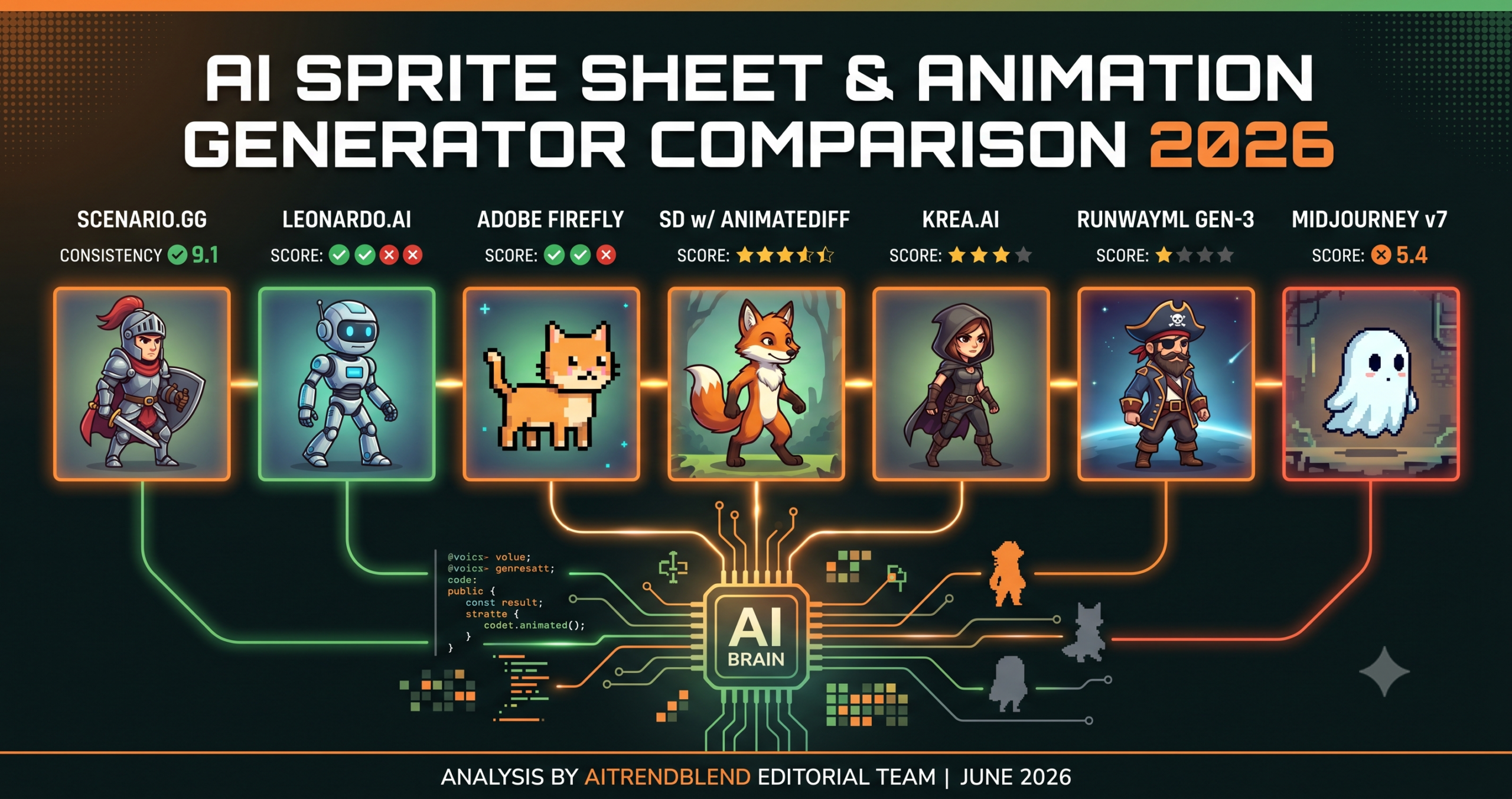
Key Points
- Scenario.gg ranks first for native sprite sheet output and the strongest frame to frame consistency we tested.
- Leonardo.ai is the best value pick for high volume work, especially for non humanoid assets and environment tiles.
- Stable Diffusion with AnimateDiff has the highest quality ceiling for pixel art but demands a serious technical setup.
- Midjourney and Krea are strongest at the character design and exploration stage, not at animation itself.
- Hand consistency, semantic motion timing, and transparent background edges remain unsolved across every tool tested.
- Treat these tools as a pipeline, not as competing alternatives, for the best production results.
The promise of AI generated sprite sheets has always been seductive for indie developers and small studios. You describe a character, the tool produces your walk cycle and attack animations, and you move on to building the actual game. That pipeline has been mostly fiction until recently. The reality for most of the past few years was a mess of ControlNet workarounds, inconsistent outputs, and cleanup work that often cost more hours than simply drawing the sprites yourself.
Something shifted this year. Several tools matured past the proof of concept stage and into territory that is genuinely useful for production work without requiring a deep background in prompt engineering or a high tolerance for tweaking seed values all afternoon. We tested seven of them across four asset categories, fantasy RPG characters, sci fi platformer enemies, casual mobile object sets, and pixel art style retro sprites. Each tool was evaluated on visual consistency across frames, ease of use for non-artists, output format flexibility, pixel art capability, and the amount of manual cleanup a developer realistically has to do before the result is game ready.
What you will find here is the honest version of that comparison. Not a ranked list of image quality screenshots. An actual account of what each tool does well, where it quietly falls apart, and which one fits which kind of developer.
Why Sprite Sheet Generation Is Harder Than It Looks
Most people encountering this problem for the first time assume it should be straightforward. If an AI model can generate a convincing character illustration at high quality, generating eight frames of that character walking is just doing the same thing eight times in sequence. That assumption collapses the moment you try it.
The problem is consistency, and it runs deeper than most tutorials explain.
A walk animation needs the same character across every frame, the same proportions, the same color palette, and the same silhouette details. Standard diffusion models treat each generation as an independent event. Frame one gives you a blue coated knight with a round shield and a specific set of armor buckles. Frame four gives you something broadly similar but the shield is now slightly oval, one of the shoulder plates changed shape, and the boots shifted two shades darker. This is not a defect in the software. It is simply how probabilistic generation works when no specific consistency mechanism is enforcing character identity between outputs.
The tools that handle this well in 2026 do so through one of three approaches. Some maintain a reference image and apply motion to it, preserving the source’s visual identity at the cost of some creative range. Others fine tune a small model on a consistent character sheet first, then generate animation variations from that specialized model. A third group uses proprietary style token architecture that tries to keep design details stable across independent generations. Understanding which approach a tool uses tells you most of what you need to know about its strengths and hard limits before you open it for the first time.
Key Takeaway
Frame consistency is the single hardest unsolved problem in AI sprite sheet generation right now. Tools that anchor to a reference image sacrifice creative variety. Tools that use style tokens offer more flexibility but demand more prompting skill. Neither is universally better. The right choice depends on your asset type and workflow.
How We Tested These Tools
For each tool we generated a full walk cycle at eight frames, a four frame idle animation, and a six frame attack sequence for the same character. We used the same descriptive prompt across all tools where the interface allowed it, adapting only for each tool’s specific syntax requirements. The test character was a humanoid fantasy warrior, complex enough to expose consistency weaknesses without being unfairly demanding.
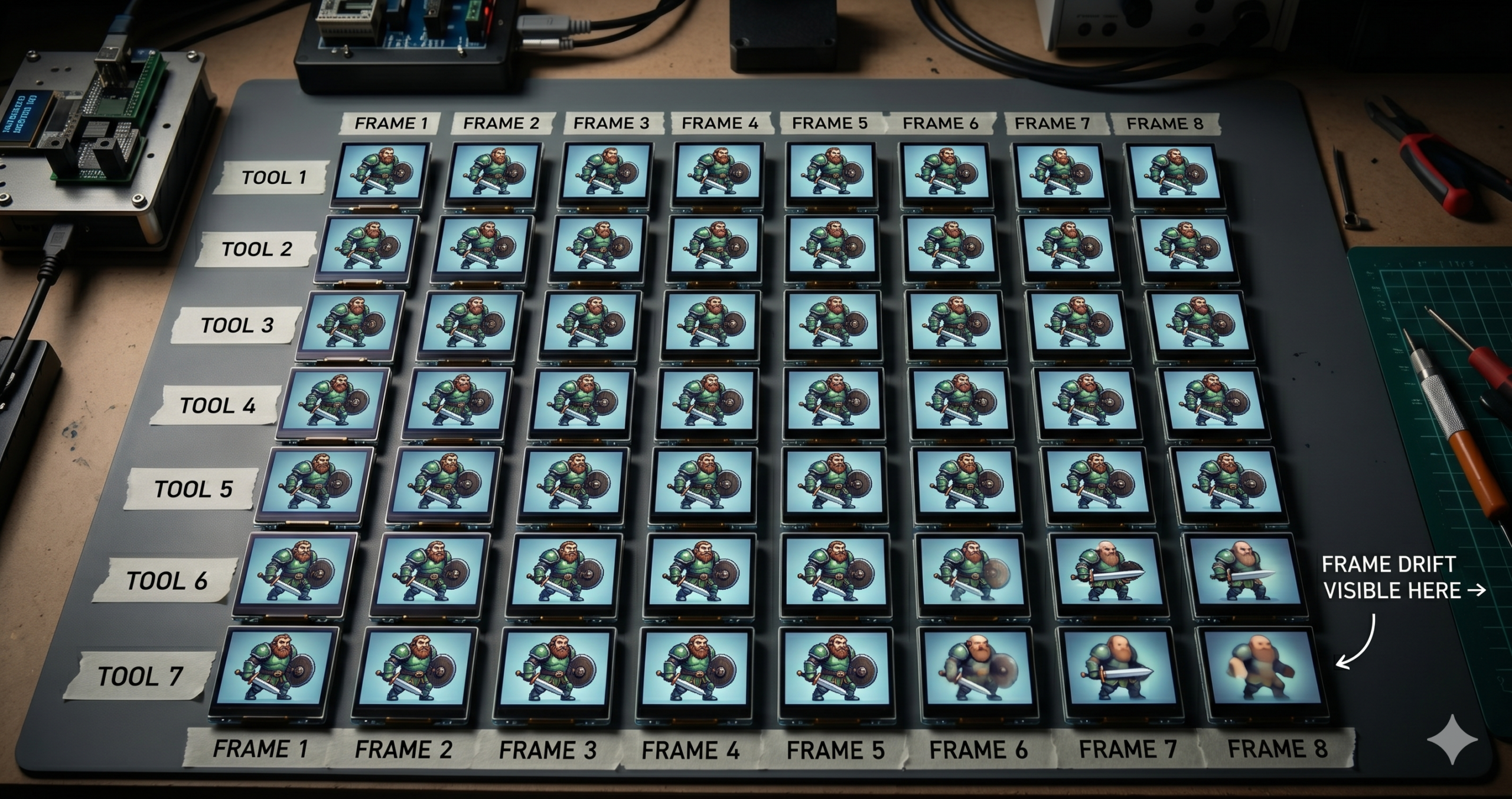
We scored each tool on five dimensions, each out of ten. Visual consistency across frames. Output resolution and format options. Ease of setup and workflow. Pixel art mode accuracy for retro style work. And the actual cleanup time per character before the sprites were ready to drop into an engine. That last metric matters more than most reviews acknowledge. A tool that scores 9 on consistency but requires ninety minutes of edge cleanup and background removal per animation cycle is not saving you time compared to alternatives that score a point lower but export clean PNGs directly.
One honest caveat before we go further. AI tools in this space are developing fast enough that scores have a short shelf life. Everything here reflects the tools as they existed between April and June 2026. Some of these assessments will look different by the end of the year.
The Seven AI Sprite Sheet and Animation Tools Compared
Scenario was built from the ground up for game asset generation, and that focus is evident immediately. Where general purpose image generators ask you to fight the model to maintain a coherent character across frames, Scenario lets you train a lightweight custom generator on a handful of your own reference images and then use that generator to produce animation frames that actually look like the same character. Our Scenario.gg custom model training guide covers this setup step by step.
The workflow maps naturally to how game developers think. You define your character visually, feed five to fifteen reference images into the generator training pipeline, wait anywhere from fifteen minutes to about an hour depending on your image count, and then generate animation frames using prompts that Scenario’s interface is built to understand. Output arrives as individual PNGs or as a pre assembled sprite sheet with configurable grid dimensions, a detail that sounds minor until you have exported your fortieth character and realize how much time it saves.
What genuinely stood out in our testing was the pixel art pipeline. Scenario has invested seriously in low resolution output, and the results at 16×16, 32×32, and 64×64 were sharper and more internally consistent than anything else we tested. The dithering patterns held coherence across frames in a way that no other hosted tool managed. Getting that kind of result from a general purpose generator requires careful upscaling and posterizing workflows that introduce their own inconsistencies.
The limitation that matters most is price. At $49 per month for the plan that allows enough generator training runs to be genuinely productive, it sits above what some solo developers will budget for a single tool. The free tier exists but hits its ceiling fast. For a studio doing several projects a year the math works easily. For a developer doing one project over twelve months it requires more consideration.
Leonardo has become one of the most practical tools for indie game asset generation, and the reasons are straightforward. It has the most accessible interface of any tool we tested, a large and active community model library with several strong game art checkpoints, and a price tier that justifies trying it for almost any project.
For sprite sheets specifically, Leonardo uses a combination of image to image referencing and the consistency features the platform introduced earlier this year. Consistency is not as solid as Scenario’s custom generator approach, and you will see drift between frames on complex characters, particularly in faces and hands, but for environment tiles, item pickups, UI elements, and simpler character designs it holds up well enough for production use. The community fine tunes available in the model library do meaningful work here. The right checkpoint for your art style can add a full point of perceived consistency over the base model.
The real advantage is the price to output ratio. At $12 per month the token allowance is generous enough to generate substantial volume. For teams that need large batches of placeholder assets to test design direction before committing to hand drawn production work, it is genuinely difficult to argue against this cost.
Where we ran into consistent trouble was with humanoid character animation sequences requiring precise limb positioning per frame. The consistency layer kept the overall aesthetic coherent but struggled when we provided specific keyframe pose descriptions for each frame. Leonardo is better suited to generating multiple characters in the same visual style than to animating a single character across distinct motion states.
Firefly’s relevance to this comparison comes largely from its Creative Cloud integration. If your team already works in Photoshop and Illustrator daily, having AI asset generation that passes directly into those tools without exporting and reimporting has genuine production value. The sprite sheet module that shipped with Firefly 3.0 lets you define a character reference and generate frame variations from within Photoshop’s timeline panel, which is a meaningful workflow advantage for artists who are already there.
Output quality at standard resolution is solid. Firefly’s training approach produces commercially safe results. You will not generate anything that looks suspiciously close to an existing copyrighted design, which matters for studios with legal review processes. Style transfer and consistency hold up well for non-character assets like environments, background elements, and UI components.
For pixel art, though, Firefly is a poor fit. The model is tuned toward polished, painterly output, and forcing it toward low resolution pixel aesthetics produces results that feel like downscaling filters applied to a realistic render rather than art built at low resolution intentionally. The dithering is wrong, the color choices do not follow the deliberate palette constraints that make pixel art feel handcrafted, and the overall result lacks the personality of work done natively at small canvas sizes.
Pricing reflects enterprise positioning. Unless your studio is already paying for Creative Cloud, the cost comparison against Scenario or Leonardo is uncomfortable. The Photoshop integration is not sufficient to close that gap for a small independent team.
Nothing tested here generates better pixel art than a properly configured Stable Diffusion setup running an appropriate checkpoint with ControlNet skeleton conditioning and an AnimateDiff motion module. The ceiling is genuinely higher than every other option on this list. The floor requires you to spend a weekend understanding what all of those words mean and how they interact before you can do anything useful with them. Our Stable Diffusion for game development guide walks through the full local setup.
For developers already comfortable with local SD setup, this combination gives precise frame level control that no hosted service currently matches. You can define exact skeleton poses per frame using OpenPose conditioning, adjust motion strength to control how much the character moves between frames, and train LoRA files on your own original character designs to enforce visual identity across outputs. The open source community around this toolchain in 2026 has produced mature, well documented workflows, and the quality of community pixel art checkpoints improved significantly over the past year.
Here is where it gets interesting. The same architecture that gives you maximum control also gives you maximum ways to break things. Timing motion modules correctly with character LoRAs and ControlNet preprocessors requires a level of experimental tolerance that many developers working under actual deadlines cannot afford. When it works, the output is impressive. When it does not, the debugging process involves isolating which of several interacting systems is causing the problem, and that can eat hours.
If you have a technical background, local GPU capacity, and are working on more than one project this year, the investment in learning this stack pays off substantially. For a first time game developer with one project and a fixed timeline, one of the hosted tools will ship faster.
Krea’s real time generation mode is fast in a way that changes how you think about early art direction work. Watching a character design update live as you adjust prompt parameters removes most of the cycle of waiting and iterating that makes other tools feel ponderous during exploration. For the stage of a project where you are trying to figure out what your game should look like before committing to any particular direction, Krea earns its subscription fee without much debate.
For sprite sheet production, it starts to show its structural limits. The real time pipeline prioritizes speed over the frame level consistency that animation demands, and the dedicated animation generation mode feels noticeably less developed than the core product. We observed more inter frame drift on humanoid characters in Krea than in either Scenario or Leonardo, though simpler environmental and object assets held up better.
Think about what this tool is actually built for. Krea is an exploration and rapid prototyping instrument that produces game usable output some of the time as a side effect of being excellent at something else. For pre production where you are establishing visual direction and need to iterate through many ideas quickly, it is an excellent first step. For production level sprite generation where consistency requirements are firm, pair it with a more specialized tool downstream.
Runway is a video generation tool that game developers are using in ways its designers probably anticipated but may not have prioritized. For traditional sprite sheet production it is overengineered and overpriced. For generating short cutscene animations, narrative intro sequences, or game trailer footage that will be rendered as video rather than extracted as game sprites, it is genuinely excellent and noticeably ahead of competitors in visual coherence.
We tested it for sprite extraction anyway because the community has developed workflows for pulling individual frames from Runway’s animation output and converting them into game usable assets. The inter frame consistency in those extracted frames is notably strong. Runway’s model was trained heavily on motion coherence, which happens to be exactly what sprite animation needs. The extraction and cleanup pipeline adds meaningful time, however, and the output format is fundamentally native to video rather than native to sprites.
The pixel art score is low and honest. Runway is essentially allergic to low resolution aesthetics. Every attempt we made to direct it toward pixel style output produced something that looked like posterize and pixelate filters applied after the fact to a realistic render. It is not the right tool for retro style games. For modern titles with painterly or illustrated aesthetics that need high quality cinematic sequences, it has real merit. Just approach the pricing with clear expectations about what you are buying.
Midjourney remains among the best tools available for generating a single high quality piece of concept art. For sprite sheet production specifically it is one of the most frustrating experiences we went through during this comparison. The character reference feature that arrived in recent versions helps considerably, and the style reference system has moved consistency in the right direction, but generating eight coherent walk frames for one character still requires substantial effort, iteration, and a fair amount of acceptance that some frames will need to be regenerated entirely. We cover the character design side of this in our Midjourney prompts for game art guide.
The problem most people run into with Midjourney is that its greatest strength is also the source of its failure here. The model’s drive to make every image look visually compelling means it is constantly introducing details, shifting lighting, and making compositional choices that look great in isolation. An animation sequence does not need impressive individual frames. It needs boring, reliable consistency between frames, and that is exactly what Midjourney’s core instinct works against.
Where Midjourney earns a clear role in a sprite workflow is at the character design stage before animation begins. Generating multiple character design options, armor or costume variations, and color scheme explorations is fast and the output quality is high. Use it to establish and iterate on what your character should look like, then carry that design into Scenario or a local Stable Diffusion pipeline to actually produce the animation frames.
“The best AI sprite tool is not the one with the highest quality ceiling. It is the one that fits your actual production pipeline without adding a new full time job.”
aitrendblend editorial, 2026 game asset tools survey
Feature Comparison at a Glance
| Tool | Native Sprite Sheet | Pixel Art Mode | Multi-Frame Animation | Custom Training | Starting Price |
|---|---|---|---|---|---|
| Scenario.gg | Yes | Strong | Walk, idle, attack | Yes | $49/mo |
| Leonardo.ai | Via manual workflow | Partial | Limited | Yes | $12/mo |
| Adobe Firefly | Yes (via Photoshop) | No | Limited | No | $55/mo |
| SD with AnimateDiff | Yes (manual export) | Excellent | Full control | Yes via LoRA | Free (local GPU) |
| Krea.ai | Partial | Partial | No dedicated mode | No | $24/mo |
| RunwayML Gen-3 | Via frame extraction | No | Video native | Limited | $95/mo |
| Midjourney v7 | No | Partial | No | No | $30/mo |
Key Takeaway
No single tool dominates every category. Scenario.gg leads on output quality and native sprite support. Stable Diffusion with AnimateDiff wins on pixel art quality and total creative control. Leonardo.ai wins on value for volume work. The right choice depends almost entirely on your workflow, budget, and the specific asset types your game requires.
Where All of These Tools Still Fall Short
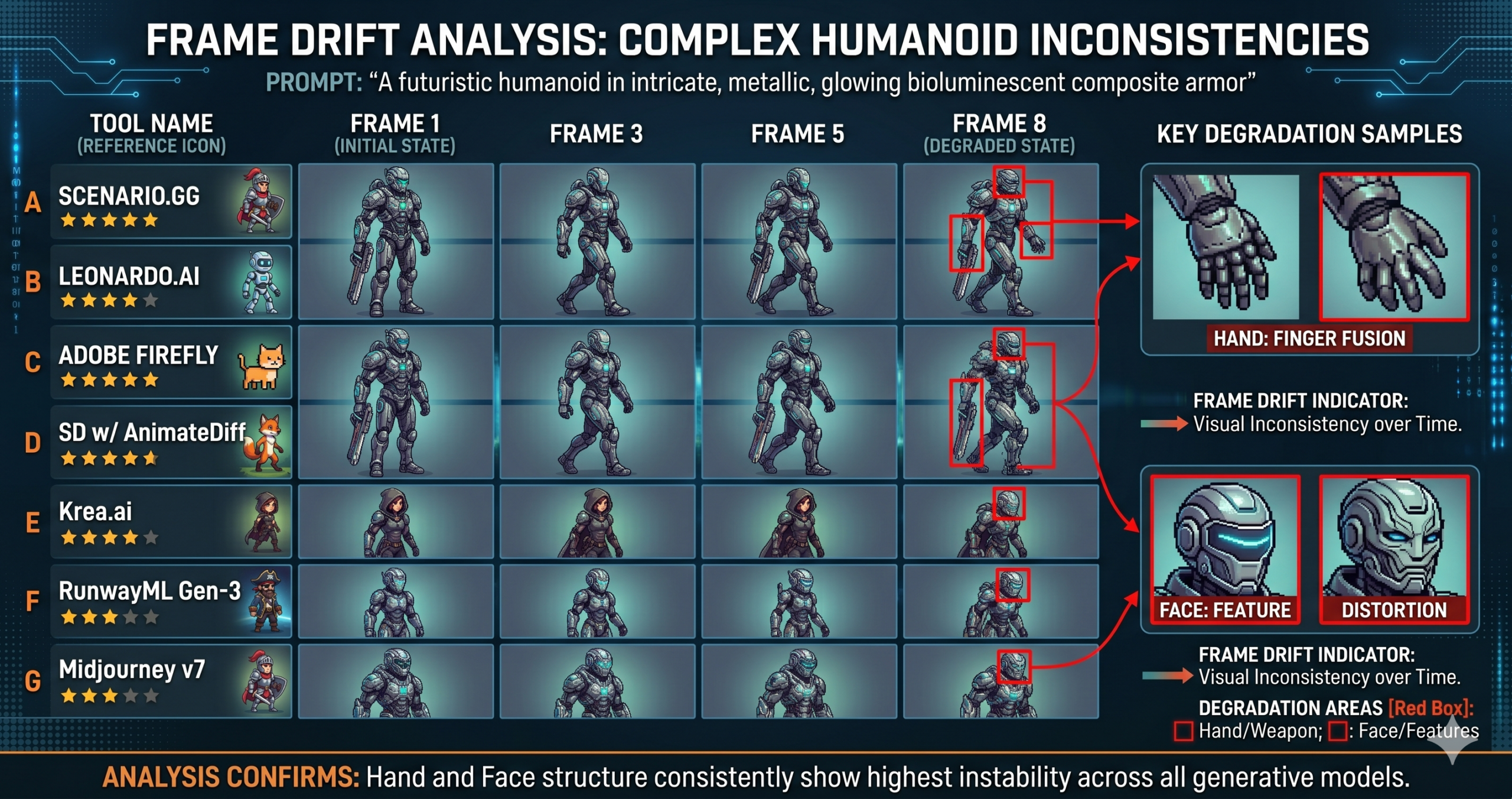
None of the tools we tested solved the hand problem. Every single generator, including Scenario at its strongest, produced occasional frames where fingers merged, changed count, or partially disappeared. Sprite sheet contexts make this worse than single image generation because you have multiple frames to compare side by side. A four fingered hand that appears consistently in all eight frames of a walk cycle is technically an error but a manageable one. A character who has four fingers in frame one and five in frame six creates a genuine production problem that requires manual correction.
The second gap is semantic motion understanding. You can describe a character throwing a punch to any of these tools and receive something that looks like a punching pose in isolation. Getting three frames where the first is a wind up, the second is the impact moment, and the third is the follow through, with correct body mechanics across all three, requires either precise pose references for each individual frame or significant post processing work. AnimateDiff with full pose conditioning and Runway Gen-3 come closest to understanding animation timing as a concept, but neither is anywhere close to a pipeline that goes directly from prompt to animation for complex motion.
Background transparency handling also remains inconsistent across the board. Several tools produce outputs with halos, anti aliasing artifacts against transparent areas, or edge color bleeding that requires careful masking before the sprites can be placed against different backgrounds inside a game engine. Scenario handles this better than any other hosted tool we tested, but even its outputs occasionally need manual edge work on detailed character silhouettes with thin features like hair or weapon details.
Which Tool Should You Actually Use
If you are a solo developer who needs production ready sprite sheets and the $49 per month is within your budget, Scenario is the clearest recommendation we can make. The learning curve is manageable within a weekend, the output consistency is the highest of anything we tested, and the native sprite sheet format removes a significant amount of post processing work. The price reflects the specialization, and the specialization is real.
For teams that need high volume at a reasonable cost and can absorb moderate cleanup work on humanoid characters, Leonardo with a well matched community checkpoint is the practical choice. Use it for non-humanoid assets, environment tiles, item sets, and simpler characters where consistency requirements are less demanding. At $12 per month it earns a place in almost any studio’s toolset regardless of what else you use.
If you have technical depth, access to a capable local GPU, and are working across more than one project this year, the Stable Diffusion and AnimateDiff stack has a higher ceiling than anything else in this comparison. The investment in setting it up properly pays off across multiple projects in a way that a monthly subscription does not scale as favorably for high volume use.
For everyone still in the phase of figuring out what their game should visually look and feel like, start with Krea for rapid style exploration and Midjourney for character design iteration. Once you have a clear direction and a finalized character design, move that design into Scenario or a local SD pipeline to actually build the animation frames. Treating these tools as a pipeline rather than competing alternatives produces better results than committing exclusively to any single one of them.
The landscape here will look meaningfully different twelve months from now. Several teams are working on animation tools with purpose built consistency architecture that goes beyond what any of these current approaches provide, tools where the model understands what a walk cycle is as a concept rather than generating frames that approximate one. What changed between 2025 and 2026 was real and noticeable. The change between 2026 and 2027 may be the step that makes this entire category genuinely low friction for indie production use.
What no tool automates right now is knowing when the AI output is good enough versus when it will create technical problems inside an engine. Getting that judgment wrong costs more time than the generation saved. The tools covered here are the best starting points available, and several of them are genuinely useful for production work rather than just impressive in a controlled demo. That is an improvement over where things stood a year ago, and it is worth taking seriously.
Frequently Asked Questions
What is the best AI tool for sprite sheet generation in 2026?
Scenario.gg ranks first overall for native sprite sheet output and frame consistency. Leonardo.ai is the better choice if budget is the main constraint and you need high volume output for non humanoid assets.
Can AI generate a fully consistent character walk cycle yet?
Not perfectly. Even the strongest tool we tested, Scenario, occasionally produced frames with hand or finger errors. Tools that train on your own reference images get closest to full consistency, but manual review is still required.
Is Stable Diffusion with AnimateDiff worth the setup time for indie developers?
Only if you have technical depth and a capable local GPU, and you are working on more than one project this year. For a single project on a deadline, a hosted tool like Scenario or Leonardo ships faster.
Why do AI sprite sheets need so much manual cleanup?
Background transparency handling and hand or finger rendering remain inconsistent across every tool tested. Edge bleeding, halos, and finger count errors are the most common issues that still require manual correction before assets are game ready.
Should I use Midjourney for game sprite animation?
Use it for character design exploration, not for animation. Midjourney’s strength is making each image visually compelling, which works against the boring frame to frame consistency that animation actually needs.
Is RunwayML Gen-3 a good fit for 2D pixel art games?
No. Runway is built for video and is one of the weakest tools tested for pixel art aesthetics. It is a strong choice for cutscenes and cinematic trailer footage rendered as video rather than extracted as sprites.
Start Testing These Tools Today
Every tool listed here offers a free tier or trial period. Start with Scenario.gg if you want the most complete native sprite pipeline, or Leonardo.ai if budget is the primary constraint for your current project.
All tools in this comparison were tested independently by the aitrendblend editorial team between April and June 2026. Scores and assessments reflect our specific testing methodology and use cases and may not reflect results for different asset types or workflows. All pricing information was accurate at the time of testing and may have changed. This is independent editorial content. We are not affiliated with any of the companies or tools reviewed here.
Reading this slowly and letting each paragraph land before moving on, and a stop at thisdomainisabdu earned the same patient approach, content that rewards slow reading rather than speed is content with real density and the writers here are clearly producing work that benefits from the careful eye rather than the rushed scan.
Honest reaction is that I want to send this to a friend who would benefit from it, and a look at vesseltame added more material I will pass along too, the impulse to share is the strongest signal I have for content quality and this site is generating that impulse cleanly across multiple posts.
Thanks for sharing this with the open internet rather than locking it behind a paywall like so many sites do now, and a stop at trenchtwist kept the same vibe going, generous helpful and clearly written by someone who actually wants people to learn from it rather than just charge them.
Felt the post handled a sensitive angle of the topic with appropriate care, and a look at uptonshade extended that careful handling across related material, sites that can navigate delicate territory without causing damage are rare and require a level of judgement that comes from experience rather than from following any clear playbook.