
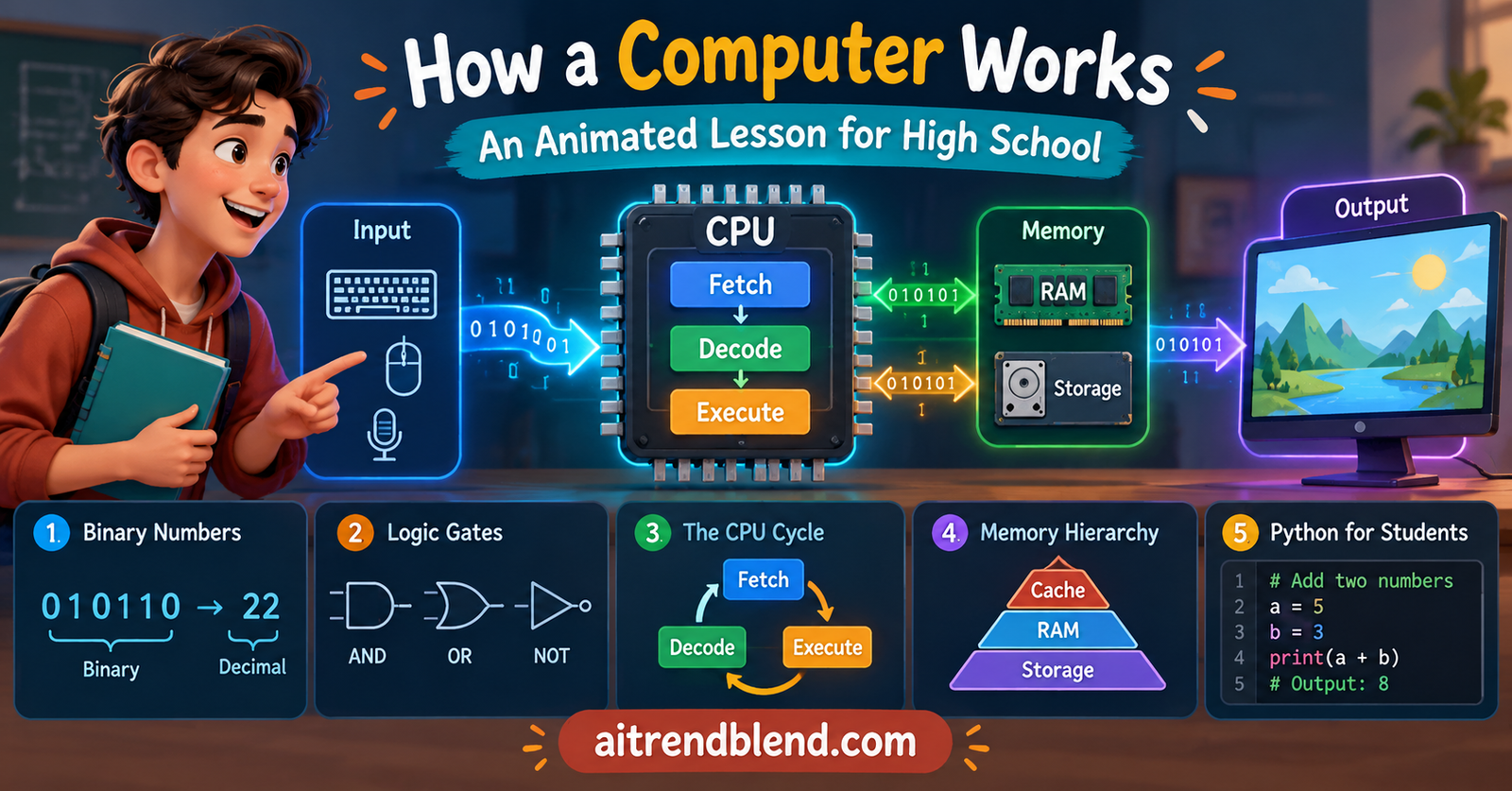
An Animated Lesson
Key points of this lesson
- Every computer, from a phone to a supercomputer, follows the same pattern of input, processing, output and storage.
- Computers store everything as binary, long patterns of 0 and 1, because a switch with two states is cheap, fast and reliable.
- Logic gates turn electricity into decisions, and a handful of gates is enough to build a circuit that adds numbers.
- The CPU repeats one simple loop billions of times per second, called fetch, decode, execute.
- Memory is a tradeoff between speed, size and cost, which is why a computer has registers, cache, RAM and storage.
- Four interactive labs, a quiz and runnable Python code are included so the lesson works on a classroom projector.
Who this lesson is for and how to use it
This article is written for two readers at once. The first is a computer teacher preparing a unit on computer fundamentals for grades nine to twelve, whether that follows a matriculation syllabus, an O Level course, or a general introduction to computing. The second is the student who wants to understand the machine rather than memorize a list of its parts. Both readers get the same content, and the teacher boxes along the way add classroom notes.
Every animation on this page is live. Students can click the bits in the binary lab, flip switches in the logic gate lab, and step through a working processor one instruction at a time. Put the page on a projector and let students take turns at the keyboard. Nothing needs to be installed, and the labs work on a phone too.
Learning objectives
After the three periods, a student should be able to do the following five things without notes.
- Describe the input, process, output and storage model and give an everyday example of each part.
- Convert numbers between decimal and binary up to 255 and explain why one byte holds 256 different values.
- Write the truth tables for the AND, OR, NOT and XOR gates and predict a gate’s output from its inputs.
- Explain the fetch, decode, execute cycle using the words program counter, instruction register and accumulator.
- Compare registers, cache, RAM and storage in terms of speed, size, cost and whether they keep data when the power goes off.
| Period | Focus | Activity on this page | Time |
|---|---|---|---|
| 1 | What a computer is, hardware tour, binary | Animated IPO diagram, binary lab, paper binary cards | 40 minutes |
| 2 | Logic gates and how circuits add | Logic gate lab, truth table race in pairs | 40 minutes |
| 3 | The CPU cycle, memory, software, link to AI | Toy CPU simulator, quiz, Python code demo | 40 minutes |
What actually counts as a computer
Students tend to picture a computer as a laptop or a tower under a desk. Start by widening that picture. A microwave oven that counts down your cooking time is a computer. So is the chip inside a car key, a calculator, a traffic signal controller and the payment machine at a shop. What they share is not a screen or a keyboard. They share a job.
Every one of them takes something in, works on it according to a set of instructions, and sends something out. Most of them also remember things for later. Computer scientists call this the input, process, output model, and the storage part is usually added as a fourth box. Watch the animation below and follow one piece of data from a key press to the screen.
A good first exercise is to hand out sticky notes and ask students to sort ten devices into the four boxes. A microphone is input. A speaker is output. A touchscreen is both, which usually starts a useful argument. A USB flash drive is storage, though a student will rightly point out that copying a file onto it is a kind of output too. Let those arguments run for a minute. The categories describe what a part is doing at a given moment, not a fixed label stamped on it.
Teacher note
The kitchen analogy carries well through the whole unit. The CPU is the cook, RAM is the counter where the cook keeps what is being used right now, storage is the cupboard and fridge, and the recipe is the program. Introduce it in period one and come back to it every time a new part appears.
A quick tour of the hardware
Before going inside the processor, students need names for the main parts. Open a desktop case in class if you can. Seeing a real motherboard does more than any diagram, and students are always surprised how much of a modern computer is empty space and fans.
| Part | What it does | Kitchen analogy | Keeps data without power |
|---|---|---|---|
| CPU | Carries out instructions and does arithmetic and comparisons | The cook | No |
| RAM | Holds the programs and data in use right now | The counter | No |
| SSD or hard disk | Keeps files and programs for the long term | The cupboard and fridge | Yes |
| Motherboard | Connects every part with wires called buses | The kitchen floor plan | Not applicable |
| GPU | Runs thousands of small calculations at the same time, mainly for graphics and AI | A row of helpers chopping vegetables together | No |
| Power supply | Turns wall electricity into the low voltages the parts need | The gas line to the stove | Not applicable |
The column on the right matters more than students expect. When the electricity goes out in the middle of typing an essay, the unsaved work vanishes because it lived in RAM. The saved copy survives because it was written to storage. That single everyday experience explains the difference between volatile and non volatile memory better than any definition.
Binary, the language underneath everything
Here is where students usually push back. Why would a machine this powerful count using only two digits when people happily use ten? The honest answer is engineering, not mathematics. A computer is built from billions of tiny switches called transistors, and a switch is easiest to build and read when it has only two clear states. Current flowing or not flowing. High voltage or low voltage. On or off. We write those two states as 1 and 0.
Trying to build a switch with ten reliable levels would be like asking a light bulb to show ten different brightnesses that never get confused, even when the room is hot or the voltage wobbles. Two levels leave a huge safety margin between them, and that margin is why your computer does not randomly change your bank balance.
Bits, bytes and place value
One binary digit is a bit. Eight bits grouped together make a byte. In our everyday decimal system each place is worth ten times the place to its right, which gives ones, tens, hundreds and thousands. Binary follows the same idea with twos instead, so the places from the right are worth 1, 2, 4, 8, 16, 32, 64 and 128.
With eight bits the largest number is every place switched on, which adds up to 255. Counting zero as well, one byte can hold 256 different values.
Now try it yourself. Click any bit to switch it on or off and watch the decimal value change. The third box shows which keyboard character that number stands for in the ASCII code, so 65 shows the letter A. Press Count to watch the byte climb from 0 to 255 on its own, the same way an odometer rolls over.
Text, photos, music and video are all stored the same way. A letter is a number from a code table. A photo is a grid of tiny squares called pixels, and each pixel is three numbers for its red, green and blue brightness. A song is a long list of numbers that describe how the speaker cone should move, measured thousands of times every second. Once students see that everything reduces to numbers, and every number reduces to bits, the rest of the machine starts to make sense.
Teacher note, an activity with no computer
Give five students a card each showing 16, 8, 4, 2 and 1 dots. Ask the class to make the number 13 by having card holders face their dots forward or turn them over. The class works out 8 plus 4 plus 1 within a minute. This classic activity comes from the CS Unplugged binary numbers unit, a free resource from the University of Canterbury in New Zealand, and it works in classrooms with no electricity at all.
Key takeaway
Binary is not a strange choice. It is the most reliable way to store information in a machine made of switches. Every file on every device is a long pattern of bits, and the meaning comes from the code we agree to use when reading them.
Logic gates, where electricity starts making decisions
A pile of switches that only stores bits would be a fancy notebook. The machine becomes a computer when those switches are wired together so that some switches control others. That arrangement is called a logic gate. A gate takes one or two bits in and produces one bit out according to a fixed rule.
The rules themselves are older than electricity in homes. The English mathematician George Boole described an algebra of true and false values in 1854, and for decades it was considered a curiosity of pure logic. Then in 1937 a young American student named Claude Shannon wrote a master’s thesis at MIT showing that Boole’s algebra described exactly how circuits of relays behave. That idea, that logic and wiring are the same thing, sits underneath every chip made since.
The four gates every student should know
The AND gate outputs 1 only when both inputs are 1. Think of a car that starts only when the key is turned and the brake pedal is pressed. The OR gate outputs 1 when at least one input is 1, like a room light that can be switched on from either of two doors. The NOT gate has a single input and flips it, so 1 becomes 0. The XOR gate, short for exclusive or, outputs 1 only when the two inputs are different. That last one turns out to be the secret ingredient of addition.
Here is the moment that lands with most classes. Put an XOR gate and an AND gate side by side, feed both of them the same two bits, and read the two outputs together. The XOR output is the sum digit and the AND output is the carry. With 1 and 1, XOR gives 0 and AND gives 1, which reads as 10 in binary, the number two. That small circuit is called a half adder. Chain enough of them together and you have the part of a processor that adds numbers, built from nothing but switches that follow rules.
A processor never understands a number. It only follows rules about switches, and the rules happen to produce the right answer every single time.From this lesson, period two
Inside the CPU, the fetch, decode, execute cycle
Students now know that bits store information and gates can calculate. The last big question is how a computer knows what to do next. The answer goes back to a 1945 report by the mathematician John von Neumann, written while engineers were designing an early computer called EDVAC. The idea he described is called the stored program concept, and it is the design almost every computer still uses. Instructions are just numbers, so they can sit in the same memory as the data, and the processor reads them one after another. You can read a short history of the idea in the overview of the von Neumann architecture.
The parts inside the processor
A real CPU has billions of transistors, but a teaching model needs only five named parts. The program counter, often shortened to PC, holds the address of the next instruction. The instruction register, or IR, holds the instruction currently being worked on. The control unit reads that instruction and sends signals to the other parts telling them what to do. The arithmetic logic unit, or ALU, is the calculator built from gates like the ones in Lab 2. The accumulator, or ACC, is a small register that holds the result of the latest calculation.
The processor repeats three steps forever. In the fetch step it copies the instruction stored at the address in the program counter and adds one to the counter. In the decode step the control unit works out what that instruction means. In the execute step the processor carries it out, which might mean loading a number, adding, or saving a result back to memory. Then it fetches again.
The simulator below runs a real four instruction program. Memory addresses 0 to 3 hold instructions and addresses 4 to 6 hold data. The program loads the number 7, adds the number 5, and stores the answer in address 6. Press Step to move one phase at a time, or Play to watch the whole run.
CPU
RAM
Twelve phases to add two small numbers looks slow. Here is the twist. A processor running at 3 GHz completes about three billion clock ticks every second, and modern designs overlap the phases of several instructions at once. The same loop you just stepped through by hand runs so many times per second that a video frame, a game physics update and a spell check all feel instant.
Key takeaway
The CPU is not clever. It repeats fetch, decode and execute without ever getting bored or making an arithmetic slip. Speed and reliability, not intelligence, are what make computers powerful.
Memory, a trade between speed, size and cost
If fast memory were cheap, a computer would have only one kind. It is not, so engineers stack several kinds in layers. Registers sit inside the CPU and are the fastest storage there is, but a processor has only a few dozen of them. Cache is a small, very fast memory close to the processor that keeps copies of the data used most often. RAM is much larger and slower. Storage on an SSD or hard disk is larger again and slower again, but it keeps data when the power is off.
Back to the kitchen. A good cook keeps the salt in hand, the chopped onions on the counter, the vegetables for tonight in the fridge and the bulk rice in the storeroom. Walking to the storeroom for every pinch of salt would make dinner take all night. The computer makes the same choice millions of times per second, keeping what it needs soon as close to the processor as it can.
This also explains a question students ask constantly, which is why a computer with more RAM feels faster. When RAM fills up, the operating system has to move data out to storage and bring it back later, and storage is far slower. More RAM means fewer trips to the storeroom.
Software, the layer that gives hardware a purpose
Hardware without instructions is a very expensive paperweight. Software is the set of instructions, and it comes in layers too. When the computer powers on, a small program stored on a chip on the motherboard, called the firmware, checks the hardware and loads the operating system from storage. The operating system, such as Windows, Linux, Android or iOS, then manages everything else. It decides which program gets the CPU next, gives each program its own section of RAM, and talks to the keyboard, screen and network on behalf of every application.
Application software sits on top. A browser, a word processor and a game are all applications. Students who write Python in class are writing in a high level language, one designed to be readable by people. A program called an interpreter or compiler translates those readable lines into the machine instructions the CPU can fetch and execute, the same kind of LOAD, ADD and STORE steps from Lab 3, only many more of them.
From this lesson to artificial intelligence
Students who use AI chatbots for homework often assume there must be something magical inside. There is not, and showing them why is one of the most useful things a computer teacher can do this year. An artificial neuron in a neural network does a very simple job. It multiplies each of its inputs by a number called a weight, adds the results together, and passes the total through a small function. That is multiplication and addition, exactly what the ALU in Lab 3 does.
What makes modern AI possible is scale. A large language model performs billions of these multiply and add steps to produce a single word. A GPU helps because it contains thousands of simple cores that can each do a multiplication at the same time, which is why AI companies buy graphics chips in enormous quantities. Underneath, every one of those calculations still runs on binary numbers flowing through logic gates, fetched and executed in a cycle.
If your students want to go further, our guide to the open source machine learning frameworks used in 2026 shows the software layers researchers build on, and our look at how far developers trust AI coding assistants is a good discussion starter for senior classes. Teachers can find more hands on material in our practical AI tools section, and anyone curious about how AI is being used to model what a student already knows can read our piece on knowledge tracing in education AI.
Misconceptions students bring to class
Every teacher meets the same handful of wrong ideas. Naming them early saves a lot of confusion later.
- Storage and memory are the same thing. Students say a phone has 128 GB of memory when they mean storage. Keep the words separate from the first lesson, because the volatile versus non volatile difference depends on it.
- The computer understands what it is doing. It does not. It follows instructions exactly, including wrong ones, which is why a single typo can crash a program.
- Binary is a code invented for secrecy. It is simply a counting system with two digits, chosen because switches have two states.
- A faster CPU always means a faster computer. A fast processor starved of RAM, or waiting on a slow hard disk, still feels slow. The whole system matters.
- AI is a different kind of computer. It is the same hardware running very large amounts of arithmetic, which is the point of the previous section.
Where this lesson simplifies the truth
Any lesson for teenagers has to leave things out, and it is worth being honest with stronger students about where the model bends. Real processors do not finish one instruction before starting the next. They use a technique called pipelining, where one instruction is being fetched while the previous one is decoded and the one before that is executed. Many also guess which way a program will branch and work ahead on that guess.
The toy CPU uses one accumulator, while real chips have many general purpose registers and instruction sets with hundreds of different operations. Modern processors also contain several cores, each running its own fetch, decode and execute loop. The memory hierarchy above shows one cache, but real systems have two or three levels of it. And SSDs do not store bits in exactly the way the transistor story suggests, since they trap electric charge in special cells rather than holding a switch open.
None of this makes the simple model wrong. It makes it a first map. A student who understands the toy version can pick up the real details later without having to unlearn anything, which is the test every good simplification should pass.
Bringing it all together
The core achievement of these three periods is a single chain of reasoning that students can follow from top to bottom. A tap on a screen becomes a number. The number is stored as bits. Bits flow through gates that follow fixed rules. Those gates are arranged into an ALU and a control unit. The control unit runs a program by fetching, decoding and executing one instruction after another, pulling data through layers of memory as it goes. Nothing in the chain is magic, and every link is something students have now clicked, flipped or stepped through themselves.
The conceptual shift is from seeing a computer as an appliance to seeing it as a machine built in layers, each one hiding the messy detail of the layer below. Electricity hides behind bits. Bits hide behind gates. Gates hide behind instructions. Instructions hide behind programming languages, and programming languages hide behind the apps students use every day. That idea of layered abstraction is the single most useful habit of thought in computer science, and it starts here.
The same thinking transfers far beyond this unit. When students later study networks, they will meet layers again in the way messages travel across the internet. When they study databases, they will meet the speed versus size tradeoff from the memory pyramid. When they study AI, they will recognize the neural network as arithmetic running on the same CPU and GPU loop they stepped through in Lab 3.
The lesson has honest limits. It leaves out pipelining, multiple cores, cache levels and the physics of flash storage, and the timings in the period plan assume a class that already uses a computer comfortably. Teachers working without a projector or electricity will lean more on the binary cards and the truth table race, and that is perfectly fine. The ideas matter more than the animations.
A natural next step is a unit on algorithms, where students write their own short programs and see how the number of steps grows as the input gets larger, followed by a unit on networks. The companion code below is a bridge into that work. Students who once said the phone just does it can now explain exactly how it does it, and that change in confidence is worth more than any single fact on this page.
Companion Python code for the classroom
The program below is a complete, runnable version of all three labs. It converts between decimal and binary, builds the XOR gate and a half adder from the three basic gates, and runs the same four instruction program as the toy CPU while printing every step. It needs nothing beyond a standard Python 3 installation, so it runs on school computers, on a phone app, or in any free online Python editor.
# How a Computer Works, companion code for the aitrendblend lesson
# Runs on any Python 3 installation. No extra libraries needed.

# Part 1. Number systems
def to_binary(n, bits=8):
    """Return n as a string of 0s and 1s, padded to `bits` digits."""
    if n < 0 or n >= 2 ** bits:
        raise ValueError("number does not fit in the chosen number of bits")
    digits = []
    for _ in range(bits):
        digits.append(str(n % 2))   # remainder is the next bit
        n //= 2                     # move one place to the left
    return "".join(reversed(digits))


def to_decimal(binary):
    """Read a binary string from left to right, doubling as we go."""
    total = 0
    for digit in binary:
        total = total * 2 + int(digit)
    return total


# Part 2. Logic gates as tiny functions (inputs are 0 or 1)
def AND(a, b):
    return a & b


def OR(a, b):
    return a | b


def NOT(a):
    return 1 - a


def XOR(a, b):
    # built only from the three basic gates above
    return AND(OR(a, b), NOT(AND(a, b)))


def half_adder(a, b):
    """Add two single bits. Returns (sum_bit, carry_bit)."""
    return XOR(a, b), AND(a, b)


# Part 3. A toy CPU that runs the fetch, decode, execute cycle
def run(ram, trace=True):
    pc, acc = 0, 0                      # program counter and accumulator
    while True:
        instruction = ram[pc]           # FETCH  : copy the word at address pc
        pc += 1                         #          and point at the next one
        opcode, operand = instruction   # DECODE : split into action + address
        if opcode == "LOAD":            # EXECUTE
            acc = ram[operand]
        elif opcode == "ADD":
            acc = acc + ram[operand]
        elif opcode == "STORE":
            ram[operand] = acc
        elif opcode == "HALT":
            if trace:
                print(f"PC={pc}  HALT        ACC={acc}")
            break
        else:
            raise ValueError(f"unknown opcode {opcode}")
        if trace:
            print(f"PC={pc}  {opcode:<5} {operand:>2}    ACC={acc}")
    return ram


# Smoke test, the same program the animated CPU in the article runs
if __name__ == "__main__":
    print(to_binary(65), "is the letter", chr(65))
    print("1011 in decimal is", to_decimal("1011"))

    print("\nHalf adder truth table (a, b) -> (sum, carry)")
    for a in (0, 1):
        for b in (0, 1):
            print(a, b, "->", half_adder(a, b))

    print("\nToy CPU trace")
    program = [("LOAD", 4), ("ADD", 5), ("STORE", 6), ("HALT", 0), 7, 5, 0]
    final = run(program)
    print("Address 6 now holds", final[6])

    assert to_decimal(to_binary(200)) == 200
    assert final[6] == 12
    print("\nAll checks passed.")
When you run it, the toy CPU trace should end with address 6 holding 12, and the final line should report that all checks passed. A good extension task is to ask students to add a SUB instruction for subtraction, then write a five instruction program that calculates 20 minus 8.
Check your understanding
Six questions cover the whole lesson. Choose an answer for each and press Check answers. The page tells you which ones were right and explains any that were not.
Frequently asked questions
What is the simplest way to explain how a computer works?
A computer takes input, processes it by following instructions, produces output, and stores data for later. Inside, everything is stored as binary numbers, and the CPU repeats a fetch, decode and execute cycle billions of times per second to carry out those instructions.
Why do computers use binary instead of decimal?
Computers are built from transistors that work as switches with two clear states, on and off. Two states are cheap to build and easy to tell apart reliably, so binary uses the digits 1 and 0 to match them.
What is the difference between RAM and storage?
RAM holds the programs and data in use right now and loses everything when the power goes off. Storage such as an SSD or hard disk is slower but much larger and keeps files permanently, even without power.
What does the fetch decode execute cycle mean?
It is the loop every CPU repeats. It fetches the next instruction from memory, decodes it to work out what it means, and executes it, such as adding two numbers or saving a result, before fetching the next one.
How many periods does this lesson take to teach?
The plan uses three periods of about forty minutes each. The first covers the computer model and binary, the second covers logic gates, and the third covers the CPU cycle, memory, software and the link to AI.
Can this lesson be taught without computers in the classroom?
Yes. The binary card activity and the truth table race need only paper, and the toy CPU can be acted out with students playing the program counter, the accumulator and the memory cells.
Take the lesson further
Use the free unplugged binary activity with your class, then move on to Python with the companion code.
CS Unplugged binary unit Official Python tutorialSources. George Boole, An Investigation of the Laws of Thought, Walton and Maberly, London, 1854. Claude E. Shannon, A Symbolic Analysis of Relay and Switching Circuits, Transactions of the American Institute of Electrical Engineers, vol. 57, 1938, based on his 1937 MIT master’s thesis. John von Neumann, First Draft of a Report on the EDVAC, Moore School of Electrical Engineering, University of Pennsylvania, 1945. CS Unplugged, University of Canterbury, binary numbers activity.
This lesson is based on standard computer science teaching material and the classroom experience of the author. The interactive simulations are simplified teaching models, not exact descriptions of any commercial processor.